1. تعارف
This manual provides comprehensive instructions for the Unitek CFast Card Reader, Model AR-1078ABK. This device is designed to facilitate high-speed data transfer from CFast 2.0 memory cards to various computing devices. It supports both USB 3.0 (Type-A) and USB-C connections, ensuring broad compatibility and efficient workflow for professionals handling high-resolution images and video recordings.
The Unitek CFast Card Reader is engineered for durability and portability, featuring an aluminum alloy casing for effective heat dissipation and a compact design for easy transport. It operates on a plug-and-play basis, requiring no external power supply or driver installation.

Figure 1.1: Unitek CFast Card Reader with included cables.
2. پيڪيج مواد
پڪ ڪريو ته سڀئي شيون پيڪيج ۾ موجود آهن:
- 1 x Unitek CFast Card Reader (Model: AR-1078ABK)
- 1 x USB-C to USB-C/USB-A Cable
- 1 x استعمال ڪندڙ دستياب (هي دستاويز)
نوٽ: This device is specifically designed for CFast cards and is not compatible with Compact Flash cards. Please ensure you are using the correct card type.

Figure 2.1: Compatibility illustration for CFast 2.0 cards only.
3. سيٽ اپ جون هدايتون
Follow these steps to set up your Unitek CFast Card Reader:
- ڪيبل ڳنڍيو: Use the provided USB-C to USB-C/USB-A cable. Connect the USB-C end to the port on the CFast card reader.
- هوسٽ ڊيوائس سان ڳنڍيو: Connect the other end of the cable (either USB-A or USB-C, depending on your device's available port) to your computer, laptop, or compatible mobile device. The card reader is bus-powered and does not require an external power adapter.
- Insert CFast Card: Carefully insert your CFast 2.0 memory card into the card slot on the reader. Ensure the card is inserted correctly, aligning with the slot's shape. Do not force the card.
- ڊوائيس جي سڃاڻپ: Your operating system (Windows, macOS, Linux, Chrome OS) should automatically detect the card reader and the inserted CFast card. No additional drivers are typically required. The card will appear as a removable drive in your file ڳولا ڪندڙ

Figure 3.1: Dual connector cable for versatile connectivity.
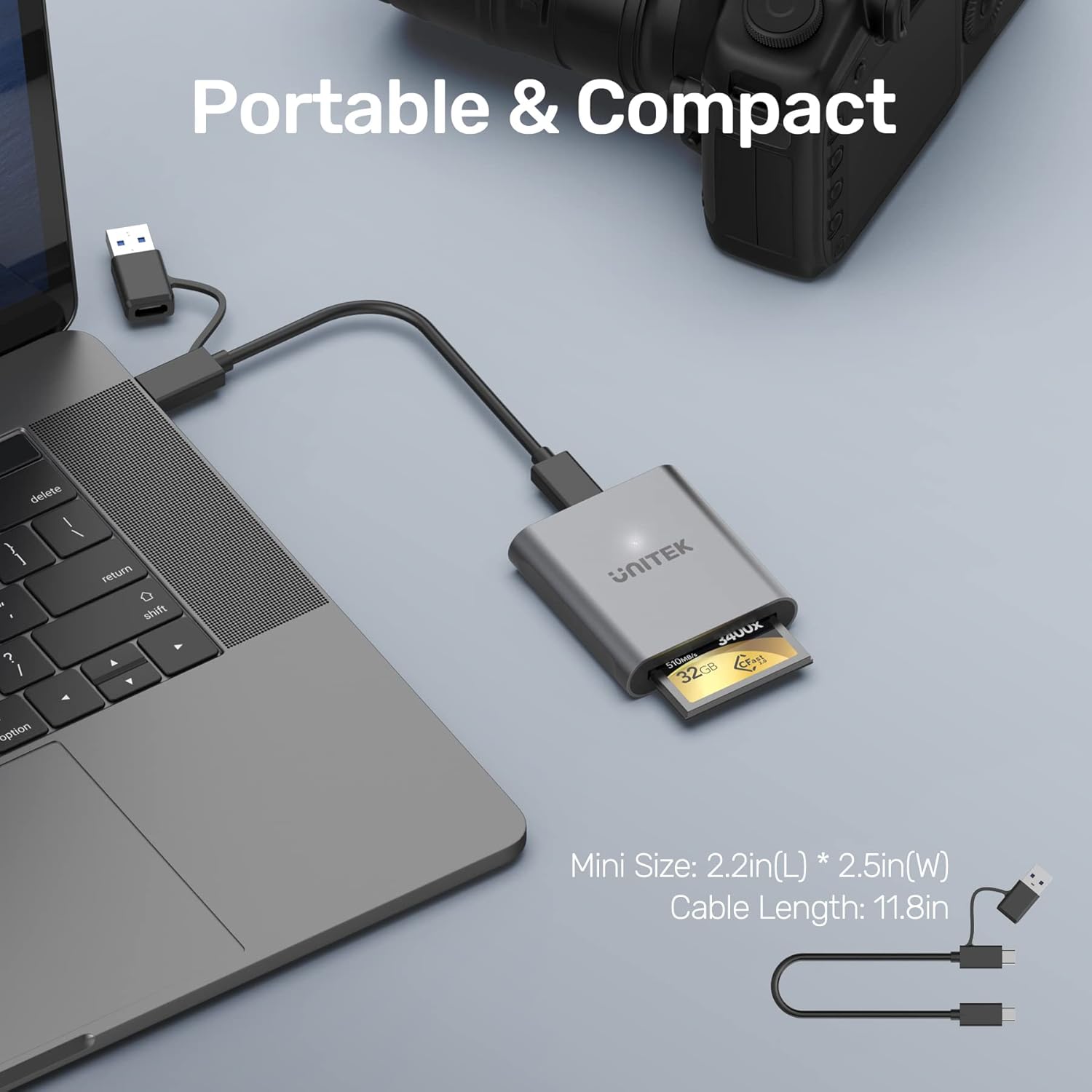
Figure 3.2: Card reader connected to a laptop with a CFast card inserted.
Video 3.1: Unboxing and initial setup of the Unitek CFast Card Reader, demonstrating cable connection and card insertion.
4. آپريٽنگ هدايتون
Once the CFast card is inserted and the reader is connected to your device, you can begin data transfer:
- پهچڻ Files: توهان جي ڪمپيوٽر کي کوليو file explorer (e.g., 'This PC' on Windows, 'Finder' on macOS). The CFast card will appear as a removable storage device. Double-click to open and view ان جو مواد.
- ڊيٽا جي منتقلي: ڇڪيو ۽ ڇڏي ڏيو files or folders between your computer and the CFast card. The reader supports USB 3.0 SuperSpeed data transfer rates up to 5Gbps, enabling quick transfer of large files. It is backward compatible with USB 2.0 and USB 1.1, though speeds will be limited by the slower standard.
- محفوظ هٽائڻ: Always safely eject the CFast card reader from your operating system before physically disconnecting it. This prevents data corruption.

Figure 4.1: Data transfer speed comparison between USB 2.0 and USB 3.0.

Figure 4.2: Accessing files from the CFast card reader on a mobile device.

Figure 4.3: Wide compatibility with multiple operating systems.
وڊيو 4.1: هڪ مختصر جائزوview of the Unitek CFast 2.0 Card Reader's features and usage.
5. وضاحتون
| خاصيت | وصف |
|---|---|
| برانڊ | يونٽيڪ |
| ماڊل نمبر | AR-1078ABK |
| ميڊيا جو قسم | سي فاسٽ 2.0 |
| رابطي ٽيڪنالاجي | USB Type C (includes USB-A adapter) |
| ڊيٽا جي منتقلي جي شرح | 5Gbps تائين (USB 3.0 سپر اسپيڊ) |
| آپريٽنگ سسٽم مطابقت | Windows XP/Vista/7/8/8.1/10, Mac OS, Linux, Chrome OS |
| خاص خاصيتون | Thunderbolt 3 compatible, USB C 3.1, Plug & Play, Hot-swapping, Bus-powered |
| مواد | المونيم مصر |
| شيءِ جو وزن | 2.2 اونس |
| پيداوار جي ماپ (LxWxH) | 2.44 x 2.24 x 0.59 انچ |
| رنگ | ڀورو |
6. مسئلا حل ڪرڻ
- ڪارڊ جي سڃاڻپ نه ٿي:
- Ensure the CFast card is fully and correctly inserted into the reader.
- Verify that the card is a CFast card, not a Compact Flash card. This reader is only compatible with CFast.
- Try connecting the reader to a different USB port on your computer.
- Test with a different CFast card if available to rule out a card issue.
- پڪ ڪريو ته توهان جي ڪمپيوٽر جو آپريٽنگ سسٽم جديد آهي.
- سست ڊيٽا منتقلي:
- Confirm that you are connected to a USB 3.0 or USB-C port on your computer. Older USB 2.0 ports will result in slower speeds.
- The actual transfer speed can be affected by the performance of your CFast card and your computer's storage drive.
- وڏي ڪم دوران گھڻن ڊمانڊنگ ايپليڪيشنن کي هلائڻ کان پاسو ڪريو file منتقلي
- وقتي ڪنيڪشن:
- Ensure the USB cable is securely connected to both the reader and the host device.
- Try using a different USB cable if available.
- Avoid placing the reader in areas with strong electromagnetic interference.
7. وارنٽي ۽ سپورٽ
Unitek provides a 2-year warranty for this product. For technical support, warranty claims, or any inquiries, please contact Unitek customer service. Refer to the contact information provided on the product packaging or the official Unitek webسائيٽ.
مھرباني ڪري وارنٽي جي مقصدن لاءِ خريداري جو ثبوت رکو.


