1. تعارف
This manual provides detailed instructions for the Inateck BK2005 Keyboard Case. Please read this manual thoroughly before using the product to ensure proper operation and to maximize its lifespan.
1.1 مطابقت
The Inateck BK2005 Keyboard Case is specifically designed for the following iPad models:
- iPad Air 2019 (3rd Generation)
- iPad پرو 10.5 انچ
This keyboard case is NOT compatible with the iPad 10.2-inch (7th Generation) or other iPad models.
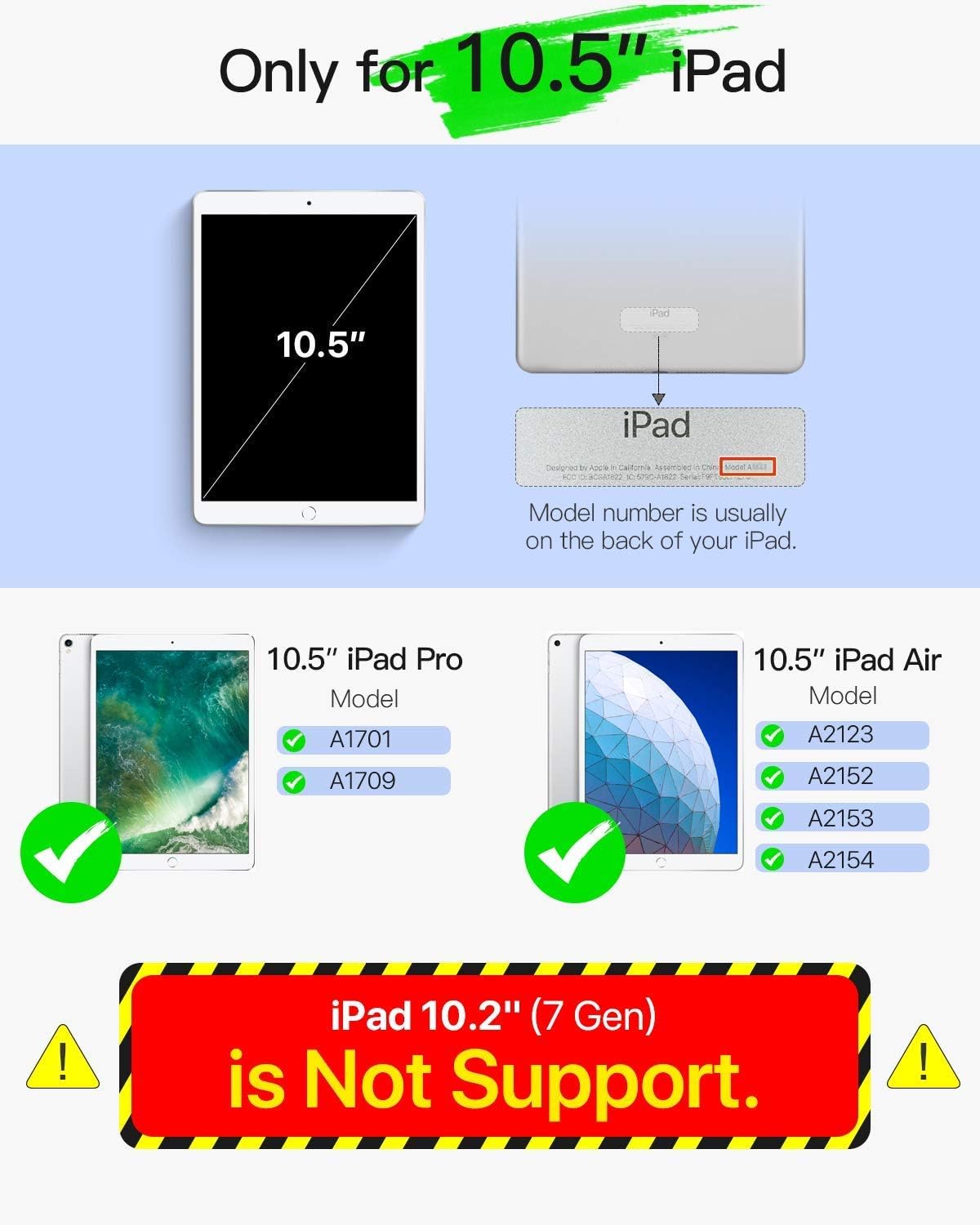
Image 1.1: Compatibility Guide. This image illustrates the specific iPad models compatible with the Inateck BK2005 Keyboard Case, highlighting that it supports 10.5-inch iPad Pro and iPad Air models, but not the 10.2-inch iPad (7th Gen).
2. پيڪيج مواد
مھرباني ڪري ھيٺ ڏنل شين لاءِ پيڪيج چيڪ ڪريو:
- Inateck BK2005 Keyboard Case
- USB چارجنگ ڪيبل
- استعمال ڪندڙ جو دستياب (ھي دستاويز)
3. مصنوعات جون خاصيتون
3.1 Ultra-Light and Thin Design
The BK2005 keyboard is engineered for portability. It measures only 0.5 cm in thickness, and the combined keyboard and cover are 1.5 cm thick. The total weight is approximately 360g, making it significantly lighter than many comparable products.

Image 3.1: Ultra-Light and Thin Profile. This image demonstrates the slim design of the keyboard case, highlighting its minimal thickness and light weight for enhanced portability.
3.2 خودڪار پاور آن/آف
The BK2005 features an intelligent magnetic sensor that automatically powers the keyboard on when your iPad is securely positioned in the typing stand. When the iPad is removed or the case is closed, the keyboard powers off. This eliminates the need for a physical power switch.

Image 3.2: Automatic Power On. This image shows the magnetic strip where the iPad connects, triggering the keyboard to power on automatically, indicated by a green light.

Image 3.3: iPad Placement for Auto Power On. This image illustrates the action of placing the iPad into the case, activating the automatic power-on function of the keyboard via magnetic connection.
3.3 وڌايل بيٽري جي زندگي
The keyboard is equipped with a long-lasting battery. A full charge, typically taking 2-3 hours, can provide up to 90 days of standby time. This means the device may only require charging approximately four times per year with typical usage.

Image 3.4: Extended Battery Life. This image depicts the keyboard case in use, emphasizing its long battery life with a claim of 90-day standby time from a single charge.
3.4 Convenient Shortcut Keys
The keyboard features a 6-row layout, including an additional row dedicated to function shortcut keys. These keys allow for quick access to common functions such as taking screenshots, locking the screen, or adjusting volume with a single press, eliminating the need for complex key combinations.
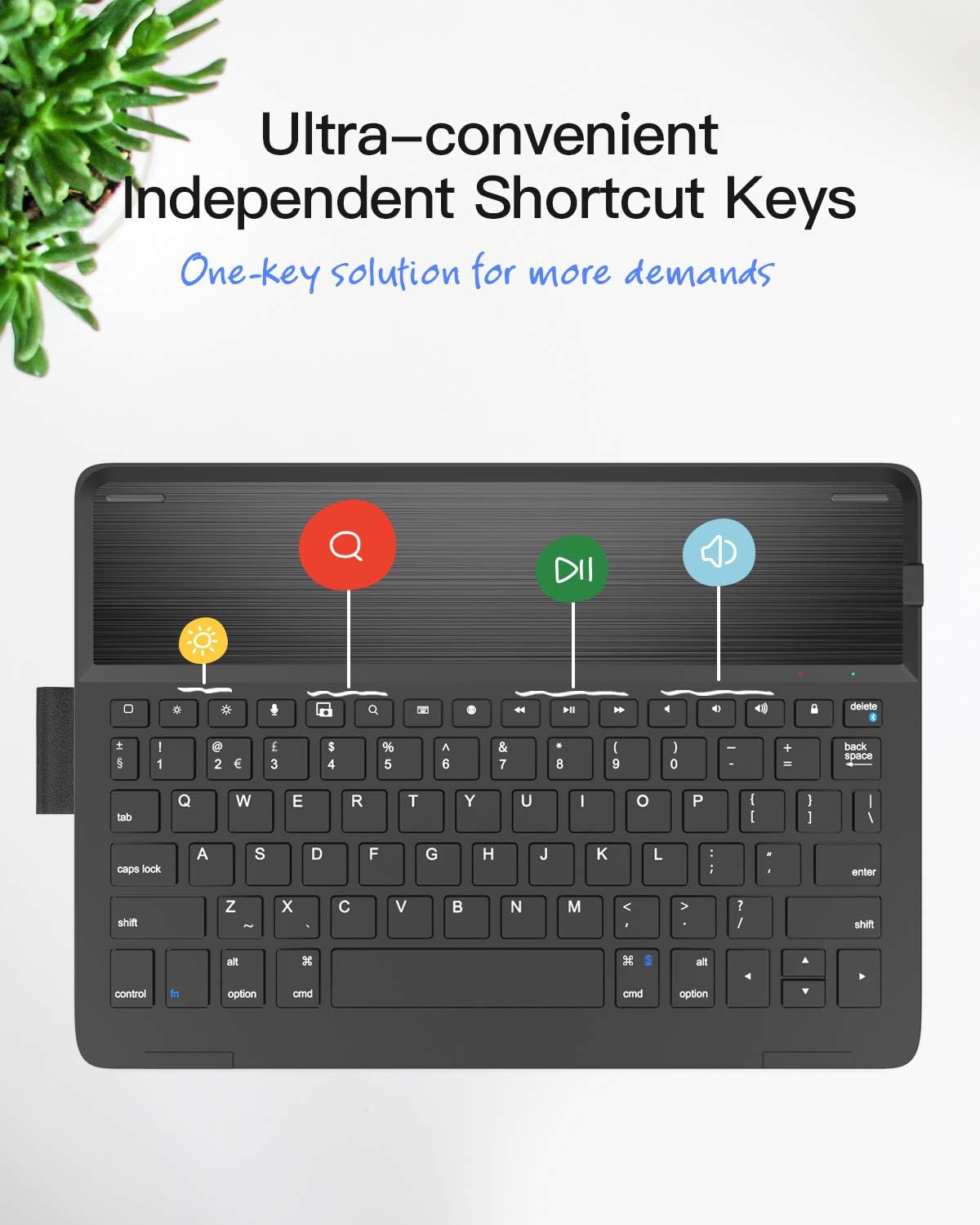
Image 3.5: Dedicated Shortcut Keys. This image highlights the top row of the keyboard, showcasing the independent shortcut keys for various functions like screen brightness, search, and media playback controls.
3.5 ترتيب ڏيڻ وارو Viewاننگز
The case design allows for multiple viewing angles, enabling users to find a comfortable position for typing, viewing, or drawing.

Image 3.6: Adjustable Angles. This image demonstrates the flexibility of the case, allowing the iPad to be positioned at various angles for optimal viewing ۽ تعامل.
4. سيٽ اپ جون هدايتون
4.1 ڪي بورڊ کي چارج ڪرڻ
- ڪيبورڊ تي چارجنگ پورٽ ڳوليو.
- Connect the provided USB charging cable to the keyboard's charging port.
- USB ڪيبل جي ٻئي ڇيڙي کي USB پاور اڊاپٽر (شامل نه آهي) يا ڪمپيوٽر جي USB پورٽ سان ڳنڍيو.
- چارجنگ انڊيڪيٽر لائيٽ روشن ٿيندي. مڪمل چارج ٿيڻ ۾ عام طور تي 2-3 ڪلاڪ لڳن ٿا.
- مڪمل طور تي چارج ٿيڻ کان پوء، چارجنگ ڪيبل کي ختم ڪريو.
4.2 بلوٽوٽ جوڙي
- پڪ ڪريو ته ڪيبورڊ چارج ٿيل آهي.
- Place your compatible iPad into the keyboard case's stand. The keyboard will automatically power on.
- پنهنجي iPad تي، وڃو سيٽنگون > بلوٽوٿ ۽ بلوٽوٿ آن ڪريو.
- On the Inateck keyboard, press and hold the Fn چاٻي ۽ ڊيل key (which has a chain-link symbol) simultaneously for 3-5 seconds. The Bluetooth indicator light on the keyboard will start flashing, indicating it is in pairing mode.
- On your iPad, locate "Inateck BK2005" or a similar name in the list of available devices and tap to connect.
- Once paired, the Bluetooth indicator light on the keyboard will stop flashing and remain solid for a moment, then turn off. Your keyboard is now ready for use.
5. آپريٽنگ هدايتون
5.1 خودڪار پاور آن/آف
- To power on the keyboard, simply place your iPad into the magnetic stand groove of the case. The keyboard will activate automatically.
- To power off the keyboard, remove your iPad from the stand groove or close the case. The keyboard will automatically deactivate.
5.2 Using Shortcut Keys
The top row of keys provides quick access to various iPad functions. Press these keys directly to activate their respective functions:
- گهر: Returns to the iPad home screen.
- ڳولهي: Activates the iPad's search function.
- Brightness Down/Up: اسڪرين جي چمڪ کي ترتيب ڏئي ٿو.
- ميڊيا ڪنٽرول: هلايو/روڪيو، پوئين ٽريڪ، ايندڙ ٽريڪ.
- حجم ڪنٽرول: خاموش ڪريو، آواز گهٽ ڪريو، آواز وڌايو.
- اسڪرين کي لاڪ ڪيو: iPad اسڪرين کي لاڪ ڪري ٿو.
- اسڪرين شاٽ: Captures a screenshot.
6. سار سنڀال
6.1 صفائي
To clean the keyboard case, use a soft, lint-free cloth. For stubborn marks, slightly dampen the cloth with water or a mild, non-abrasive cleaner. Avoid using harsh chemicals or abrasive materials, as these can damage the surface.
6.2 بيٽري جي سنڀال
- Charge the keyboard regularly, even if not in frequent use, to maintain battery health.
- Avoid exposing the keyboard to extreme temperatures (hot or cold) for extended periods, as this can affect battery performance and lifespan.
- Do not attempt to replace the internal battery yourself. Contact customer support if battery issues arise.
7. مسئلا حل ڪرڻ
7.1 Keyboard Not Connecting/Reconnecting
- بيٽري چيڪ ڪريو: پڪ ڪريو ته ڪيبورڊ ڪافي چارج ٿيل آهي.
- بلوٽوٿ آن: Verify that Bluetooth is enabled on your iPad.
- ٻيهر جوڙيو: If the connection is lost frequently, try unpairing the keyboard from your iPad's Bluetooth settings (forget this device) and then re-pairing it following the instructions in Section 4.2.
- Wake Keyboard: If the iPad has been idle for a while, the keyboard may enter sleep mode. Tap any key a couple of times to wake it up and re-establish the connection.
- Restart iPad: Sometimes, restarting your iPad can resolve connectivity issues.
7.2 ڪنجيون جواب نه ڏئي رهيون آهن
- Ensure the keyboard is powered on and successfully connected via Bluetooth.
- Check if the iPad is properly seated in the magnetic stand, as this triggers the keyboard's power.
- If specific keys are not working, try cleaning around them to ensure no debris is obstructing their movement.
8. وضاحتون
| خاصيت | تفصيل |
|---|---|
| ماڊل نمبر | BK2005-BCK |
| طول و عرض (پراڊڪٽ) | 25.5 x 18.49 x 1.5 سينٽي |
| وزن | 476 جي |
| ڪي بورڊ جي ٿلهي | 0.5 سينٽي |
| مطابقت رکندڙ ڊوائيسز | iPad Air 2019 (3rd Gen), iPad Pro 10.5-inch |
| بيٽري جي زندگي (اسٽينڊ بائي) | 90 ڏينهن تائين |
| چارج ڪرڻ وقت | 2-3 ڪلاڪ |
| ڪي بورڊ لي آئوٽ | QWERTY |
| ڪنجي جو تعداد | 78 |
9. وارنٽي ۽ سپورٽ
Inateck products come with a standard warranty. For detailed warranty information, product support, or to report any issues, please refer to the warranty card included with your purchase or visit the official Inateck webسائيٽ. مھرباني ڪري وارنٽي دعوائن لاءِ خريداري جو ثبوت رکو.


