1. تعارف
The LAUNCH CRP123E V2.0 is an advanced automotive diagnostic tool designed to assist in identifying and resolving issues across various vehicle systems. This device offers comprehensive diagnostic capabilities for the Engine, Anti-lock Braking System (ABS), Supplemental Restraint System (SRS), and Transmission. It also includes seven essential reset functions and full OBD2 functionality, making it a versatile tool for both professional technicians and DIY enthusiasts.
2. اهم خاصيتون
- 4-سسٽم تشخيص: Comprehensive scanning for Engine, ABS, SRS, and Transmission systems.
- 7 ڪم ري سيٽ ڪريو: Includes Oil Reset, Steering Angle Sensor (SAS) Reset, Electronic Parking Brake (EPB) Reset, Diesel Particulate Filter (DPF) Regeneration, ABS Bleeding, Battery Matching, and Throttle Adaptation.
- مڪمل OBD2 ڪم: Supports all 10 OBD2 test modes for complete vehicle diagnostics, including reading/clearing codes, live data stream, I/M readiness, O2 sensor test, EVAP test, and more.
- آٽو وين ٽيڪنالاجي: Automatically identifies vehicle information for quick and accurate diagnostics.
- Free Lifetime WiFi Updates: Ensures the software is always up-to-date with the latest vehicle models and diagnostic functions.
- استعمال ڪندڙ-دوست انٽرفيس: Features a 5-inch touchscreen display and Android 8.1 operating system for intuitive navigation.
- حقيقي وقت جي بيٽري Voltagاي مانيٽرنگ: Helps assess the vehicle's battery health.
- گاڏين جي وسيع ڪوريج: Supports over 60 car brands and 100,000 car models, covering vehicles from 1996 to 2025 (and continuously growing).
- Diagnostic Report Generation: Ability to record, replay, and print diagnostic reports for analysis and sharing.
- DTC Help & Google Code Search: Provides detailed explanations for diagnostic trouble codes and allows for online lookup.

تصوير: مٿانview of the LAUNCH CRP123E V2.0's 4-system diagnostic capabilities (Engine, ABS, SRS, Transmission) and 7 key reset functions (BMS Reset, EPB Reset, DPF Reset, ABS Bleeding, Oil Reset, SAS Reset, Throttle Adaptation).
تصوير: تفصيلي view of the 7 hot reset services available on the LAUNCH CRP123E V2.0, including Brake Reset, DPF Reset, ABS Bleeding, Battery Matching, Oil Reset, Steering Angle Reset, and Electric Throttle Relearn.
3. پيڪيج مواد
پيڪيج کولڻ تي، مھرباني ڪري تصديق ڪريو ته ھيٺ ڏنل سڀ شيون شامل آھن:
- LAUNCH CRP123E V2.0 Diagnostic Tool
- Main Diagnostic Cable (OBD2 connector)
- Type-C USB Cable (for charging and data transfer)
- ڪيري جو ٿيلهو
- استعمال ڪندڙ جو دستياب (ھي دستاويز)
- تڪڙو شروع ھدايت
- رنگ باڪس پيڪنگنگ

Image: The LAUNCH CRP123E V2.0 diagnostic scanner and its included accessories: main cable, Type-C cable, carry bag, user manual, quick start guide, and color box.
4. سيٽ اپ
- ڊوائيس چارج ڪريو: Before first use, fully charge the CRP123E V2.0 using the provided Type-C USB cable and a compatible USB power adapter (not included). The device has a 6100mAh battery.
- پاور آن: ڊوائيس کي چالو ڪرڻ لاء پاور بٽڻ کي دٻايو ۽ دٻايو.
- شروعاتي سيٽ اپ: Follow the on-screen prompts to select your language, time zone, and connect to a Wi-Fi network. A stable Wi-Fi connection is essential for software updates.
- رجسٽر ۽ تازه ڪاري:
- Register your device online through the "Upgrade" or "Settings" menu to activate lifetime free updates.
- Navigate to the "Upgrade" section and download all available software updates for your vehicle makes. This ensures you have the latest diagnostic capabilities and vehicle coverage.
- گاڏي سان ڳنڍيو: Locate your vehicle's OBD2 port (usually under the dashboard on the driver's side). Connect the main diagnostic cable to the CRP123E V2.0 and then to the vehicle's OBD2 port. Turn the vehicle's ignition to the "ON" position (engine off).
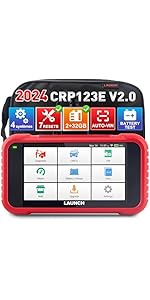
Image: The main interface of the LAUNCH CRP123E V2.0, displaying icons for various functions such as Diagnose, OBD II, I/M Readiness, Reset, Battery Voltage, Data, Mall, Upgrade, and Settings. This screen is accessed after initial setup.
5. آپريٽنگ هدايتون
5.1. System Diagnostics (Engine, ABS, SRS, Transmission)
- From the main menu, select "Diagnose".
- The device will attempt to automatically identify the vehicle via AutoVIN. If successful, confirm the vehicle information. If not, manually select the vehicle make, model, and year.
- Choose the system you wish to diagnose (e.g., Engine, ABS, SRS, or Transmission).
- Select "Read Fault Codes" to retrieve Diagnostic Trouble Codes (DTCs). The device will display the codes and their descriptions.
- Select "Clear Fault Codes" to erase the codes after repairs have been made. نوٽ: Clearing codes without addressing the underlying issue will result in the codes reappearing.
- View "Live Data Stream" to monitor real-time parameters from the selected system. This data can be displayed in text or graphical format.

Image: Smart diagnostic features of the CRP123E V2.0, including online feedback, one-click WiFi update, battery test, health report printing, AutoVIN recognition, and DTC help with Google search integration.
5.2. OBD2 Functions
The CRP123E V2.0 provides full OBD2 functionality for all OBD2 compliant vehicles (1996 and newer). From the main menu, select "OBD II" to access these functions:
- ڪوڊ پڙهو: موجوده، التوا ۾، ۽ مستقل تشخيصي مشڪلات ڪوڊ (DTCs) ڏيکاري ٿو.
- صاف ڪوڊ: Erases DTCs from the vehicle's computer.
- لائيو ڊيٽا اسٽريم: Shows real-time data from various sensors in text or graph format.
- I/M تياري: اخراج سان لاڳاپيل مانيٽرن جي تياري جي جانچ ڪري ٿو.
- View فيض جو فريم: Displays a snapshot of vehicle operating conditions when an emission-related fault occurred.
- O2 سينسر ٽيسٽ: O2 سينسر مانيٽرنگ ٽيسٽ جا نتيجا حاصل ڪري ٿو.
- آن بورڊ مانيٽر ٽيسٽ: اخراج سان لاڳاپيل پاور ٽرين حصن ۽ سسٽم لاءِ نتيجا حاصل ڪري ٿو.
- EVAP سسٽم ٽيسٽ: Initiates a test of the Evaporative Emission System.
- گاڏي جي :اڻ: گاڏي جي سڃاڻپ نمبر (VIN)، ڪيليبريشن ID (CALID)، ۽ ڪيليبريشن تصديق نمبر (CVN) حاصل ڪري ٿو.

Image: The LAUNCH CRP123E V2.0 showcasing its full OBD2 functions, including Read Codes, Clear Codes, Live Data Stream, DTCs Help, EVAP Test, O2 Sensor Test, I/M Readiness, Freeze Frame, On Board Monitoring, and support for over 60 car brands and 11 languages.

Image: Professional functions of the CRP123E V2.0, illustrating 4-in-1 live data graphing, diagnostic record keeping, real-time battery voltage display, and the ability to launch diagnostic feedback.
5.3. Reset Functions
From the main menu, select "Reset" to access the special service functions. The availability of specific reset functions may vary by vehicle make and model.
- تيل ري سيٽ: Resets the oil life system after an oil change.
- Steering Angle Sensor (SAS) Reset: Performs calibration for the Steering Angle Sensor.
- اليڪٽرانڪ پارڪنگ بريڪ (EPB) ري سيٽ: Deactivates and reactivates the brake control system, assists with brake fluid control, opens and closes brake pads, and sets brakes after disc or pad replacement.
- ڊيزل پارٽيڪيوليٽ فلٽر (DPF) جي بحالي: Manages DPF regeneration, DPF component replacement teach-in, and DPF after-treatment.
- ABS رت وهڻ: Performs various bi-directional tests to check the operating conditions of the Anti-lock Braking System.
- بيٽري ملائڻ: Allows the scan tool to evaluate the battery charge state, monitor the close-circuit current, register the battery replacement, and activate the rest state of the vehicle.
- ٿروٽل موافقت: Initializes the throttle actuators to the default state for regulating throttle (or idle engine) operations accurately.
6. سار سنڀال
- سافٽ ويئر اپڊيٽ: Regularly connect the device to Wi-Fi and check for updates in the "Upgrade" section. Lifetime free updates ensure optimal performance and expanded vehicle coverage.
- صفائي: نرم استعمال ڪريو، ڊيamp ڊوائيس صاف ڪرڻ لاءِ ڪپڙو. گھڙڻ وارا صاف ڪندڙ يا محلولن کان پاسو ڪريو.
- اسٽوريج: Store the CRP123E V2.0 in its protective carry bag in a dry, cool environment when not in use.
- بيٽري جي سنڀال: بيٽري جي زندگي کي وڌائڻ لاءِ، ڊوائيس کي بار بار مڪمل طور تي چارج ڪرڻ کان پاسو ڪريو. ان کي باقاعدي طور تي چارج ڪريو، خاص طور تي جيڪڏهن اهو ڊگهي عرصي تائين ذخيرو ڪيو وڃي.

Image: The "One-Key Free Update" feature of the LAUNCH CRP123E V2.0, demonstrating how to update the device, read ECU memory, view diagnostic records, and monitor real-time battery voltage.
7. مسئلا حل ڪرڻ
| مسئلو | ممڪن سبب | حل |
|---|---|---|
| ڊوائيس تي طاقت نه آهي. | Low battery; faulty power button; internal issue. | Charge the device for at least 30 minutes. If still unresponsive, contact technical support. |
| گاڏي سان ڳنڍجي نه ٿو سگهي. | Loose OBD2 connection; vehicle ignition off; incompatible vehicle; faulty OBD2 port. | Ensure the OBD2 cable is securely connected. Turn vehicle ignition to "ON". Verify vehicle compatibility. Try connecting to another vehicle if possible. |
| Diagnostic functions not working. | Outdated software; incorrect vehicle selection; communication error. | Perform a software update. Ensure correct vehicle information is entered. Reconnect the OBD2 cable. |
| وائي فائي ڪنيڪشن جا مسئلا. | Incorrect password; weak signal; router issues. | Verify Wi-Fi password. Move closer to the router. Restart the router. |
| Device is slow or freezes. | تمام گهڻيون ايپليڪيشنون هلندڙ آهن؛ گهٽ اسٽوريج؛ سافٽ ويئر ۾ خرابي. | Restart the device. Ensure sufficient storage space. Perform a software update. |
8. وضاحتون
| خاصيت | تفصيل |
|---|---|
| برانڊ | لانچ |
| ماڊل | CRP123E V2.0 |
| آپريٽنگ سسٽم | Android 8.1 |
| اسڪرين جي ماپ | 5 انچ ٽچ اسڪرين |
| اندروني اسٽوريج | 32GB (implied from feature bullets) |
| بيٽري جي گنجائش | 6100mAh |
| رابطي | Wi-Fi, OBD2 Cable (Type-C USB for charging/data) |
| پيداوار جي ماپ (L x W x H) | 17 x 7 x 25 سينٽي |
| شيءِ جو وزن | 1 ڪلوگرام |
| سپورٽ پروٽوڪول | OBDII/EOBD (all 10 modes) |
| گاڏين جي ڪوريج | 60+ car brands, 1996-2025+ models |
| يو پي سي | 724190789872 |
9. وارنٽي ۽ سپورٽ
The LAUNCH CRP123E V2.0 comes with a پنج سال وارنٽي, as stated in the product features. Additionally, LAUNCH offers:
- لائف ٽائيم مفت سافٽ ويئر اپڊيٽس: Ensure your device always has the latest features and vehicle compatibility.
- Technical Feedback Function: Utilize the built-in "Feedback" function to send diagnostic reports and receive professional guidance from LAUNCH engineers.
- آن لائن سپورٽ: For further assistance, refer to the contact information provided with your product or visit the official LAUNCH webسائيٽ.
For specific inquiries regarding vehicle compatibility or service functions, it is recommended to contact LAUNCH support directly.


