تعارف
This manual provides comprehensive instructions for the setup, operation, and maintenance of your new Easytry123 replacement remote control. This remote is designed to be compatible with various ONKYO Home Theater Systems, including models HT-R592, HT-RC330, HT-S5400, HT-S3500, HT-S5500, HT-R391, HT-R590, HT-R591, HT-S7805, and HT-S3800.
Please note that as a replacement unit, some advanced or specific functions of your original remote may not be fully supported. Ensure your ONKYO system model is listed above for optimal compatibility.
پيداوار ختمview
The Easytry123 replacement remote control features an ergonomic design for comfortable handling and intuitive button layout for ease of use. It operates using infrared (IR) technology to communicate with your ONKYO Home Theater System.
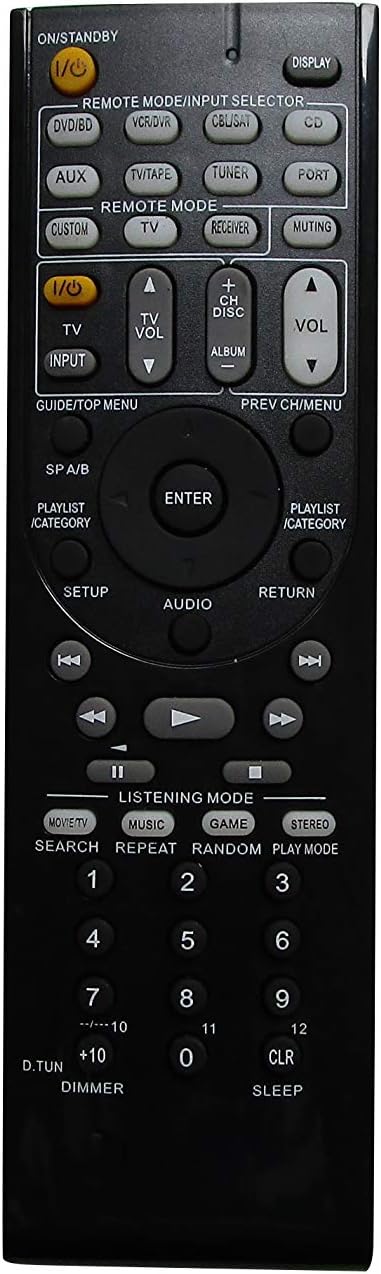
شڪل 1: سامهون view of the remote control, displaying the power button, input selectors, volume controls, navigation, and various function buttons.

شڪل 2: پوئتي view of the remote control, highlighting the battery compartment located at the bottom.
سيٽ اپ ڪريو
بيٽري لڳائڻ
ريموٽ ڪنٽرول کي ٻه AAA بيٽريون گهرجن (شامل نه آهن). انهن کي انسٽال ڪرڻ لاءِ انهن قدمن تي عمل ڪريو:
- ريموٽ ڪنٽرول جي پوئين پاسي بيٽري جي ڪمري کي ڳوليو (شڪل 2 ڏسو).
- بيٽري جي ڪمپارٽمينٽ جي ڍڪ کي هيٺئين طرف سلائڊ ڪريو ۽ ان کي هٽايو.
- ٻہ AAA بيٽريون داخل ڪريو، پڪ ڪريو ته مثبت (+) ۽ منفي (-) ٽرمينل ڪمري اندر نشانن سان صحيح طرح سان ترتيب ڏين.
- بيٽري جي ڪمپارٽمينٽ جي ڍڪ کي واپس جاءِ تي سلائڊ ڪندي تبديل ڪريو جيستائين اهو محفوظ طور تي ڪلڪ نه ڪري.
اهم: Always use fresh batteries and replace both batteries at the same time. Do not mix old and new batteries or different types of batteries.
آپريٽنگ هدايتون
This section details the basic functions and operation of your replacement remote control.
بنيادي ڪم
- Power (I/O STANDBY): Press this button to turn your ONKYO system on or off (standby mode).
- حجم (+/-): Adjusts the master volume level of your ONKYO system.
- خاموش ڪرڻ: آڊيو آئوٽ کي خاموش يا خاموش ڪري ٿو.
- Input Selector (DVD/BD, VCR/DVR, CBL/SAT, CD, AUX, TV/TAPE, TUNER, PORT): Selects the desired input source connected to your ONKYO system.
- نيويگيشن بٽڻ (مٿي، هيٺ، کاٻي، ساڄي، داخل ڪريو): Used to navigate menus and confirm selections on your ONKYO system's display.
- واپسي: پوئين مينيو يا اسڪرين ڏانهن واپس اچي ٿو.
- ڏيکار Toggles display information on your ONKYO system.
Remote Mode Selection
The remote features dedicated buttons to switch between different control modes:
- REMOTE MODE/INPUT SELECTOR: These buttons (e.g., DVD/BD, TV, CD, TUNER) function as both input selectors and remote mode activators. Pressing one will switch the remote to control that specific device type, if programmed or compatible.
- وصول ڪندڙ: Activates the remote to control the ONKYO receiver functions.
- ٽي وي: Activates the remote to control basic TV functions (e.g., power, volume, channel), if compatible and programmed.
Audio/Video Control
- PLAY, PAUSE, STOP, FAST FORWARD, REWIND, SKIP: Standard playback control buttons for compatible media devices connected to your ONKYO system.
- LISTENING MODE (MOVIE/TV, MUSIC, GAME, STEREO): Selects different audio listening modes for optimized sound experience.
- سيٽ اپ ڪريو: Accesses the setup menu of your ONKYO system.
- آڊيو: Cycles through audio settings or modes.
سار سنڀال
توهان جي ريموٽ ڪنٽرول جي ڊگهي عمر ۽ صحيح ڪم کي يقيني بڻائڻ لاءِ، انهن سار سنڀال جي هدايتن تي عمل ڪريو:
- صفائي: Wipe the remote control regularly with a soft, dry cloth. Do not use liquid cleaners, abrasive pads, or chemical solvents, as these can damage the surface or internal components.
- بيٽري مٽائڻ: Replace batteries promptly when the remote's performance degrades. Remove batteries if the remote will not be used for an extended period to prevent leakage.
- اسٽوريج: ريموٽ کي سڌي سج جي روشني، انتهائي گرمي پد ۽ تيز نمي کان پري ٿڌي، سڪل جاءِ تي رکو.
- سنڀالڻ: Avoid dropping the remote control or subjecting it to strong impacts, which can damage internal circuitry.
مشڪلاتون
جيڪڏهن توهان کي پنهنجي ريموٽ ڪنٽرول سان مسئلا درپيش اچن ٿا، ته هيٺ ڏنل عام مسئلن ۽ حلن جو حوالو ڏيو:
- ريموٽ جواب نه ڏئي رهيو آهي:
- چيڪ ڪريو ته بيٽريون صحيح پولارٽي (+/-) سان صحيح طرح سان داخل ڪيون ويون آهن.
- بيٽرين کي نئين سان تبديل ڪريو.
- Ensure there are no obstructions between the remote control and the ONKYO system's infrared sensor.
- Confirm you are within the effective operating range and pointing the remote directly at the system.
- ڪجھ ڪم ڪم نه ٿا ڪن:
- Verify that the remote is in the correct mode (e.g., RECEIVER mode for receiver functions, TV mode for TV functions).
- As a replacement remote, some specific or advanced functions of the original ONKYO remote may not be supported. Refer to your ONKYO system's original manual for specific function compatibility.
- ريموٽ وقفي وقفي سان ڪم ڪري ٿو:
- اهو اڪثر ڪري گهٽ بيٽري پاور جي نشاندهي ڪري ٿو. بيٽريون تبديل ڪريو.
- Ensure the remote's infrared emitter is clean and free from dust or debris.
وضاحتون
| برانڊ | ايزيٽري 123 |
| مطابقت رکندڙ ڊوائيسز | ONKYO Home Theater Systems (HT-R592, HT-RC330, HT-S5400, HT-S3500, HT-S5500, HT-R391, HT-R590, HT-R591, HT-S7805, HT-S3800) |
| رابطي ٽيڪنالاجي | انفراريڊ (IR) |
| ڪنٽرولر جو قسم | بٽڻ ڪنٽرول |
| خاص خصوصيت | Ergonomic ڊيزائن |
| طاقت جو ذريعو | 2 x AAA بيٽريون (شامل نه آهن) |
| ٺاهيندڙ | ايزيٽري 123 |
وارنٽي ۽ سپورٽ
Specific warranty information for this Easytry123 replacement remote control is not provided in the product details. For any support inquiries or further assistance, please contact the seller directly through your purchase platform.


