1. تعارف
This document provides comprehensive instructions for the Easytry123 Replacement Remote Control. This remote is designed to function as a substitute for the original remote controls of various ONKYO Home Theater System models. Please review this manual to ensure proper setup and operation.
While this replacement remote is designed for broad compatibility, some advanced or specific functions present on your original remote may not be fully supported. Refer to the original ONKYO system manual for detailed functions of your specific home theater unit.
2. مطابقت رکندڙ ماڊل
This Easytry123 Replacement Remote Control is compatible with the following ONKYO Home Theater System models:
- ONKYO HT-R670
- ONKYO HT-S6200
- ONKYO HT-R570
- ONKYO HT-S5200
- ONKYO HT-S5200S
- ONKYO HT-S7100
- ONKYO HT-R960
- ONKYO HT-S9100THX
- ONKYO HT-R560
- ONKYO HT-R667
If your specific ONKYO model is not listed above, this replacement remote may not be fully compatible.
3. سيٽ اپ
3.1 بيٽري لڳائڻ
- ريموٽ ڪنٽرول جي پٺي تي بيٽري جي خاني کي ڳوليو.
- ان کي کولڻ لاءِ بيٽري جي ڪمپارٽمينٽ جي ڍڪ کي هيٺ يا ٻاهر سلائڊ ڪريو.
- ٻہ (2) AAA بيٽريون داخل ڪريو (شامل نه آهن)، پڪ ڪريو ته مثبت (+) ۽ منفي (-) ٽرمينل ڪمري اندر نشانن سان صحيح طرح سان ترتيب ڏين.
- بيٽري جي ڪمپارٽمينٽ جي ڍڪ کي واپس پوزيشن ۾ سلائڊ ڪندي تبديل ڪريو جيستائين اهو محفوظ طور تي ڪلڪ نه ڪري.
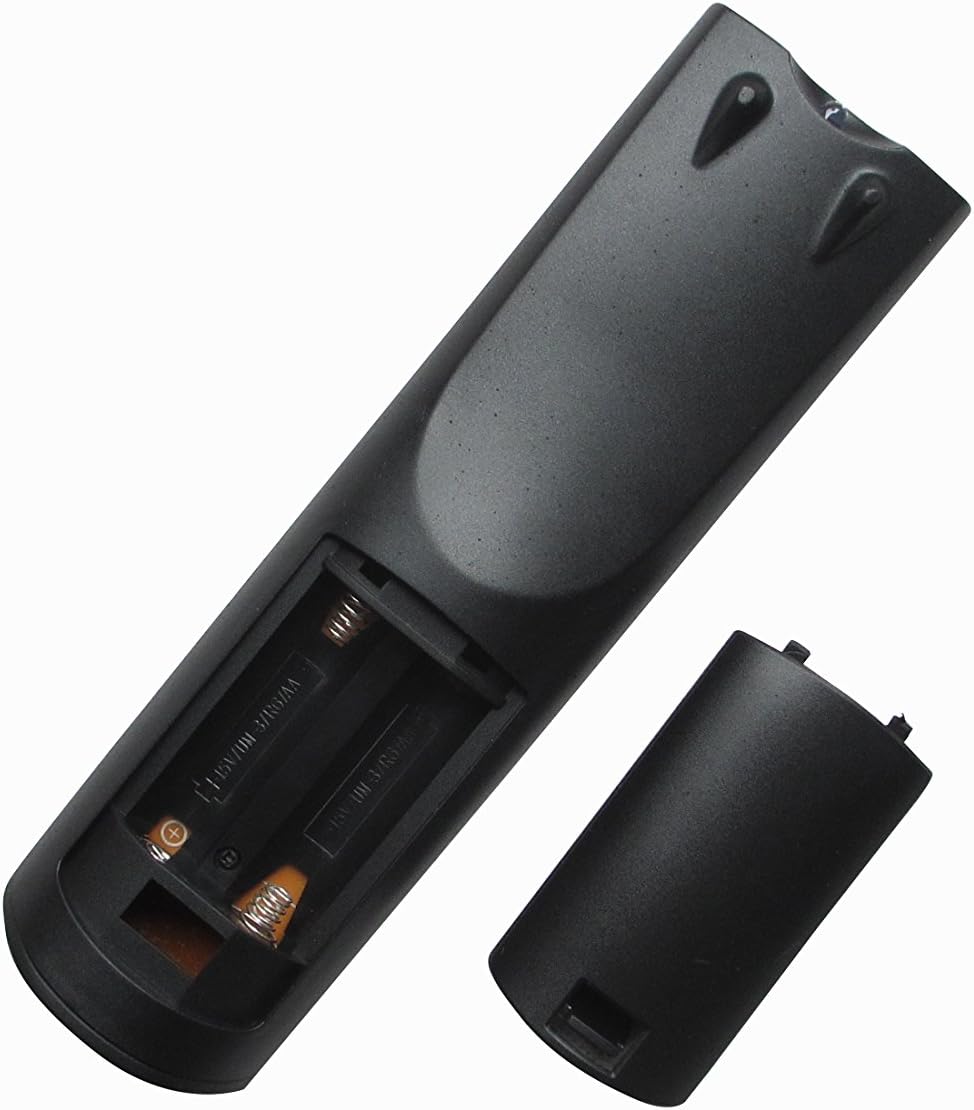
شڪل 1: پوئتي view ريموٽ ڪنٽرول جو بيٽري ڪمپارٽمينٽ کليل آهي، جيڪو AAA بيٽري داخل ڪرڻ لاءِ صحيح رخ کي ظاهر ڪري ٿو.
The remote control does not require any programming. Once batteries are installed, it is ready for use with compatible ONKYO Home Theater Systems.
4. آپريٽنگ هدايتون
4.1 ريموٽ ڪنٽرول لي آئوٽ

شڪل 2: سامهون view of the Easytry123 replacement remote control, displaying the arrangement and labeling of all operational buttons.
4.2 بنيادي ڪم
Point the remote control directly at the infrared receiver on your ONKYO Home Theater System. Ensure there are no obstructions between the remote and the system.
- آن / اسٽينڊ بائي: Powers the system on or puts it into standby mode.
- INPUT SELECTOR (e.g., DVD, CD, TUNER, AUX): گهربل آڊيو/وڊيو ان پٽ ذريعو چونڊيندو آهي.
- VOL +/-: ماسٽر حجم جي سطح کي ترتيب ڏئي ٿو.
- مٽي: Toggles the audio mute function.
- نيويگيشن (مٿي، هيٺ، کاٻي، ساڄي، داخل ڪريو): مينيو کي نيويگيٽ ڪرڻ ۽ چونڊن جي تصديق ڪرڻ لاءِ استعمال ڪيو ويندو آهي.
- واپسي: پوئين مينيو يا اسڪرين ڏانهن واپس اچي ٿو.
- PLAY/PAUSE, STOP, SKIP (<<, >>): ميڊيا پلے بیک افعال کي ڪنٽرول ڪري ٿو.
- نمبر بٽڻ (0-9): Used for direct track selection, radio station tuning, or inputting numerical values.
- ڏيکار Changes the information displayed on the system's screen.
- ريموٽ موڊ: Switches the remote's operating mode for controlling different components (e.g., TV, DVD). Note that full functionality for external devices may vary.
5. سار سنڀال
- صفائي: To clean the remote, gently wipe it with a soft, dry cloth. Do not use liquid cleaners, solvents, or abrasive materials, as these can damage the remote's surface or internal components.
- بيٽري مٽائڻ: Replace batteries when the remote's response becomes sluggish or stops functioning. Always replace both batteries simultaneously with new AAA batteries. Do not mix old and new batteries, or different types of batteries.
- اسٽوريج: If the remote will not be used for an extended period, remove the batteries to prevent leakage and potential damage. Store the remote in a cool, dry place away from direct sunlight.
6. مسئلا حل ڪرڻ
- ريموٽ جواب نه ڏئي رهيو آهي:
- چيڪ ڪريو ته بيٽريون صحيح پولارٽي (+/-) سان صحيح طرح سان داخل ڪيون ويون آهن.
- بيٽرين کي تازو سان تبديل ڪريو.
- Ensure there are no obstructions between the remote and the ONKYO system's infrared receiver.
- Confirm you are within the effective range and pointing the remote directly at the system.
- محدود ڪارڪردگي:
- This is a replacement remote; some advanced or specific functions of your original ONKYO remote may not be replicated.
- Ensure the remote is in the correct 'REMOTE MODE' if applicable for controlling different devices.
- Verify your ONKYO system model is listed in the 'Compatible Models' section of this manual.
- بٽڻ چپچپا يا غير جوابده آهن:
- This may indicate internal damage or dirt. Do not attempt to disassemble the remote.
- Ensure the remote is kept clean and dry.
7. وضاحتون
| خاصيت | وصف |
|---|---|
| برانڊ | ايزيٽري 123 |
| رابطي ٽيڪنالاجي | انفراريڊ (IR) |
| مطابقت رکندڙ ڊوائيسز | ONKYO Home Theater Systems (specific models listed in Section 2) |
| سپورٽ ٿيل ڊوائيسز جو وڌ ۾ وڌ تعداد | 1 (controls the primary ONKYO system) |
| خاص خصوصيت | Ergonomic ڊيزائن |
| طاقت جو ذريعو | 2 x AAA بيٽريون (شامل نه آهن) |
8. وارنٽي ۽ سپورٽ
Specific warranty information for this Easytry123 replacement remote control is not provided in the product details. For any warranty claims, technical support, or further inquiries, please contact the seller directly through your purchase platform.
Please retain your proof of purchase for any support requests.


