1. تعارف
Thank you for choosing the Ozeri 360 Duo Tower Fan. This manual provides essential information for the safe and efficient operation of your new fan. Please read these instructions thoroughly before use and retain them for future reference.
The Ozeri 360 Duo Tower Fan features a unique dual oscillation system and advanced airflow patterns designed to circulate air effectively throughout your room.
2. اھم حفاظتي ھدايتون
- ھن فين کي استعمال ڪرڻ کان پھريائين س instructionsئي هدايتون پڙھو.
- پڪ ڪريو ته بجلي جي فراهمي جي مقدار سان ملي ٿيtage فين جي ريٽنگ ليبل تي بيان ڪيل آهي.
- خراب ٿيل ڪنڊ يا پلگ سان ڪو به پرستار نه هلايو. فين کي رد ڪريو يا امتحان ۽/يا مرمت لاءِ بااختيار سروس سهولت ڏانهن واپس وڃو.
- قالين جي هيٺان ڪنڊ نه هلايو. ڊور کي اڇلائي قالين، رنرن، يا ساڳي طرح ڍڪڻ سان نه ڍڪيو. ٽريفڪ واري علائقي کان پري ڪنڊ کي ترتيب ڏيو ۽ جتي ان کي ختم نه ڪيو ويندو.
- To disconnect the fan, turn controls to OFF, then remove plug from outlet.
- ڪنهن به وينٽيليشن يا ايگزاسٽ اوپننگ ۾ غير ملڪي شين کي داخل نه ڪريو يا داخل ٿيڻ نه ڏيو ڇو ته اهو بجلي جو جھٽڪو يا باهه جو سبب بڻجي سگهي ٿو، يا پنکھي کي نقصان پهچائي سگهي ٿو.
- هوا جي سوراخن کي نه روڪيو يا پردن يا ٻين مواد جي ويجهو ڪم نه ڪريو جيڪي هوا جي وهڪري کي روڪي سگهن ٿا.
- هي پرستار گندي يا ڊي ۾ استعمال لاء ارادو نه آهيamp جڳھون.
- آپريشن دوران پنکڙي کي هميشه هڪ مستحڪم، فليٽ مٿاڇري تي رکو.
- بند نگراني ضروري آهي جڏهن ڪو به اوزار استعمال ڪيو وڃي يا ٻارن جي ويجهو.
3. پيڪيج مواد
Carefully unpack your Ozeri 360 Duo Tower Fan and ensure all items are present:
- Ozeri 360 Duo Tower Fan Unit
- Fan Base (consisting of two halves)
- ريموٽ ڪنٽرول
- هدايت نامو (هي دستاويز)
4. پراڊڪٽ ختمview
Familiarize yourself with the components of your Ozeri 360 Duo Tower Fan.
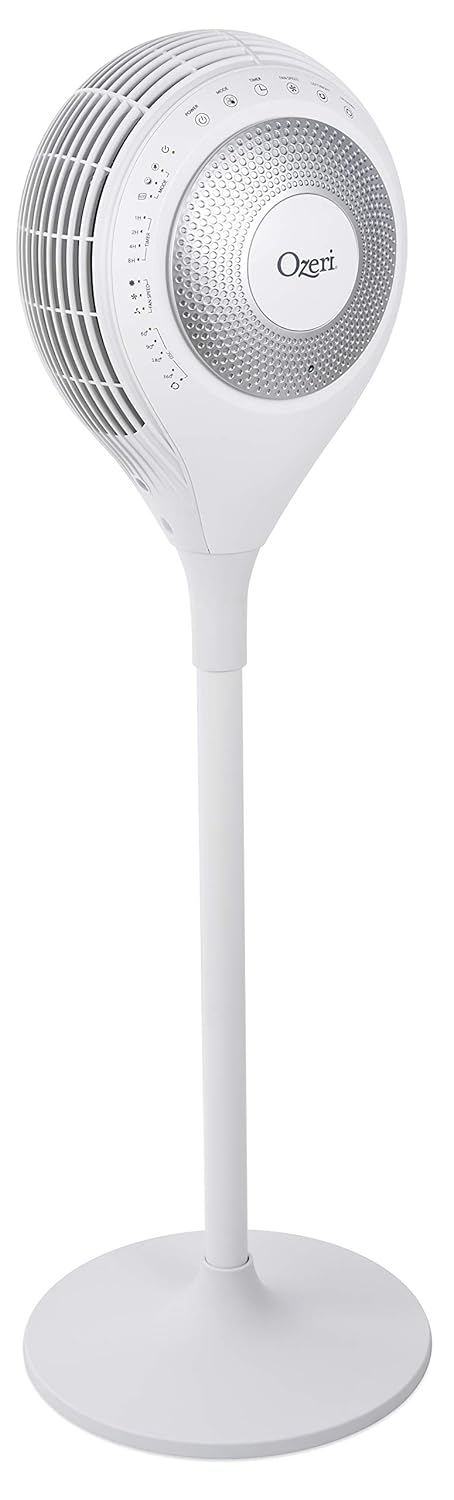


5. سيٽ اپ
The Ozeri 360 Duo Tower Fan is designed for easy assembly without special tools.
- بنياد گڏ ڪريو: Connect the two halves of the fan base together. Ensure they snap securely into place.
- Attach Fan Unit to Base: Carefully align the main fan unit with the assembled base. Push down firmly until it is securely seated.
- فين جي پوزيشن: Place the fan on a firm, level surface, ensuring there are no obstructions to airflow.
- پاور سان ڳنڍيو: Plug the power cord into a standard AC electrical outlet.
6. آپريٽنگ هدايتون
Your Ozeri 360 Duo Tower Fan can be operated using the touch control panel on the unit or the included remote control.

6.1. ڪنٽرول پينل ۽ ريموٽ فنڪشن
| بٽڻ / فنڪشن | وصف |
|---|---|
| طاقت (🏻) | پنکڙي کي آن يا آف ڪري ٿو. |
| موڊ (☸) | Cycles through Normal, Natural, Sleeping, and Eco modes. |
| Fan Speed (☠) | Adjusts fan speed (Low, Medium, High) in Normal mode. Speed adjusts automatically in other modes. |
| Left/Right Oscillation (↻) | Activates or deactivates horizontal oscillation (60°, 90°, 180°, 360°). Press repeatedly to cycle through options. |
| Up/Down Oscillation (⇅) | Activates or deactivates vertical oscillation. |
| ٽائمر (⏲) | Sets the auto-off timer for 1, 2, 4, or 8 hours. |

6.2. آپريٽنگ موڊس
- عام موڊ: Provides continuous airflow at a selected speed (Low, Medium, High).
- قدرتي موڊ: Simulates natural breezes by alternating between low, medium, and high airflow speeds.
- سمهڻ جو طريقو: Provides soothing, patterned airflow. The fan speed gradually reduces after 30 minutes to promote restful sleep. The LED display dims automatically.
- ايڪو موڊ: Adjusts fan speed automatically based on ambient temperature to maintain comfort and optimize energy use.
6.3. Dual Oscillation
The Ozeri 360 Duo Tower Fan features both horizontal (Left/Right) and vertical (Up/Down) oscillation. These can be used independently or simultaneously to create helical wind currents, ensuring comprehensive air circulation throughout the room.
- افقي اوسيليشن: Press the Left/Right Oscillation button to cycle through 60°, 90°, 180°, or 360° rotation angles.
- عمودي اوسيليشن: Press the Up/Down Oscillation button to activate or deactivate vertical movement of the fan head.
7. سار سنڀال
باقاعدي صفائي توهان جي پنکڙي جي ڪارڪردگي کي برقرار رکڻ ۽ ان جي عمر وڌائڻ ۾ مدد ڪندي.
- صفائي کان اڳ: صفائي ڪرڻ کان اڳ هميشه فين کي پاور آئوٽليٽ مان ڪڍو.
- ٻاهرين صفائي: نرم استعمال ڪريو، ڊيamp فين جي ٻاهرين سطحن کي صاف ڪرڻ لاءِ ڪپڙو. گھڙڻ وارا صاف ڪندڙ يا محلول استعمال نه ڪريو.
- Air Intake/Output Vents: Use a vacuum cleaner with a brush attachment to gently remove dust from the air intake and output vents. Do not attempt to disassemble the fan for cleaning.
- اسٽوريج: If storing the fan for an extended period, cover it to protect it from dust and store it in a cool, dry place.
8. مسئلا حل ڪرڻ
If you experience issues with your Ozeri 360 Duo Tower Fan, please refer to the following common problems and solutions:
| مسئلو | ممڪن سبب | حل |
|---|---|---|
| پنکڙو نه ٿو هلي. | Not plugged in; power outlet not active; power button not pressed. | Ensure the fan is securely plugged into a working outlet. Press the Power button on the unit or remote. |
| ڪمزور هوا جو وهڪرو. | Fan speed set too low; vents obstructed; dust accumulation. | Increase fan speed. Ensure vents are clear. Clean dust from vents as per Maintenance section. |
| اوسيليشن ڪم نه ڪري رهيو آهي. | اوسيليشن فنڪشن چالو نه ٿيو آهي. | Press the Left/Right or Up/Down Oscillation button to activate. |
| ريموٽ ڪنٽرول ڪم نه ڪري رهيو آهي. | Batteries depleted; remote not aimed at sensor. | Replace remote control batteries. Ensure the remote is aimed at the fan's control panel sensor. |
9. وضاحتون
| خاصيت | تفصيل |
|---|---|
| برانڊ | اوزيري |
| ماڊل نالو | Ozeri 360 Duo Tower Fan, with Dual Oscillation |
| شيون ماڊل نمبر | OZF7 |
| رنگ | اڇو |
| اليڪٽرڪ فين ڊيزائن | فرش فين |
| طاقت جو ذريعو | AC |
| پيداوار جي ماپ | 14.5"ڊي x 14.5"ڊي x 45.5"ايڇ |
| شيءِ جو وزن | 14.96 پائونڊ (6.8 ڪلوگرام) |
| خاص خصوصيت | Oscillating (Dual Oscillation: Horizontal and Vertical) |
| ڪنٽرول جو طريقو | Touch, Remote |
| وضاحت ميٽر | Energy Star, FCC |
| يو پي سي | 815817012654 |
10. وارنٽي ۽ سپورٽ
Ozeri products are manufactured to high-quality standards. For specific warranty information, please refer to the warranty card included with your purchase or visit the official Ozeri webسائيٽ.
For technical support, replacement parts, or customer service inquiries, please contact Ozeri customer support through their official channels.
آن لائن سپورٽ: جو دورو ڪريو Ozeri Store on Amazon وڌيڪ پراڊڪٽ جي معلومات ۽ سپورٽ وسيلن لاءِ.


