تعارف
Thank you for choosing the Piquadro BV4729B3 Trolley Briefcase. This manual provides essential information for the proper setup, operation, and maintenance of your new briefcase. Please read these instructions carefully before use to ensure optimal performance and longevity of your product.
پيداوار ختمview
The Piquadro BV4729B3 is a versatile trolley briefcase designed for business and travel. It features dedicated compartments for electronic devices, multiple organizer pockets, and a convenient trolley system for easy transport.

تصوير 1: سامهون view of the Piquadro BV4729B3 Trolley Briefcase in brown leather, showcasing its elegant design and front pocket.
اهم خاصيتون:
- Durable leather construction.
- Padded compartments for laptops (up to 15.7 inches) and tablets (up to 12.2 inches).
- Integrated telescopic trolley system.
- Smooth-rolling wheels.
- Multiple internal and external organizer pockets.
- Reinforced bottom for stability.
- Two reinforced top handles and a removable, adjustable shoulder strap.
سيٽ اپ ڪريو
1. Adjusting the Telescopic Handle:
To extend the telescopic handle, locate the button on the handle grip. Press and hold the button, then pull the handle upwards until it locks into your desired position. To retract, press the button again and push the handle down. The handle extends up to approximately 65 cm.

تصوير 2: The briefcase with its telescopic handle fully extended, ready for rolling transport.
2. Attaching the Shoulder Strap:
If you prefer to carry the briefcase over your shoulder, attach the removable shoulder strap to the D-rings located on the sides of the briefcase. Adjust the strap length for comfortable carrying. The shoulder strap is continuously adjustable up to 160 cm.
آپريٽنگ
1. Using Main Compartments:
The main compartment is secured with a two-way zipper. Inside, you will find a padded laptop compartment with a closure strap and a padded tablet compartment with a closure strap. There is also an additional zippered compartment for smaller items.
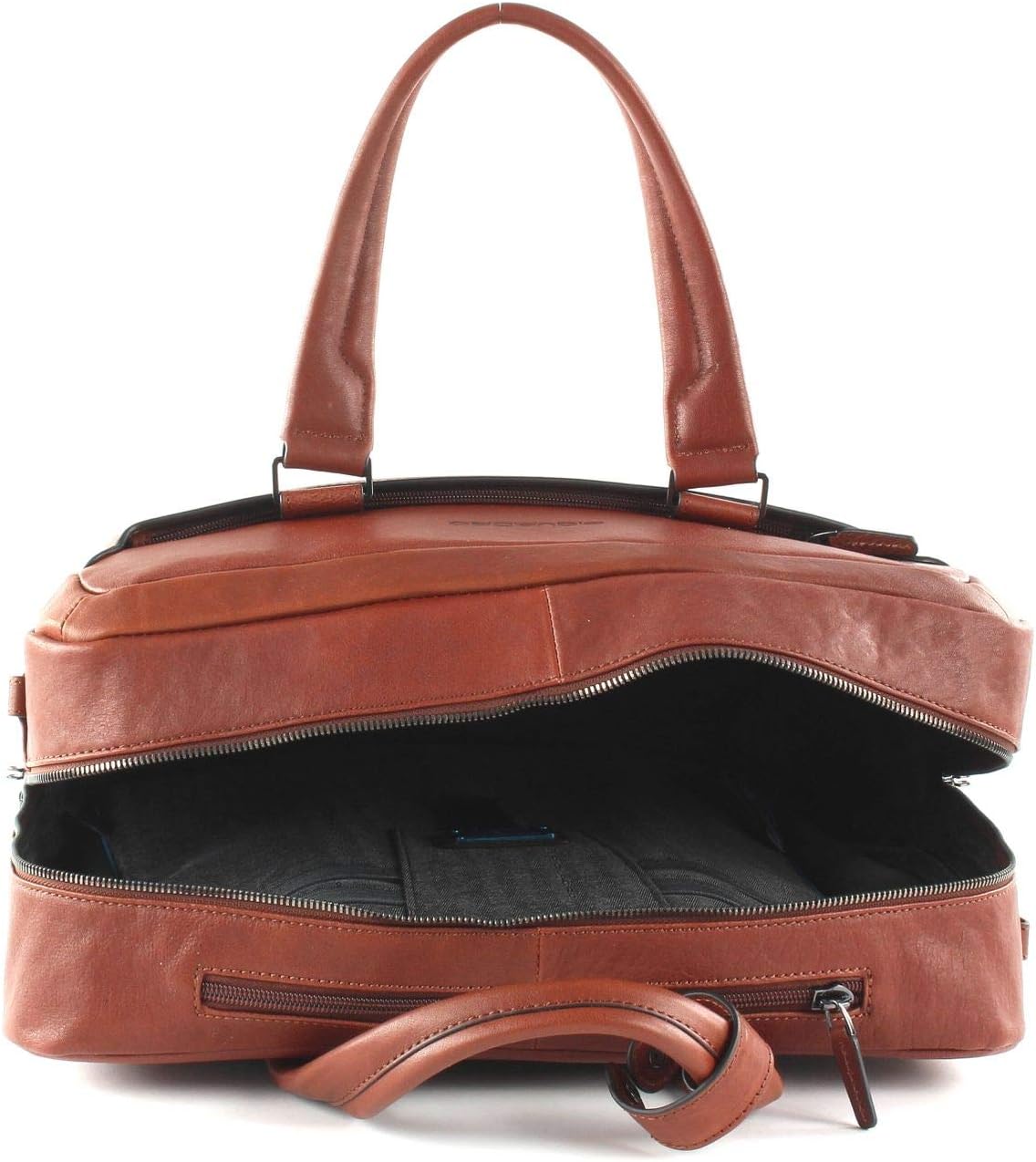
تصوير 3: View of the main compartment opened, showing the internal organization including padded sleeves for devices.
2. Front Organizer Pocket:
The front of the briefcase features a zippered compartment containing three hidden mesh pockets, two elastic hidden compartments, and four pen holders. This is ideal for organizing small accessories, business cards, and writing instruments.
3. Trolley Holder:
On the back of the briefcase, there is a trolley holder with a lock, allowing you to securely attach the briefcase to the handle of a larger suitcase for consolidated travel.

تصوير 4: ريڙهه view of the briefcase, highlighting the trolley strap for securing it to luggage handles.
4. Carrying Options:
The briefcase offers versatile carrying options:
- رولنگ: Utilize the telescopic handle and smooth-rolling wheels for effortless transport.
- Hand-carry: Use the two reinforced top handles for a classic briefcase carry.
- Shoulder-carry: Attach the adjustable shoulder strap for hands-free carrying.
سار سنڀال
چمڙي جي سنڀال:
- چمڙي جي مٿاڇري کي نرم، ڊي سان صاف ڪريوamp مٽي ۽ مٽي کي هٽائڻ لاء ڪپڙو.
- For deeper cleaning, use a specialized leather cleaner and conditioner according to the product instructions.
- Avoid exposing the briefcase to direct sunlight or extreme heat for prolonged periods, as this can cause the leather to dry out or fade.
- Protect from excessive moisture. If the briefcase gets wet, gently blot with a dry cloth and allow it to air dry naturally, away from direct heat.
عام سنڀال:
- Regularly check zippers and hardware for smooth operation. Lubricate with a suitable product if necessary.
- Keep the wheels clean and free of debris to ensure smooth rolling.
- Store the briefcase in a cool, dry place when not in use, preferably in its dust bag to protect it from dust and scratches.
مشڪلاتون
Stiff Zippers:
If a zipper becomes stiff or difficult to operate, apply a small amount of zipper lubricant or a graphite pencil lead along the teeth. Gently work the zipper back and forth to distribute the lubricant.
ڦيٿا جيڪي آساني سان نه ڦرن:
Check the wheels for any accumulated dirt, hair, or debris. Clean them thoroughly. If the issue persists, the wheel bearings may require professional inspection or replacement.
ٽيليسڪوپڪ هينڊل اسٽڪنگ:
Ensure no objects are obstructing the handle mechanism. Clean any visible dirt or dust from the handle shafts. If the problem continues, avoid forcing the handle and seek professional assistance.
وضاحتون
| خاصيت | تفصيل |
|---|---|
| ماڊل نمبر | BV4729B3 |
| طول و عرض (W x H x D) | تقريبن 39 سينٽي ميٽر x 32 سينٽي ميٽر x 13.5 سينٽي ميٽر (15.35 x 12.6 x 5.51 انچ) |
| وزن | Approximately 3050 g (2.2 pounds / 1 Kilogram) |
| حجم | تقريبن 20 ليٽر |
| مواد | Outer: Leather, Inner: Polyester, Nylon |
| Laptop Compartment Dimensions | Approximately 32 cm x 22 cm x 3 cm (fits up to 15.7-inch laptop) |
| Tablet Compartment Dimensions | Approximately 31 cm x 21 cm x 1 cm (fits up to 10.5-inch iPad / 12.2-inch tablet) |
| Telescopic Handle Extension | Up to approximately 65 cm |
| ڪلهي جي پٽي جي ڊيگهه | Adjustable up to 160 cm |
وارنٽي ۽ سپورٽ
Piquadro products are crafted with high-quality materials and attention to detail. For information regarding warranty coverage, please refer to the warranty card included with your purchase or visit the official Piquadro website. For any product support or service inquiries, please contact Piquadro customer service through their official channels.


