1. تعارف
This manual provides detailed instructions for the setup, operation, maintenance, and troubleshooting of your ipega PG-9078 Universal Wireless Bluetooth Game Controller. Please read this manual carefully before use to ensure proper functionality and to extend the lifespan of your device. The PG-9078 is designed to provide a versatile gaming experience across multiple platforms including Android, iOS, Tablet, TV, and PC.

Figure 1.1: Package Contents - ipega PG-9078 Controller, detachable bracket, USB cable, and user manual.
2. سيٽ اپ
2.1. ڪنٽرولر کي چارج ڪرڻ
Before initial use, fully charge the controller. Connect the supplied USB cable to the Micro-USB port on the controller and the other end to a USB power source (e.g., computer USB port, USB wall adapter). The charging indicator light will illuminate during charging and turn off when fully charged.
2.2. Attaching the Phone Bracket
The PG-9078 comes with a detachable bracket for holding smartphones. To attach, align the bracket's base with the slot on the top of the controller and slide it into place until it clicks securely. To remove, gently press the release button (if present) or slide it off in the opposite direction.

Figure 2.1: Controller with Phone Bracket Attached.
2.3. بلوٽوٽ جوئر
The pairing process varies slightly depending on the operating system. Ensure the controller is charged before attempting to pair.
- Android/PC Mode: Press and hold the 'X' button + 'HOME' button simultaneously until the indicator light flashes rapidly. On your device, enable Bluetooth, search for "PG-9078" and select it to pair.
- iOS موڊ: Press and hold the 'Y' button + 'HOME' button simultaneously until the indicator light flashes rapidly. On your iOS device, enable Bluetooth, search for "PG-9078" and select it to pair.
- Direct Play Mode (Android/iOS): For certain games, press and hold the 'A' button + 'HOME' button. This mode is designed for direct connection without mapping.
- PC Wired Mode: Connect the controller directly to your PC using the USB cable. The controller will be recognized as a standard gamepad.

Figure 2.2: Controller Paired with a Smartphone.
3. آپريٽنگ هدايتون
3.1. ڪنٽرولر لي آئوٽ
Familiarize yourself with the buttons and controls of the PG-9078 controller:
- کاٻي اينالاگ اسٽڪ: Movement control.
- ڊي-پيڊ (ڊائريڪشنل پيڊ): هدايتي ان پٽ.
- چونڊيو بٽڻ: Function varies by game/system.
- هوم بٽڻ: Power on/off, pairing mode, return to home screen.
- START بٽڻ: Function varies by game/system.
- ساڄي اينالاگ اسٽڪ: Camera control or secondary movement.
- ايڪشن بٽڻ (A، B، X، Y): Primary game actions.
- ڪلهي جا بٽڻ (L1، R1): Top triggers.
- Trigger Buttons (L2, R2): Bottom triggers.
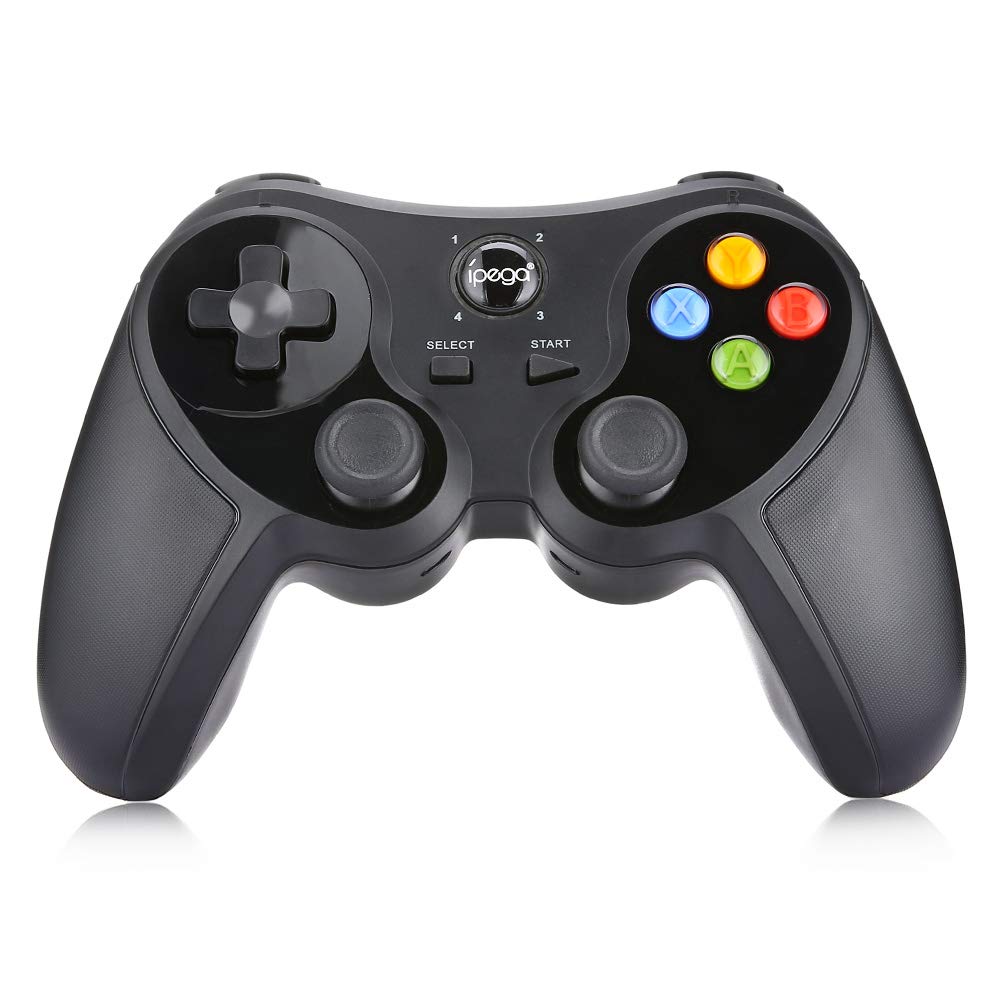
شڪل 3.1: سامهون View of the Controller.
3.2. گيمنگ جو تجربو
Once paired, the controller should be recognized by compatible games and applications. For optimal performance, ensure your device's operating system and game applications are up to date. Some games may require in-game controller settings adjustments.

Figure 3.2: Hands-on View of the Controller in Use.
4. سار سنڀال
- صفائي: ڪنٽرولر کي صاف ڪرڻ لاءِ نرم، سڪل ڪپڙو استعمال ڪريو. ضدي مٽيءَ لاءِ، ٿورو ڊيamp cloth can be used, but ensure no moisture enters the device. Do not use harsh chemicals or abrasive cleaners.
- اسٽوريج: Store the controller in a cool, dry place away from direct sunlight and extreme temperatures. If storing for extended periods, ensure the battery is partially charged (around 50%) to preserve battery health.
- بيٽري جي سنڀال: Avoid fully discharging the battery frequently. Recharge the controller when the low battery indicator appears. Do not attempt to replace the internal battery yourself.
5. مسئلا حل ڪرڻ
| مسئلو | ممڪن سبب | حل |
|---|---|---|
| ڪنٽرولر تي طاقت نه آهي. | گھٽ بيٽري. | ڪنٽرولر کي مڪمل طور تي چارج ڪريو. |
| بلوٽوٿ ذريعي جوڙي نه ٿو سگهجي. | Incorrect pairing mode; Bluetooth interference; device not discoverable. | Ensure correct pairing mode (Android/iOS) is selected. Turn off and on Bluetooth on your device. Move closer to the device. Try resetting the controller (if a reset button is available, usually a small pinhole). |
| Buttons are unresponsive or laggy. | Low battery; software conflict; distance from device. | Recharge the controller. Restart the game/device. Ensure no other Bluetooth devices are causing interference. |
| ڪنٽرولر بار بار ڊسڪنيڪٽ ٿئي ٿو. | گهٽ بيٽري؛ ڊوائيس کان فاصلو؛ مداخلت. | Charge the controller. Stay within effective Bluetooth range. Reduce wireless interference. |
6. وضاحتون
- ماڊل: پي جي-9078
- رابطي: Bluetooth وائرليس
- مطابقت: Android, iOS, Tablet, TV, PC
- انٽ واليمtage: ڊي سي 5 وي
- ان پٽ موجوده: 500 ايم اي
- موجوده ڪم: 30 ايم اي
- پيداوار: چين ۾ ٺهيل

Figure 6.1: Controller Back Panel with Specifications.
7. وارنٽي ۽ سپورٽ
وارنٽي جي معلومات ۽ ٽيڪنيڪل سپورٽ لاءِ، مھرباني ڪري خريداري وقت مهيا ڪيل دستاويزن جو حوالو ڏيو يا پنھنجي پرچون ڪندڙ سان رابطو ڪريو. ڪنھن به وارنٽي دعوائن لاءِ خريداري جو ثبوت رکو.


