1. تعارف
This manual provides comprehensive instructions for the installation, operation, and maintenance of your DIGITUS Wireless Dual Band Mesh Kit (Model DN-7071). Please read this manual carefully before using the device to ensure proper functionality and to prevent damage.
The DIGITUS Wireless Dual Band Mesh Kit is designed to extend and enhance your Wi-Fi coverage, providing a seamless and stable network experience throughout your home or office. It supports dual-band operation (2.4 GHz and 5.8 GHz) with a combined speed of up to 1200 Mbps, and features WPS for easy setup, along with LAN and Wi-Fi connectivity.
2. پيڪيج مواد
پڪ ڪريو ته سڀئي شيون توهان جي پيڪيج ۾ موجود آهن:
- 1 x DIGITUS 1200 Mbps Dual Band Mesh System (3 pieces)
- 1 x استعمال ڪندڙ دستياب
3. پراڊڪٽ ختمview
Familiarize yourself with the components and indicators of your DIGITUS Mesh Kit.
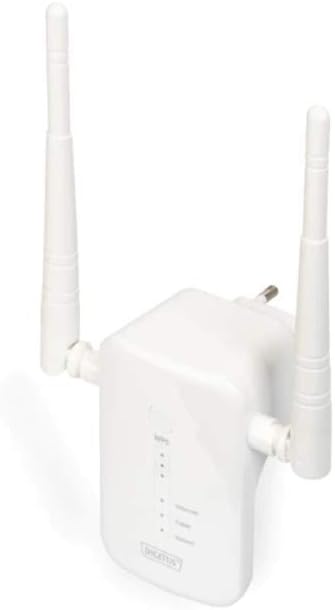
Figure 1: DIGITUS Wireless Dual Band Mesh Kit (DN-7071). This image displays the DIGITUS Wireless Dual Band Mesh Kit, a white rectangular device with two adjustable external antennas. The front panel features LED indicators for status, and a power plug is visible on the back, indicating direct wall-socket integration.
LED اشارا:
- پاور LED: طاقت جي حالت کي ظاهر ڪري ٿو.
- وائي فائي LED: Indicates Wi-Fi activity and connection status.
- LAN LED: Indicates LAN port activity.
- سگنل طاقت LED: Indicates the strength of the mesh connection.
بندرگاهن ۽ بٽڻ:
- LAN پورٽ: For wired connections.
- WPS بٽڻ: For quick and secure connection setup.
- ري سيٽ بٽڻ: فيڪٽري ڊفالٽ سيٽنگون بحال ڪرڻ لاءِ (عام طور تي هڪ ننڍڙو پن هول بٽڻ).
4. سيٽ اپ
4.1 شروعاتي جڳهه
Place the main mesh unit (router mode) near your internet modem/router. Subsequent mesh units should be placed strategically to cover dead zones, ensuring they are within range of another mesh unit or the main unit for optimal signal strength.
4.2 پاور آن
- Plug the main mesh unit into a power outlet.
- Wait for the Power LED to become stable.
- Repeat for the other mesh units.
4.3 Connecting to Your Existing Network
There are two primary methods for connecting the mesh system:
Method 1: WPS (Wi-Fi Protected Setup)
- Press the WPS button on your existing router.
- Within two minutes, press the WPS button on the main DIGITUS mesh unit.
- The Wi-Fi LED on the mesh unit will blink during connection and become solid when successfully connected.
- Repeat for additional mesh units, pressing WPS on an already connected mesh unit or the main unit, then on the new unit.
Method 2: Manual Setup (via Web انٽرفيس)
- Connect your computer to the LAN port of one of the mesh units using an Ethernet cable, or connect wirelessly to its default Wi-Fi network (SSID and password usually found on a sticker on the device).
- کوليو a web برائوزر ۽ ڊفالٽ IP پتو داخل ڪريو (مثال طور،
192.168.1.1or192.168.0.1) or domain name (e.g.,http://digitusmesh.net) provided in the quick start guide. - Log in with the default username and password (e.g.,
admin/admin). - Follow the on-screen wizard to configure the mesh system, including network name (SSID), password, and operating mode (e.g., Router, Access Point, Repeater).
- Save your settings and restart the device if prompted.
5. آپريٽنگ هدايتون
5.1 ڳنڍڻ وارا آلات
- وائرليس ڊوائيسز: ڳولھيو the Wi-Fi network name (SSID) you configured and enter the password.
- وائرڊ ڊوائيسز: Connect devices like computers, gaming consoles, or smart TVs to the LAN port of any mesh unit using an Ethernet cable.
5.2 ڪارڪردگي بهتر ڪرڻ
- لڳائڻ: Ensure mesh units are not obstructed by large objects or placed near sources of interference (e.g., microwaves, cordless phones).
- فرم ويئر اپڊيٽس: باقاعدي طور تي چيڪ ڪريو ۽ فرم ويئر اپڊيٽس انسٽال ڪريو ذريعي web بهترين ڪارڪردگي ۽ سيڪيورٽي کي يقيني بڻائڻ لاءِ انٽرفيس.
- ڊبل بينڊ: Utilize the 5 GHz band for devices requiring higher speeds (e.g., streaming, gaming) and the 2.4 GHz band for wider coverage and older devices.
6. سار سنڀال
- صفائي: ڊوائيس کي صاف ڪرڻ لاءِ نرم، سڪل ڪپڙو استعمال ڪريو. مائع صاف ڪندڙ يا ايروسول استعمال نه ڪريو.
- وينٽيليشن: Ensure the mesh units have adequate ventilation and are not covered.
- فرم ویئر: Keep the device firmware updated to the latest version for security and performance improvements.
- تبديل ڪريو If the device is not functioning correctly, a factory reset may resolve issues. Press and hold the reset button for 5-10 seconds until the LEDs flash. Note that this will erase all custom settings.
7. مسئلا حل ڪرڻ
- طاقت ناهي: Ensure the power adapter is securely plugged into the unit and a working power outlet.
- انٽرنيٽ ڪنيڪشن ناهي:
- Check the connection between the main mesh unit and your modem/router.
- Verify your modem/router has an active internet connection.
- Restart your modem, router, and mesh units.
- ڪمزور وائي فائي سگنل:
- Relocate mesh units closer to each other or to the main unit.
- Ensure there are no major obstructions.
- مداخلت جي ذريعن جي جانچ ڪريو.
- رسائي نه ٿي سگهي Web انٽرفيس:
- Ensure your device is connected to the mesh unit's network.
- Verify the correct IP address or domain name is entered.
- پنهنجي برائوزر جي ڪيش صاف ڪرڻ جي ڪوشش ڪريو يا ڪو ٻيو برائوزر استعمال ڪريو.
- Perform a factory reset if necessary (note: this will erase all custom settings).
8. وضاحتون
| خاصيت | تفصيل |
|---|---|
| برانڊ | DIGIT |
| ماڊل نالو | ڊي اين-7071 |
| رنگ | اڇو |
| رابطي ٽيڪنالاجي | WLAN |
| وائرليس ڪميونيڪيشن معياري | 802.11a، 802.11ac، 802.11b، 802.11g، 802.11n |
| فريڪوئنسي بينڊ ڪلاس | Dual Band (2.4 GHz / 5.8 GHz) |
| خاص خاصيتون | QoS، WPS |
| مطابقت رکندڙ ڊوائيسز | Smartphone (and other Wi-Fi enabled devices) |
| بندرگاهن | RJ-45 (LAN) |
| شيءِ جو وزن | 117 گرام |
| شامل اجزاء | 1 x 1200 Mbps Dual Band Mesh System (3 pieces), 1 x User Manual |
9. وارنٽي ۽ سپورٽ
For warranty information and technical support, please refer to the official DIGITUS website or contact their customer service. Details are typically available on the product packaging or the manufacturer's official support pages.
You can find more solutions and information on the official DIGITUS webسائيٽ: DIGITUS Solutions


