1. تعارف
The iOptron iPolar is an advanced electronic polarscope (e-PS) engineered for high-precision and user-friendly polar alignment of equatorial mounts. It eliminates the need for a visible Polaris (North Star) or Sigma Octantis (South Star) and simplifies the alignment process by removing the requirement to rotate the mount.
2. اهم خاصيتون
- USB پلگ ۽ پلي: Requires no dedicated driver installation for operation.
- عالمي مطابقت: Functions worldwide without the need to specify northern or southern hemisphere settings.
- No Visible Pole Star Required: Operates effectively even when Polaris or Sigma Octantis are not visible.
- Static Mount Alignment: Eliminates the need to rotate the mount during the polar alignment procedure.
- ورسٽائل تنصيب: Can be installed internally within the RA shaft of compatible iOptron equatorial mounts or externally using appropriate adapters.
- CEM60/CEM60EC Support: Specifically designed to support front mounting on CEM60 and CEM60EC mounts.
3. سيٽ اپ گائيڊ
Follow these steps to set up your iOptron iPolar electronic polarscope:
- پيڪنگ کولڻ: Carefully remove all components from the packaging. Verify that all parts are present.
- جسماني تنصيب:
- For CEM60/CEM60EC mounts, attach the iPolar to the designated front mounting position using the provided adapter and hardware.
- For other compatible iOptron mounts, install the iPolar inside the RA shaft as per your mount's specific instructions.
- For external mounting on other equatorial mounts, use the appropriate adapter (sold separately if not included) to securely attach the iPolar.
- سافٽ ويئر انسٽاليشن: The iPolar is USB plug-and-play and typically does not require specific driver installation. However, you will need to download and install the iPolar software from the official iOptron webسائيٽ.
- ڪنيڪشن: Connect the iPolar to your computer using a standard USB cable. Ensure the connection is secure.
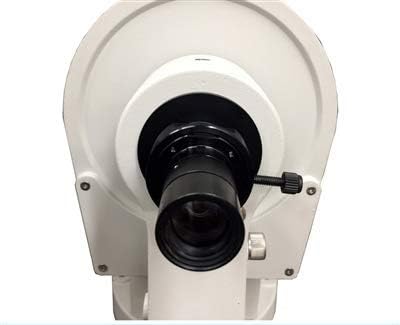
Figure 3.1: The iOptron iPolar Electronic Polarscope attached to a telescope mount, illustrating its compact design and how it integrates with the mount's structure. The main lens and a small adjustment knob are visible.
4. آپريٽنگ هدايتون
Once the iPolar is physically installed and connected to your computer, follow these general steps for polar alignment:
- سافٽ ويئر لانچ ڪريو: Open the iPolar software application on your computer.
- ڊوائيس Connectنيو: Within the software, select and connect to your iPolar device.
- اسڪرين تي ڏنل هدايتن تي عمل ڪريو: The iPolar software will guide you through the polar alignment process. This typically involves adjusting your mount's altitude and azimuth axes until the on-screen indicators show precise alignment.
- ترتيب جي تصديق ڪريو: The software will provide feedback on the accuracy of your alignment. Make fine adjustments until the desired precision is achieved.
5. سار سنڀال
To ensure the longevity and optimal performance of your iOptron iPolar, observe the following maintenance guidelines:
- صفائي: Use a soft, lint-free cloth to gently wipe the exterior of the iPolar. For the lens, use a specialized optical cleaning solution and cloth to avoid scratches.
- اسٽوريج: Store the iPolar in a dry, dust-free environment when not in use. Protect it from extreme temperatures and humidity.
- اثر کان بچڻ: Handle the device with care to prevent physical damage from drops or impacts.
6. مسئلا حل ڪرڻ
If you encounter issues with your iOptron iPolar, consider the following:
- ڊوائيس نه سڃاڻي: Ensure the USB cable is securely connected to both the iPolar and your computer. Try a different USB port or cable. Restart the iPolar software and/or your computer.
- سافٽ ويئر جا مسئلا: Ensure you have the latest version of the iPolar software installed from the official iOptron website. If problems persist, try reinstalling the software.
- Alignment Difficulties: Ensure your mount is roughly level before beginning the polar alignment process. Verify that there are no obstructions in the iPolar's field of view.
For persistent issues, refer to the iOptron support resources or contact their customer service.
7. وضاحتون
| برانڊ | آئوپيٽرون |
| ماڊل | 3339-060 |
| ٽيلي اسڪوپ ماؤنٽ جي وضاحت | ايڪوٽوريل جبل |
| فوڪس جو قسم | دستي فوڪس |
| طاقت جو ذريعو | تار ٿيل اليڪٽرڪ (USB) |
| Finderscope Type | Reflex |
| يو پي سي | 758277664004 |
| تقريبن پيڪيج جي ماپ | 6 x 6 x 3.5 انچ |
8. وارنٽي ۽ سپورٽ
For detailed information regarding the product warranty, please refer to the official iOptron website or the warranty card included with your purchase. For technical support, software updates, or further assistance, please visit the iOptron support page or contact their customer service department directly.