1. تعارف
This manual provides essential instructions for the Easytry123 Replacement Remote Control. This remote is designed as a direct replacement for original remote controls used with various Philips LED LCD HDTV TV models, including the 32PHT4002, 43PHT4002, and 32PHT4001 series. It operates using infrared (IR) technology and does not require any programming or setup codes. Simply insert batteries and begin use.
اهم نوٽ: This is a replacement remote and may not support all advanced functions or smart TV features present on some original remotes. Please ensure your original remote's appearance matches this replacement for optimal compatibility.
2. حفاظت جي ڄاڻ
- بيٽرين کي ٻارن جي پهچ کان پري رکو.
- پراڻي ۽ نئين بيٽرين، يا بيٽرين جي مختلف قسمن کي گڏ نه ڪريو.
- جيڪڏهن ريموٽ ڪنٽرول گهڻي عرصي تائين استعمال نه ٿيندو ته بيٽريون هٽايو.
- مقامي ضابطن جي مطابق استعمال ٿيل بيٽرين کي ختم ڪريو.
- ريموٽ ڪنٽرول کي سڌي سج جي روشني، گرمي جي ذريعن، يا نمي جي سامهون آڻڻ کان پاسو ڪريو.
3. پيڪيج مواد
- 1 x Easytry123 Replacement Remote Control
Note: Batteries (2 x AAA) are not included and must be purchased separately.
4. پراڊڪٽ ختمview
The following image illustrates the layout of the remote control and its primary buttons.

تصوير 4.1: سامهون view of the Easytry123 Replacement Remote Control. This image displays the full array of buttons, including power, channel, volume, navigation, and playback controls, arranged ergonomically on the black remote.
بٽڻ افعال:
- طاقت (●): ٽي وي کي آن يا بند ڪري ٿو.
- ذريعو: ان پٽ ذريعن کي چونڊيندو آهي (HDMI، AV، وغيره).
- ٽي وي: ٽي وي موڊ تي سوئچ ڪري ٿو.
- نيويگيشن پيڊ (مٿي، هيٺ، کاٻي، ساڄي، ٺيڪ): مينيو کي نيويگيٽ ڪري ٿو ۽ چونڊن جي تصديق ڪري ٿو.
- Back/Exit Menu: پوئين اسڪرين ڏانهن موٽندو آهي يا موجوده مينيو مان نڪرندو آهي.
- Home/Smart TV: Accesses the TV's home screen or smart TV features.
- مٿي مينيو: مين مينيو کوليو.
- آڊيو: آڊيو سيٽنگون ترتيب ڏئي ٿو.
- اختيارن: حوالي سان حساس آپشن ڏيکاري ٿو.
- ھدايت: اليڪٽرانڪ پروگرام گائيڊ کوليو.
- CH+/CH-: چينلز کي مٿي يا هيٺ تبديل ڪري ٿو.
- VOL+/VOL-: حجم وڌائي ٿو يا گھٽائي ٿو.
- خاموش: ٽي وي جي آواز کي ميوٽ يا ان ميوٽ ڪري ٿو.
- نمبر بٽڻ (0-9): سڌو چينل چونڊ.
- پلے بیک ڪنٽرول (کيڏڻ، روڪيو، روڪيو، ريوائنڊ، فاسٽ فارورڊ): ميڊيا پلے بیک کي ڪنٽرول ڪري ٿو.
- رنگ جا بٽڻ (لال، سائو، پيلو، نيرو): Accesses specific functions within menus or applications.
- ذيلي عنوان ٽوگل ڪري ٿو سب ٽائيٽل آن/ آف.
- متن: Accesses teletext (if supported by TV).
5. سيٽ اپ
5.1 بيٽري لڳائڻ
The remote control requires two (2) AAA batteries for operation. Follow these steps to install them:
- ريموٽ ڪنٽرول جي پٺيءَ تي بيٽري جي دٻي جي احاطي کي ڳولھيو.
- ٽيب تي دٻايو ۽ ڍڪ کي هيٺئين طرف سلائڊ ڪريو ته جيئن ان کي هٽايو وڃي.
- ٻہ AAA بيٽريون داخل ڪريو، پڪ ڪريو ته مثبت (+) ۽ منفي (-) ٽرمينل ڪمري اندر نشانن سان صحيح طرح سان ترتيب ڏين.
- بيٽري جي ڪمپارٽمينٽ جي ڍڪ کي واپس جاءِ تي سلائڊ ڪريو جيستائين اهو محفوظ طور تي ڪلڪ نه ڪري.

تصوير 5.1: پوئتي view of the remote control with the battery compartment cover removed, revealing the empty battery slots.
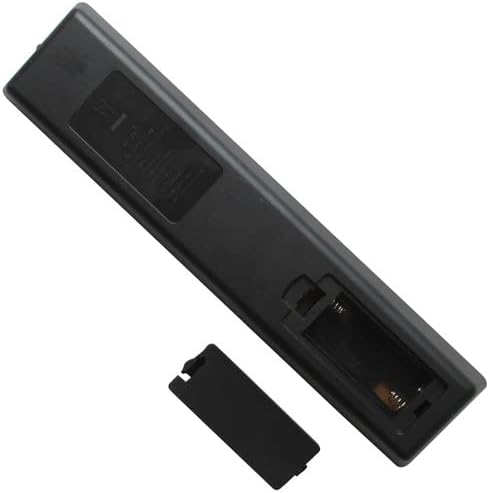
تصوير 5.2: پوئتي view of the remote control with two AAA batteries correctly inserted into the battery compartment.
ريموٽ ڪنٽرول هاڻي استعمال لاءِ تيار آهي. ڪنهن به پروگرامنگ يا جوڙي جي ضرورت ناهي.
6. آپريٽنگ هدايتون
To operate your TV with the Easytry123 Replacement Remote Control:
- Point the remote control directly towards the infrared receiver on your Philips TV.
- Ensure there are no obstructions between the remote control and the TV.
- Press the desired button to perform the corresponding function (e.g., Power, Volume Up, Channel Down).
The effective operating range is typically up to 8 meters (26 feet) without obstacles.
7. مسئلا حل ڪرڻ
| مسئلو | ممڪن سبب / حل |
|---|---|
| ريموٽ ڪنٽرول ڪم نه ڪري رهيو آهي. |
|
| ريموٽ ڪنٽرول وقفي وقفي سان ڪم ڪري ٿو. |
|
| ڪجھ بٽڻ ڪم نه ٿا ڪن. |
|
8. وضاحتون
- برانڊ: ايزيٽري 123
- مطابقت رکندڙ ڊوائيسز: Philips LED LCD HDTV Televisions (Models: 32PHT4002/98, 43PHT4002/98, 43PHT4002/56, 43PHT4002/05, 32PHT4001, 32PHT4001/12)
- رابطي ٽيڪنالاجي: انفراريڊ (IR)
- ڪنٽرولر جو قسم: بٽڻ ڪنٽرول
- خاص خصوصيت: Ergonomic, Direct Replacement (no setup required)
- طاقت جو ذريعو: 2 x AAA بيٽريون (شامل نه آهن)
9. وارنٽي ۽ سپورٽ
As a replacement product, specific warranty details may vary. Please refer to the retailer or seller (Easytry123) from whom you purchased this remote control for information regarding warranty coverage and customer support. For general troubleshooting not covered in this manual, ensure your TV's original manual is consulted for specific TV functions.


