1. تعارف
This manual provides comprehensive instructions for the installation, operation, and maintenance of your Alpine INE-W970HD Audio/Video/Nav System. This advanced in-dash unit offers seamless integration with Apple CarPlay and Android Auto, built-in navigation, and a wide array of multimedia features. Please read this manual thoroughly before using the product to ensure proper and safe operation.
2. اهم خاصيتون
- ايپل ڪار پلي ۽ اينڊرائيڊ آٽو مطابقت: Seamlessly integrate your smartphone for navigation, communication, and entertainment.
- بلٽ ان نيويگيشن: Advanced 3D & 2D mapping with turn-by-turn directions.
- ملٽي ميڊيا پلے بیک: Supports DVD, AAC, MP3, DivX playback, and HDMI input.
- بلوٽوت ڪنيڪشن: هٿ کان سواءِ ڪالنگ ۽ آڊيو اسٽريمنگ.
- USB ڪنيڪشن: For iPod, iPhone, or USB memory devices.
- اڳ-amp آئوٽ پُٽ: Three 4-Volt pre-amp outputs for system expansion.
3. سيٽ اپ ۽ تنصيب
Installation of the Alpine INE-W970HD should ideally be performed by a qualified professional. Incorrect installation can lead to damage to the unit or vehicle's electrical system.
3.1. قبل از انسٽاليشن چيڪ
- Ensure the vehicle's battery is disconnected before beginning installation.
- Verify all included components are present: main unit, wiring harness, GPS antenna, microphone, and mounting hardware.
- Consult your vehicle's specific wiring diagram for proper connections.
3.2. وائرنگ ڪنيڪشن
Connect the main wiring harness to the vehicle's power, ground, and speaker wires. Ensure proper polarity for all speaker connections. Connect the GPS antenna to the designated port on the rear of the unit and mount it in a location with a clear view of the sky. The microphone should be positioned for optimal voice pickup during hands-free calls.
3.3. شروعاتي پاور اپ ۽ ترتيب
After installation, reconnect the vehicle battery. The unit will power on. Follow the on-screen prompts for initial setup, including language selection, time zone, and basic audio settings. Refer to the "Operating" section for detailed configuration of features like Apple CarPlay and Android Auto.
4. آپريٽنگ هدايتون
4.1. يوزر انٽرفيس اوورview
The INE-W970HD features a responsive touchscreen display and physical buttons on the left side for quick access to key functions like Navigation, Audio, and Home. The main screen provides access to various sources and settings.

Image: Main screen displaying the Apple CarPlay interface.

Image: All Menus screen, providing access to various audio sources and connectivity options.

Image: Second page of the All Menus screen, showing additional media and input options.
4.2. ايپل ڪار پلي ۽ اينڊرائيڊ آٽو
Connect your compatible iPhone or Android smartphone via USB. The unit will automatically detect and launch the respective interface. Follow on-screen prompts on both the unit and your phone to complete the connection. This allows access to approved apps for navigation, music, messaging, and calls directly from the unit's display.

Image: Screen displaying the Android Auto interface.
4.3. Navigation System
کي دٻايو NAV button on the side panel or select the Navigation icon from the main menu to access the built-in navigation. Enter destinations using the touchscreen keyboard or voice commands (if supported by the system's current software version). The system provides visual maps and spoken turn-by-turn directions.
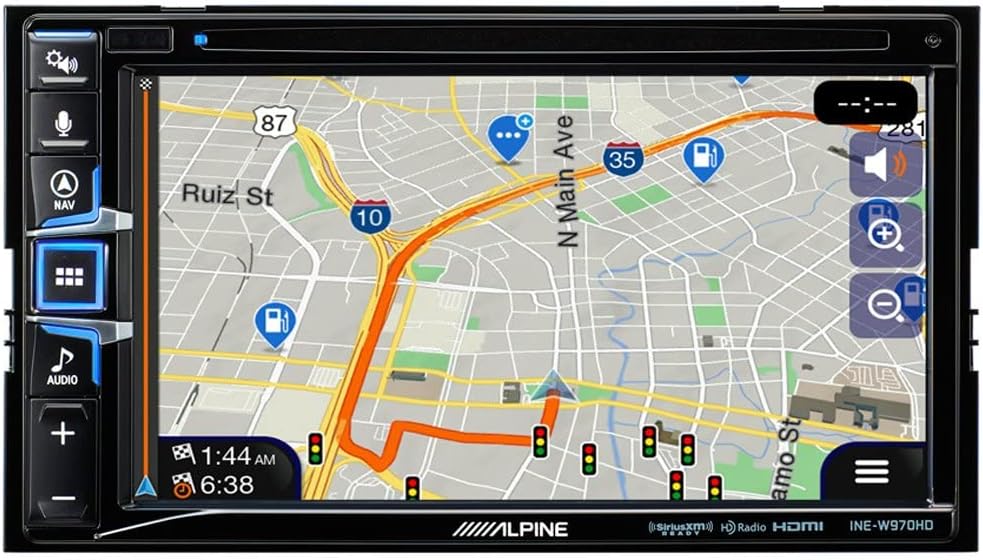
Image: Navigation map display with active route guidance.
4.4. آڊيو سيٽنگون
Access audio settings by pressing the آڊيو button or selecting the Audio icon. Adjust bass, mid, treble, fader, and balance settings to optimize sound quality for your vehicle's interior. The unit also supports various audio sources including Radio, SiriusXM, Disc, Bluetooth Audio, USB Music, and AUX input.

Image: Audio adjustment screen for tone, fader, and balance.
5. سار سنڀال
- اسڪرين جي صفائي: ٽچ اسڪرين کي نرميءَ سان صاف ڪرڻ لاءِ نرم، لِنٽ فري ڪپڙو استعمال ڪريو. ضدي داغن لاءِ، ڊيampen the cloth with a small amount of screen cleaner designed for electronics. Do not use abrasive cleaners or solvents.
- سافٽ ويئر اپڊيٽ: Periodically check the Alpine support website for firmware updates. Updates can improve performance, add features, and resolve known issues. Follow the instructions provided with the update package carefully.
- عام سنڀال: يونٽ کي انتهائي گرمي پد، ڊگهي عرصي تائين سڌي سج جي روشني، يا گهڻي نمي جي سامهون رکڻ کان پاسو ڪريو. يونٽ جي چوڌاري مناسب هوا جي وهڪري کي يقيني بڻايو.
6. مسئلا حل ڪرڻ
| مسئلو | ممڪن سبب | حل |
|---|---|---|
| يونٽ پاور نه آهي. | غلط وائرنگ؛ ڦاٽل فيوز؛ گاڏي جي بيٽري جو مسئلو. | Check power and ground connections. Inspect vehicle fuses. Ensure battery is charged. |
| ڳالهائيندڙن مان ڪوبه آواز ناهي. | Speaker wires disconnected; Mute function active; Incorrect audio settings. | Verify speaker connections. Check if mute is enabled. Adjust fader/balance settings. |
| Navigation is slow or inaccurate. | Poor GPS signal; Outdated map data; System overload. | پڪ ڪريو ته GPS اينٽينا صاف آهي view of sky. Check for map updates. Perform a system reset (if available). |
| ايپل ڪار پلي/اينڊرائيڊ آٽو ڳنڍي نه رهيو آهي. | Faulty USB cable; Phone software issue; Unit software issue. | Use a certified USB cable. Restart phone and unit. Check for software updates for both phone and unit. |
| CD/DVD playback issues (e.g., skipping, not reading folders). | Dirty or scratched disc; Incompatible disc format; Unit mechanism issue. | Clean disc. Ensure disc format is supported (e.g., MP3/4 folder navigation may not be supported). Try a different disc. |
If problems persist after attempting these solutions, please contact Alpine customer support or a certified service center.
7. وضاحتون
- ماڊل: INE-W970HD
- برانڊ: الپائن
- پيداوار جي ماپ: 12 x 12 x 12 انچ
- شيء جو وزن: 6 پائونڊ
- خاص خاصيتون: ٽچ اسڪرين
- واتtage: 18 واٽ
- رابطي ٽيڪنالاجي: USB
- ڪنٽرولر جو قسم: Android
- مطابقت رکندڙ ڊوائيسز: اسمارٽ فون
- ڪل HDMI بندرگاهن: 1
- ڪنيڪٽر جو قسم: USB، HDMI
- آڊيو آئوٽ موڊ: اسٽيريو
- چوڌاري آواز چينل جي جوڙجڪ: 4.0
- وڊيو انڪوڊنگ: ايڇ.264، ايڇ.265/ايڇ اي وي سي
8. وارنٽي ۽ سپورٽ
Alpine products are manufactured to high quality standards. For specific warranty details, please refer to the warranty card included with your product or visit the official Alpine website. For technical support, product registration, or service inquiries, please contact Alpine customer service through their official channels. Keep your proof of purchase for warranty claims.
توهان وڌيڪ معلومات ۽ مدد تي ڳولي سگهو ٿا ايميزون تي الپائن اسٽور.