1. تعارف
The eKids Frozen 2 Bluetooth Karaoke Machine with Light Show is designed to provide an interactive music experience. This portable device allows users to stream audio wirelessly via Bluetooth, sing along with the included wired microphone, and expand content through a USB port. It features a multi-colored LED light show and built-in memory for storing music.
2. دٻي ۾ ڇا آهي
- Bluetooth MP3 Karaoke Machine
- وائرڊ مائڪروفون
- USB چارجنگ ڪيبل
3. مصنوعات جون خاصيتون
- بلوٽوت ڪنيڪشن: Connect to any compatible Bluetooth device to stream audio wirelessly.
- وائرڊ مائڪروفون: Includes one real working wired microphone for singing along. An additional mic jack is available for a second microphone (sold separately).
- USB Audio Player: Features a USB port to play MP3 files from a USB flash drive (not included).
- رڪارڊنگ فنڪشن: Record performances while singing along to streaming music. Requires a USB flash drive (not included).
- Multi-colored LED Light Show: Integrated light show to enhance the performance experience.
- بلٽ ان ميموري: Store hours of music directly on the device.
- Rechargeable بيٽري: Portable design with a built-in rechargeable battery for on-the-go use.

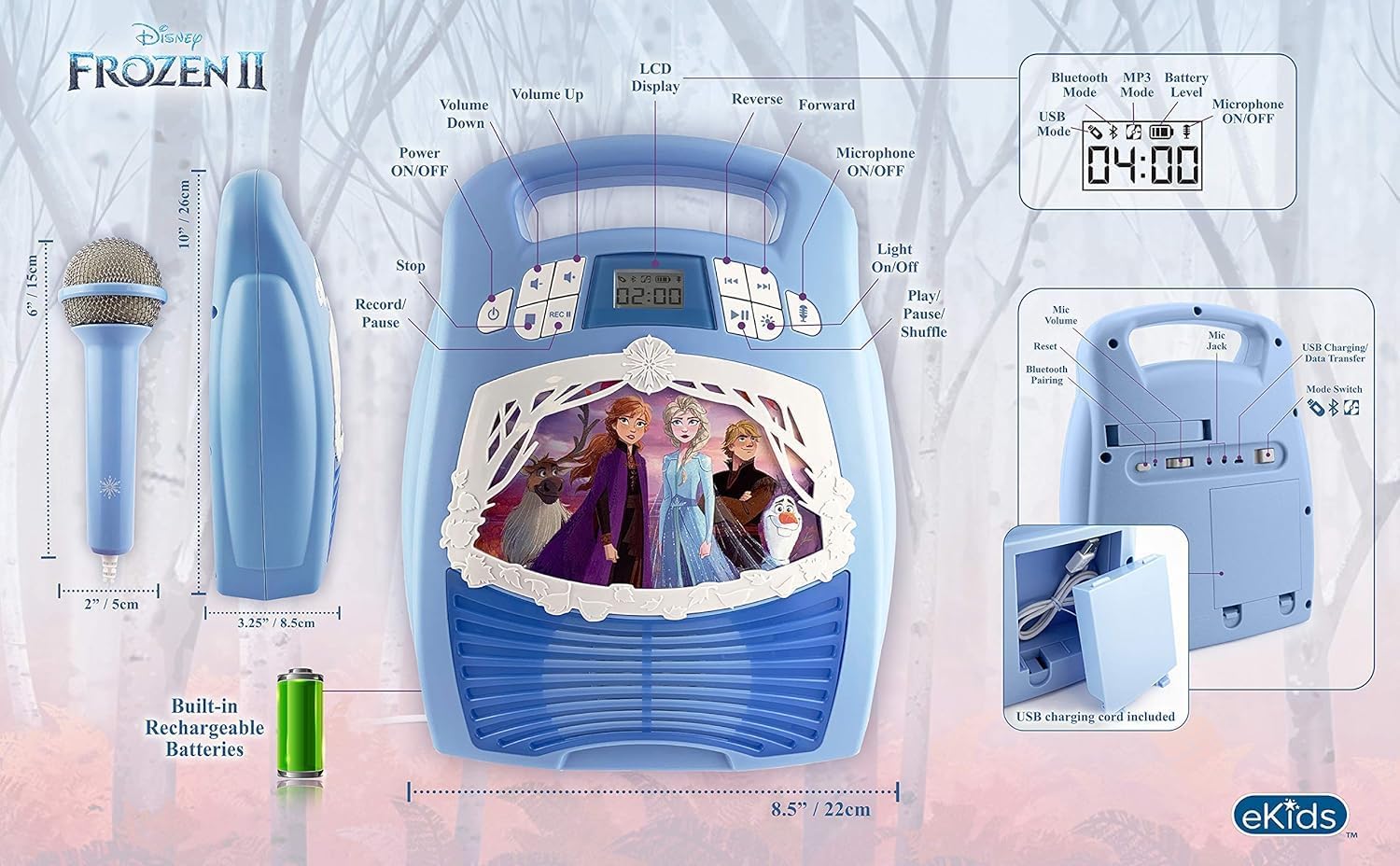
شڪل 1: ختمview of the Karaoke Machine's Controls and Features.

Figure 2: Bluetooth Compatibility with various devices.
4. سيٽ اپ
4.1 يونٽ کي طاقت ڏيڻ
The karaoke machine operates on a built-in rechargeable battery. Ensure the unit is fully charged before first use for optimal performance.
- Connect the supplied USB charging cable to the USB charging port on the back of the unit.
- Connect the other end of the USB cable to a standard USB power adapter (not included) or a powered USB port.
- The charging indicator will illuminate. Allow sufficient time for a full charge.
4.2 مائڪروفون کي ڳنڍڻ
The wired microphone connects to the microphone jack on the unit.
- Locate the microphone jack on the side or back of the karaoke machine.
- Insert the microphone plug firmly into the jack.

Figure 3: Karaoke Machine with Microphone Connected.
5. آپريٽنگ هدايتون
5.1 پاور آن/آف
کي دٻايو ۽ رکو طاقت يونٽ کي آن يا آف ڪرڻ لاءِ ڪنٽرول پينل تي موجود بٽڻ.
5.2 بلوٽوٽ جوڙي
- Turn on the karaoke machine. The Bluetooth indicator on the display will flash, indicating it is in pairing mode.
- پنهنجي بلوٽوٿ-فعال ڊوائيس (اسمارٽ فون، ٽيبليٽ، وغيره) تي، بلوٽوٿ سيٽنگز ڏانهن وڃو ۽ بلوٽوٿ کي فعال ڪريو.
- Select "eKids Frozen 2 Karaoke" (or similar name) from the list of available devices.
- Once paired, the Bluetooth indicator will stop flashing and remain solid. You can now stream audio from your device.
5.3 Playing Music via USB
- MP3 تي مشتمل USB فليش ڊرائيو داخل ڪريو files يونٽ تي USB پورٽ ۾.
- The unit should automatically switch to USB mode and begin playing music. If not, press the موڊ USB موڊ چونڊڻ لاءِ بٽڻ.
- استعمال ڪريو راند/روڪ, ايندڙ ٽريڪ، ۽ اڳيون ٽريڪ پلے بیک کي ڪنٽرول ڪرڻ لاءِ بٽڻ.
5.4 مائڪروفون جو استعمال
- Ensure the microphone is securely plugged into the mic jack.
- کي دٻايو مائڪروفون آن / بند button to activate the microphone.
- Adjust the microphone volume using the dedicated volume controls if available, or the main volume controls.
5.5 روشني ڏيکاريو
کي دٻايو روشني آن / بند button to activate or deactivate the multi-colored LED light show.
5.6 رڪارڊنگ پرفارمنس
To record your singing, a USB flash drive (not included) must be inserted into the USB port.
- Ensure a USB flash drive is inserted.
- Start playing your desired music (via Bluetooth or USB).
- کي دٻايو آر اي سي رڪارڊنگ شروع ڪرڻ لاءِ بٽڻ.
- Sing into the microphone.
- کي دٻايو آر اي سي button again to stop recording. Your performance will be saved to the USB flash drive.
6. سار سنڀال
- يونٽ کي نرم، سڪل ڪپڙي سان صاف ڪريو. گھڙڻ وارا صاف ڪندڙ يا محلول استعمال نه ڪريو.
- يونٽ کي سڌي سج جي روشني، گرمي جي ذريعن ۽ نمي کان پري رکو.
- Store the microphone in its designated compartment on the back of the unit when not in use to prevent loss or damage.
شڪل 4: پوئتي view with microphone storage compartment.
7. مسئلا حل ڪرڻ
- طاقت ناهي: Ensure the unit is charged. Connect the USB charging cable and allow it to charge.
- آواز ناهي: Check the volume levels on both the karaoke machine and your connected Bluetooth device. Ensure the microphone is turned on if using it.
- بلوٽوت نه ڳنڍي رهيو آهي: Make sure Bluetooth is enabled on your device and the karaoke machine is in pairing mode. Try restarting both devices. Ensure no other devices are currently connected to the karaoke machine.
- مائڪروفون ڪم نه ڪري رهيو آهي: Verify the microphone is securely plugged into the correct jack and the microphone ON/OFF button is activated.
- رڪارڊنگ جا مسئلا: Ensure a compatible USB flash drive is inserted and has sufficient free space.
8. وضاحتون
| خاصيت | تفصيل |
|---|---|
| پيداوار جي ماپ | 8 x 3 x 10 انچ |
| شيءِ جو وزن | 2.64 پائونڊ |
| ماڊل نمبر | ايف آر-553v9M |
| سفارش ٿيل عمر | 3 - 35 مهينا |
| بيٽريون | 3 AA batteries required (included) - Note: Product description also mentions built-in rechargeable battery. Please refer to packaging for exact battery type. |
| خاص خصوصيت | پورٽبل، ريچارج لائق |
| رنگ | Older Version |
| ٺاهيندڙ | KID ڊيزائن |
9. حفاظت جي ڄاڻ
Please read and follow all safety instructions provided with the product packaging. This product is intended for use by children aged 3 and up, under adult supervision.
10. وارنٽي ۽ سپورٽ
هي پراڊڪٽ هڪ سان گڏ اچي ٿو هڪ سال جي محدود وارنٽي. For warranty claims or technical support, please refer to the contact information provided in your product packaging or visit the eKids official webسائيٽ.
11. پراڊڪٽ وڊيو
Video 1: An official product video from KIDdesigns, Inc. showcasing the eKids Frozen 2 Bluetooth Karaoke Machine with Light Show, highlighting its features and design.


