1. پراڊڪٽ ختمview
The COMFAST CF-WA350 is a high-performance, dual-band (2.4GHz and 5GHz) outdoor wireless access point and repeater designed for extended Wi-Fi coverage in outdoor environments. It supports the 802.11ac Wave2 standard, offering speeds up to 1300Mbps, and features robust weatherproofing (IP67) for reliable operation in various conditions.

Image 1.1: The COMFAST CF-WA350 Outdoor WiFi Repeater, showcasing its sleek design and key features like 1300Mbps speed, dual-band support, dual antenna design, and IP67 rating.
2. پيڪيج مواد
Please verify that all items listed below are included in your package. If any items are missing or damaged, please contact your vendor.
- COMFAST CF-WA350 Outdoor AP Unit
- استعمال ڪندڙ دستي
- PoE پاور اڊاپٽر
- Stainless Ties (for mounting)
- پاور لائن
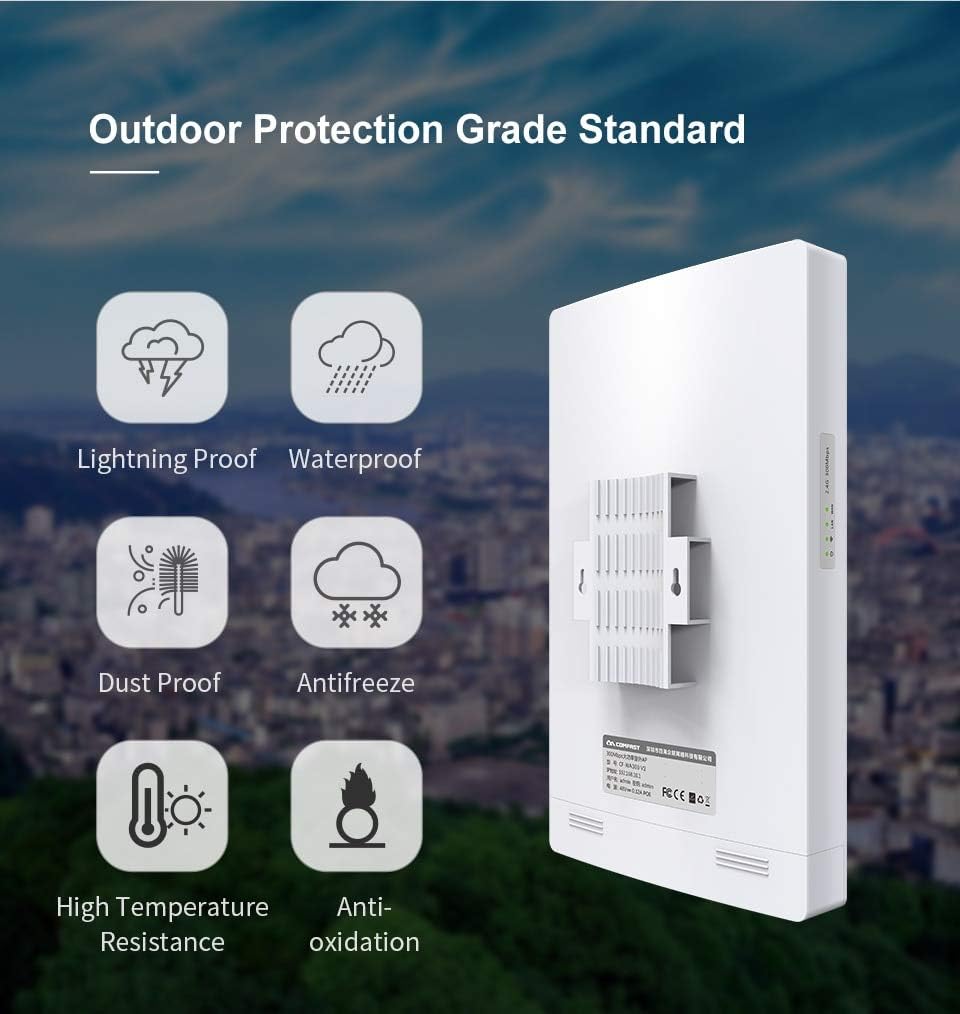
Image 2.1: Contents of the COMFAST CF-WA350 package, including the main unit, user manual, PoE adapter, stainless ties, and power cable.
3. اهم خاصيتون
The CF-WA350 is equipped with advanced features to provide a robust and reliable wireless network solution:
- Dual-Band Wi-Fi: Supports 2.4G (450 Mbps) and 5G (867 Mbps) for a combined 1300Mbps wireless rate.
- 802.11ac Wave2 MU-MIMO: Enhances multi-user performance and throughput.
- Gigabit Ethernet بندرگاهن: Features 1 WAN and 1 LAN 10/100/1000Mbps port for high-speed wired connections.
- Outdoor Protection Grade (IP67): Waterproof, dustproof, lightning proof, antifreeze, high temperature resistance, and anti-oxidation for extreme outdoor conditions.
- High Power & Dual Antenna Design: Ensures strong signal penetration and wide coverage.
- گھڻن آپريٽنگ موڊس: Supports AP, Repeater, and Router modes.
- Qualcomm Chipset: Utilizes Qualcomm QCA9563+QCA8337+QCA9886 for stable and powerful performance.

تصوير 3.1: مٿيview of the CF-WA350's luxury configuration, highlighting Qualcomm chips, 1300Mbps speed, high power, support for 160+ users, dual Gigabit ports, Wave2 technology, dual antenna design, and IP67 rating.
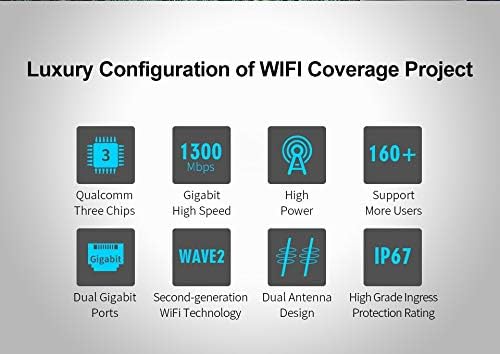
Image 3.2: Explanation of New Wave2 Technology, including RF Hardware Acceleration, CPU Hardware Acceleration, MU-MIMO, and Beam Shaping for improved performance.

Image 3.3: Visual representation of the CF-WA350's outdoor protection features: Lightning Proof, Waterproof, Dust Proof, Antifreeze, High Temperature Resistance, and Anti-oxidation.
4. سيٽ اپ ۽ تنصيب
4.1 ڊوائيس تي چڙهڻ
The CF-WA350 is designed for outdoor pole or wall mounting. Use the provided stainless ties or appropriate mounting hardware to secure the device in a location with clear line of sight to the desired coverage area.

Image 4.1: The COMFAST CF-WA350 mounted on a pole, demonstrating its outdoor installation capability.
4.2 پاور آن
Connect the device to the PoE (Power over Ethernet) adapter using an Ethernet cable. Then, connect the PoE adapter to a power outlet using the provided power line. The device will power on automatically.
4.3 شروعاتي ڪنيڪشن
For initial configuration, connect your computer directly to the LAN port of the PoE adapter using an Ethernet cable. Ensure your computer's IP address is set to obtain an IP address automatically (DHCP) or manually configure it to be in the same subnet as the device's default IP (e.g., 192.168.10.X).
5. آپريٽنگ موڊس
The CF-WA350 supports multiple operating modes to suit various network requirements:
5.1 رسائي پوائنٽ (اي پي) موڊ
In AP mode, the device connects to your existing wired network and broadcasts a wireless signal, allowing wireless clients to connect to the network. This is ideal for extending Wi-Fi coverage from a wired source.
5.2 ريپيٽر موڊ
In Repeater mode, the device wirelessly extends the range of an existing Wi-Fi network. It receives the wireless signal from your main router and re-broadcasts it, effectively expanding your Wi-Fi coverage area without requiring a wired connection to the main router.
5.3 روٽر موڊ
In Router mode, the device acts as a primary router, connecting to an internet source (e.g., a modem) via its WAN port and providing both wired and wireless network access to connected devices. This mode is suitable for setting up a new network.
6. Web انٽرفيس جي تشڪيل
To configure the CF-WA350, access its web-بنياد مينيجمينٽ انٽرفيس:
- Ensure your computer is connected to the device (as described in Section 4.3).
- کوليو a web برائوزر (مثال طور، ڪروم، فائر فاڪس، ايج).
- In the address bar, type the default IP address of the device (commonly
192.168.10.1or similar, refer to the device label or quick installation guide for exact IP) and press Enter. - ڊفالٽ يوزر نالو ۽ پاسورڊ داخل ڪريو (عام طور تي
adminfor both, or as specified in the quick installation guide). - Once logged in, you can configure network settings, Wi-Fi SSIDs, security protocols, operating modes, and other advanced features. It is highly recommended to change the default login credentials for security purposes.
7. سار سنڀال
Regular maintenance ensures optimal performance and longevity of your CF-WA350:
- صفائي: Periodically clean the exterior of the device to remove dust and debris. Use a soft, dry cloth. Do not use liquid cleaners or aerosols.
- فرم ويئر اپڊيٽس: Check the COMFAST official website for the latest firmware updates. Updating firmware can improve performance, add new features, and fix bugs. Follow the instructions provided with the firmware update carefully.
- ماحولياتي چڪاس: Ensure the mounting location remains secure and free from obstructions that could interfere with the signal or damage the device.
- ڪيبل جي چڪاس: Periodically inspect Ethernet cables and power connections for any signs of wear or damage.
8. مسئلا حل ڪرڻ
If you encounter issues with your CF-WA350, refer to the following common problems and solutions:
- طاقت ناهي:
- Ensure the PoE adapter is properly connected to a working power outlet and the device.
- Check the power line and Ethernet cable for damage.
- رسائي نه ٿي سگهي Web انٽرفيس:
- Verify your computer's IP address is in the same subnet as the device's default IP.
- پنهنجي برائوزر جي ڪيش صاف ڪرڻ جي ڪوشش ڪريو يا ڪو ٻيو برائوزر استعمال ڪريو.
- Ensure the Ethernet cable connection is secure.
- If the IP address has been changed and forgotten, you may need to perform a factory reset (see below).
- وائي فائي سگنل نه هجڻ يا ڪمزور سگنل:
- Check the device's status indicators to ensure it is operating correctly.
- Verify Wi-Fi settings (SSID, password, channel) in the web انٽرفيس.
- پڪ ڪريو ته ڊوائيس گهٽ ۾ گهٽ رڪاوٽن سان هڪ بهترين جڳهه تي نصب ٿيل آهي.
- Adjust antenna orientation if applicable.
- سست انٽرنيٽ اسپيڊ:
- Check the speed of your internet connection directly from the source.
- Ensure the device is operating in the correct mode (e.g., AP mode for wired backhaul).
- Consider channel interference; try changing Wi-Fi channels in the web انٽرفيس.
- پڪ ڪريو ته فرم ويئر اپڊيٽ آهي.
- فيڪٽري ريسٽ: If issues persist or you forget the login credentials, you can perform a factory reset. Locate the reset button (often a small pinhole) on the device. With the device powered on, press and hold the reset button for approximately 5-10 seconds until the indicators flash, then release. The device will revert to its default factory settings.
9. ٽيڪنيڪل وضاحتون
Detailed specifications for the COMFAST CF-WA350:

Image 9.1: Comprehensive table of technical specifications for the COMFAST CF-WA350.
| خاصيت | تفصيل |
|---|---|
| ماڊل | CF-WA350 |
| هارڊويئر جي وضاحت | Qualcomm QCA9563+QCA8337+QCA9886 chip solution; Memory: 128MB; Flash memory: 16MB; Power amplifier chip: 2.4G SE2576L, 5.8G SKY85728-11; Set watchdog chip; |
| اينٽينا | 2.4GHz 11dBi directional antenna / 5.8GHz 13dBi directional antenna |
| وائرليس جي شرح | 2.4GHz: 450Mbps / 5GHz: 867Mbps |
| ريڊيو فريڪوئنسي | Transmitting power: 500mW (27dBm); Receiving sensitivity: -96dBm; Operating frequency: 802.11ac/n/a: 5.18GHz-5.825GHz; 802.11b/g/n: 2.412GHz-2.482GHz |
| جسماني انٽرفيس | 1*10/100/1000Mbps WAN RJ45; 1*10/100M/1000Mbps LAN RJ45; 1*RESET |
| اشارو | Power \ WiFi \ LAN \ WAN |
| بجلي جي فراهمي | PoE power supply; power adapter: 48V 0.5A (Configured) |
| طاقت جو خاتمو | <20W |
| تحفظ جي سطحون | IP67 |
| تنصيب | Derrick / Support |
| شيل مواد | ABS |
| ايم بي ايف | > 250000 ايڇ |
| ماپ | 300*180*50mm |
| ڪم ڪندڙ ماحول | Working Temperature: -10℃~65℃; Storage Temperature: -40℃~70℃; Operation Humidity: 10%~90%RH Non condensing; Storage Humidity: 5%~90%RH Non condensing |
10. حفاظت جي ڄاڻ
ڊوائيس کي نقصان پهچڻ يا پاڻ کي زخمي ٿيڻ کان بچائڻ لاءِ مهرباني ڪري انهن حفاظتي هدايتن کي پڙهو ۽ ان تي عمل ڪريو:
- صرف ڊوائيس سان مهيا ڪيل پاور اڊاپٽر استعمال ڪريو.
- ڊوائيس کي پاڻ نه کوليو ۽ نه ئي مرمت ڪرڻ جي ڪوشش ڪريو. سڀني سروسنگ کي قابل اهلڪارن جي حوالي ڪريو.
- Ensure proper grounding for outdoor installations to protect against lightning strikes.
- Avoid placing the device near heat sources or in direct sunlight for prolonged periods beyond its operating temperature range.
- Keep the device away from water and excessive moisture, despite its waterproof rating, to prevent electrical hazards.
- وينٽيليشن جي افتتاح کي نه روڪيو.
11. وارنٽي ۽ سپورٽ
For warranty information and technical support, please refer to the warranty card included with your product or visit the official COMFAST website. You can also contact your local distributor or reseller for assistance.