1. تعارف
This manual provides detailed instructions for the setup, operation, and maintenance of your Natec TURBOT Wireless Keyboard with Touchpad (model NKL-0968). This device is designed to enhance your experience with Smart TVs, cellphones, and other compatible devices, offering convenient wireless control via 2.4 GHz technology.
مھرباني ڪري پراڊڪٽ استعمال ڪرڻ کان اڳ ھن دستور کي چڱي طرح پڙھو ته جيئن مناسب ڪارڪردگي کي يقيني بڻائي سگھجي ۽ نقصان کان بچي سگھجي.
2. پيڪيج مواد
پڪ ڪريو ته سڀئي شيون پيڪيج ۾ موجود آهن:
- Natec TURBOT Wireless Keyboard with Touchpad
- USB 2.4 GHz رسيور
- استعمال ڪندڙ جو دستياب (ھي دستاويز)
- (Note: 2 AAA batteries are required and may not be included)
3. سيٽ اپ گائيڊ
3.1. بيٽري لڳائڻ
The Natec TURBOT keyboard requires two (2) AAA batteries for operation. Locate the battery compartment on the underside of the keyboard. Open the cover, insert the batteries according to the polarity markings (+/-), and close the cover securely.
3.2. USB رسيور کي ڳنڍڻ
The USB 2.4 GHz receiver is typically stored in a dedicated compartment on the keyboard itself for safekeeping. Carefully remove the receiver from its storage slot.

Figure 1: USB receiver stored in the keyboard compartment.
Insert the USB receiver into an available USB port on your Smart TV, computer, or other compatible device. The device should automatically detect and install the necessary drivers.
3.3. Powering On the Keyboard
Locate the power switch on the side of the keyboard. Slide the switch to the "ON" position. The keyboard should now be ready for use.
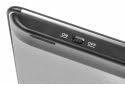
Figure 2: Power switch on the keyboard.
4. آپريٽنگ هدايتون
4.1. ڪي بورڊ جا ڪم

Figure 3: Natec TURBOT Wireless Keyboard Layout.
The keyboard features a standard QWERTY layout for typing. It also includes dedicated function keys (F1-F12) which may have secondary multimedia functions (e.g., volume control, media playback). These secondary functions are often accessed by holding down the Fn key and pressing the corresponding function key.
- ڪيپس لاڪ: Toggles uppercase/lowercase letters.
- شفٽ: Used for uppercase letters and secondary symbols.
- Ctrl / Alt / Win: Standard modifier keys for various shortcuts depending on the operating system.
- پٺاڻ: The keyboard features a backlight for improved visibility in low-light conditions. Refer to your device's operating system or the keyboard's specific function key combinations (often involving the Fn key) to activate or adjust the backlight.
4.2. ٽچ پيڊ جا ڪم
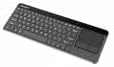
Figure 4: Integrated Touchpad.
The integrated touchpad allows for mouse-like navigation. It supports various gestures:
- سنگل آڱر ٽيپ: Functions as a left-click.
- ٻه آڱريون ٽيپ: Functions as a right-click.
- ٻن آڱرين سان اسڪرول: Drag two fingers up or down to scroll through content.
- جسماني بٽڻ: Below the touchpad, there are two physical buttons. The left button acts as a left-click, and the right button acts as a right-click.
Touchpad sensitivity and other settings may be adjustable through your connected device's operating system settings.
5. سار سنڀال
- صفائي: Use a soft, dry cloth to clean the keyboard and touchpad. For stubborn dirt, a slightly damp cloth with mild cleaning solution can be used, ensuring no liquid enters the device.
- بيٽري مٽائڻ: Replace batteries when the keyboard's performance degrades or it stops responding. Always use fresh AAA batteries.
- ذخيرو: When not in use for extended periods, turn off the keyboard to conserve battery life. Store the USB receiver in its designated compartment to prevent loss.
- انتهائي حالتن کان بچڻ: Do not expose the keyboard to extreme temperatures, direct sunlight, or high humidity.
6. مسئلا حل ڪرڻ
6.1. ڪي بورڊ جواب نه ڏئي رهيو آهي
- پڪ ڪريو ته ڪيبورڊ فعال آهي.
- چيڪ ڪريو ته بيٽريون صحيح طرح سان لڳل آهن ۽ ڪافي چارج آهن. جيڪڏهن ضروري هجي ته تبديل ڪريو.
- Verify that the USB receiver is securely plugged into a working USB port on your device.
- ڪوشش ڪريو USB وصول ڪندڙ کي مختلف USB پورٽ ۾ پلگ ان ڪرڻ.
- Restart your connected device (Smart TV, computer, etc.).
6.2. ٽچ پيڊ ڪم نه ڪري رهيو آهي
- Ensure the keyboard is powered on and connected.
- Clean the touchpad surface to remove any dirt or obstructions.
- Check your device's settings for any touchpad-related configurations.
6.3. Intermittent Connection
- Ensure there are no large metallic objects or other 2.4 GHz wireless devices causing interference between the keyboard and the USB receiver.
- ڪيبورڊ کي USB رسيور جي ويجهو منتقل ڪريو.
7. وضاحتون
| برانڊ | نيٽڪ |
| ماڊل نمبر | NKL-0968 |
| رابطي ٽيڪنالاجي | 2.4 GHz وائرليس |
| مطابقت رکندڙ ڊوائيسز | Smart TV, Cellphone |
| آپريٽنگ سسٽم مطابقت | Android 10.0 (and compatible systems) |
| خاص خاصيتون | Integrated Touchpad, Backlit Keys |
| ڪي بورڊ جي وضاحت | ملٽي ميڊيا |
| رنگ | ڪارو / چاندي |
| مواد | Acrylonitrile Butadiene Styrene (ABS) |
| طاقت جو ذريعو | 2 x AAA بيٽريون |
8. وارنٽي ۽ سپورٽ
For warranty information, technical support, or further assistance, please refer to the official Natec webسائيٽ تي وڃو يا انهن جي ڪسٽمر سروس ڊپارٽمينٽ سان رابطو ڪريو. وارنٽي دعوائن لاءِ پنهنجي خريداري جي رسيد رکو.
Natec does not provide specific information regarding spare parts availability or software updates beyond the initial purchase.


