1. تعارف
This manual provides detailed instructions for the ipega PG-9162 Mini Wireless Game Controller. This controller is designed for use with the Nintendo Switch console, offering both wireless and wired connectivity options. It features a compact design, six-axis gyroscope, dual motor vibration, and a TURBO function to enhance your gaming experience.

تصوير 1.1: سامهون view of the ipega PG-9162 Mini Wireless Game Controller.
2. مصنوعات جون خاصيتون
- مطابقت: Designed for the Nintendo Switch host, supporting both wireless and wired connections to the Switch dock.
- Ergonomic ڊيزائن: Small and exquisite handle for comfortable grip during extended gaming sessions.
- Six-axis Gyroscope: Built-in six-axis gyro chip for precise motion control and fine-tuning assistance in games.
- ٻٽي موٽر وائبريشن: Integrated dual motors provide immersive feedback based on in-game actions.
- ٽربو فنڪشن: Supports continuous TURBO function for rapid button presses.
- ڊگھي بيٽري زندگي: Built-in 380mAh battery capacity provides over 8 hours of continuous play.

تصوير 2.1: مٿيview of key features including vibration, gyroscope, and TURBO function.
3. پيڪيج مواد
- ipega PG-9162 Mini Wireless Game Controller
- USB چارجنگ ڪيبل (ٽائيپ-سي)
- استعمال ڪندڙ دستي

Image 3.1: Retail packaging of the ipega PG-9162 controller.
4. پراڊڪٽ ختمview
The ipega PG-9162 controller features standard gamepad buttons and joysticks, designed for intuitive control. Familiarize yourself with the layout:

تصوير 4.1: مٿي view of the controller highlighting its button layout.
- کاٻي اينالاگ اسٽڪ: حرڪت ۽ ڪئميرا ڪنٽرول لاءِ.
- ڊي پيڊ: هدايتي ان پٽ.
- هوم بٽڻ: Returns to the Switch home menu.
- اسڪرين شاٽ بٽڻ: اسڪرين شاٽ ڪيپچر ڪري ٿو.
- ساڄي اينالاگ اسٽڪ: For camera control or specific in-game actions.
- ايڪشن بٽڻ (A، B، X، Y): راند ۾ ڪمن لاءِ.
- Shoulder Buttons (L, R) & Triggers (ZL, ZR): For various in-game functions.
- Plus (+) & Minus (-) Buttons: For menu navigation and options.
- LED اشارا: Display connection status and battery level.
5. سيٽ اپ ۽ ڪنيڪشن
5.1 Wireless Connection to Nintendo Switch
- پڪ ڪريو ته توهان جو Nintendo Switch ڪنسول آن آهي ۽ جديد سسٽم سافٽ ويئر سان اپڊيٽ ٿيل آهي.
- هوم مينيو مان، "ڪنٽرولرز" > "گرفت/آرڊر تبديل ڪريو" چونڊيو.
- On the ipega PG-9162 controller, press and hold the گهر جو بٽڻ ۽ Y بٽڻ simultaneously for a few seconds until the LED indicators start flashing rapidly. This indicates pairing mode.
- The Switch console will detect the controller. Once detected, the LED indicators on the controller will become solid, indicating a successful connection.
- You can now use the controller wirelessly with your Nintendo Switch.
5.2 Wired Connection to Nintendo Switch Dock
- Place your Nintendo Switch console into its dock.
- Connect one end of the USB charging cable to the ipega PG-9162 controller and the other end to an available USB port on the Nintendo Switch dock.
- The controller will automatically connect to the Switch console via the wired connection.
- Ensure that "Pro Controller Wired Communication" is enabled in the Switch System Settings (System Settings > Controllers and Sensors > Pro Controller Wired Communication).
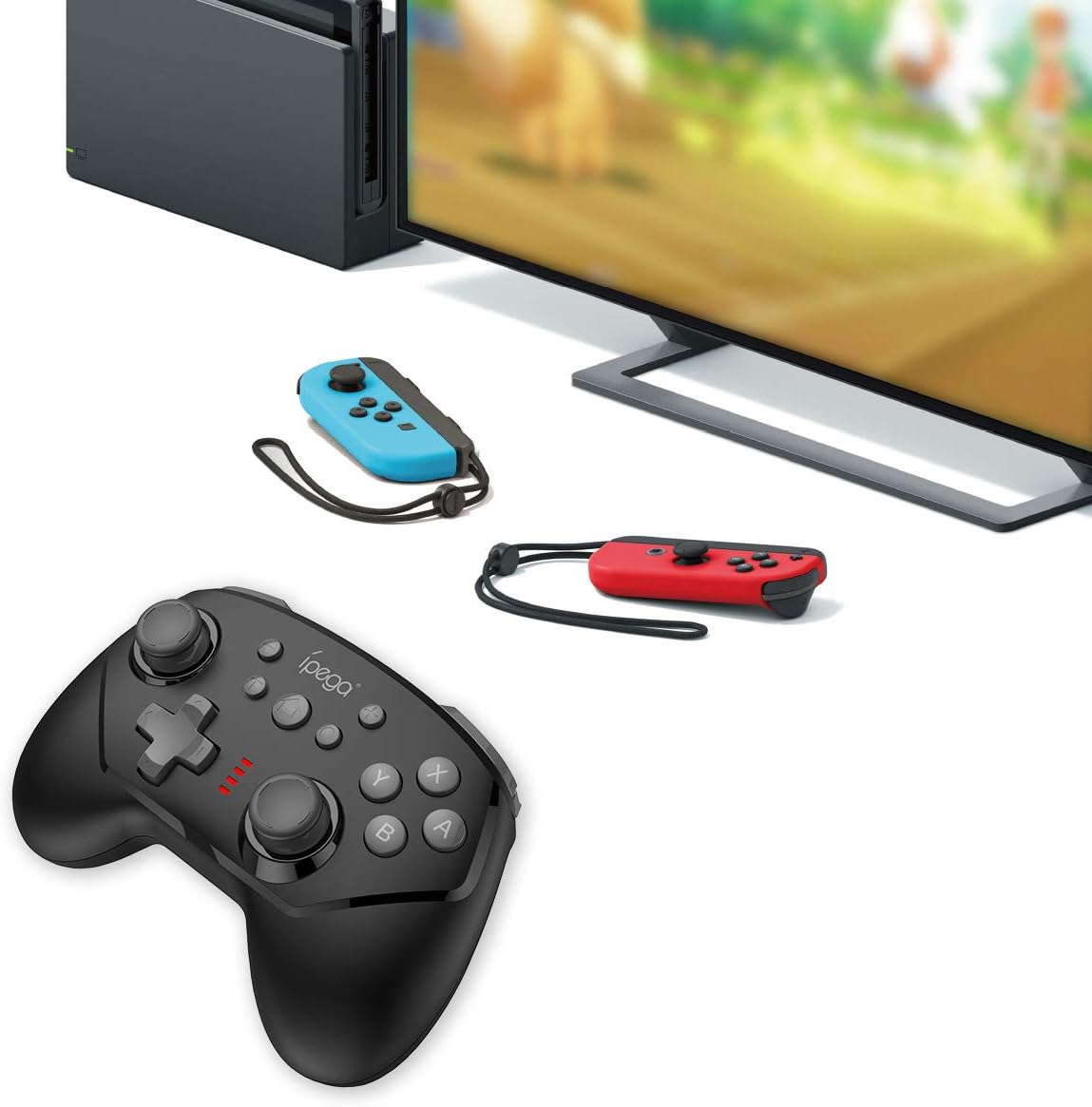
Image 5.1: The controller connected to a Nintendo Switch dock, demonstrating wired play.
6. آپريٽنگ هدايتون
6.1 TURBO فنڪشن
The TURBO function allows for rapid, continuous pressing of a button without repeatedly pressing it manually.
- To Set TURBO: Press and hold the desired action button (e.g., A, B, X, Y, L, R, ZL, ZR), then press the TURBO بٽڻ once. The button will now continuously register presses as long as you hold it down.
- To Clear TURBO: Repeat the process: press and hold the button with TURBO enabled, then press the TURBO بٽڻ again. The TURBO function for that specific button will be deactivated.
6.2 Six-axis Gyroscope
The built-in six-axis gyroscope provides motion control capabilities, allowing for precise aiming and in-game interactions by tilting and moving the controller.
- Ensure the game you are playing supports gyroscope controls.
- Calibrate the gyroscope if you experience drift or inaccurate motion sensing. Refer to your Nintendo Switch system settings for calibration options.

Image 6.1: Illustration of the six-axis gyroscope in action, enhancing aiming precision.
6.3 وائبريشن فنڪشن
The dual motor vibration provides tactile feedback, immersing you further into the game by reacting to in-game events like collisions, explosions, or character actions.
- Vibration intensity is typically controlled by the game itself.
- If vibration is not working, check the in-game settings or Nintendo Switch system settings to ensure it is enabled.

Image 6.2: Visual representation of the built-in dual motor vibration feature.
7. ڪنٽرولر کي چارج ڪرڻ
The ipega PG-9162 controller has a built-in rechargeable battery. When the battery is low, the LED indicators will flash slowly.
- Connect the provided USB charging cable to the Type-C port on the controller.
- Connect the other end of the USB cable to a USB power source (e.g., Nintendo Switch dock, computer USB port, or a USB wall adapter).
- The LED indicators will show charging status. Once fully charged, the indicators will typically turn off or show a solid light.
- A full charge provides over 8 hours of gameplay.
8. سار سنڀال
- ڪنٽرولر کي سڪل ۽ نمي کان پري رکو.
- ڪنٽرولر کي انتهائي گرمي پد تي بي نقاب ڪرڻ کان پاسو ڪريو.
- Clean the controller with a soft, dry cloth. Do not use harsh chemicals or abrasive cleaners.
- نقصان کان بچڻ لاءِ استعمال ۾ نه هجڻ وقت ڪنٽرولر کي محفوظ جاءِ تي رکو.
9. مسئلا حل ڪرڻ
9.1 ڪنٽرولر ڳنڍي نه رهيو آهي
- پڪ ڪريو ته ڪنٽرولر ڪافي چارج ٿيل آهي.
- Verify the Nintendo Switch console is updated to the latest system software.
- جوڙيندڙ عمل کي ورجايو (سيڪشن 5.1).
- If using wired connection, ensure "Pro Controller Wired Communication" is enabled in Switch settings.
- Try restarting both the controller and the Nintendo Switch console.
9.2 ان پٽ ليگ يا ڊسڪنيڪشن
- پڪ ڪريو ته ويجهو ڪو به مضبوط برقي مقناطيسي مداخلت نه آهي.
- Move closer to the Nintendo Switch console.
- Disconnect other wireless devices that might be causing interference.
9.3 بٽڻ جواب نه ڏئي رهيا آهن
- چيڪ ڪريو ته ڪنٽرولر صحيح طرح سان ڳنڍيل آهي.
- Test the buttons in the Switch's controller test menu (System Settings > Controllers and Sensors > Test Input Devices).
- بٽڻن جي چوڌاري صاف ڪريو ته جيئن ڪو به ملبو انهن ۾ رڪاوٽ نه بڻجي.
10. وضاحتون
| برانڊ | ipega |
| ماڊل نمبر | پي جي-9162 |
| رابطي | وائرليس (بلوٽوٿ)، وائرڊ (يو ايس بي) |
| بيٽري جي گنجائش | 380mAh |
| بيٽري جي زندگي | >8 hours (approx.) |
| خاص خاصيتون | Six-axis Gyroscope, Dual Motor Vibration, TURBO Function |
| مطابقت | Nintendo سوئچ |
| طول و عرض | 17.53 x 13.72 x 6.6 سينٽي ميٽر (تقريبن) |
| وزن | 295 گرام (تقريبن) |
11. وارنٽي ۽ سپورٽ
This product comes with a standard manufacturer's warranty. For specific warranty terms, please refer to the documentation included with your purchase or contact the retailer. For technical support or further assistance, please visit the official ipega webسائيٽ يا انهن جي ڪسٽمر سروس کاتي سان رابطو ڪريو.
ٺاهيندڙ: ipega
تاريخ پهرين دستياب: 2 آگسٽ 2019