1. تعارف
This manual provides comprehensive instructions for the setup, operation, and maintenance of your Williams AV FM 558 Large-Area Dual FM Plus and Wi-Fi Assistive Listening System. This system is designed to provide clear audio for individuals with hearing loss in large venues, utilizing both FM and Wi-Fi technologies for versatile listening options.
Please read this manual thoroughly before operating the system to ensure proper use and to maximize its performance and longevity.
2. حفاظت جي ڄاڻ
Always observe the following safety precautions to prevent damage to the system and ensure user safety:
- Do not expose the system to water or excessive moisture.
- سسٽم کي گرمي جي ذريعن جي ويجهو يا سڌي سج جي روشني ۾ رکڻ کان پاسو ڪريو.
- Use only the power adapters and accessories supplied or approved by Williams AV.
- Do not attempt to open or service the units yourself. Refer all servicing to qualified personnel.
- ننڍن حصن کي ٻارن کان پري رکو ته جيئن ٿڪڻ جي خطرن کي روڪڻ لاء.
- مقامي ضابطن جي مطابق بيٽرين کي ختم ڪريو.
3. پيڪيج مواد
پڪ ڪريو ته هيٺ ڏنل سڀئي شيون توهان جي پيڪيج ۾ شامل آهن:
- 1 x T55 Transmitter
- 4 x PPA R38N Receivers
- 4 x Ear 022 Earphones
- 2 x NKL 001 Neckloops
- Power Supply for T55 Transmitter
- Charging Cables for PPA R38N Receivers
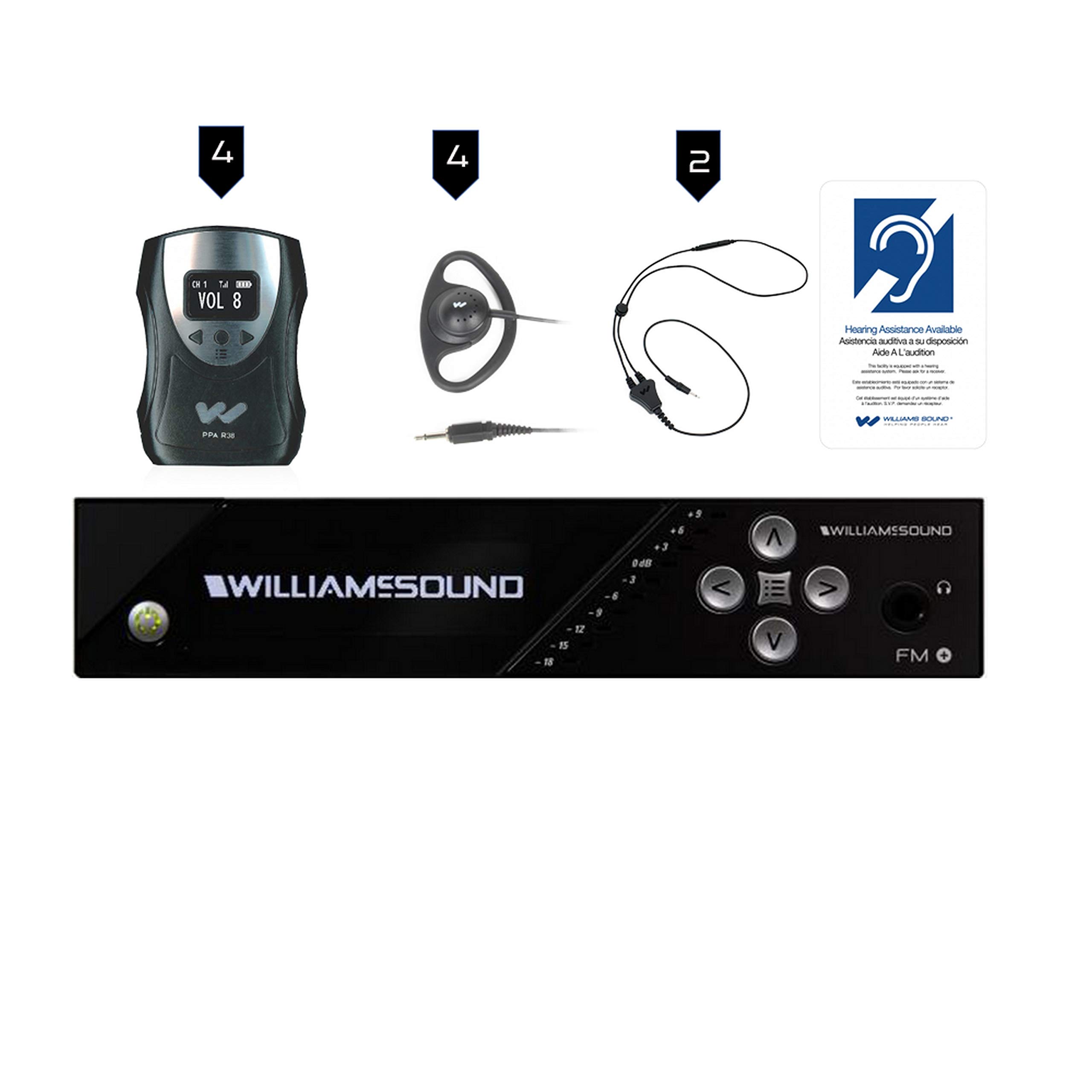
4. سسٽم اوورview
The Williams AV FM 558 system combines FM and Wi-Fi technologies to deliver high-quality audio directly to listeners. It consists of the following key components:
- T55 Transmitter: This unit broadcasts audio signals via FM and Wi-Fi. It connects to your audio source (e.g., microphone, sound system) and transmits the sound to the receivers and Wi-Fi enabled devices.
- PPA R38N Receivers: These portable FM receivers pick up the audio signal from the T55 transmitter. Each receiver features a 3.5mm jack for connecting earphones or neckloops and controls for volume and channel selection.
- Ear 022 Earphones: Standard earphones designed for comfortable listening with the PPA R38N receivers.
- NKL 001 Neckloops: These inductive neckloops are designed for users with T-coil equipped hearing aids or cochlear implants. When connected to a PPA R38N receiver, they transmit the audio signal wirelessly to the hearing aid/implant.
5. سيٽ اپ
5.1 T55 Transmitter Setup
- لڳائڻ: Position the T55 transmitter in a central location within the desired listening area, ensuring it is free from obstructions that could interfere with signal transmission.
- پاور ڪنيڪشن: Connect the provided power supply to the T55 transmitter's power input and then plug it into a standard electrical outlet.
- آڊيو ان پٽ: Connect your audio source (e.g., mixer, microphone, media player) to the appropriate audio input jacks on the T55 transmitter. Refer to the T55 transmitter's dedicated manual for detailed audio input configurations.
- اينٽينا: Ensure the FM antenna is properly connected and extended for optimal signal range.
5.2 PPA R38N Receiver Setup
- چارج ڪرڻ: Before first use, fully charge the PPA R38N receivers using the provided charging cables. The charging indicator will show when charging is complete.
- Connecting Listening Devices: Plug the Ear 022 earphones or NKL 001 neckloops into the 3.5mm audio output jack on the top of each receiver.
- پاور آن: Turn on each receiver by rotating the volume knob clockwise.
- چينل چونڊ: Use the channel selection buttons on the receiver to tune into the desired FM channel broadcast by the T55 transmitter. Ensure the receiver's channel matches the transmitter's output channel.
6. آپريٽنگ هدايتون
6.1 Using the FM System
- Ensure the T55 transmitter is powered on and receiving audio input.
- Power on the PPA R38N receivers and select the correct FM channel.
- Adjust the volume on the receiver to a comfortable listening level using the volume knob.
- For neckloop users, ensure your hearing aid or cochlear implant is set to the T-coil (telecoil) program.
6.2 Using the Wi-Fi System
The T55 transmitter also supports Wi-Fi audio streaming. Users can access the audio stream via a compatible mobile application on their smartphone or other Wi-Fi enabled devices.
- Ensure the T55 transmitter is connected to a network with Wi-Fi capabilities.
- Download and install the appropriate Williams AV listening app on your mobile device.
- Connect your mobile device to the Wi-Fi network provided by or connected to the T55 transmitter.
- Open the app and select the desired audio stream.
- Adjust the volume on your mobile device.
7. سار سنڀال
7.1 صفائي
- Wipe the exterior of the transmitter and receivers with a soft, dry cloth.
- مائع صاف ڪندڙ، ايروسول، يا محلول استعمال نه ڪريو.
- Regularly clean earphones and neckloops according to their specific instructions to maintain hygiene.
7.2 Battery Care (PPA R38N Receivers)
- Recharge receivers regularly, especially after extended periods of non-use.
- Avoid fully discharging the batteries frequently to prolong their lifespan.
- Store receivers in a cool, dry place when not in use.
8. مسئلا حل ڪرڻ
| مسئلو | ممڪن سبب | حل |
|---|---|---|
| رسيور مان ڪو به آواز نه آيو | Receiver off; low battery; incorrect channel; earphones/neckloop not connected; transmitter off/no audio input. | Turn on receiver; charge battery; select correct channel; connect earphones/neckloop securely; check transmitter power and audio input. |
| خراب آواز جي معيار/ جامد | Interference; weak signal; incorrect channel; damaged earphones/neckloop. | Relocate transmitter/receiver; check antenna; ensure correct channel; try different earphones/neckloop. |
| Receiver not charging | Faulty cable/charger; dirty charging port; battery issue. | Try different cable/charger; clean charging port; contact support if issue persists. |
| Wi-Fi streaming not working | No Wi-Fi connection; incorrect app settings; network issues. | Verify Wi-Fi connection; check app settings; restart transmitter and router. |
If you encounter problems not listed here or if the suggested solutions do not resolve the issue, please contact Williams AV customer support.
9. وضاحتون
| خاصيت | تفصيل |
|---|---|
| برانڊ | وليمس اي وي |
| ماڊل نمبر | ايف ايم 558 |
| شيءِ جو وزن | 3 پائونڊ |
| رابطي ٽيڪنالاجي | Ethernet, Wi-Fi, RF |
| مطابقت رکندڙ ڊوائيسز | اسمارٽ فون ، اسپيڪر |
| ڪل HDMI بندرگاهن | 4 |
| ڪنيڪٽر جو قسم | 3.5mm جيڪ |
| آڊيو آئوٽ پٽ موڊ | اسٽيريو، سرائونڊ |
| چوڌاري آواز چينل جي جوڙجڪ | 2 |
| چينلن جو تعداد | 17 |
| آڊيو آئوٽ جو قسم | هيڊفون |
10. وارنٽي ۽ سپورٽ
Williams AV products are designed for reliability and performance. For specific warranty details regarding your FM 558 system, please refer to the warranty card included with your product or visit the official Williams AV webسائيٽ.
For technical support, troubleshooting assistance, or service inquiries, please contact Williams AV customer support through their official webسائيٽ يا توهان جي پراڊڪٽ دستاويزن ۾ ڏنل رابطي جي معلومات.
Webسائيٽ: www.williamsav.com


