تعارف
This manual provides comprehensive instructions for the setup, operation, maintenance, and troubleshooting of your Logitech G703 Hero Lightspeed Wireless Gaming Mouse. Designed for precision and responsiveness, this mouse features the 16,000 DPI Hero optical sensor and Lightspeed wireless technology, along with customizable RGB illumination.
پيداوار ختمview
The Logitech G703 Hero is a high-performance wireless gaming mouse engineered for competitive play and daily use. Key features include:
- هيرو 16K سينسر: Delivers precise 1:1 tracking and 16,000 max DPI.
- LIGHTSPEED Wireless: Provides pro-grade connectivity with an incredibly fast 1 ms report rate.
- Ergonomic ڊيزائن: Shaped for comfort with rubber grips.
- پروگرام لائق بٽڻ: Six customizable buttons for personalized control.
- ترتيب ڏيڻ وارو وزن: Includes an optional 10g removable weight.
- LIGHTSYNC RGB Lighting: Customizable 16.8M color illumination.
- POWERPLAY Compatible: Supports continuous wireless charging with a POWERPLAY mouse pad (sold separately).
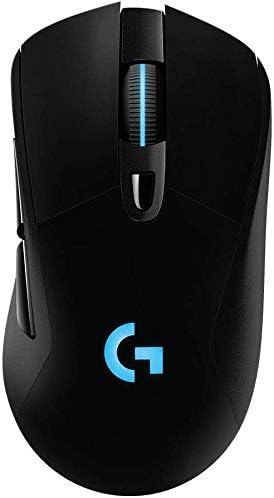
شڪل 1: مٿي view of the Logitech G703 Hero Wireless Gaming Mouse, showcasing its ergonomic design and illuminated 'G' logo.

شڪل 2: ڌماڪو ٿيو view illustrating key components including 6 programmable buttons, advanced button tensioning, charging/data cable, wireless extension adapter, LIGHTSPEED wireless nano receiver, ergonomic design with rubber grip, and 16.8M color RGB lighting.

Figure 3: Bottom and side profile of the G703 mouse, highlighting the ON/OFF switch, HERO 16K sensor, and the slot for the 10g removable weight. Dimensions are also shown.

Figure 4: Details of the HERO 16K Sensor, emphasizing 1:1 tracking, 16,000 max DPI, and class-leading efficiency.

Figure 5: Illustration of LIGHTSPEED Wireless technology, providing pro-grade connectivity with an incredibly fast 1 ms report rate.

Figure 6: The G703 mouse shown with a POWERPLAY mouse pad, indicating compatibility for continuous wireless charging and up to 60 hours of rechargeable battery life.
سيٽ اپ ڪريو
- مائوس کي چارج ڪريو: Connect the included charging/data cable to the mouse and a USB port on your computer. Allow the mouse to fully charge before first use.
- Connect the LIGHTSPEED Receiver: Insert the LIGHTSPEED wireless nano receiver into an available USB port on your computer. For optimal performance, use the included wireless extension adapter to position the receiver closer to the mouse.
- پاور آن: مائوس جي تري ۾ آن/آف سوئچ کي ڳوليو ۽ ان کي 'آن' پوزيشن تي سلائڊ ڪريو.
- Install G HUB Software: For full customization of buttons, DPI settings, and RGB lighting, download and install the Logitech G HUB software from the official Logitech webسائيٽ.
- Optional Weight: If desired, insert the 10g removable weight into the designated slot on the bottom of the mouse for personalized feel and balance.
آپريٽنگ هدايتون
بٽڻ افعال
The G703 Hero features six programmable buttons. By default, these buttons perform standard mouse functions. You can customize their actions using the Logitech G HUB software.
- کاٻو ڪلڪ (بٽڻ 1): بنيادي ڪارروائي.
- ساڄي ڪلڪ ڪريو (بٽڻ 2): ثانوي عمل.
- Middle Click/Scroll Wheel (Button 3): Activates middle click, scrolls up/down.
- DPI Cycle (Button 4): اڳواٽ مقرر ٿيل DPI حساسيت جي سطحن ذريعي چڪر.
- Forward (Button 5): اڳتي نيويگيٽ ڪري ٿو web برائوزر يا ايپليڪيشنون.
- Back (Button 6): پوئتي نيويگيٽ ڪري ٿو web برائوزر يا ايپليڪيشنون.
ڊي پي آءِ ايڊجسٽمينٽ
The DPI (Dots Per Inch) setting determines the mouse cursor's sensitivity. Use the DPI Cycle button (Button 4) to switch between different DPI profiles. You can configure these profiles in the G HUB software to match your preferences for various games or tasks.
آر جي بي لائيٽنگ حسب ضرورت
The G703 Hero features LIGHTSYNC RGB lighting on the 'G' logo and scroll wheel. Use the Logitech G HUB software to select from 16.8 million colors, synchronize lighting effects with other Logitech G devices, or create custom animations.
بيٽري جو انتظام
The mouse offers up to 60 hours of battery life on a single charge. When the battery is low, the RGB lighting may flash to indicate the need for recharging. Connect the charging/data cable to continue using the mouse while it charges. For continuous wireless charging, the mouse is compatible with the Logitech POWERPLAY Wireless Charging System (sold separately).
سار سنڀال
To ensure optimal performance and longevity of your Logitech G703 Hero mouse, follow these maintenance guidelines:
- صفائي: Use a soft, lint-free cloth to wipe down the mouse surface. For stubborn dirt, slightly dampپاڻي سان ڪپڙو. سخت ڪيميڪلز يا رگڙيندڙ مواد کان پاسو ڪريو.
- سينسر جي سنڀال: Keep the optical sensor on the bottom of the mouse clean and free of dust or debris. Use a can of compressed air to gently clear any obstructions.
- اسٽوريج: جڏهن گهڻي عرصي تائين استعمال ۾ نه هجي، ته مائوس کي انتهائي گرمي پد کان پري صاف، سڪل ماحول ۾ رکو.
مشڪلاتون
| مسئلو | ممڪن حل |
|---|---|
| مائوس جواب نه ڏئي رهيو آهي |
|
| دير يا وقفي وقفي سان ڪنيڪشن |
|
| DPI or button settings not working |
|
| آر بي جي روشني ڪم نه ڪندي |
|
وضاحتون
- برانڊ: Logitech
- ماڊل: G703 Hero Lightspeed
- رابطي ٽيڪنالاجي: Wireless (LIGHTSPEED)
- تحريڪ جي سڃاڻپ ٽيڪنالاجي: Optical (HERO 16K Sensor)
- وڌ ۾ وڌ DPI: 16,000
- پروگرام لائق بٽڻ: 6
- آر بي جي روشني: LIGHTSYNC RGB (16.8M colors)
- وزن: 7.8 ounces (without optional weight)
- Optional Weight: 10 جي
- بيٽري جي زندگي: Up to 60 hours (without lighting), up to 35 hours (with default lighting)
- طول و عرض (L x W x H): 5.67 x 3.35 x 3.31 انچ (پيڪيج طول و عرض)
- رنگ: ڪارو
- پهرين دستياب تاريخ: ڊسمبر 11، 2017
وارنٽي ۽ سپورٽ
This product is sold as "Renewed" and may come with specific return policies. Please refer to your purchase documentation for details on the return policy, which typically allows for returns or replacements within 90 days. For technical support, driver updates, and additional resources, please visit the official Logitech support webسائيٽ.
Logitech سپورٽ Webسائيٽ: support.logi.com


