1. تعارف
Thank you for choosing the CREATE NETBOT S15 Robot Vacuum Cleaner. This manual provides essential information for the safe operation, maintenance, and troubleshooting of your device. Please read it thoroughly before first use and retain it for future reference.
پيداوار ختمview

The image above displays the CREATE NETBOT S15 Robot Vacuum Cleaner, its dedicated remote control, and a smartphone screen showing the companion application interface. The robot is black with a textured top surface and a central green power button. The remote control features a digital display and various control buttons. The app shows a map of a cleaned area.
The NETBOT S15 is designed to simplify your cleaning routine, offering multiple cleaning modes and smart features for efficient floor maintenance.
2. حفاظتي هدايتون
محفوظ آپريشن کي يقيني بڻائڻ ۽ نقصان کي روڪڻ لاءِ، مھرباني ڪري ھيٺ ڏنل حفاظتي احتياطن تي عمل ڪريو:
- اوزار استعمال ڪرڻ کان پهريان سڀ هدايتون پڙهو.
- ٻارن کي روبوٽ ويڪيوم هلائڻ جي اجازت نه ڏيو. جڏهن روبوٽ ڪم ڪري رهيو هجي ته ٻارن ۽ پالتو جانورن جي نگراني ڪريو.
- Ensure the charging base is placed against a wall on a hard, level surface, with adequate clear space around it.
- وارن، ڍڪيل ڪپڙا، آڱريون ۽ جسم جي سڀني حصن کي کليل ۽ هلندڙ حصن کان پري رکو.
- Do not pick up large objects, sharp objects, liquids, or burning/smoking materials.
- روبوٽ کي گلي ماحول ۾ يا گلي سطحن تي استعمال نه ڪريو.
- Remove power cords, small objects, and fragile items from the floor before operation to prevent entanglement or damage.
- Use only the original charger and battery provided by the manufacturer.
- Do not modify or attempt to repair the robot vacuum yourself. Contact qualified service personnel for repairs.
3. پيڪيج مواد
پڪ ڪريو ته سڀئي جزا پيڪيج ۾ موجود آهن:

The image shows the retail box for the CREATE NETBOT S15 Robot Vacuum Cleaner, indicating the product and its key features.
- NETBOT S15 روبوٽ ويڪيوم ڪلينر ٺاهيو
- چارجنگ جو بنياد
- پاور اڊاپٽر
- ريموٽ ڪنٽرول
- Dustbin (600 ml capacity)
- Water Tank (400 ml capacity)
- Side Brushes (2 + 2 replacements)
- HEPA Filter (1 + 1 replacement)
- Cleaning Mop (1 + 1 replacement)
- صفائي برش
- مقناطيسي پٽي
- استعمال ڪندڙ دستي
4. سيٽ اپ
4.1 چارجنگ بيس پليسمينٽ

The image shows the CREATE NETBOT S15 Robot Vacuum Cleaner correctly docked on its charging station, indicating proper placement for recharging.
- Place the charging base against a wall in an open area.
- Ensure there is at least 1 meter (3 feet) of clear space on both sides of the charging base and 2 meters (6 feet) in front of it.
- پاور اڊاپٽر کي چارجنگ بيس سان ڳنڍيو ۽ ان کي وال آئوٽليٽ ۾ لڳايو.
- Ensure the power indicator light on the charging base is illuminated.
4.2 شروعاتي چارجنگ

This image depicts the CREATE NETBOT S15 Robot Vacuum Cleaner positioned near its charging dock in a room, ready for or undergoing charging.
Before first use, fully charge the robot vacuum. Place the robot onto the charging base, ensuring the charging contacts align. The indicator light on the robot will show charging status. A full charge typically takes 4-5 hours.
4.3 ايپ جي انسٽاليشن ۽ ڪنيڪشن
The CREATE NETBOT S15 can be controlled via a smartphone application, compatible with Alexa and Google Home.
- Download the official CREATE app from your smartphone's app store.
- هڪ اڪائونٽ رجسٽر ڪريو ۽ لاگ ان ڪريو.
- Follow the in-app instructions to add your NETBOT S15 device. This typically involves putting the robot into pairing mode and connecting it to your home Wi-Fi network.
- Once connected, you can program cleaning schedules, select cleaning modes, and monitor the robot's status from your phone.
- For voice control, link the CREATE app with your Alexa or Google Home account through their respective applications.
5. آپريٽنگ هدايتون
5.1 صفائي جا طريقا
The NETBOT S15 offers four cleaning functions:
- ڇڪڻ: Uses side brushes to gather debris.
- ويڪيوم: Utilizes suction power to collect dust and dirt. Features up to 1500 Pa suction power with adjustable levels.
- ماپ: Wipes floors with a damp cloth from the water tank.
- ڌوئڻ: Combines sweeping, vacuuming, and mopping for comprehensive cleaning.

This image illustrates the CREATE NETBOT S15 Robot Vacuum Cleaner actively cleaning under a sofa, demonstrating its ability to reach confined spaces. Two dogs are visible in the foreground, suggesting a pet-friendly environment.
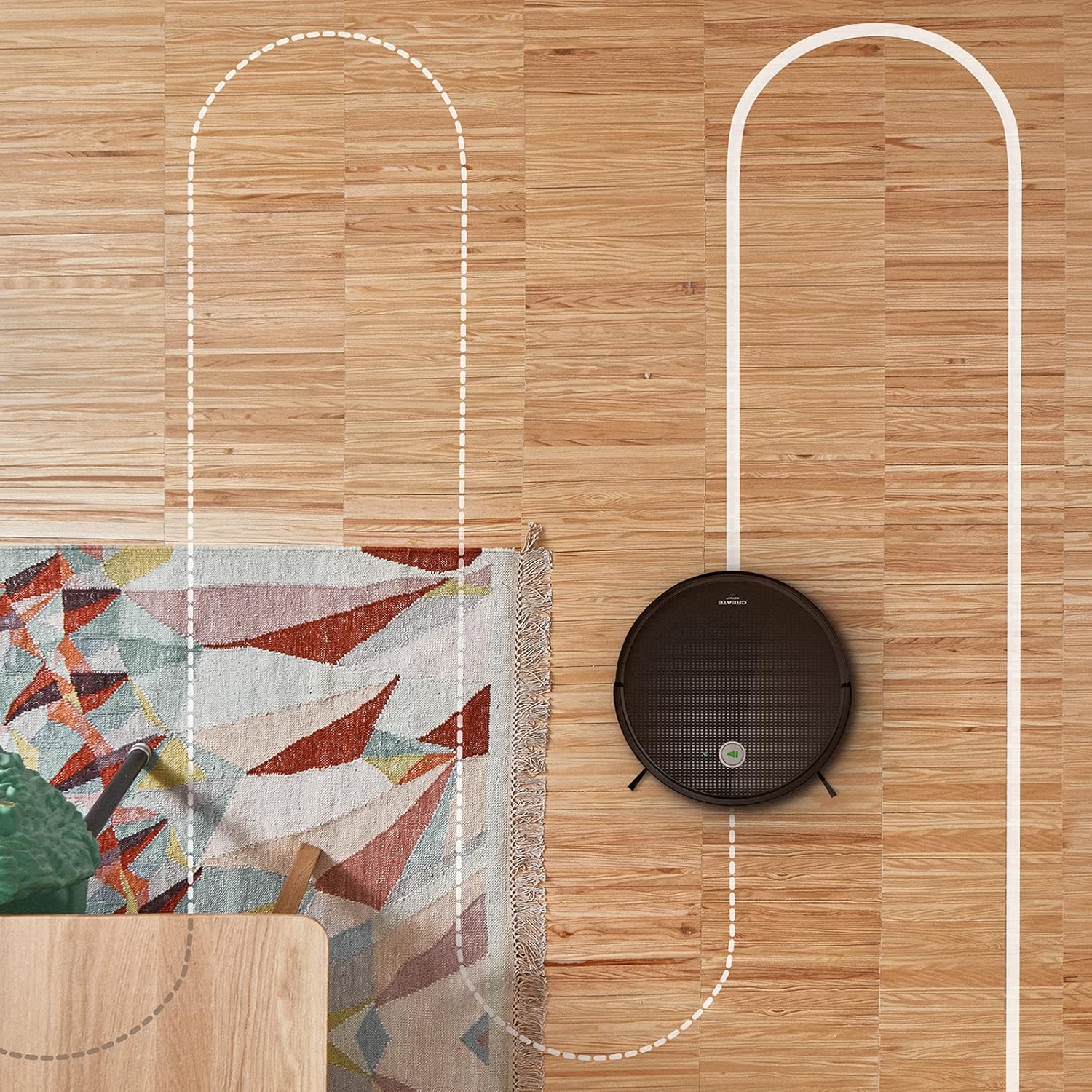
هڪ هوائي view shows the CREATE NETBOT S15 Robot Vacuum Cleaner moving across a wooden floor, with a dotted line indicating its systematic cleaning path, highlighting its gyroscopic navigation.
5.2 ريموٽ ڪنٽرول استعمال ڪندي
The included remote control allows for direct operation of the robot vacuum. Refer to the remote control diagram in your quick start guide for button functions. Common functions include:
- شروعات / رڪاوٽ صفائي
- چارجنگ بيس تي واپس ٿيو
- Directional Control (manual steering)
- جڳھ جي صفائي
- ايج جي صفائي
- شيڊول سيٽنگ
5.3 Magnetic Strip Usage
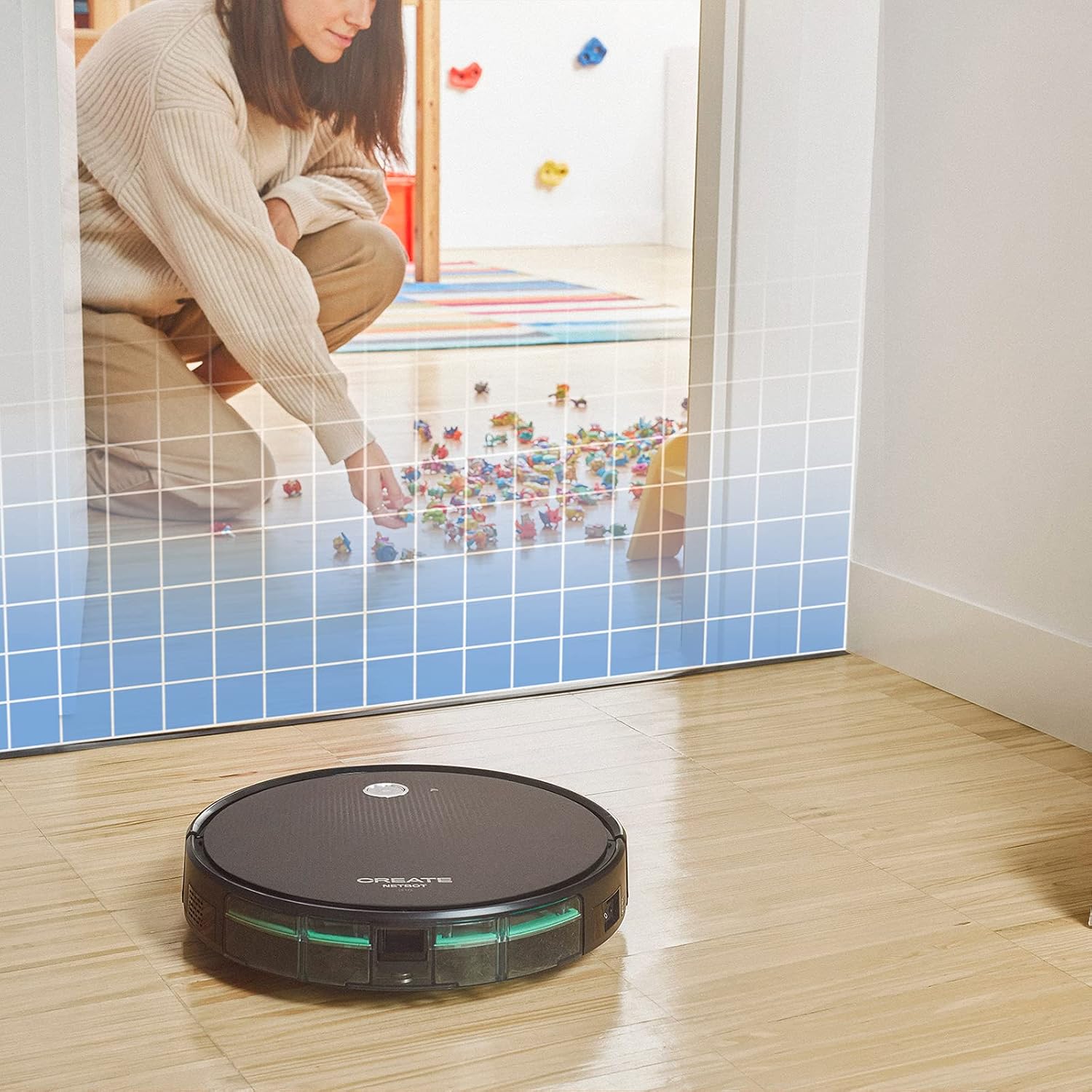
This illustration demonstrates the CREATE NETBOT S15 Robot Vacuum Cleaner approaching a virtual boundary, represented by a grid, which prevents it from entering a specific area, such as where toys are located.
Use the provided magnetic strip to create virtual boundaries that the robot will not cross. Place the strip on the floor to delimit areas where the robot should not enter, such as pet feeding zones or areas with delicate items.
5.4 بيٽري جي زندگي
The NETBOT S15 is equipped with a long-lasting LG Lithium battery, providing up to 120 minutes of cleaning autonomy on a single charge, depending on the selected power mode.
6. سار سنڀال
باقاعده سار سنڀال بهترين ڪارڪردگي کي يقيني بڻائي ٿي ۽ توهان جي روبوٽ ويڪيوم جي عمر وڌائي ٿي.
6.1 Dustbin and Water Tank Cleaning
Empty the dustbin after each use. The 600 ml dustbin is easily removable. If using the mopping function, empty and rinse the 400 ml water tank after each use to prevent mold or odors.
6.2 برش جي صفائي

هڪ بند اپ view of the CREATE NETBOT S15 Robot Vacuum Cleaner's side brush, showing its design for sweeping debris into the main suction path.
- پاسي وارا برش: Regularly check for hair or debris entanglement. Remove and clean as needed. Replace worn brushes with the provided spares.
- مکيه برش: Remove the main brush cover and lift out the brush. Use the cleaning tool to remove tangled hair and debris.
6.3 فلٽر جي صفائي/متبادل
The robot uses a double filter system: a sponge filter and a HEPA filter. Tap the filters to remove loose dirt. Do not wash HEPA filters with water. Replace filters every 3-6 months, or more frequently with heavy use, to maintain suction performance.
6.4 سينسر جي صفائي
Wipe the cliff sensors (located on the bottom of the robot) and the bumper sensors (on the front) with a clean, dry cloth to ensure proper navigation and obstacle detection.
7. مسئلا حل ڪرڻ
If you encounter issues with your NETBOT S15, refer to the following common problems and solutions:
| مسئلو | ممڪن سبب | حل |
|---|---|---|
| روبوٽ شروع نٿو ٿئي ۽ نه ئي جواب ڏئي ٿو. | بيٽري گهٽ آهي؛ پاور سوئچ بند آهي؛ روبوٽ ڦاسي پيو آهي. | روبوٽ کي چارج ڪريو؛ پڪ ڪريو ته پاور سوئچ آن آهي؛ ڪنهن به رڪاوٽ کي صاف ڪريو. |
| خراب صفائي جي ڪارڪردگي. | Full dustbin; Clogged brushes/filters; Worn brushes. | Empty dustbin; Clean brushes and filters; Replace brushes/filters. |
| روبوٽ چارجنگ بيس نه ڳولي سگهيو. | چارجنگ بيس ۾ رڪاوٽ آهي؛ روبوٽ بيس کان تمام پري آهي؛ بيس پاور نه آهي. | Ensure clear space around base; Manually place robot closer; Check power connection to base. |
| روبوٽ اڪثر ڦاسي پوندو آهي. | Cables/small objects on floor; Uneven surfaces; Dark colored carpets. | Clear floor of obstacles; Use magnetic strips for problem areas; Robot may struggle on very dark surfaces. |
| وائي فائي ڪنيڪشن جا مسئلا. | غلط وائي فائي پاسورڊ؛ روٽر تمام پري آهي؛ 5GHz نيٽ ورڪ. | Verify password; Move robot closer to router; Ensure connection to a 2.4GHz Wi-Fi network. |
8. وضاحتون
Key technical specifications for the CREATE NETBOT S15 Robot Vacuum Cleaner:
- برانڊ: ٺاھيو
- ماڊل نمبر: Netbot S15
- رنگ: Black - Turquoise
- طول و عرض (L x W x H): 33 x 33 x 7.5 سينٽي
- وزن: 3 ڪلوگرام
- طاقت: 25 واٽ
- سکشن پاور: 1500 پ. تائين
- شور جي سطح: 62 ڊي بي
- بيٽري جو قسم: ليتيم-آئن
- بيٽري جي زندگي: 120 منٽن تائين
- ڪچري جي گنجائش: 600 مليل
- پاڻي جي ٽانڪي گنجائش: 400 مليل
- فلٽر سسٽم: Double sponge Clean + HEPA filter
- رابطي: Wi-Fi, App Control
- وائس اسسٽنٽ مطابقت: Google Home, Alexa
- خاص خاصيتون: Gyroscopic navigation, Magnetic strip boundary, 4 cleaning modes (sweep, vacuum, mop, wash)
9. وارنٽي ۽ سپورٽ
For warranty information, technical support, or service inquiries, please refer to the warranty card included with your product or visit the official CREATE webسائيٽ. خريداري جي ثبوت طور پنهنجي خريداري جي رسيد رکو.


