1. تعارف
This manual provides instructions for the Easytry123 RC602S replacement remote control. This remote is designed to operate various TCL Smart UHD LED LCD HDTV models. Please note that as a replacement unit, some advanced or specific functions of your original remote may not be fully supported. Ensure your TV model is listed for optimal compatibility.
2. سيٽ اپ
2.1 بيٽري لڳائڻ
The RC602S remote control requires two (2) AAA batteries (not included). Follow these steps to install the batteries:
- ريموٽ ڪنٽرول جي پٺي تي بيٽري جي خاني کي ڳوليو.
- ٽيب تي دٻايو ۽ ان کي کولڻ لاءِ بيٽري جي ڍڪ کي هيٺئين طرف سلائڊ ڪريو.
- ٻہ AAA بيٽريون داخل ڪريو، پڪ ڪريو ته مثبت (+) ۽ منفي (-) ٽرمينل ڪمري اندر نشانن سان صحيح طرح سان ترتيب ڏين.
- بيٽري جي ڍڪ کي واپس جاء تي سلائيڊ ڪريو جيستائين اهو محفوظ طور تي ڪلڪ ڪري.

تصوير 2.1: سامهون view of the RC602S remote control with the battery compartment detached, illustrating the battery insertion area. Ensure correct polarity when inserting batteries.
2.2 مطابقت جي چڪاس
This remote is compatible with the following TCL Smart UHD LED LCD HDTV models:
- ٽي سي ايل 50 پي 20 يو ايس
- ٽي سي ايل 65 پي 20 يو ايس
- TCL 49C2US
- TCL U55P6046
- TCL 55C2US
- TCL U65P6046
- TCL U60P6046
If your TV model is not listed, this remote may not function correctly or provide full functionality. No programming is typically required for these compatible models; simply insert batteries and point the remote at your TV.
3. آپريٽنگ هدايتون
The RC602S remote control uses infrared (IR) technology. Ensure there is a clear line of sight between the remote's emitter and your TV's IR receiver for proper operation. Point the remote directly at the television.
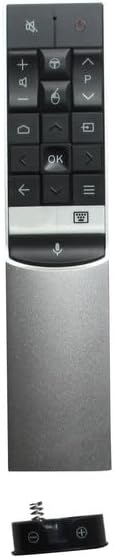
تصوير 3.1: مٿيview of the RC602S remote control, displaying its ergonomic design and button layout.
3.1 اهم ڪم
- پاور بٽڻ (ڳاڙهو دائرو): ٽي وي کي آن يا بند ڪري ٿو.
- گونگا بٽڻ (Speaker with X): ٽي وي آڊيو کي خاموش يا خاموش ڪري ٿو.
- حجم مٿي/هيٺ (+/-): حجم جي سطح کي ترتيب ڏئي ٿو.
- چينل مٿي / هيٺ (P^/P˅): ٽي وي چينلز بدلائي ٿو.
- نيويگيشن بٽڻ (تير): مينيو کي نيويگيٽ ڪرڻ ۽ اختيارن کي چونڊڻ لاءِ استعمال ڪيو ويندو آهي.
- ٺيڪ بٽڻ (OK): مينيو ۾ چونڊ جي تصديق ڪري ٿو.
- هوم بٽڻ (گھر جو آئڪن): Accesses the TV's smart home screen or main menu.
- پوئتي بٽڻ (کاٻي تير): پوئين اسڪرين يا مينيو ڏانھن واپسي.
- ان پٽ/ذريعو بٽڻ (Rectangle with Arrow): ان پٽ سورس (HDMI، AV، وغيره) چونڊيندو آهي.
- Menu/Options Button (Three Horizontal Lines): Opens context-sensitive menus or settings.
- وائيس ڪنٽرول بٽڻ (مائڪروفون آئڪن): Activates voice command features (if supported by your TV model and configured).
4. سار سنڀال
4.1 ريموٽ صاف ڪرڻ
پنهنجي ريموٽ ڪنٽرول کي صاف ڪرڻ لاءِ، نرم، سڪل ڪپڙو استعمال ڪريو. ضدي مٽيءَ لاءِ، ٿورو ڊيampڪپڙي کي پاڻي يا نرم، غير رگڙيندڙ ڪلينر سان ڌوئڻ ڏيو. سخت ڪيميڪلز يا گهڻي نمي استعمال ڪرڻ کان پاسو ڪريو، ڇاڪاڻ ته اهي ريموٽ جي اليڪٽرانڪس کي نقصان پهچائي سگهن ٿا.
4.2 بيٽري مٽائڻ
Replace batteries when the remote's response becomes sluggish or stops working. Always replace both batteries at the same time with new AAA batteries. Do not mix old and new batteries, or different types of batteries, as this can lead to leakage or malfunction.
4.3 اسٽوريج
When not in use for extended periods, it is recommended to remove the batteries to prevent potential leakage and damage to the remote control.
5. مسئلا حل ڪرڻ
- ريموٽ جواب نه ڏئي رهيو آهي:
- چيڪ ڪريو ته بيٽريون صحيح پولارٽي سان صحيح طرح سان داخل ڪيون ويون آهن.
- پراڻين بيٽرين کي نئين AAA بيٽرين سان تبديل ڪريو.
- پڪ ڪريو ته ريموٽ ۽ ٽي وي جي IR رسيور جي وچ ۾ ڪا به رڪاوٽ نه آهي.
- ريموٽ کي سڌو ٽي وي ڏانهن اشارو ڪريو.
- Limited functionality or certain buttons not working:
- As a replacement remote, some specific or advanced functions of your original TV remote may not be supported. This is normal for universal or replacement remotes.
- Verify that your TV model is listed in the compatibility section (Section 2.2).
- بٽڻ چپچپا يا غير جوابده آهن:
- سيڪشن 4.1 ۾ بيان ڪيل ريموٽ ڪنٽرول کي صاف ڪريو.
6. وضاحتون
| برانڊ | ايزيٽري 123 |
| ماڊل | آر سي 602 ايس |
| رابطي ٽيڪنالاجي | انفراريڊ (IR) |
| مطابقت رکندڙ ڊوائيسز | TCL Televisions |
| سپورٽ ٿيل ڊوائيسز جو وڌ ۾ وڌ تعداد | 1 |
| بيٽرين جي ضرورت آهي | 2 x AAA (شامل نه آهي) |
| خاص خصوصيت | Ergonomic ڊيزائن |
7. وارنٽي ۽ سپورٽ
This Easytry123 RC602S remote control is a replacement unit. Specific warranty information is not provided with the product. For any issues or support inquiries, please contact the seller directly through your purchase platform. Ensure you have your order details available when contacting support.