1. تعارف
This manual provides essential information for the installation, operation, maintenance, and troubleshooting of your Chieftec Polaris 650W 80Plus Certified Power Supply Unit (PSU). Please read this manual thoroughly before installing and using the product to ensure proper function and safety. The Chieftec Polaris 650W PSU is designed to provide stable and efficient power to your personal computer system.
2. حفاظت جي ڄاڻ
پنهنجي سامان کي زخم يا نقصان کان بچڻ لاءِ هميشه هيٺ ڏنل حفاظتي احتياطن تي عمل ڪريو:
- نه پي ايس يو سي کوليوasinج. هاءِ وولٽtages inside can cause electric shock. There are no user-serviceable parts inside.
- نه insert any objects into the PSU's ventilation openings.
- نه PSU کي پاڻي، نمي، يا وڌيڪ نمي جي سامهون رکو.
- Ensure the PSU is installed in a well-ventilated area, free from obstructions to airflow.
- Always disconnect the AC power cord from the wall outlet before installing, removing, or cleaning the PSU.
- Use only the modular cables provided with your Chieftec Polaris 650W PSU. Using incompatible cables may damage the PSU or connected components.
- Ensure all cable connections are secure before powering on the system.
3. پيڪيج مواد
پڪ ڪريو ته سڀئي شيون توهان جي پيڪيج ۾ موجود آهن:
- Chieftec Polaris 650W Power Supply Unit
- Modular Cable Set (e.g., 24-pin ATX, 8-pin EPS/CPU, PCIe, SATA, Molex)
- اي سي پاور ڪارڊ
- چڙهڻ اسڪرو
- استعمال ڪندڙ جو دستياب (ھي دستاويز)
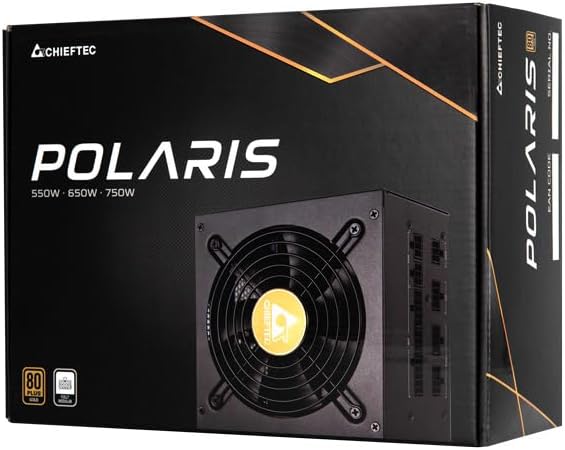
Image: The Chieftec Polaris 650W Power Supply Unit and its retail packaging.
4. سيٽ اپ ۽ تنصيب
Follow these steps to install your Chieftec Polaris 650W PSU into your personal computer system:
- پنهنجو نظام تيار ڪريو: Ensure your computer is completely powered off and unplugged from the wall outlet. Open your computer case to access the PSU mounting area.
- پراڻي PSU کي هٽايو (جيڪڏهن قابل اطلاق هجي): If replacing an existing PSU, disconnect all cables from the components and motherboard, then unscrew and remove the old PSU.
- نئون PSU لڳايو: Carefully slide the Chieftec Polaris 650W PSU into the designated PSU bay in your computer case. Ensure the fan faces the correct direction (typically downwards for bottom-mounted PSUs, or as per case design for optimal airflow). Secure the PSU with the provided mounting screws.
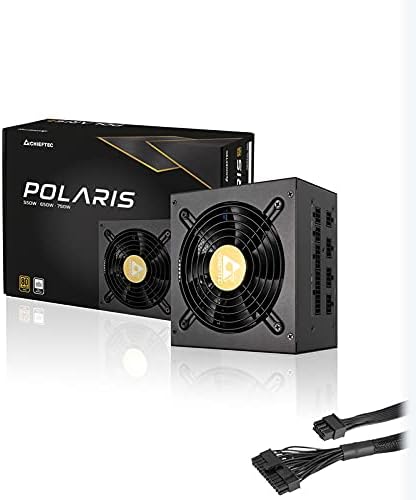
- ماڊيولر ڪيبل ڳنڍيو: Identify the necessary modular cables for your system components (motherboard, CPU, graphics card, storage drives). Connect these cables to the corresponding ports on the back of the PSU. Refer to the image below for connector identification.
- اجزاء سان ڳنڍيو: Connect the other end of the modular cables to your motherboard (24-pin ATX and 8-pin EPS/CPU), graphics card(s) (PCIe), and storage devices (SATA/Molex). Ensure all connections are firm and fully seated.
- ڪيبل جو انتظام: پنهنجي ڪيس ۾ هوا جي وهڪري ۽ جمالياتيات کي بهتر بڻائڻ لاءِ ڪيبلن کي صاف سٿرو ڪريو.
- آخري چڪاس: Double-check all connections. Ensure no loose cables are obstructing fans. Close your computer case.
- AC پاور ڳنڍيو: Plug the AC power cord into the PSU's power inlet and then into a wall outlet.

تصوير: پوئين پاسي view of the Chieftec Polaris 650W PSU showing modular cable connection ports for M/B, SATA, PCIe, and CPU.

Image: The Chieftec Polaris 650W Power Supply Unit with its modular cables connected, ready for installation.
5. آپريٽنگ هدايتون
Once the Chieftec Polaris 650W PSU is correctly installed and all connections are secure:
- پاور آن: Locate the power switch on the back of the PSU (next to the AC power inlet). Ensure it is in the 'I' (On) position.
- سسٽم جي شروعات: Press the power button on your computer case. The system should power on, and the PSU fan will begin to spin, indicating normal operation.
- فين آپريشن: The PSU features an air cooling method. The fan will operate to dissipate heat generated by the power supply components. Its speed may vary depending on the load and temperature to maintain optimal cooling and noise levels.
- بجلي بند: To shut down your system, use the operating system's shutdown procedure. For a complete power cut, switch the PSU's power switch to the 'O' (Off) position and unplug the AC power cord.
تصوير: مٿي کان هيٺ تائين view of the Chieftec Polaris 650W Power Supply, highlighting the cooling fan and protective grille.
6. سار سنڀال
مناسب سار سنڀال توهان جي PSU جي ڊگهي عمر ۽ بهترين ڪارڪردگي کي يقيني بڻائي ٿي:
- مٽي صاف ڪرڻ: Periodically (e.g., every 3-6 months), power off your computer, unplug the AC cord, and open the case. Use compressed air to gently blow dust out of the PSU's fan and ventilation grilles. نه use a vacuum cleaner directly on the PSU as it can generate static electricity.
- ماحولياتي حالتون: Ensure the computer operates in a clean, dry, and well-ventilated environment. Avoid extreme temperatures and direct sunlight.
- ڪيبل سالميت: Occasionally check that all modular cables are securely connected and not frayed or damaged.
7. مسئلا حل ڪرڻ
If you encounter issues with your Chieftec Polaris 650W PSU, consider the following troubleshooting steps:
- طاقت ناهي:
- پڪ ڪريو ته AC پاور ڪنڊ PSU ۽ وال آئوٽليٽ ٻنهي ۾ محفوظ طور تي لڳل آهي.
- Check that the PSU's power switch on the back is in the 'I' (On) position.
- ٻئي ڊوائيس ۾ پلگ ان ڪندي تصديق ڪريو ته وال آئوٽليٽ ڪم ڪري رهيو آهي.
- Confirm all internal power cables (24-pin ATX, 8-pin EPS/CPU) are firmly connected to the motherboard.
- سسٽم جي عدم استحڪام/ بي ترتيب بندش:
- Ensure the PSU is adequately ventilated and not overheating.
- Check all power connections to components (graphics card, storage) for looseness.
- If possible, test the PSU with a different set of components or in another system to rule out other hardware issues.
- غير معمولي آواز:
- A rattling or grinding noise may indicate a fan issue. Power off the system and inspect the PSU fan for obstructions (e.g., loose cables).
- If the noise persists and is not due to an obstruction, contact support.
جيڪڏهن انهن قدمن سان مسئلو حل نه ٿيو ته مهرباني ڪري وارنٽي ۽ سپورٽ سيڪشن جو حوالو ڏيو.
8. وضاحتون
| خاصيت | تفصيل |
|---|---|
| برانڊ | چيفٽيڪ |
| ماڊل نالو | پولارس |
| شيون ماڊل نمبر | IN-ACT-ZDLCHFOBU0087 |
| آئوٽ پٽ واٽtage | 650 واٽ |
| فارم فيڪٽر | اي ٽي ايڪس |
| کولڻ جو طريقو | هوا |
| ڪنيڪٽر جو قسم | اي ٽي ايڪس |
| مطابقت رکندڙ ڊوائيسز | پرسنل ڪمپيوٽر |
| پيداوار جي ماپ (L x W x H) | 8.66 x 3.15 x 1.18 انچ (22 x 8 x 3 سينٽي) |
| شيءِ جو وزن | 4.4 پائونڊ (2 ڪلوگرام) |
| سرٽيفڪيشن | 80 پلس تصديق ٿيل |
9. وارنٽي ۽ سپورٽ
Chieftec products are manufactured to high-quality standards. For specific warranty terms and conditions, please refer to the warranty card included with your product or visit the official Chieftec website. Warranty periods and coverage may vary by region and product.
For technical support, product inquiries, or warranty claims, please contact Chieftec customer service through their official website or the contact information provided in your product documentation. When contacting support, please have your product model number (IN-ACT-ZDLCHFOBU0087) and proof of purchase readily available.


