1. تعارف
Welcome to the Argon Audio FORTE A5 powered speaker system. This manual provides essential information for setting up, operating, and maintaining your speakers to ensure optimal performance and longevity. Please read this manual thoroughly before using your speakers.
2. حفاظتي هدايتون
To prevent fire or electric shock, do not expose this appliance to rain or moisture. Do not open the cabinet. Refer servicing to qualified personnel only.
- وينٽيليشن: اسپيڪرن جي چوڌاري مناسب هوا جي وهڪري کي يقيني بڻايو. ڪنهن به هوا جي وهڪري جي سوراخن کي نه روڪيو.
- طاقت جو ذريعو: Connect the speakers only to the specified power supply.
- پاڻي ۽ نمي: Do not expose the speakers to dripping or splashing water. Do not place objects filled with liquids, such as vases, on the speakers.
- صفائي: صرف سڪل ڪپڙي سان صاف ڪريو. مائع صاف ڪندڙ يا ايروسول صاف ڪندڙ استعمال نه ڪريو.
- گرمي: ڪنهن به گرمي جي ذريعن جي ويجهو نصب نه ڪريو جهڙوڪ ريڊيٽرز، گرمي رجسٽر، اسٽو، يا ٻيو سامان (بشمول ampلائفائرز) جيڪي گرمي پيدا ڪن ٿا.
- لڳائڻ: Place the speakers on a stable, level surface to prevent them from falling.
3. پيڪيج مواد
مھرباني ڪري چيڪ ڪريو ته سڀ شيون پيڪيج ۾ موجود آھن:
- Argon Audio FORTE A5 Powered Speakers (1 pair)
- Special Speaker Cable (3 meters)
- ريموٽ ڪنٽرول
- پاور ڪيبل
- استعمال ڪندڙ جو دستياب (ھي دستاويز)
4. پراڊڪٽ ختمview
4.1 فرنٽ پينل
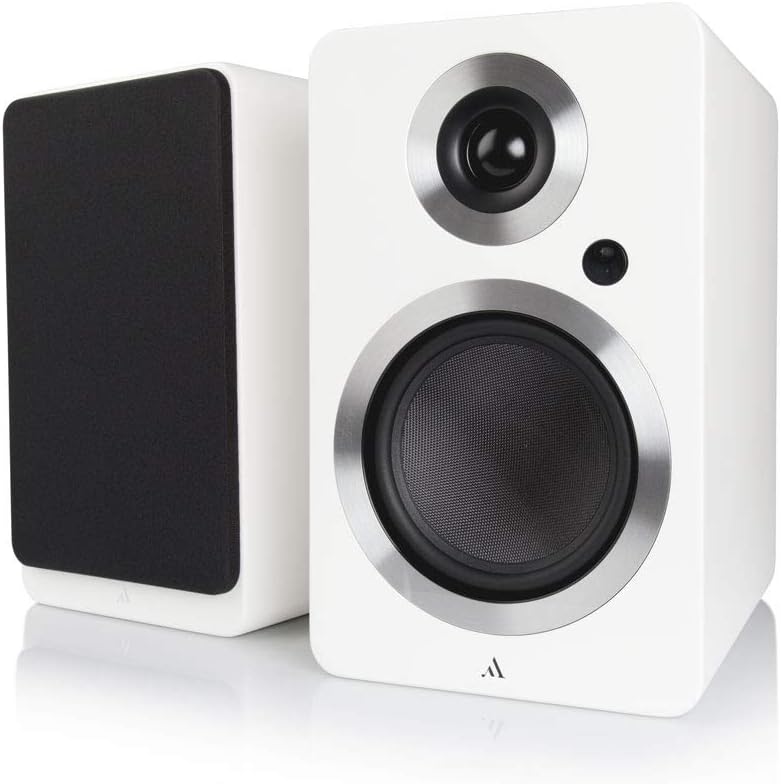
تصوير: سامهون view of the Argon Audio FORTE A5 speakers. The image displays two white bookshelf speakers with black speaker cones and metallic rings around the drivers. The left speaker is shown from the side, while the right speaker is shown from the front, highlighting its clean design.
- ٽائيٽل: High-frequency driver.
- Mid/Bass Driver: Handles mid-range and bass frequencies.
- اسٽيٽس LED Indicates power status and selected input.
4.2 ريئر پينل

تصوير: پوئين پاسي view of the Argon Audio FORTE A5 speakers. The image shows the back panel of the active speaker with various connection ports including RCA, optical, USB, and speaker terminals. The passive speaker's rear panel is also visible, showing only the speaker terminals.
- RCA Inputs (L/R): For connecting analog audio sources like CD players or turntables.
- Optical Inputs (OPT1, OPT2): For connecting digital audio sources like TVs or game consoles.
- سب آئوٽ: ٻاهرين سب ووفر کي ڳنڍڻ لاءِ.
- USB Charge (5V/1A): موبائل ڊوائيسز کي چارج ڪرڻ لاءِ.
- Speaker Cable Output: غير فعال اسپيڪر سان ڳنڍي ٿو.
- پاور ان پٽ: AC پاور سپلائي سان ڳنڍي ٿو.
5. سيٽ اپ
5.1 لڳائڻ
Place the speakers on a stable surface, such as a bookshelf or speaker stands. For optimal stereo imaging, position the speakers equidistant from your listening position and angle them slightly towards you (toe-in). Ensure there is sufficient space behind the speakers for proper ventilation and cable connections.
5.2 ڪنيڪشن
- اسپيڪر ڳنڍيو: Use the provided speaker cable to connect the active speaker (with all the inputs) to the passive speaker. Ensure correct polarity (+ to + and - to -).
- ڳنڍيو آڊيو ذريعن:
- آر سي سي: Connect your analog audio device (e.g., CD player, turntable with pre-amp) to the RCA inputs.
- بصري: Connect your digital audio device (e.g., TV, game console) to either OPT1 or OPT2.
- بلوٽوٿ: For wireless connection, see section 6.3.
- پاور Connectنيو: Plug the power cable into the active speaker's power input, then plug the other end into a wall outlet.
6. آپريشن
6.1 پاور آن/آف
The speakers will automatically enter standby mode when no audio signal is detected for a period. They will wake up automatically when an audio signal is received on the selected input. To manually power off, use the remote control or the power button on the active speaker (if available).
6.2 ان پٽ چونڊ
Use the input selection buttons on the remote control or the active speaker to cycle through the available audio inputs (RCA, Optical 1, Optical 2, Bluetooth). The Status LED will change color to indicate the currently selected input.
6.3 بلوٽوٽ جوڙي
- Select the Bluetooth input on your speakers. The Status LED will blink, indicating pairing mode.
- On your Bluetooth device (smartphone, tablet, laptop), enable Bluetooth and search for new devices.
- Select "Argon Audio FORTE A5" from the list of available devices.
- Once connected, the Status LED on the speaker will turn solid, and you can now play audio wirelessly.
6.4 ريموٽ ڪنٽرول افعال
The included remote control allows you to:
- Adjust Volume (Up/Down)
- خاموش / چالو
- انپٽ جو ذريعو چونڊيو
- پاور آن/آف (اسٽابائي)
7. سار سنڀال
To keep your Argon Audio FORTE A5 speakers in optimal condition:
- صفائي: Use a soft, dry, lint-free cloth to clean the cabinet surfaces. Do not use abrasive cleaners, waxes, or solvents.
- گرلس: The speaker grilles can be carefully removed for cleaning, but ensure they are reattached securely to protect the drivers.
- مٽي: Regularly dust the speakers to prevent accumulation, especially around the drivers and ventilation ports.
8. مسئلا حل ڪرڻ
If you experience issues with your speakers, please refer to the following table:
| مسئلو | ممڪن سبب | حل |
|---|---|---|
| آواز ڪونهي | بجلي ڳنڍيل نه آهي؛ غلط ان پٽ چونڊيو ويو آهي؛ حجم تمام گهٽ آهي؛ ڪيبل ڍِلي آهن. | Check power connection; Select correct input; Increase volume; Reconnect all cables securely. |
| بگڙيل آواز | Volume too high; Source audio quality poor; Cables damaged. | Reduce volume; Try a different audio source; Check and replace cables if necessary. |
| بلوٽوٿ ڳنڍي نه ٿو | Speakers not in pairing mode; Device too far; Previously paired device connected. | Ensure speakers are in Bluetooth pairing mode; Move device closer; Disconnect from other Bluetooth devices. |
| ريموٽ ڪنٽرول ڪم نه ڪري رهيو آهي | Batteries dead; Obstruction between remote and speaker. | بيٽريون تبديل ڪريو؛ ڪنهن به رڪاوٽ کي هٽايو. |
If the problem persists, please contact Argon Audio customer support.
9. وضاحتون
| خاصيت | تفصيل |
|---|---|
| ماڊل | FORTE A5 |
| شيءِ جو وزن | 6.7 ڪلوگرام |
| پيداوار جي ماپ (W x D x H) | 16.5 x 23 x 27 سينٽي |
| وڌ ۾ وڌ اسپيڪر آئوٽ پُٽ پاور | 80 واٽ |
| رابطي ٽيڪنالاجي | بلوٽوٿ |
| آڊيو آئوٽ پٽ موڊ | اسٽيريو |
| چڙهڻ جو قسم | شيلف مائونٽ |
| اسپيڪر جو قسم | Subwoofer (Note: This refers to the capability to connect a subwoofer, as these are bookshelf speakers) |
| مطابقت رکندڙ ڊوائيسز | Smartphone, Tablet, Laptop, TV, Desktop, Turntable, MP3 Player |
| چوڌاري آواز جي ترتيب | 2.0 |
10. وارنٽي ۽ سپورٽ
Argon Audio products are designed and manufactured to the highest quality standards. For information regarding warranty terms and conditions, please refer to the warranty card included with your product or visit the official Argon Audio website. For technical support or service inquiries, please contact your local dealer or Argon Audio customer service.
Webسائيٽ: www.argonaudio.com


