1. تعارف
Thank you for choosing the Kingdom Professional Wireless Microphone System SYSV54. This system is designed to provide clear and reliable audio for various applications, including speech, singing, presentations, and events. It features a 1000-channel UHF design, ensuring stable signal transmission and minimizing interference. This manual provides detailed instructions for setting up, operating, and maintaining your wireless microphone system.
The system includes a metal UHF receiver, two handheld microphones, two bodypack transmitters, and two lavalier/lapel microphones, offering versatile audio capture options.
2. حفاظت جي ڄاڻ
Please read and understand all safety instructions before operating this device. Keep this manual for future reference.
- برقي حفاظت: Use only the provided power adapter. Ensure the power source matches the voltage گهرجون.
- اليڪٽرڪ شاڪ جو خطرو: ڊوائيس نه کوليو casing. Opening the device may result in serious injury and voids the warranty. Refer all servicing to qualified personnel.
- پاڻي ۽ نمي: Do not expose the system to water, rain, or excessive moisture. Avoid using the system in high-humidity environments.
- گرمي جا ذريعا: Keep the system away from heat sources such as radiators, heat registers, stoves, or other heat-producing appliances.
- وينٽيليشن: Ensure proper ventilation around the receiver. Do not block any ventilation openings.
- بيٽريون: Use the correct type and size of batteries for the handheld microphones and bodypack transmitters. Do not mix old and new batteries, or different types of batteries. Dispose of used batteries responsibly.
- صفائي: Disconnect the power before cleaning. Use a dry cloth for cleaning. Do not use liquid cleaners or aerosol cleaners.
3. پيڪيج مواد
پڪ ڪريو ته سڀئي شيون پيڪيج ۾ موجود آهن:
- 1 × 1000-channel UHF Metal Receiver
- 2 × Handheld Microphones
- 2 × Bodypack Transmitters
- 2 × Lavalier/Lapel Microphones
- 2 ، اينٽينا
- 1 × استعمال ڪندڙ دستورالعمل (هي دستاويز)
- 1 × آڊيو ڪيبل
- 1 × External Wall Wart Power Supply
4. سيٽ اپ جون هدايتون
4.1 وصول ڪندڙ سيٽ اپ
- لڳائڻ: Place the receiver on a stable, flat surface, ensuring adequate ventilation. Position it within the desired operating range of the microphones, ideally with a clear line of sight.
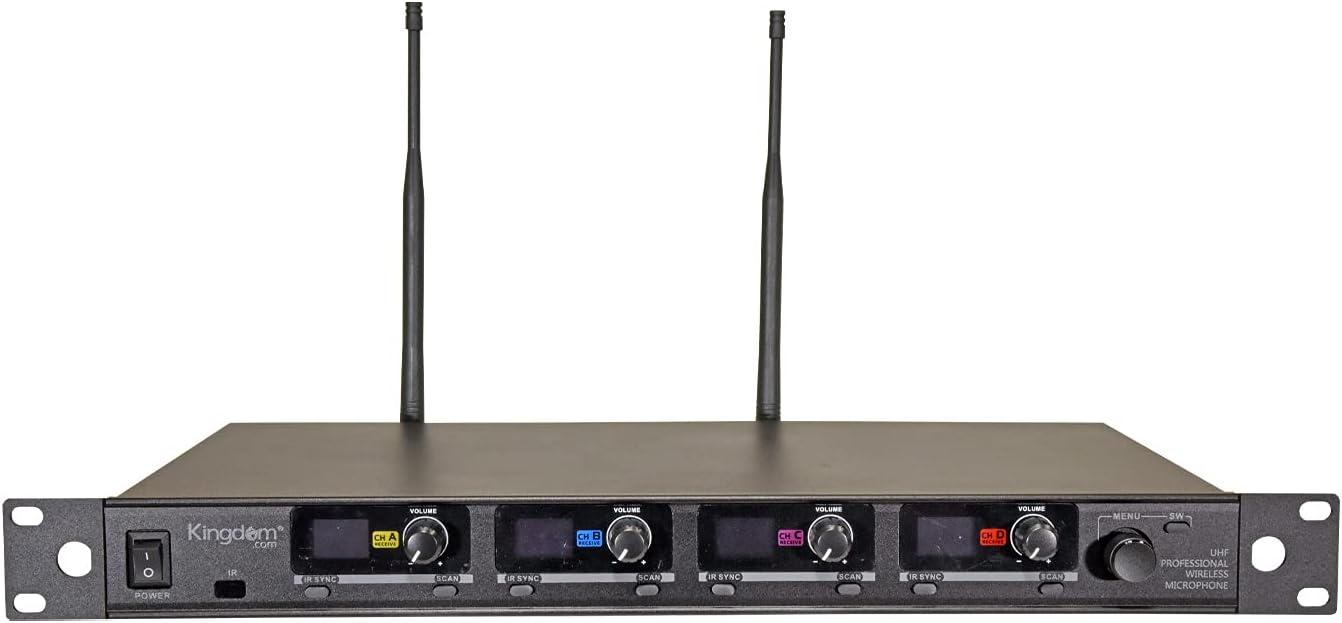
- اينٽينا ڳنڍيو: Screw the two included antennas onto the ANT A-B and ANT C-D connectors on the rear panel of the receiver. Ensure they are securely tightened and positioned vertically for optimal signal reception.
- پاور Connectنيو: Connect the external wall wart power supply to the DC INPUT port on the rear of the receiver, then plug the power supply into a suitable electrical outlet.
- آڊيو آئوٽ ڪنيڪشن: Connect the receiver to your audio mixer, amplifier, or sound system using the provided audio cable. You can use the MIX OUT (1/4" unbalanced) for a combined output, or the individual BALANCED A, B, C, D (XLR) outputs for separate channel control.

4.2 Microphone Setup (Handheld & Bodypack)
- بيٽرين کي انسٽال ڪريو. Open the battery compartment of each handheld microphone and bodypack transmitter. Insert two AA batteries (not included), ensuring correct polarity.
- Attach Lapel Microphones: For bodypack transmitters, plug the lavalier/lapel microphone into the input jack on the bodypack. Secure the lapel microphone to clothing, approximately 6-8 inches from the speaker's mouth.
- پاور آن: Press and hold the power button on each handheld microphone and bodypack transmitter to turn them on. The display will illuminate.


4.3 Frequency Synchronization (IR Sync)
To establish a wireless connection, the microphones/bodypacks must be synchronized with the receiver.
- پاور آن وصول ڪندڙ: Turn on the receiver using the POWER button on the front panel.
- چينل چونڊيو: On the receiver, select the desired channel (CH A, CH B, CH C, or CH D) for the microphone you wish to sync.
- Initiate Scan (Optional but Recommended): Press the 'SCAN' button on the receiver for the selected channel. The receiver will automatically search for an available, clear frequency.
- Activate IR Sync on Receiver: Press the 'IR SYNC' button on the receiver for the selected channel. The IR indicator on the receiver will flash.
- Align Transmitters: Hold the handheld microphone or bodypack transmitter with its IR window facing the IR window on the receiver, typically within a few inches.
- Confirm Sync: The display on the microphone/bodypack will show the synchronized frequency, and the RF indicator on the receiver will illuminate steadily, indicating a successful connection.
- Repeat this process for each microphone/bodypack.
5. آپريٽنگ هدايتون
5.1 پاور آن/آف
- وصول ڪندڙ: Press the 'POWER' button on the front panel.
- Handheld Microphones/Bodypacks: Press and hold the 'POWER' button on the device until the display illuminates (for ON) or turns off (for OFF).
5.2 حجم ڪنٽرول
Each channel on the receiver has an independent volume control knob. Adjust these knobs to achieve the desired audio level for each microphone. Start with the volume low and gradually increase it to avoid sudden loud sounds.
5.3 خاموش فنڪشن
Both handheld microphones and bodypack transmitters feature a MUTE function. Press the 'MUTE' button on the microphone/bodypack to temporarily silence the audio transmission without turning off the device. Press it again to unmute.
5.4 Channel Selection and Auto Scan
The system offers 1000 channels. If you experience interference, you can change the operating frequency:
- On the receiver, press the 'SCAN' button for the desired channel. The receiver will automatically find and select a clear frequency.
- Once a new frequency is displayed, perform an IR Sync (as described in Section 4.3) to synchronize the corresponding microphone/bodypack to the new frequency.
5.5 استعمال جا طريقا
- آپريٽنگ فاصلو: Maintain a line of sight between the microphones/bodypacks and the receiver for optimal performance. The system has a working distance of up to approximately 200 feet.
- رڪاوٽن کان بچڻ: Walls, metal objects, and large crowds can reduce the effective range and cause signal drops.
- بيٽري جي زندگي: Monitor the battery indicators on the microphones/bodypacks. Replace batteries promptly when they are low to avoid interruptions during use.
- راءِ جي روڪٿام: Position microphones away from speakers to prevent audio feedback. Adjust microphone gain and speaker volume carefully.
6. سار سنڀال
- صفائي: Use a soft, dry cloth to clean the exterior of the receiver and microphones. Do not use abrasive cleaners or solvents.
- بيٽري مٽائڻ: Replace AA batteries in handheld microphones and bodypacks as needed. Always use fresh batteries for best performance.
- اسٽوريج: When not in use for extended periods, remove batteries from microphones/bodypacks and store the system in a cool, dry place, away from direct sunlight and extreme temperatures.
- انتوننا: Ensure antennas are not bent or damaged. Handle them carefully.
7. مسئلا حل ڪرڻ
If you encounter issues with your wireless microphone system, refer to the following common problems and solutions:
| مسئلو | ممڪن سبب | حل |
|---|---|---|
| مائڪروفون مان ڪو آواز ناهي | Microphone/bodypack not powered on گھٽ يا مرده بيٽري Microphone/bodypack muted Not synchronized with receiver Receiver volume too low Audio cable disconnected | Ensure microphone/bodypack is on بيٽرين کي تبديل ڪريو Unmute microphone/bodypack Perform IR Sync (Section 4.3) Increase receiver channel volume آڊيو ڪيبل ڪنيڪشن چيڪ ڪريو |
| مداخلت يا جامد | ويجھا ٻيا وائرليس ڊوائيسز Operating on a crowded frequency ٽرانسميٽر ۽ رسيور جي وچ ۾ رڪاوٽون | ٻين وائرليس ڊوائيسز کان پري وڃو Use Auto Scan to find a clear frequency and re-sync Ensure clear line of sight; reposition receiver/transmitters |
| مختصر آپريٽنگ رينج | ڪمزور بيٽريون Antennas not properly positioned Excessive obstructions ماحولياتي عنصر | بيٽرين کي تبديل ڪريو Ensure antennas are vertical and unobstructed Minimize obstructions; ensure line of sight Avoid areas with high RF noise |
| مائڪروفون ڊسپلي ڪم نه ڪري رهيو آهي | گھٽ يا مرده بيٽري ڊوائيس تي طاقت نه آهي | بيٽرين کي تبديل ڪريو Ensure device is powered on |
8. وضاحتون
Key technical specifications for the Kingdom Professional Wireless Microphone System SYSV54:
- ماڊل نالو: SYSV54
- ڪيريئر موج فريکوئنسي رينج: UHF 516.0 - 541.0 MHz
- چينلن جو تعداد: 1000 (per mic)
- ڪم جو فاصلو: Up to ~200 feet (line of sight)
- ٽرانسميٽر پاور: Up to ~50mW
- Frequency Response (Handheld): 50 Hz ~ 18 KHz
- ڏيکاريو: LCD (IR sync capable)
- طاقت جو ذريعو: Corded Electric (Receiver), Battery Powered (Transmitters - AA batteries required, not included)
- آڊيو نتيجا: 1/4" Mix Out, 4x XLR Balanced Outputs
- شيء جو وزن: تقريبن 10.08 پائونڊ
- پيڪيج جي ماپ: 22.2 x 12.6 x 7.25 انچ
- UPC: 617407927696
9. وارنٽي ڄاڻ
The Kingdom Professional Wireless Microphone System SYSV54 is warranted to be free of manufacturing defects for 1 year from the date of purchase. Additionally, a 30-day return policy is offered. This warranty covers defects in materials and workmanship under normal use. It does not cover damage caused by misuse, accident, unauthorized modification, or improper installation.
10. ڪسٽمر سپورٽ
If you have any questions, require assistance with setup, operation, or troubleshooting, or need to make a warranty claim, please contact Kingdom customer support. We are dedicated to ensuring your satisfaction and are always available to help.
Please refer to your purchase documentation or the official Kingdom webجديد ترين رابطي جي معلومات لاءِ سائيٽ.


