1. تعارف
This manual provides detailed instructions for the installation, operation, and maintenance of your Lorex D841A82B Series 8 Channel 4K HD Digital Video Recorder (DVR). This DVR is designed to provide high-resolution surveillance with advanced features such as 4K recording, person/vehicle detection, and smart home integration. Please read this manual thoroughly before using the product to ensure proper setup and functionality.
2. پيڪيج مواد
Verify that all items listed below are included in your product packaging. If any items are missing or damaged, please contact Lorex customer support.
- Lorex D841A82B Series DVR
- HDMI ڪيبل
- پاور اڊاپٽر
- Ethernet ڪيبل
- USB ماؤس
- جلدي شروع ڪرڻ جي گائيڊ (هي دستور)
3. پراڊڪٽ ختمview

Figure 3.1: Front Panel of the Lorex D841A82B DVR. This image displays the front of the DVR unit, featuring the "4K Ultra HD DVR" label, a central circular button, and a USB port for connecting a mouse or other peripherals.

Figure 3.2: Side Panel with Ventilation. This image shows the side of the DVR, highlighting the ventilation grilles designed for heat dissipation, crucial for continuous operation.
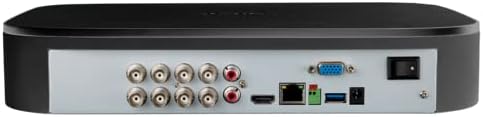
شڪل 3.3: پوئين پينل ڪنيڪشن. This image illustrates the rear panel of the DVR, displaying various input/output ports including BNC connectors for cameras, audio inputs/outputs, HDMI, VGA, Ethernet, USB ports, and the power input with an on/off switch.
4. اهم خاصيتون
- 4K الٽرا ايڇ ڊي رڪارڊنگ: Capable of recording up to 4K (8MP) resolution on all channels, providing detailed video footage.
- ترقي يافته حرڪت جي چڪاس: Reduces false alarms with intelligent person and vehicle detection, sending push notifications when relevant motion is detected (available on up to 4 channels).
- سمارٽ گهر مطابقت: Integrates with Amazon Alexa and Google Assistant for hands-free voice control, and Chromecast for viewing live or recorded video on your TV.
- Lorex Home Mobile Application: ريموٽ جي اجازت ڏئي ٿو viewing and control of active deterrence features from a smartphone or tablet.
- مقامي اسٽوريج: Equipped with a pre-installed 2TB security-grade hard drive, ensuring secure local storage without monthly cloud fees. Expandable up to 10TB.
- سمارٽ ڳولا: Filter motion events to quickly review footage.
- خوفناڪ بٽڻ: Located on the DVR, activates lights and sirens on connected cameras for immediate response.
- 24/7 نگراني: Designed for continuous operation and reliable surveillance.
5. سيٽ اپ گائيڊ
5.1 شروعاتي ڪنيڪشن
- ڪئميرا ڳنڍيو: Connect your analog HD security cameras to the BNC video input ports on the rear of the DVR. Ensure connections are secure.
- مانيٽر سان ڳنڍيو: Use the provided HDMI cable to connect the DVR's HDMI output port to an HDMI input on your TV or monitor. Alternatively, use a VGA cable for VGA monitors.
- USB ماؤس ڳنڍيو: Plug the included USB mouse into one of the USB ports on the DVR (front or rear).
- نيٽ ورڪ سان ڳنڍيو (اختياري پر سفارش ٿيل): ريموٽ لاءِ viewing and smart features, connect the DVR to your router using the supplied Ethernet cable.
- پاور Connectنيو: Connect the power adapter to the DVR's power input and then plug it into a power outlet. Turn on the DVR using the power switch on the rear panel.
5.2 پهريون ڀيرو سيٽ اپ مددگار
Upon first power-up, the DVR will guide you through a setup wizard. Follow the on-screen prompts to:
- هڪ محفوظ پاسورڊ ٺاهيو.
- تاريخ ۽ وقت سيٽنگون ترتيب ڏيو.
- Set up network parameters (if not automatically detected).
- Adjust recording preferences.
It is crucial to complete these steps to ensure your system is secure and functioning correctly.
6. آپريٽنگ هدايتون
6.1 زنده View
شروعاتي سيٽ اپ کان پوءِ، DVR لائيو ڏيکاريندو view from all connected cameras on your monitor.
- سنگل ڪئميرا View: ڪنهن به ڪئميرا فيڊ تي ڊبل ڪلڪ ڪريو view ان کي پوري اسڪرين ۾. ملٽي ڪئميرا ڏانهن واپس وڃڻ لاءِ ٻيهر ڊبل ڪلڪ ڪريو. view.
- ڊجيٽل زوم: مڪمل اسڪرين ۾ view, use the digital zoom function to magnify specific areas of interest.
6.2 رڪارڊنگ ۽ پلے بیک
The DVR is configured for continuous recording by default. You can adjust recording schedules and motion detection settings via the main menu.
- پلے بیک تائين رسائي: لائيو تي صحيح ڪلڪ ڪريو view screen and select "Playback" from the menu.
- Search Footage: Use the date and time filters to locate specific recordings. The Smart Search feature allows filtering by motion events.
- فو ايڪسپورٽ ڪريوtage: Connect a USB flash drive to a USB port on the DVR to export selected video clips.
6.3 Lorex Home Mobile Application
Download the Lorex Home app from your smartphone's app store.
- هڪ اڪائونٽ ٺاهيو ۽ لاگ ان ٿيو.
- Add your DVR by scanning the QR code displayed on the DVR's monitor (found in the network settings) or by manually entering the device ID.
- هڪ دفعو ڳنڍيل، توهان ڪري سگهو ٿا view live feeds, play back recordings, receive push notifications, and control active deterrence features remotely.
6.4 سمارٽ هوم انٽيگريشن
The Lorex D841A82B DVR supports integration with Amazon Alexa, Google Assistant, and Chromecast.
- وائس ڪنٽرول: Enable the Lorex skill/action in your smart home app (Alexa or Google Home). Use voice commands to view camera feeds on compatible smart displays or TVs (e.g., "Alexa, show me the front door camera").
- Chromecast: Link your Lorex account to Google Home and cast live or recorded video directly to a Chromecast-enabled display.
7. سار سنڀال
7.1 هارڊ ڊرائيو جو انتظام
The DVR's hard drive is designed for continuous operation. When the hard drive is full, the system will automatically overwrite the oldest recordings.
- اهم فو جو باقاعدي بيڪ اپ وٺوtage هڪ خارجي اسٽوريج ڊوائيس ڏانهن.
- Check the hard drive status periodically through the DVR's system settings to ensure optimal performance.
7.2 صفائي
To maintain the DVR's performance and longevity:
- Wipe the exterior of the DVR with a soft, dry cloth.
- Ensure ventilation openings are clear of dust and debris to prevent overheating. Do not use liquid cleaners or aerosol sprays directly on the unit.
7.3 فرم ویئر تازه ڪاريون
Lorex periodically releases firmware updates to improve performance and add new features. Check the Lorex support website for the latest firmware for your model and follow the provided instructions for updating.
8. مسئلا حل ڪرڻ
If you encounter issues with your Lorex D841A82B DVR, refer to the following common troubleshooting steps.
| مسئلو | ممڪن سبب | حل |
|---|---|---|
| مانيٽر تي ڪو به وڊيو آئوٽ پُٽ ناهي. | Loose HDMI/VGA cable, incorrect monitor input, DVR not powered on. | Check cable connections. Ensure monitor is set to the correct input source. Verify DVR power. |
| ڪئميرا جي تصوير ناهي. | Loose BNC cable, camera power issue, camera malfunction. | Check BNC connections. Ensure cameras are receiving power. Test camera with another channel or DVR if possible. |
| Cannot connect to Lorex Home app. | No network connection, incorrect device ID, firewall settings. | Verify DVR is connected to the internet. Double-check device ID. Ensure router/firewall allows DVR access. |
| Motion detection alerts are too frequent or not working. | Sensitivity settings, detection zone configuration. | Adjust motion detection sensitivity and detection zones in the DVR settings. Ensure person/vehicle detection is enabled for relevant channels. |
For further assistance, please contact Lorex customer support.
9. وضاحتون
| خاصيت | تفصيل |
|---|---|
| ماڊل نمبر | ڊي 841A82B |
| وڊيو چينلز | 8 چينل |
| رڪارڊنگ جي قرارداد | Up to 4K (8MP) Ultra HD |
| هارڊ ڊسڪ جي ماپ | 2 TB (pre-installed), expandable up to 10 TB |
| رابطي ٽيڪنالاجي | ايٿرنيٽ، HDMI |
| مطابقت رکندڙ ڊوائيسز | Cameras, Smartphone, Tablet, Television |
| پيداوار جي ماپ | 13.25 x 16 x 5.5 انچ |
| شيءِ جو وزن | 6.41 پائونڊ |
10. Compatible Cameras
The D841B series DVR is compatible with a wide range of Lorex cameras. Below is a list of compatible camera models:
- LW2287, LW2297, LW4211B
- C841CA, LAB243
- LBV1511, LBV1521B, LBV2521, LBV2531, LBV2561U, LBV2711, LBV2723, LBV4711, LBV8531B, LBV8451XB, LBV8721AB
- LEV2750AB, LEV4712
- LZV2722, LZV2925
- C241XC-E, C241DA-E, C581CB, C581CD, C581DA, C861CF, C861CH, C861XC-E, C881DA, C882DA
11. سپورٽ ۽ وارنٽي
For technical support, product registration, and warranty information, please visit the official Lorex website or contact Lorex customer service directly. Keeping your product registered helps ensure you receive timely updates and support.
لورڪس Webسائيٽ: www.lorex.com


