تعارف
خريد ڪرڻ لاءِ مهربانيasing the Havit IX-102 Wired In-Ear Headphones with Microphone. This manual provides essential information for the proper setup, operation, and maintenance of your new earphones. Please read this guide thoroughly before use to ensure optimal performance and longevity of your product.
پيداوار ختمview
The Havit IX-102 headphones are designed for clear audio and convenient communication. Familiarize yourself with the components:
- In-Ear Earphones (Left and Right)
- Integrated Microphone and Control Module (on cable)
- 3.5mm آڊيو جيو
- ڪنن جي کشن جا ڪيترائي سائز
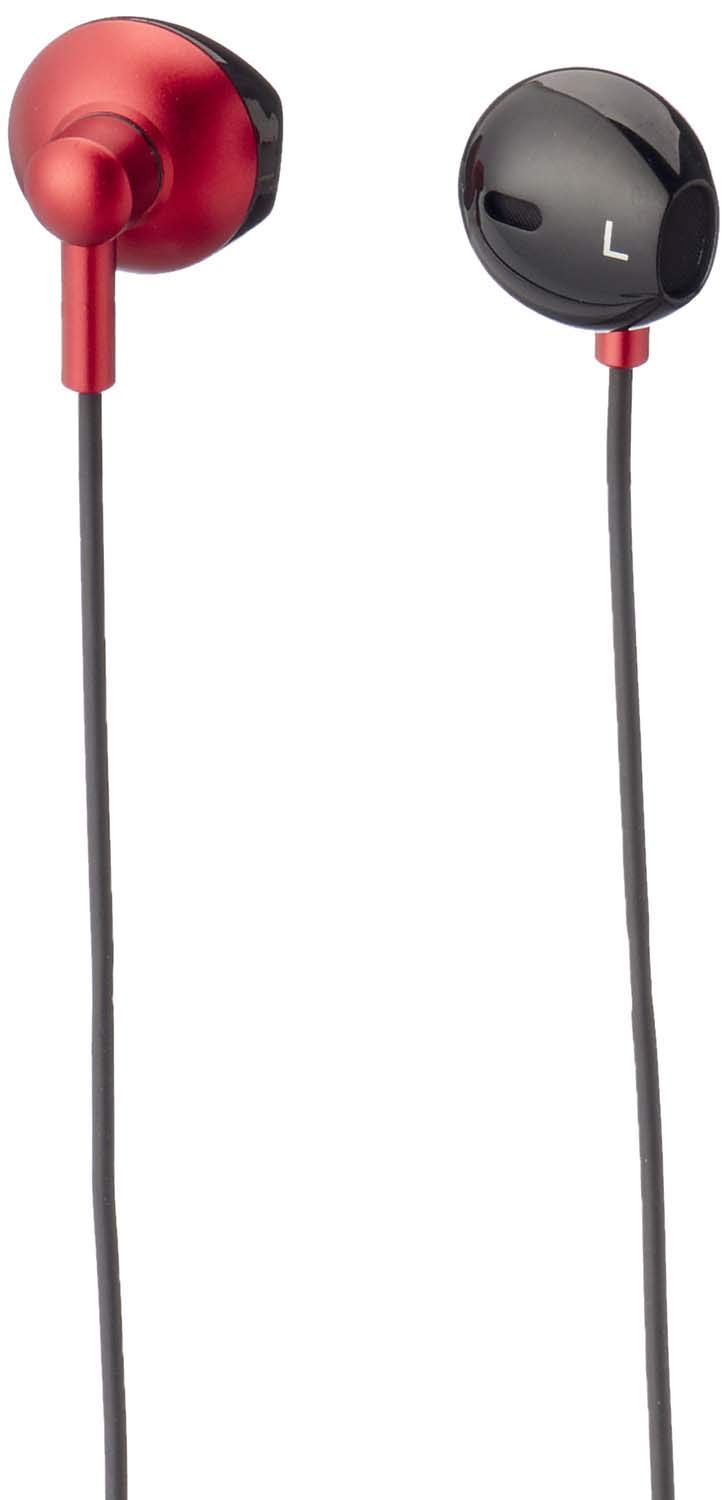
شڪل 1: Havit IX-102 Wired In-Ear Headphones. This image shows the complete set of in-ear headphones, featuring the earbuds, cable, and 3.5mm audio jack.

شڪل 2: Cable with Integrated Control Module. This image highlights the cable section that includes the microphone and a potential control button for managing audio and calls.

شڪل 3: 3.5mm Audio Jack. A close-up view of the standard 3.5mm connector used to plug the headphones into compatible audio devices.

شڪل 4: Replacement Ear Cushions. This image displays the various sizes of silicone ear cushions provided for a comfortable and secure fit.
سيٽ اپ ڪريو
- ڪنن جا کشن چونڊيو: Choose the ear cushion size that provides the most comfortable and secure fit for your ears. A good seal enhances sound quality and bass response. Gently attach the selected ear cushions to the earphone nozzles.
- ڊوائيس سان ڳنڍيو: Insert the 3.5mm audio jack firmly into the headphone port of your audio device (smartphone, tablet, laptop, MP3 player, etc.). Ensure the jack is fully inserted to prevent audio issues.
- ائرفون پائڻ: Place the earphones into your ears. Adjust them until they feel comfortable and provide a good seal.
آپريٽنگ هدايتون
The Havit IX-102 headphones feature an in-line control module for basic audio and call management. Functionality may vary slightly depending on your connected device.
- موسيقي هلايو/روڪ ڪريو: Press the button on the control module once to play or pause the current track.
- جواب/آخر ڪال: جڏهن ڪو ڪال اچي، جواب ڏيڻ لاءِ هڪ ڀيرو بٽڻ دٻايو. ڪال دوران، ڪال ختم ڪرڻ لاءِ هڪ ڀيرو بٽڻ دٻايو.
- ڪال رد ڪريو: ايندڙ ڪال کي رد ڪرڻ لاءِ تقريباً 2 سيڪنڊن لاءِ بٽڻ کي دٻايو ۽ رکو.
- اڳيون ٽريڪ: ايندڙ گيت تي وڃڻ لاءِ بٽڻ کي ٻه ڀيرا جلدي دٻايو.
- پويون ٽريڪ: Press the button three times quickly to go back to the previous song.
- مائڪرو فون استعمال: The integrated microphone allows for hands-free communication during calls. Ensure the microphone is positioned clearly for optimal voice pickup.
Note: Volume control is typically managed directly on your connected audio device.
سار سنڀال
Proper care will extend the life of your Havit IX-102 headphones.
- ڪنن جي کشن جي صفائي: Remove the silicone ear cushions and wash them gently with mild soap and water. Rinse thoroughly and allow them to air dry completely before reattaching.
- Cleaning Earphones: Use a soft, dry, lint-free cloth to wipe the earphone bodies. Do not use harsh chemicals or abrasive materials. Avoid getting moisture into the speaker grilles.
- ڪيبل جي سنڀال: Avoid sharp bends, twists, or excessive pulling on the cable. Store the headphones neatly to prevent tangling.
- اسٽوريج: When not in use, store your headphones in a clean, dry place, away from extreme temperatures and direct sunlight.
مشڪلاتون
جيڪڏهن توهان کي پنهنجي هيڊفونز سان مسئلا درپيش اچن ٿا، ته هيٺ ڏنل عام مسئلن ۽ حلن جو حوالو ڏيو:
| مسئلو | ممڪن سبب | حل |
|---|---|---|
| ڪوبه آواز يا گهٽ حجم نه |
|
|
| Sound is distorted or intermittent |
|
|
| مائڪرو فون ڪم نه ڪري رهيو آهي |
|
|
وضاحتون
| برانڊ | حوت |
| ماڊل نمبر | IX-102 |
| رنگ | ڪارو ۽ ڳاڙهو |
| هيڊفون فارم فيڪٽر | ڪن ۾ |
| رابطي ٽيڪنالاجي | وائرڊ |
| ڪنيڪٽر جو قسم | 3.5mm جيڪ |
| ڪيبل ڊگھائي | 1.2 ميٽر |
| مواد جو قسم | پلاسٽڪ |
| شيءِ جو وزن | 60 گرام |
| شامل اجزاء | ڪن کشن |
| مطابقت رکندڙ ڊوائيسز | Multiple devices with 3.5mm audio jack |
وارنٽي ۽ سپورٽ
For warranty information or technical support, please refer to the documentation included with your purchase or contact Havit customer service directly. Contact details can typically be found on the manufacturer's official webسائيٽ يا پراڊڪٽ پيڪنگنگ.
ڪنهن به وارنٽي دعوائن لاءِ خريداري جو ثبوت رکو.


