1. تعارف
This manual provides detailed instructions for the Amazon Basics Aluminum Type-C Docking Station. This device expands the connectivity of your USB-C enabled laptop or tablet, offering a wide range of ports for various peripherals and external displays. Please read this manual thoroughly before use to ensure proper operation and to maximize the product's functionality.
2. مصنوعات جون خاصيتون
- 11-in-1 Multi-Port Design: Integrates Mini DisplayPort, HDMI, VGA, 3 USB-A ports, Ethernet, SD/TF card reader, 3.5mm audio jack, and a Type-C charging port (PD 100W).
- هاءِ ريزوليوشن وڊيو آئوٽ پُٽ: Supports Ultra HD 4K output via Mini DisplayPort/HDMI and Full HD 1080P via VGA, allowing for mirroring or extending your display to HDTVs, monitors, or projectors. Note: 4K resolution is supported at 30Hz refresh rate.
- تيز ڊيٽا جي منتقلي: Three USB 3.0 A ports provide data transfer speeds up to 5Gbps, backward compatible with USB 2.0/1.0.
- Stable Network Connection: 1000Mbps RJ45 Ethernet port ensures a fast and reliable wired network connection.
- Universal Card Reader: Integrated SD and TF slots allow simultaneous reading of universal SD and Micro SD memory cards.
- پاور پهچائڻ: Type-C charging port supports Power Delivery (PD) up to 100 watts for charging your host device.
- آڊيو ڪنيڪشن: هيڊفون يا اسپيڪر لاءِ 3.5 ايم ايم آڊيو جيڪ.
- پائيدار تعمير: Features an aluminum pedestal-style housing for enhanced durability and heat dissipation.
3. پيڪيج مواد
- Amazon Basics Aluminum Type-C Docking Station
- استعمال ڪندڙ دستي
4. پراڊڪٽ ختمview ۽ پورٽ لي آئوٽ
Familiarize yourself with the various ports and their functions on your docking station.

تصوير: ويجهو تصوير view of the Amazon Basics Type-C Docking Station's ports, including Ethernet, Mini DisplayPort, HDMI, VGA, and USB-C.
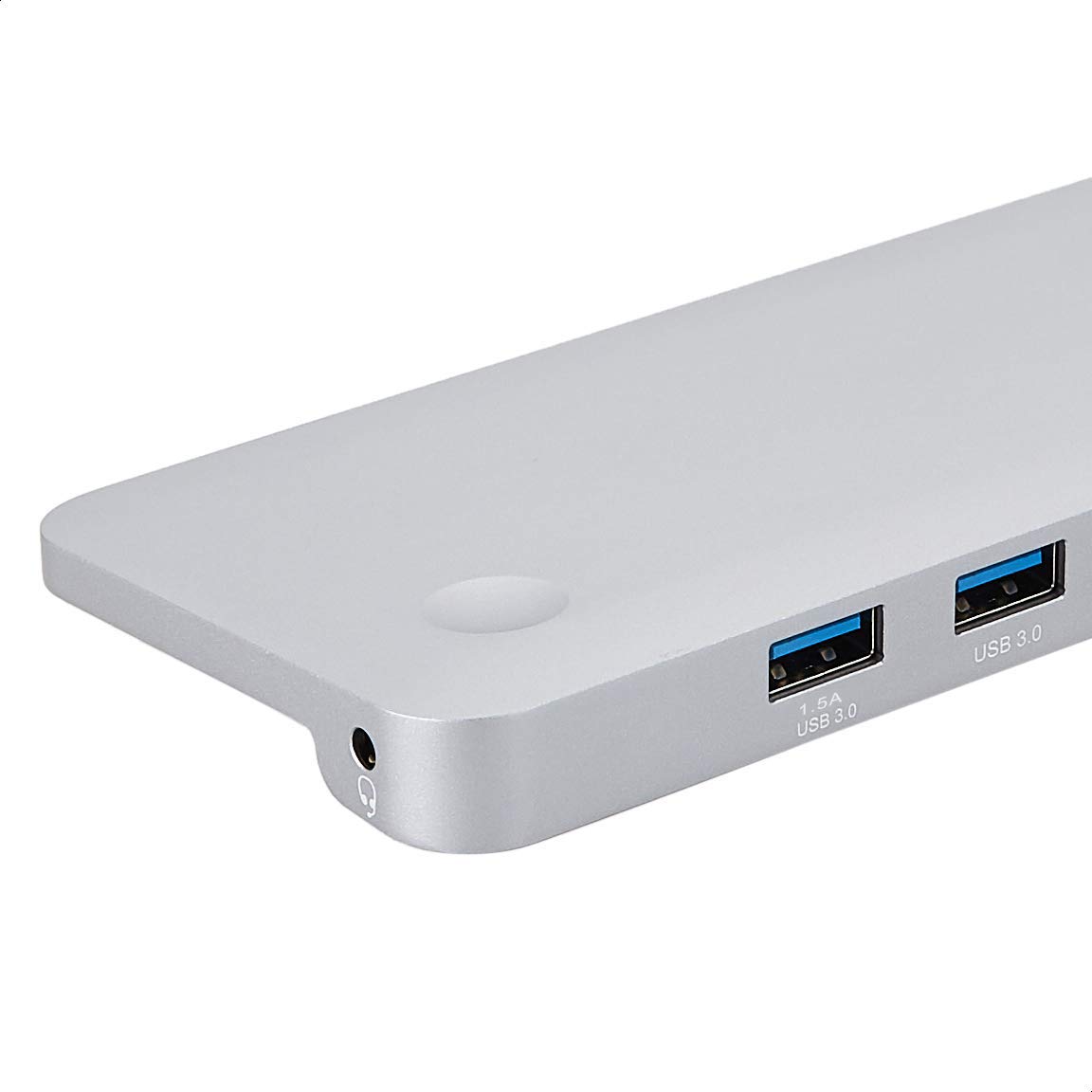
تصوير: تفصيلي view of the USB 3.0 ports and 3.5mm audio jack on the Amazon Basics Type-C Docking Station.
- USB-C Host Connector: Connects to your laptop or tablet's USB-C port.
- USB 3.0 بندرگاهن (x3): For connecting USB devices such as external hard drives, keyboards, mice, or USB flash drives.
- SD ڪارڊ سلاٽ: For reading standard SD memory cards.
- TF Card Slot (Micro SD): For reading Micro SD memory cards.
- RJ45 Ethernet پورٽ: وائرڊ نيٽ ورڪ ڪنيڪشن لاءِ.
- ميني ڊسپلي پورٽ: ٻاهرين ڊسپلي سان ڳنڍڻ لاءِ.
- HDMI پورٽ: ٻاهرين ڊسپلي سان ڳنڍڻ لاءِ.
- VGA پورٽ: ٻاهرين ڊسپلي سان ڳنڍڻ لاءِ.
- 3.5mm آڊيو جيڪ: هيڊفون يا اسپيڪر ڳنڍڻ لاءِ.
- USB-C PD چارجنگ پورٽ: For connecting a USB-C power adapter to charge your host device and power the docking station.
5. سيٽ اپ جون هدايتون
پنھنجي ڊاکنگ اسٽيشن قائم ڪرڻ لاءِ ھيٺين قدمن تي عمل ڪريو:
- هوسٽ ڊيوائس سان ڳنڍيو: Plug the integrated USB-C host connector cable from the docking station into an available USB-C port on your laptop or tablet. Ensure your host device's USB-C port supports DisplayPort Alt Mode (DP Alt Mode) for video output functionality.
- پاور ڳنڍيو (اختياري پر سفارش ٿيل): If your host device requires charging or if you are connecting power-intensive peripherals, connect your USB-C power adapter (up to 100W) to the USB-C PD Charging Port on the docking station. This will charge your host device and provide stable power to the docking station and connected peripherals.
- پردي سان ڳنڍڻ: Connect your desired peripherals (e.g., external monitors, USB devices, Ethernet cable, SD/TF cards, audio devices) to the corresponding ports on the docking station.

Image: Amazon Basics Type-C Docking Station connected to a laptop, with multiple peripherals like a USB drive and external display cables plugged in.
6. آپريٽنگ هدايتون
6.1. وڊيو آئوٽ
- Connect your monitor or projector to the HDMI, Mini DisplayPort, or VGA port.
- Your operating system should automatically detect the external display. You may need to adjust display settings (e.g., extend, duplicate) in your computer's display preferences.
- The docking station supports 4K resolution at 30Hz refresh rate via HDMI and Mini DisplayPort. For optimal performance, ensure your display and cables support the desired resolution and refresh rate.
- Dual video display is supported, allowing you to mirror or expand your screen across multiple monitors.
6.2. USB Data Transfer
- Plug your USB devices into the USB 3.0 ports.
- The ports support data transfer speeds up to 5Gbps.
6.3. Ethernet ڪنيڪشن
- Connect an Ethernet cable from your router or modem to the RJ45 Ethernet port on the docking station.
- Your computer should automatically establish a wired network connection.
6.4. ايس ڊي/ٽي ايف ڪارڊ ريڊر
- Insert your SD or TF (Micro SD) card into the corresponding slot.
- The cards will appear as removable drives on your computer, allowing you to access and transfer files. Both slots can be used simultaneously.
6.5. آڊيو آئوٽ
- Connect your headphones or speakers to the 3.5mm audio jack.
- You may need to select the docking station as the default audio output device in your computer's sound settings.
6.6. Power Delivery (PD)
- Connect your laptop's USB-C power adapter to the USB-C PD Charging Port on the docking station.
- This port supports up to 100W power delivery to charge your host device while using the docking station.
7. مطابقت
This docking station is compatible with a wide range of USB-C enabled devices, including but not limited to:
- MacBook Pro 2018/2017/2016
- iPad پرو 2018
- Mac mini 2018
- MacBook ايئر
- iMac 2017
- سامسنگ نوٽ 9
- HUAWEI MateBook X
- ڊيل ايڪس پي ايس 13
- ThinkPad
- Chromebook
اهم: This product functions only with computers that support DisplayPort Alt Mode (DP Alt Mode) via their USB-C port. Please verify your computer's specifications for compatibility before use.
8. مسئلا حل ڪرڻ
- ڪابه ڊسپلي آئوٽ پٽ ناهي:
- Ensure your host device's USB-C port supports DisplayPort Alt Mode.
- Check all cable connections (USB-C to host, video cable to monitor).
- Verify the external monitor is powered on and set to the correct input source.
- توھان جي ڪمپيوٽر کي ٻيهر شروع ڪرڻ جي ڪوشش ڪريو.
- 4K Resolution Not Working at 60Hz:
- This docking station supports 4K resolution at a maximum refresh rate of 30Hz. If your monitor is set to 4K@60Hz, it will not display correctly. Adjust your display settings to 4K@30Hz or a lower resolution with a higher refresh rate if desired.
- USB Devices Not Recognized or Disconnecting:
- Ensure the docking station is receiving sufficient power. Connect a USB-C power adapter to the PD port if you are using multiple power-intensive USB devices.
- USB ڊوائيس کي سڌو سنئون پنهنجي ڪمپيوٽر سان ڳنڍڻ جي ڪوشش ڪريو ته جيئن تصديق ڪري سگهجي ته اهو ڪم ڪري رهيو آهي.
- Reconnect the docking station to your computer.
- No Network Connection via Ethernet:
- Check the Ethernet cable connection to both the docking station and your router/modem.
- Verify your network settings on your computer.
- پڪ ڪريو ته توهان جو روٽر/موڊيم صحيح طريقي سان ڪم ڪري رهيو آهي.
- ڪوبه آڊيو آئوٽ:
- Ensure your headphones or speakers are properly connected to the 3.5mm audio jack.
- Check your computer's sound settings and select the docking station as the default audio output device.
- Host Device Not Charging:
- Ensure a compatible USB-C power adapter is connected to the docking station's USB-C PD Charging Port.
- Verify that your host device supports USB-C Power Delivery.
- نقصان لاءِ پاور اڊاپٽر ۽ ڪيبل چيڪ ڪريو.
9. وضاحتون
| خاصيت | تفصيل |
|---|---|
| برانڊ | Amazon بنياديات |
| ماڊل نمبر | UTC-DOCK01-PRO |
| رنگ | ڀورو |
| طول و عرض (LxWxH) | 28 x 7.5 x 1.4 Centimeters (11.02 x 2.95 x 0.55 Inches) |
| شيءِ جو وزن | 317 گرام (0.32 ڪلوگرام) |
| ڪُل بندرگاهون | 11 |
| USB بندرگاهن | 3 x USB 3.0 ٽائپ-اي |
| ويڊيو آئوٽ پورٽ | 1 x HDMI, 1 x Mini DisplayPort, 1 x VGA |
| HDMI قرارداد | 4K@30Hz تائين |
| Mini DisplayPort Resolution | 4K@30Hz تائين |
| Ethernet پورٽ | RJ45 Gigabit Ethernet (10/100/1000Mbps) |
| ڪارڊ ريڊر | SD and TF (Micro SD) slots, simultaneous read |
| آڊيو پورٽ | 3.5mm آڊيو جيو |
| USB-C PD چارجنگ پورٽ | 100 واٽ تائين |
| ھارڊويئر انٽرفيس | Ethernet, HDMI, Mini DisplayPort, VGA, USB-A, USB-C, SD/TF, Audio |
10. سار سنڀال
- صفائي: Use a soft, dry cloth to clean the docking station. Avoid using liquid cleaners or aerosols.
- اسٽوريج: ڊوائيس کي سڌي سج جي روشني ۽ انتهائي گرمي پد کان پري ٿڌي، سڪل جاءِ تي رکو.
- سنڀالڻ: Avoid dropping or subjecting the device to strong impacts. Do not attempt to disassemble or modify the docking station.
11. حفاظت جي ڄاڻ
- Keep the device away from water, fire, and high humidity environments.
- ڊوائيس کي انتهائي گرمي پد تي ظاهر نه ڪريو.
- Use only compatible power adapters and cables.
- ٻارن جي پهچ کان پري رکو.
- جيڪڏهن ڊوائيس خراب ٿي وئي آهي يا خراب ٿي وئي آهي، ته فوري طور تي استعمال بند ڪريو ۽ ڪسٽمر سپورٽ سان رابطو ڪريو.
12. وارنٽي ۽ سپورٽ
This Amazon Basics product comes with a 1 سالن جي محدود وارنٽي from the date of purchase. This warranty covers manufacturing defects and workmanship under normal use. It does not cover damage caused by misuse, accident, modification, or unauthorized repair.
For warranty claims, technical support, or further assistance, please contact Amazon Basics customer service through your Amazon purchase history or the official Amazon Basics support channels.


