1. تعارف
This manual provides detailed instructions for the installation, operation, and maintenance of your SONOFF Zigbee Smart Plug S31 Lite. Please read this manual thoroughly before using the product to ensure proper function and safety.
اهم خاصيتون:
- Simple Setup and Use: Easy pairing with a compatible Zigbee hub.
- سمارٽ ڪنٽرول: Control connected appliances via smartphone app and set schedules.
- وائس ڪنٽرول: هينڊز فري آپريشن لاءِ Amazon Alexa ۽ Google Home سان مطابقت رکندڙ.
- Zigbee Repeater Function: Extends your Zigbee network range.
- ETL تصديق ٿيل: Ensures product safety and quality.
- ڪمپيڪٽ ڊيزائن: Does not obstruct adjacent outlets.

Image 1.1: The SONOFF S31 Lite Zigbee Smart Plug in a standard wall outlet.

تصوير 1.2: تفصيلي view of the SONOFF S31 Lite Smart Plug, showing its components and safety features.
2. سيٽ اپ جون هدايتون
The SONOFF S31 Lite Zigbee Smart Plug requires a compatible Zigbee hub (e.g., SmartThings, Amazon Echo Plus) for smart functionality.
2.1 زگبي حب سان جوڙڻ
- Plug the SONOFF S31 Lite Smart Plug into a standard wall outlet.
- Ensure your Zigbee hub is powered on and in pairing mode. Refer to your hub's manual for specific instructions on enabling pairing mode.
- پنهنجي اسمارٽ فون تي eWeLink ايپ کوليو.
- Tap the "+" icon in the upper right corner to add a new device.
- Follow the on-screen instructions to discover and add the SONOFF S31 Lite Smart Plug to your network. This typically involves selecting the Zigbee device type and confirming the pairing process.
- Once successfully paired, the device will appear in your eWeLink App and be controllable through your Zigbee hub.

Image 2.1: Visual guide for adding a device using the eWeLink app.
2.2 Hub Compatibility
The SONOFF S31 Lite is designed to work with various Zigbee hubs, including:
- SmartThings Hub
- Amazon Echo Plus
- Amazon Echo Show (2nd Gen)
- Amazon ايڪو اسٽوڊيو

Image 2.2: Compatibility diagram for the SONOFF Zigbee Smart Plug.
3. آپريٽنگ هدايتون
3.1 ايپ ڪنٽرول
Once paired, you can control the smart plug and connected devices through the eWeLink app:
- آن / آف ڪنٽرول: Tap the power icon in the app to toggle the connected appliance on or off.
- شيڊيولنگ: Set custom schedules, timers, or countdowns for automatic operation.
- پاور مانيٽرنگ: View real-time power consumption (if supported by your specific model and app version).

Image 3.1: Controlling a device via the eWeLink app interface.

تصوير 3.2: اڳوڻيample of setting a schedule for an appliance.
3.2 وائس ڪنٽرول
Integrate your SONOFF S31 Lite with Amazon Alexa or Google Home for convenient voice commands. Ensure your Zigbee hub is linked to your voice assistant account.
- Amazon Alexa: After linking your eWeLink or SmartThings account to Alexa, you can use commands like "Alexa, turn on the [device name]" or "Alexa, turn off the [device name]."
- گوگل هوم: Similar integration allows commands such as "Hey Google, turn on the [device name]."
Video 3.1: Demonstration of controlling SONOFF devices using Alexa voice commands.
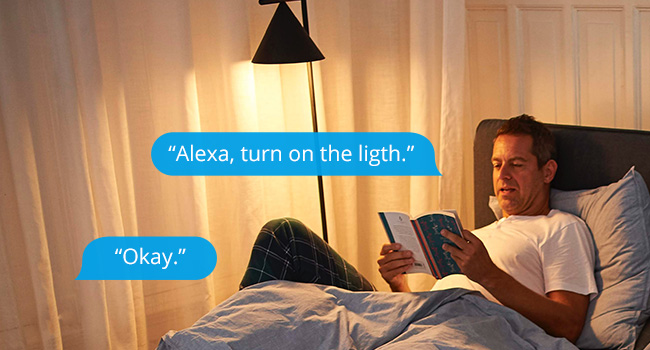
تصوير 3.3: اڳوڻيample of using Alexa to control a light connected to the smart plug.
3.3 دستي ڪنٽرول
The smart plug features a physical button on its side. Press this button to manually toggle the power of the connected appliance on or off. This action will also update the status in your app.

Image 3.4: The SONOFF S31 Lite Smart Plug used with a lamp, illustrating its versatility.
4. سار سنڀال
To ensure the longevity and optimal performance of your SONOFF Zigbee Smart Plug S31 Lite:
- ڊوائيس کي صاف ۽ مٽيءَ کان پاڪ رکو. صفائي لاءِ سڪل، نرم ڪپڙو استعمال ڪريو.
- ڊوائيس کي وڌيڪ نمي يا انتهائي گرمي پد تي ظاهر ڪرڻ کان بچاء.
- ڊوائيس کي الڳ ڪرڻ يا مرمت ڪرڻ جي ڪوشش نه ڪريو. مدد لاءِ ڪسٽمر سپورٽ سان رابطو ڪريو.
- Ensure the connected appliance's power consumption does not exceed the smart plug's maximum rating (15 Amps).
5. مسئلا حل ڪرڻ
If you encounter issues with your SONOFF Zigbee Smart Plug S31 Lite, consider the following:
- ڊوائيس جواب نه ڏئي رهيو آهي:
- Check if the smart plug is properly plugged into the outlet and receiving power.
- Verify that your Zigbee hub is online and functioning correctly.
- Ensure the smart plug is within range of your Zigbee hub or another Zigbee repeater.
- Try re-pairing the device with your Zigbee hub.
- ايپ ڪنيڪشن جا مسئلا:
- Confirm your smartphone has a stable internet connection.
- eWeLink ايپ کي ٻيهر شروع ڪريو.
- ايپ اپڊيٽس لاءِ چيڪ ڪريو.
- وائس ڪنٽرول ڪم نه ڪري رهيو آهي:
- Ensure your Zigbee hub is correctly linked to your voice assistant (Alexa/Google Home) account.
- Verify the device name used in voice commands matches the name in your app.
- Check your voice assistant's settings for any connectivity issues.
If problems persist, please refer to the official SONOFF support resources or contact customer service.
6. وضاحتون
| خاصيت | تفصيل |
|---|---|
| ماڊل نمبر | S31 Lite zb |
| پيداوار جي ماپ | 1.57 x 3 x 1.3 انچ |
| شيءِ جو وزن | 3.21 اونس |
| موجوده درجه بندي | 15 Amps |
| مواد | Copper (internal components), PC V0 (shell) |
| رابطي | زگبي پروٽوڪول (حب گهربل) |
| مطابقت | SmartThings, Amazon Echo Plus, Alexa, Google Home |
| چڙهڻ جو قسم | پلگ ان جبل |
7. وارنٽي ۽ سپورٽ
وارنٽي جي معلومات، ٽيڪنيڪل سپورٽ، يا وڌيڪ مدد لاءِ، مھرباني ڪري سرڪاري SONOFF جو دورو ڪريو. website or contact their customer service department. Details can typically be found on the product packaging or the SONOFF official webسائيٽ.


