تعارف
This instruction manual provides detailed information on the installation, operation, and maintenance of your Blaupunkt DENVER 212 DAB BT car radio. Please read this manual thoroughly before using the device to ensure proper functionality and to prevent damage. Keep this manual for future reference.

Image: Blaupunkt DENVER 212 DAB BT product banner.
حفاظت جي ڄاڻ
- Ensure proper installation by a qualified professional to avoid electrical hazards or damage to your vehicle.
- ڊوائيس کي اهڙي طريقي سان نه هلايو جيڪو توهان کي ڊرائيونگ کان پريشان ڪري. هميشه روڊ جي حفاظت کي ترجيح ڏيو.
- يونٽ کي انتهائي گرمي پد، سڌي سج جي روشني، يا نمي جي سامهون آڻڻ کان پاسو ڪريو.
- Use only approved accessories and parts.
- Disconnect the vehicle's battery before installation to prevent short circuits.
پيڪيج مواد
پڪ ڪريو ته سڀئي شيون پيڪيج ۾ موجود آهن:
- Blaupunkt DENVER 212 DAB BT Car Radio Unit
- چڙهائي وارو فريم
- وائرنگ هارنس (ISO ڪنيڪٽر)
- DAB+ Antenna (if included with specific models)
- خارجي مائڪروفون
- Disassembly Keys
- استعمال ڪندڙ جو دستياب (ھي دستاويز)
پيداوار ختمview
The Blaupunkt DENVER 212 DAB BT is a 1-DIN car radio featuring DAB+ digital radio, Bluetooth hands-free calling, and media streaming. It offers a robust design and short installation depth for versatile vehicle compatibility.

Image: Front panel of the Blaupunkt DENVER 212 DAB BT, showing display, control knobs, and buttons.
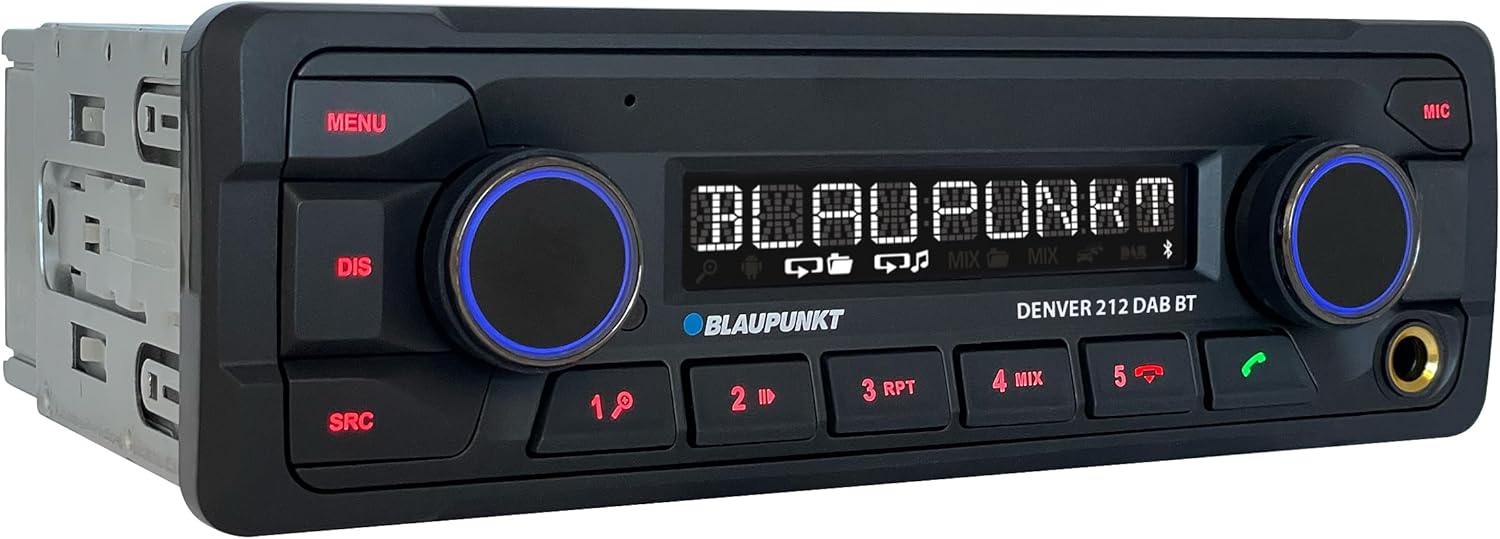
تصوير: زاويه view of the Blaupunkt DENVER 212 DAB BT, highlighting its compact design.
فرنٽ پينل ڪنٽرول:
- مينيو بٽڻ: سسٽم سيٽنگون ۽ اختيارن تائين رسائي حاصل ڪري ٿو.
- DIS بٽڻ: ڊسپلي جي معلومات تبديل ڪري ٿو.
- ايس آر سي بٽڻ: Selects audio source (Radio, DAB, Bluetooth, USB, AUX).
- Volume Knob (Left): آڊيو جي مقدار کي ترتيب ڏئي ٿو. خاموش/انموٽ ڪرڻ لاءِ دٻايو.
- Selection Knob (Right): مينيو کي نيويگيٽ ڪري ٿو ۽ آپشن چونڊي ٿو.
- پري سيٽ بٽڻ (1-6): Store and recall radio stations, control media playback.
- Call Buttons (Green/Red): Answer/end Bluetooth calls.
- USB پورٽ: ميڊيا پلے بیک لاءِ USB اسٽوريج ڊوائيسز ڳنڍيو.
- AUX ان پٽ (3.5mm جڪ): ٻاهرين آڊيو ذريعن کي ڳنڍيو.
سيٽ اپ ۽ تنصيب
تنصيب جا مرحلا:
- تياري: پنهنجي گاڏي جي بيٽري جي منفي ٽرمينل کي ڌار ڪريو.
- چڙهڻ: Insert the supplied mounting frame into the vehicle's 1-DIN opening. Bend the tabs to secure it.
- وائرنگ: Connect the wiring harness according to the diagram below. Ensure all connections are secure.
- Antenna ڪنيڪشن: Connect the FM antenna and the DAB+ antenna (if applicable) to the corresponding inputs on the rear of the radio.
- مائڪروفون ڪنيڪشن: Connect the external microphone to the designated input for optimal hands-free call quality.
- يونٽ داخل ڪريو: Slide the radio unit into the mounting frame until it clicks into place.
- فائنل چيڪ: Reconnect the vehicle's battery and test the unit.
Wiring Diagram (General):
| تار جو رنگ | فنڪشن |
|---|---|
| پيلو | مسلسل 12V (بيٽري) |
| ڳاڙهو | تبديل ٿيل 12V (آگيشن) |
| ڪارو | زمين |
| نيرو | پاور اينٽينا / Ampلائفائر ريموٽ |
| نارنگي / اڇو | روشني |
| Speaker Wires (e.g., White, Grey, Green, Purple pairs) | Connect to vehicle speakers (Front Left, Front Right, Rear Left, Rear Right) |
| اسٽيئرنگ ويل ڪنٽرول ان پٽ | Connect to vehicle's steering wheel control interface (if applicable) |
Note: Specific wire colors may vary. Always refer to your vehicle's wiring diagram and the radio's included diagram for precise connections.

Image: The Blaupunkt DENVER 212 DAB BT car radio seamlessly integrated into a vehicle's dashboard.
آپريٽنگ هدايتون
1. بنيادي ڪم:
- پاور آن / آف: Press the volume knob (left) briefly to turn the unit on. Press and hold to turn off.
- حجم ڪنٽرول: Rotate the volume knob (left) to adjust the sound level.
- ذريعو چونڊ: کي دٻايو ايس آر سي button repeatedly to cycle through available audio sources (FM, DAB, Bluetooth Audio, USB, AUX).
- مينيو نيويگيشن: کي دٻايو مينيو button to enter the main menu. Use the right knob to navigate and select options.
2. Radio (FM/DAB+):
- Selecting Radio Mode: دٻايو ايس آر سي until FM or DAB is selected.
- خودڪار ترتيب: In FM/DAB mode, press and hold the right knob or seek buttons (if available) to automatically search for stations.
- دستي ترتيب Briefly press the right knob or seek buttons to fine-tune frequencies.
- اسٽورنگ سيٽون: Tune to a desired station, then press and hold one of the numeric preset buttons (1-6) until you hear a confirmation beep.
- وري يادگار سيٽون: Briefly press a numeric preset button (1-6) to recall a stored station.
3. بلوٽوٿ آپريشن:
- هڪ ڊوائيس جوڙڻ:
- پڪ ڪريو ته توهان جي موبائل ڊوائيس تي بلوٽوت فعال آهي.
- Select "Bluetooth" as the source on the car radio. The display will show "PAIRING".
- On your mobile device, search for Bluetooth devices and select "BLAUPUNKT DENVER".
- جيڪڏهن اشارو ڪيو وڃي ته ٻنهي ڊوائيسز تي جوڙي جي تصديق ڪريو.
- هينڊ فري ڪالنگ:
- ڪال جو جواب ڏيڻ سائي ڪال بٽڻ کي دٻايو.
- ڪال ختم ڪرڻ: ڳاڙهي ڪال بٽڻ کي دٻايو.
- ڪال ڪرڻ: Dial from your phone; audio will transfer to the car radio.
- بلوٽوٿ آڊيو اسٽريمنگ: Once paired, select "Bluetooth Audio" as the source. Play music from your mobile device, and it will stream through the car radio. Use the preset buttons (e.g., 4 for MIX, 5 for RPT) for playback control (play/pause, skip tracks).
4. USB and AUX Input:
- USB پلے بیک: Insert a USB storage device into the front USB port. The unit will automatically switch to USB mode and begin playback.
- AUX ان پٽ: Connect an external audio device (e.g., MP3 player) to the 3.5mm AUX input jack using an audio cable. Select "AUX" as the source.
5. Sound Settings (Equalizer):
- کي دٻايو مينيو button, then navigate to "AUDIO" or "EQ" settings.
- Adjust bass, treble, balance, and fader settings to your preference.
- Pre-set equalizer modes (e.g., Pop, Rock, Classic) may be available.
وڊيو: هڪ اوورview of the Blaupunkt DENVER 212 DAB BT car radio's features and basic operation.
سار سنڀال
- صفائي: يونٽ جي سامهون واري پينل کي صاف ڪرڻ لاءِ نرم، سڪل ڪپڙو استعمال ڪريو. رگڙيندڙ ڪلينر يا سالوينٽس استعمال نه ڪريو.
- USB پورٽ: USB پورٽ کي مٽي ۽ ملبي کان پاڪ رکو.
- فرم ويئر اپڊيٽس: سرڪاري بلائوپنڪٽ چيڪ ڪريو webتوهان جي ماڊل لاءِ ڪنهن به دستياب فرم ويئر اپڊيٽ لاءِ وقتاً فوقتاً سائيٽ چيڪ ڪريو.
مشڪلاتون
| مسئلو | ممڪن سبب | حل |
|---|---|---|
| طاقت نه آهي | Blown fuse; incorrect wiring (constant/switched 12V); loose connection. | Check vehicle fuses and the radio's fuse. Verify wiring connections, especially constant and ignition power. Ensure the unit is properly seated. |
| آواز ڪونهي | آواز تمام گهٽ آهي؛ خاموشي چالو آهي؛ غلط اسپيڪر وائرنگ؛ ampزندگي ڏيندڙ مسئلا. | Increase volume. Check if mute is active. Verify speaker connections. If an external ampجيڪڏهن لائفائر استعمال ڪيو ويو آهي، ته ان جي طاقت ۽ ڪنيڪشن چيڪ ڪريو. |
| Poor radio reception (FM/DAB) | Antenna not connected; damaged antenna; weak signal area. | Ensure antenna is securely connected. Check antenna for damage. Consider a stronger antenna or signal booster if in a weak signal area. For DAB+, ensure the DAB antenna is correctly installed and positioned. |
| بلوٽوٿ ڪنيڪشن جا مسئلا | Device not in pairing mode; incorrect wiring (ignition+ and constant+); interference. | Ensure both devices are in pairing mode. Delete previous pairings and try again. Verify that the constant 12V and switched 12V wires are correctly connected to the radio, as improper wiring can affect Bluetooth stability. Move away from other Bluetooth devices. |
| USB جي سڃاڻپ ناهي | اڻ سڌريل file format; USB drive not formatted correctly; damaged USB drive. | آڊيو کي يقيني بڻايو files are in supported formats (e.g., MP3, WMA). Format the USB drive to FAT32. Try a different USB drive. |
وضاحتون
| خاصيت | تفصيل |
|---|---|
| برانڊ | BLAUPUNKT |
| ماڊل نمبر | Denver 212 DAB BT |
| رنگ | ڪارو |
| رابطي ٽيڪنالاجي | بلوٽوٿ، يو ايس بي |
| ڪنيڪٽر جو قسم | 3.5 ايم ايم جڪ، يو ايس بي |
| خاص خاصيتون | DAB, RDS, Equalizer, Bluetooth Hands-free |
| مطابقت رکندڙ ڊوائيسز | اسمارٽ فون |
| ڪل USB بندرگاهن | 1 |
| آڊيو آئوٽ پٽ موڊ | اسٽيريو |
| چوڌاري آواز چينل جي جوڙجڪ | 4.0 |
| پيداوار جي ماپ | 12D x 17.8W x 5.2H سينٽي ميٽر |
| ٺاهيندڙ | بلوپنڪٽ |
| اسپيئر پارٽس جي دستيابي | 1 سال |
وارنٽي ۽ سپورٽ
This Blaupunkt product comes with a manufacturer's warranty. For specific warranty terms and conditions, please refer to the warranty card included with your product or visit the official Blaupunkt website. For technical support, troubleshooting assistance, or spare parts inquiries, please contact Blaupunkt customer service through their official channels.
اسپيئر پارٽس عام طور تي خريداري جي تاريخ کان 1 سال تائين موجود هوندا آهن.
سرڪاري بلاپنڪٽ Webسائيٽ: www.blaupunkt.com