1. تعارف
This manual provides detailed instructions for the safe and effective operation, maintenance, and troubleshooting of your RovyVon Aurora A5 G4 Rechargeable Keychain Flashlight. Please read this manual thoroughly before using the product to ensure optimal performance and longevity.

Image 1.1: The RovyVon Aurora A5 G4 Rechargeable Keychain Flashlight, showcasing its compact design and metal button.
2. پراڊڪٽ ختمview
2.1 اهم خاصيتون
- 4th Generation Design: Features a metal button for improved tactile feedback and operation.
- Magnetic Pocket Clip and Base: Allows for hands-free use and versatile attachment.
- USB-C فاسٽ چارجنگ: Equipped with a 330 mAh Lithium Polymer battery for efficient recharging.
- وڌايل رن ٽائم: Moonlight mode provides up to 72 hours of continuous operation.
- Upgraded Sidelights: Includes White Low, White High, Red, and Red Flash (Signal) modes. Red modes are designed for night vision preservation and signaling.
- ميموري موڊ: Remembers the last used main light mode if left on for more than 3 minutes.
- ڪمپيڪٽ اي ڊي سي ڊيزائن: Small and lightweight, suitable for everyday carry.
- Fluorescent Body: The flashlight body glows in the dark after exposure to light, aiding in location.
2.2 پيڪيج مواد
پڪ ڪريو ته سڀئي شيون پيڪيج ۾ موجود آهن:
- RovyVon Aurora A5 G4 Flashlight
- مقناطيسي پاڪيٽ ڪلپ
- مقناطيسي ڊيٽيچ ايبل بيس
- USB-C Port Cover (spare)
- Key Rings (2)
- استعمال ڪندڙ جي ھدايت وارو دستور
- وارنٽي ڪارڊ

Image 2.1: Included accessories for the Aurora A5 G4, including the magnetic clip, detachable base, USB-C cover, and key rings.
3. سيٽ اپ
3.1 بيٽري کي چارج ڪرڻ
The Aurora A5 G4 is equipped with a built-in 330 mAh Lithium Polymer battery and supports USB-C charging.
- ٽارچ جي پاسي تي USB-C چارجنگ پورٽ ڳوليو.
- Gently open the protective USB-C port cover.
- Connect a USB-C charging cable (not included) to the port and a power source (e.g., USB wall adapter, computer USB port).
- The indicator light will show charging status. Refer to the indicator light section for details.
- Once fully charged, disconnect the cable and securely close the USB-C port cover to protect against dust and moisture.

تصوير 3.1: ويجهو تصوير view of the USB-C charging port on the flashlight.
3.2 Attaching the Magnetic Clip and Base
The flashlight comes with a magnetic pocket clip and a magnetic detachable base for enhanced versatility.
- Magnetic Pocket Clip: Slide the clip onto the flashlight body in the desired orientation. This allows for attachment to pockets, belts, or the brim of a cap for hands-free illumination.
- Magnetic Detachable Base: The base can be attached to the tail end of the flashlight, providing a stable magnetic surface for mounting on metallic objects.
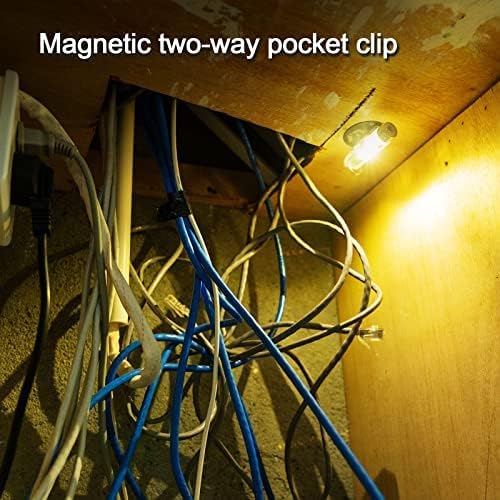
Image 3.2: The flashlight utilizing its magnetic base to attach to a metal surface, providing illumination for a work area.
4. آپريٽنگ هدايتون
4.1 Main Light Operation
The main light features multiple brightness levels.
- آن/بند ڪريو: Double-click the metal button to turn the main light on. Double-click again to turn it off.
- سائيڪل جا طريقا: While the main light is on, single-click the button to cycle through brightness levels (e.g., Low → Medium → High).
- Momentary On (Turbo): Press and hold the button from the OFF state to activate the highest brightness level (Turbo mode). Release the button to turn off. This mode is temporary and cannot be memorized.
- ميموري موڊ: If the main light is left on a specific mode for more than 3 minutes, the flashlight will remember this mode. The next time you turn on the main light (double-click), it will activate in the memorized mode.

Image 4.1: A hand demonstrating the momentary on feature by pressing and holding the button, activating the main light.
4.2 Sidelight Operation
The sidelights offer various utility and signaling modes.
- آن/بند ڪريو: Triple-click the metal button to turn the sidelights on. Triple-click again to turn them off.
- سائيڪل جا طريقا: While the sidelights are on, single-click the button to cycle through modes: White Low → White High → Red → Red Flash (Signal).
- Red Light Functionality: The red light modes are suitable for preserving night vision during activities like map reading or for signaling purposes.

Image 4.2: The flashlight attached to a backpack, emitting a red signal light, useful for visibility or emergencies.

Image 4.3: The natural white sidelight providing illumination for reading a book at close range, designed to be non-dazzling.
4.3 Hands-Free Use
The magnetic clip and base allow for various hands-free applications:
- Cap Light: Attach the flashlight to the brim of a cap using the pocket clip to convert it into a headlamp.
- مقناطيسي جبل: Use the magnetic base to secure the flashlight to metallic surfaces for stationary lighting.

Image 4.4: A person using the flashlight clipped to their cap, functioning as a hands-free headlamp for reading a map in low light conditions.
5. سار سنڀال
5.1 عام سنڀال
- Keep the flashlight clean and free from dirt and debris. Use a soft, dry cloth for cleaning.
- Avoid dropping the flashlight or subjecting it to strong impacts.
- Ensure the USB-C port cover is securely closed when not charging to prevent dust and moisture ingress.
5.2 بيٽري جي سنڀال
- Charge the battery regularly, even if the flashlight is not frequently used, to maintain battery health.
- ري چارج ڪرڻ کان اڳ بيٽري کي مڪمل طور تي ختم ڪرڻ کان پاسو ڪريو.
- جڏهن استعمال ۾ نه هجي ته ٽارچ کي ٿڌي، سڪل جاءِ تي محفوظ ڪريو.
5.3 Fluorescent Body
The fluorescent body of the flashlight will glow in the dark after being exposed to light. To maximize the glow effect, expose the flashlight to a bright light source for a few minutes.
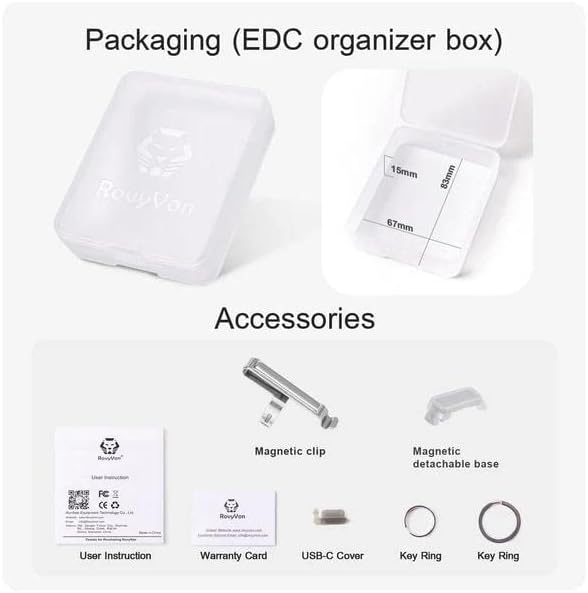
Image 5.1: The flashlight body emitting a green glow in a dark environment, demonstrating its fluorescent properties.
6. مسئلا حل ڪرڻ
| مسئلو | ممڪن سبب | حل |
|---|---|---|
| ٽارچ نه ٿي روشن ٿئي. | گھٽ بيٽري. | Charge the battery using a USB-C cable. |
| Flashlight gets excessively hot during use. | Prolonged use on highest brightness (Turbo mode). | Reduce brightness level. Turbo mode is designed for short bursts. If overheating persists on lower modes, discontinue use and contact support. |
| چارجنگ انڊيڪيٽر ڪم نه ڪري رهيو آهي. | Faulty cable or power source; loose connection. | Try a different USB-C cable or power adapter. Ensure the cable is securely connected. |
| Sidelights not activating. | غلط بٽڻ دٻائڻ جو سلسلو. | Ensure you are triple-clicking the button to activate sidelights. |
7. وضاحتون
| خاصيت | تفصيل |
|---|---|
| ماڊل | Aurora A5 G4 |
| برانڊ | رووي ون |
| مکيه روشني جي روشني | 420 Lumens تائين |
| رنگ جي درجه حرارت | 5000K (Nominal) |
| بيٽري جو قسم | 330 mAh Lithium Polymer (LiPo) |
| چارجنگ پورٽ | USB-C |
| مواد | پولي ڪاربونيٽ |
| طول و عرض (L x W x H) | 2.38" x 0.61" x 0.61" (60.45 ملي ميٽر x 15.49 ملي ميٽر x 15.49 ملي ميٽر) |
| وزن | 2.24 آونس (63.5 گرام) |
| پاڻي جي مزاحمت جي سطح | نه پاڻي مزاحمتي |
| خاص خاصيتون | Magnetic, Rechargeable, Red Light, Fluorescent Body |
8. وارنٽي ۽ سپورٽ
8.1 وارنٽي ڄاڻ
RovyVon products typically come with a warranty. Please refer to the included Warranty Card in your package for specific terms, conditions, and duration of the warranty for your Aurora A5 G4 flashlight. Retain your proof of purchase for warranty claims.
8.2 ڪسٽمر سپورٽ
For any questions, technical assistance, or support regarding your RovyVon Aurora A5 G4 flashlight, please contact RovyVon customer service. Contact details can usually be found on the official RovyVon webسائيٽ تي يا وارنٽي ڪارڊ تي.


