1. تعارف ۽ اوورview
The OSD Audio MX1680 GEN2 is a high-performance, multi-channel amplifier designed for distributed audio systems. This Class D amplifier provides 16 channels across 8 independent zones, delivering 80 Watts per channel into 4 Ohms or 50 Watts per channel into 8 Ohms. It is suitable for both residential and commercial audio installations, serving as a main amplifier for multi-room audio or integrating into home theater systems.
Key features include front-panel on/off buttons for each zone, efficient Class D amplification for low distortion, and built-in protection circuitry against thermal overload and short circuits. Its slim, 2U rack-mountable design (hardware included) allows for flexible installation.

تصوير 1.1: اڳيان ۽ پوئين view of the OSD Audio MX1680 GEN2 Multi-Zone Digital Ampوierيڪ زنده
2. حفاظت جي ڄاڻ
Please read and understand all safety instructions before operating this device. Retain this manual for future reference.
- طاقت جو ذريعو: ڳنڍيو amplifier only to the type of power source indicated on the unit. Ensure the voltage توهان جي علائقي لاءِ صحيح آهي.
- وينٽيليشن: Do not block any ventilation openings. Install in accordance with the manufacturer's instructions. Maintain adequate space around the unit for proper airflow.
- پاڻي ۽ نمي: هن اوزار کي مينهن يا نمي جي سامهون نه رکو. اوزار تي مائع سان ڀريل شيون، جهڙوڪ گلدان، نه رکو.
- گرمي: ڪنهن به گرمي جي ذريعن جي ويجهو نصب نه ڪريو جهڙوڪ ريڊيٽرز، گرمي رجسٽر، اسٽو، يا ٻيو سامان (بشمول ampلائفائرز) جيڪي گرمي پيدا ڪن ٿا.
- گرائونڊنگ: This appliance must be grounded. Ensure the power cord is connected to a properly grounded outlet.
- خدمت ڪرڻ: ھن پراڊڪٽ کي پنھنجي خدمت ڪرڻ جي ڪوشش نه ڪريو. س servني خدمتن جو حوالو ڏيو قابل سروس اهلڪارن کي.
- صفائي: صفائي ڪرڻ کان اڳ يونٽ کي پاور آئوٽليٽ مان ڪڍو. صفائي لاءِ سڪل ڪپڙو استعمال ڪريو.
3. سيٽ اپ ۽ تنصيب
3.1 کولڻ
احتياط سان ختم ڪريو amplifier from its packaging. Verify that all components listed in the 'What's in the Box' section are present. This includes the MX1680 GEN2 amplifier and the Quick Start Guide.
3.2 لڳائڻ
The MX1680 GEN2 is designed for rack mounting (2U height) or placement on a flat, stable surface. Ensure adequate ventilation around the unit to prevent overheating. Avoid placing it near other heat-generating equipment.
3.3 ڪنيڪشن
Refer to the rear panel diagram for all input and output connections.
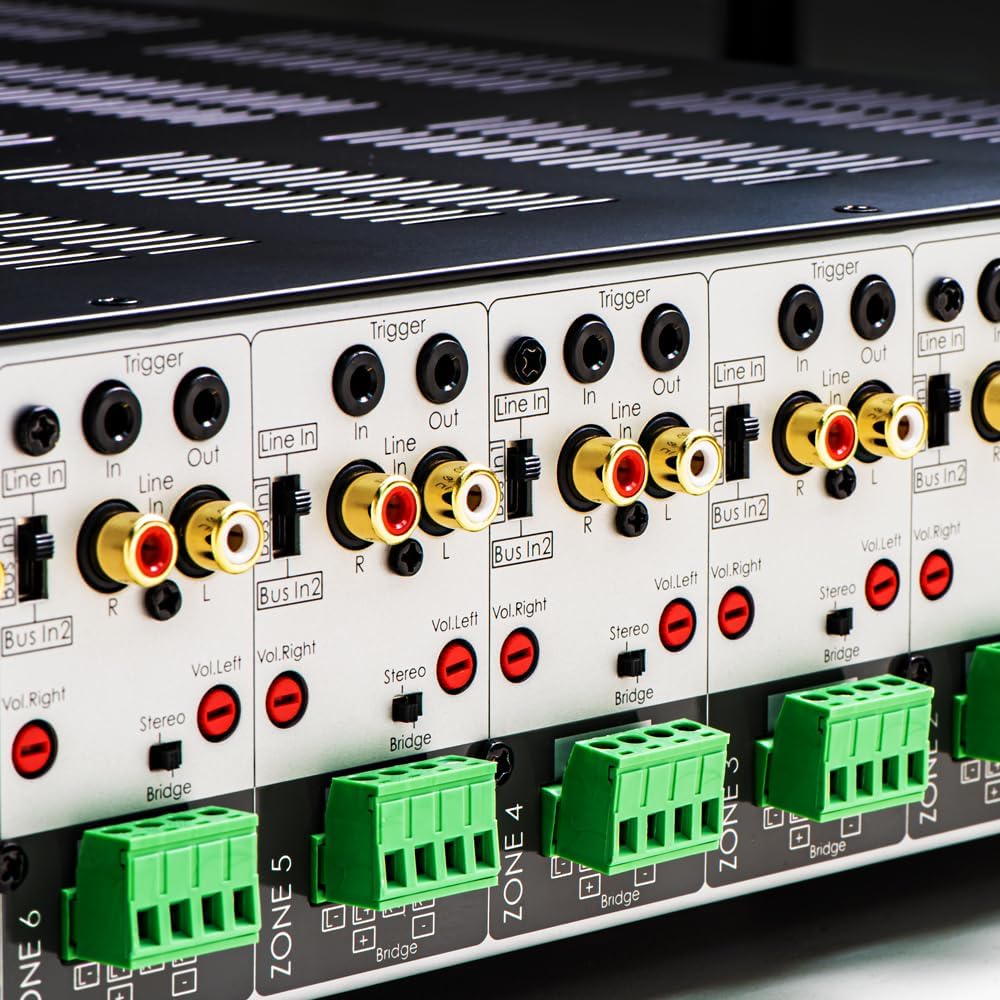
تصوير 3.1: تفصيلي view of the rear panel input and output connections.
- اسپيڪر جا نتيجا: Connect your speakers to the corresponding zone terminals. Ensure correct polarity (+ to + and - to -). The amplifier supports both 4-ohm and 8-ohm speakers. For bridged mode operation, refer to section 4.3.
- Line Inputs (RCA): Each zone has a dedicated stereo RCA Line In. Connect your audio sources (e.g., pre-amplifier, media player) to these inputs.
- Bus Inputs (RCA): جي amplifier features two stereo Bus Inputs (Bus In 1, Bus In 2). These allow a single audio source to be distributed to multiple zones.
- لائين آئوٽ پُٽ (RCA): Each zone also has a stereo RCA Line Out, allowing the audio signal from that zone to be passed to another ampلائفائر يا آڊيو ڊوائيس.
- ٽريگر اندر/آئوٽ: The 12V Trigger In allows the amplifier to be turned on/off by an external device. The 12V Trigger Out can be used to control other devices.
- AC پاور ان پٽ: Connect the supplied power cord to the AC IN receptacle and then to a suitable wall outlet.

تصوير 3.2: تفصيلي view of Bus inputs and Trigger connections on the rear panel.
4. آپريٽنگ هدايتون
4.1 پاور آن/آف
موڙڻ لاءِ سامهون واري پينل تي مکيه پاور بٽڻ کي دٻايو amplifier on or off. A red LED indicator will illuminate when the unit is powered on.

Image 4.1: Front panel power button.
4.2 زون ڪنٽرول
Each of the 8 zones has a dedicated button on the front panel. Pressing a zone button will activate or deactivate that specific audio zone. The corresponding LED will indicate the zone's status.

Image 4.2: Front panel zone selection buttons.
4.3 Input Selection and Volume Adjustment
On the rear panel, each zone features switches for input selection and rotary controls for volume adjustment:
- انٽ چونڊيندڙ: A slide switch allows you to select the audio input for each zone: لائن ۾ (dedicated input for that zone), Bus In 1، يا Bus In 2.
- حجم ڪنٽرول: Separate rotary controls for Left and Right channels (Vol. Left, Vol. Right) allow for precise volume balancing within each zone.
- Stereo/Bridge Switch: A switch allows you to configure the zone for stereo operation or bridged mono operation. In bridged mode, two amplifier channels combine to deliver higher power to a single speaker. Ensure the speaker impedance is appropriate for bridged mode (typically 8 ohms minimum).
4.4 Audio Sensing
جي amplifier incorporates an audio sense feature that automatically activates a zone when an input signal is detected and turns it off after a period of no signal. This helps conserve power and prolong the unit's lifespan.

تصوير 4.3: اڳوڻيample of multi-zone audio distribution with the ampوierيڪ زنده
5. سار سنڀال
The OSD Audio MX1680 GEN2 amplifier requires minimal maintenance. Follow these guidelines to ensure optimal performance and longevity:
- صفائي: Periodically wipe the exterior surfaces with a soft, dry cloth. Do not use liquid cleaners or aerosol sprays, as they may damage the finish or internal components.
- وينٽيليشن: Ensure that the ventilation openings on the top and sides of the unit remain clear of dust and obstructions. Dust accumulation can impede airflow and lead to overheating.
- ڪنيڪشن: Occasionally check all cable connections to ensure they are secure and free from corrosion. Loose connections can lead to signal loss or degradation.
- اسٽوريج: جيڪڏهن ذخيرو ampجيڪڏهن توهان لائفائر کي ڊگهي عرصي تائين بند رکو ٿا، ته ان کي بجلي کان ڌار ڪريو ۽ ان کي ٿڌي، سڪل جاءِ تي، سڌي سج جي روشني ۽ انتهائي گرمي پد کان پري رکو.
6. مسئلا حل ڪرڻ
If you experience issues with your MX1680 GEN2 amplifier, consult the following troubleshooting guide. For problems not resolved here, please contact OSD Audio support.
| مسئلو | ممڪن سبب | حل |
|---|---|---|
| طاقت نه آهي | بجلي جي تار ڪٽيل آهي؛ بجلي جو آئوٽليٽ خراب آهي؛ Amplifier fuse blown | Check power cord connection; Test outlet with another device; Contact service for fuse replacement. |
| ڪنهن زون مان ڪو به آواز نه آيو | Zone not activated; Incorrect input selected; Source device off/muted; Speaker wires loose/incorrectly connected; Volume too low | Press the zone button on the front panel; Verify input selector switch position; Check source device; Inspect speaker connections; Adjust zone volume controls. |
| بگڙيل آواز | Input signal too high; Speaker impedance mismatch; Faulty speaker cable; Ampوierيڪ گرميءَ وارو | Reduce source device output level; Ensure correct speaker impedance (4 or 8 ohms, or 8 ohms for bridged); Check speaker cables; Ensure proper ventilation. |
| Amplifier shuts off unexpectedly | Overheating; Short circuit in speaker wiring; Protection circuit activated | Ensure proper ventilation; Check all speaker wiring for shorts; Allow unit to cool down before restarting. |
7. وضاحتون
| خاصيت | تفصيل |
|---|---|
| ماڊل نمبر | MX1680-GEN2 |
| چينل | 16 Channels (8 Zones) |
| پاور آئوٽ (4 Ohms) | 80 Watts per channel (1KHz) |
| پاور آئوٽ (8 Ohms) | 50 Watts per channel (1KHz) |
| Ampوierيڪ ڪلاس | ڪلاس ڊي |
| پيداوار جي ماپ (L x W x H) | 16.81 x 16.14 x 3.46 انچ |
| شيءِ جو وزن | 23 پائونڊ |
| رک جو قابل چڙھڻ | Yes (2U, hardware included) |
| ٺاهيندڙ | او ايس ڊي آڊيو |
| تاريخ پهرين دستياب | جنوري 31، 2020 |
8. وارنٽي ڄاڻ
Warranty information for the OSD Audio MX1680 GEN2 amplifier is typically provided with your purchase documentation or can be found on the official OSD Audio webسائيٽ. وارنٽي ڪوريج، شرطن ۽ ضابطن جي تفصيل لاءِ مھرباني ڪري انھن وسيلن جو حوالو ڏيو.
9. سپورٽ
For technical assistance, product inquiries, or service requests, please contact OSD Audio customer support. You can typically find contact information, including phone numbers and email addresses, on the official OSD Audio webسائيٽ:
Please have your model number (MX1680-GEN2) and purchase details ready when contacting support.


