تعارف
This manual provides detailed instructions for the proper use and maintenance of your HOCO ES36 Wireless Earbuds. Please read this manual thoroughly before using the product to ensure optimal performance and longevity.

Image: The HOCO ES36 Wireless Earbuds resting inside their open charging case, displaying the earbuds and the case's interior.

تصوير: هڪ ويجهو تصوير view of the HOCO ES36 Wireless Earbuds, highlighting their design and in-ear form factor.
پيڪيج مواد
- HOCO ES36 Wireless Earbuds (Left and Right)
- وائرليس چارجنگ ڪيس
- چارج ڪيبل
- استعمال ڪندڙ جو دستياب (ھي دستاويز)
سيٽ اپ ڪريو
1. ائربڊس ۽ ڪيس کي چارج ڪرڻ
Before first use, ensure both the earbuds and the charging case are fully charged. The charging case supports both wired charging via the included cable and wireless charging.
- وائرڊ چارجنگ: Connect the charging cable to the charging port on the case and to a USB power source. The indicator light on the case will show charging status.
- وائرليس چارجنگ: چارجنگ ڪيس کي هڪ مطابقت رکندڙ وائرليس چارجنگ پيڊ تي رکو. يقيني بڻايو ته ڪيس موثر چارجنگ لاءِ پيڊ تي مرڪز ۾ آهي.

Image: The HOCO ES36 charging case placed on a wireless charging pad next to a smartphone, both receiving power wirelessly.
The earbuds will charge automatically when placed inside the charging case, provided the case has power.
2. بلوٽوٽ جوئر
- Ensure the earbuds are in the charging case and the case is charged.
- چارجنگ ڪيس جو لڪ کوليو. ائربڊس پاڻمرادو پاور آن ٿي ويندا ۽ جوڙڻ واري موڊ ۾ داخل ٿيندا.
- توهان جي ڊوائس تي (اسمارٽ فون، ٽيبليٽ، وغيره)، بلوٽوٿ سيٽنگز ڏانهن وڃو ۽ بلوٽوٿ کي فعال ڪريو.
- Look for "HOCO ES36" or a similar name in the list of available devices and select it to connect.
- A pop-up window may appear on compatible devices, showing the connection status and battery levels.
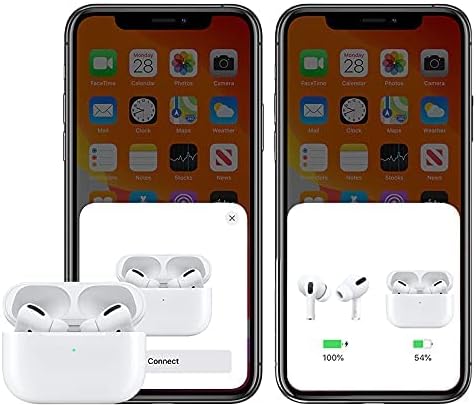
Image: A smartphone screen displaying a pop-up window indicating the HOCO ES36 earbuds are ready to connect, along with battery level indicators for both earbuds and the charging case.
Once paired, the earbuds will automatically connect to your device when the case lid is opened and Bluetooth is enabled on your device.
آپريٽنگ هدايتون
خودڪار فنڪشن
- خودڪار پاور آن / آف: The earbuds power on automatically when removed from the case and power off when placed back into the case and the lid is closed.
- خودڪار جوڙڻ: After initial pairing, the earbuds will automatically connect to the last paired device when removed from the case.
- ڪن ۾ چڪاس: Music playback may pause automatically when an earbud is removed from your ear and resume when reinserted (feature availability may vary).
- ماسٽر-غلام سوئچنگ: Both earbuds can function independently. You can use either the left or right earbud alone, and they will seamlessly switch roles.
ٽچ ڪنٽرول
The HOCO ES36 earbuds feature touch-sensitive areas for controlling various functions. Specific touch gestures may vary slightly depending on your device and software version. Common functions include:
- راند/روڪ: ٻنهي ائربڊ تي هڪ ڀيرو ٽيپ ڪريو.
- اڳيون ٽريڪ: ساڄي ائربڊ تي ٻٽي ٽيپ ڪريو.
- پويون ٽريڪ: کاٻي ائربڊ تي ٻٽي ٽيپ ڪريو.
- جواب/آخر ڪال: ٻنهي ائربڊ تي هڪ ڀيرو ٽيپ ڪريو.
- ڪال رد ڪريو: ٻنهي مان ڪنهن به ائربڊ کي دٻايو ۽ رکو.
- وائيس اسسٽنٽ (سري/گوگل اسسٽنٽ) کي چالو ڪريو: ٻنهي مان ڪنهن به ائربڊ تي ٽي ڀيرا ٽيپ ڪريو.

Image: The HOCO ES36 earbuds placed next to a smartphone displaying a music player interface, illustrating their use for audio playback.
سار سنڀال
- صفائي: ائربڊس ۽ چارجنگ ڪيس کي باقاعدي طور تي نرم، سڪل، لِنٽ فري ڪپڙي سان صاف ڪريو. رگڙيندڙ مواد يا سخت ڪيميڪل استعمال نه ڪريو.
- اسٽوريج: جڏهن استعمال ۾ نه هجي، ته ائربڊس کي انهن جي چارجنگ ڪيس ۾ محفوظ ڪريو ته جيئن انهن جي حفاظت ٿئي ۽ انهن کي چارج رکيو وڃي.
- نمي کان بچڻ: Keep the earbuds and case away from water and excessive moisture.
- گرمي پد: Avoid exposing the product to extreme temperatures (hot or cold).
مشڪلاتون
| مسئلو | حل |
|---|---|
| ائربڊس نه ملائي رهيا آهن |
|
| صرف هڪ ائربڊ ڪم ڪري رهيو آهي |
|
| آواز ڪونهي |
|
| چارج ڪيس چارج نه ڪرڻ |
|
وضاحتون
| خاصيت | تفصيل |
|---|---|
| برانڊ | هيڪو |
| ماڊل نالو | Airpods Pro (ES36) |
| شيون ماڊل نمبر | ES36 |
| رابطي ٽيڪنالاجي | وائرليس |
| وائرليس ڪميونيڪيشن ٽيڪنالاجي | بلوٽوٿ 5.0 |
| هيڊفون فارم فيڪٽر | ڪن ۾ |
| هيڊفونز ڪن جي جڳهه | ڪن ۾ |
| شور ڪنٽرول | فعال شور منسوخي (Note: This typically refers to passive noise isolation for this product type unless specific ANC features are detailed by the manufacturer.) |
| گفتگو / موسيقي جو وقت | لڳ ڀڳ 3 ڪلاڪ |
| اسٽينڊ بائي ٽائيم | لڳ ڀڳ 150 ڪلاڪ |
| چارج ڪرڻ | Supports Wireless Charging |
| شامل اجزاء | Cable, Wireless Charging Case |
| رنگ | اڇو |
| پيڪيج جي ماپ | 18.8 X 11.2 x 3.6 سينٽي ؛ 190 گ |
حفاظت جي ڄاڻ
پراڊڪٽ کي نقصان پهچڻ يا پاڻ کي نقصان پهچڻ کان بچائڻ لاءِ مھرباني ڪري ھيٺ ڏنل حفاظتي ھدايتن تي عمل ڪريو:
- مصنوعات کي جدا نه ڪريو، مرمت ڪريو، يا تبديل ڪريو.
- پيداوار کي باهه يا تيز گرمي پد کي ظاهر نه ڪريو.
- ٻڌڻ کان پاسو ڪريو بلند آواز جي سطح تي وڌايل عرصي تائين ٻڌڻ جي نقصان کي روڪڻ لاءِ.
- مصنوعات کي ٻارن ۽ پالتو جانورن جي پهچ کان پري رکو.
- پراڊڪٽ ۽ ان جي اجزاء کي مقامي ضابطن جي مطابق ذميواري سان ختم ڪريو.
وارنٽي ۽ سپورٽ
For warranty information and customer support, please refer to the documentation provided at the point of purchase or contact your retailer. HOCO products typically come with a limited warranty against manufacturing defects. Please retain your proof of purchase for warranty claims.


