1. تعارف
The BlissLights Sky Lite LED Laser Star Projector transforms any room into a mesmerizing celestial experience. It projects a field of drifting blue stars against a transforming blue nebula cloud, creating a relaxing and immersive atmosphere. This manual provides essential information for setting up, operating, maintaining, and troubleshooting your Sky Lite projector.
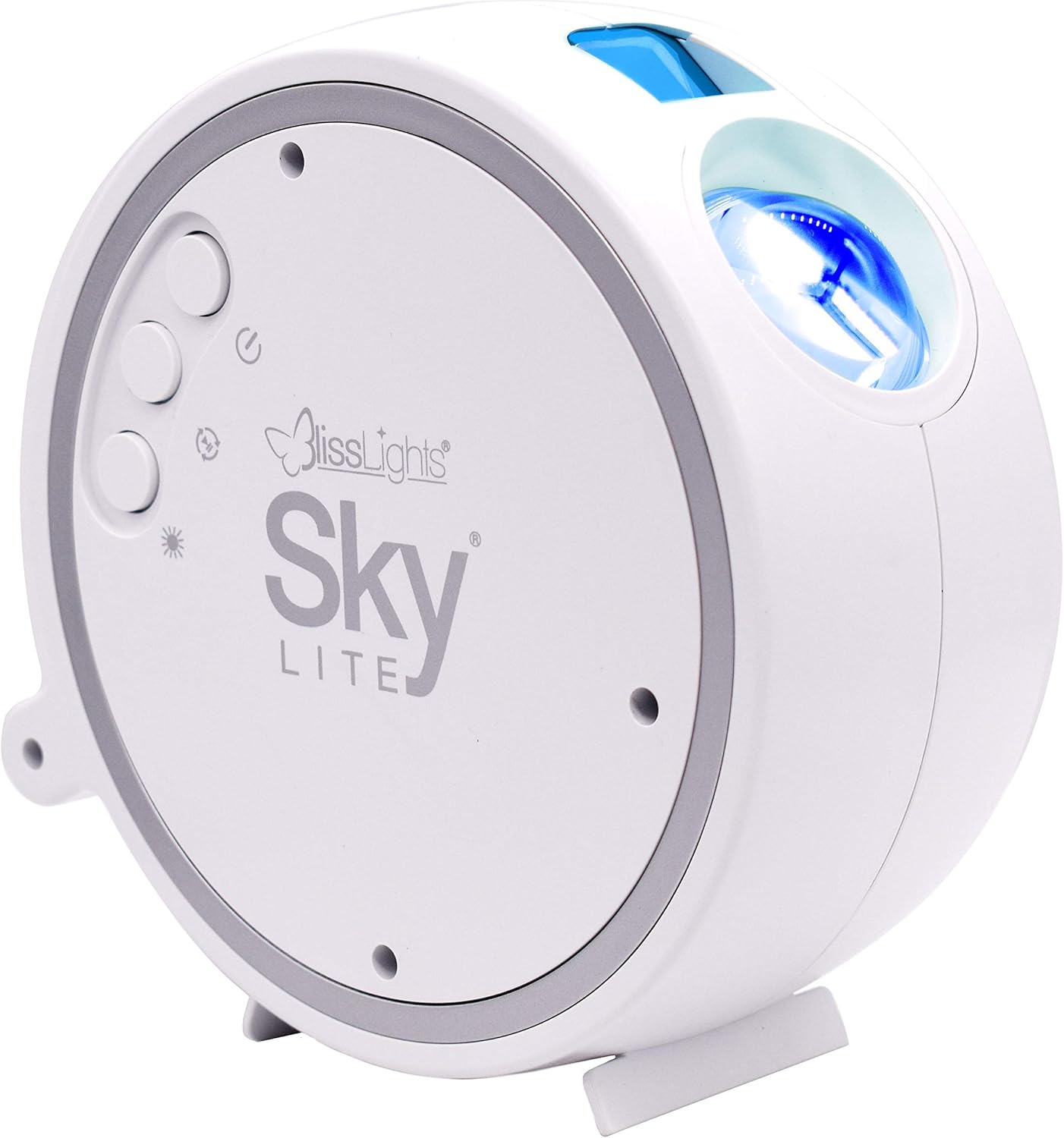
2. مصنوعات جون خاصيتون
- Dynamic Star Projection: Instantly projects a field of drifting blue stars.
- Nebula Cloud Effect: Features a transforming blue nebula cloud for an otherworldly visual experience.
- ترقي يافته ٽيڪنالاجي: Incorporates a direct diode Laser, precision glass optics, and holographic technologies.
- آرامده ماحول: Creates a relaxing environment suitable for various settings including bedrooms, gaming stations, and meditation spaces.
- استعمال ڪندڙ-دوست ڪنٽرول: Simple button controls allow for cycling through light effects, adjusting brightness, and controlling rotation.
- خودڪار ٽائمر: Equipped with a 6-hour auto timer for convenience.
3. سيٽ اپ
3.1 انباڪسنگ
پيڪنگ مان سڀني حصن کي احتياط سان هٽايو. پڪ ڪريو ته هيٺيون شيون موجود آهن:
- BlissLights Sky Lite Projector
- پاور اڊاپٽر
- استعمال ڪندڙ جو دستياب (ھي دستاويز)
3.2 لڳائڻ
For optimal projection, place the Sky Lite on a flat, stable surface. The projector can be angled to direct the light effects onto a ceiling or wall. Consider placing it in a corner or against a wall to maximize the spread of the projection.


3.3 پاور ڪنيڪشن
Connect the provided power adapter to the DC input port on the Sky Lite projector. Plug the other end of the adapter into a standard electrical outlet (AC 120V).
4. آپريٽنگ هدايتون
The Sky Lite features intuitive button controls for easy operation.
4.1 پاور آن/آف
- کي دٻايو پاور بٽڻ (circular button with a vertical line and circle) once to turn the unit ON.
- کي دٻايو پاور بٽڻ again to turn the unit OFF.
4.2 بٽڻ جا ڪم
The Sky Lite has three main control buttons:
- پاور بٽڻ: Controls power ON/OFF.
- اسٽار بٽڻ: Cycles through different star brightness levels (Off, Low, Medium, High).
- Nebula Button: Cycles through different nebula effects (Off, Static, Rotating).
4.3 Automatic Timer
The Sky Lite is equipped with a 6-hour automatic timer. After 6 hours of continuous operation, the device will automatically shut off to conserve energy and ensure longevity.
5. سار سنڀال
5.1 صفائي
To maintain the clarity and performance of your Sky Lite projector:
- پڪ ڪريو ته ڊوائيس صاف ڪرڻ کان اڳ ان پلگ ٿيل آهي.
- Use a soft, dry, lint-free cloth to wipe the exterior of the projector.
- For the projection lens, gently wipe with a microfiber cloth. Avoid using abrasive cleaners or solvents, as they may damage the lens or finish.
5.2 اسٽوريج
When not in use for extended periods, store the Sky Lite in a cool, dry place, away from direct sunlight and extreme temperatures. Keep it in its original packaging or a protective case to prevent dust accumulation and damage.
6. مسئلا حل ڪرڻ
If you encounter issues with your Sky Lite, refer to the table below for common problems and solutions.
| مسئلو | ممڪن سبب | حل |
|---|---|---|
| ڪابه روشني پروجيڪٽ ناهي | Not powered on; loose connection; faulty adapter. | Ensure power adapter is securely plugged in. Press the Power Button. Try a different outlet. |
| Stars not moving/Nebula static | Rotation feature is off. | Press the Nebula Button to cycle through rotation modes. |
| مدھم پروجئشن | Low brightness setting; dirty lens. | Press the Star Button to increase brightness. Clean the projection lens with a soft cloth. Ensure room is dark. |
| ڊوائيس غير متوقع طور تي بند ٿي وئي | Automatic timer activated. | This is normal operation due to the 6-hour auto timer. Turn the unit back on if desired. |
7. ٽيڪنيڪل وضاحتون
| تفصيل | تفصيل |
|---|---|
| ماڊل نمبر | 900-00047_A |
| رنگ | Blue/Blue - White Housing |
| شڪل | تارو |
| مواد | شيشي |
| ختم ڪرڻ جو قسم | ليزر |
| روشني جو ذريعو قسم | ايل اي ڊي |
| طاقت جو ذريعو | تار ٿيل برقي |
| جلدtage | 120 وولٽ (AC) |
| شيءِ جو وزن | 1.65 پائونڊ |
| پيداوار جي ماپ | 5.91"ليٽر x 2.95"ڊبليو x 5.91"ايڇ |
| خاص خاصيتون | 6 Hour Auto Timer |
8. وارنٽي ڄاڻ
The BlissLights Sky Lite is covered by a manufacturer's warranty. Please refer to the official BlissLights webتفصيلي وارنٽي شرطن ۽ ضابطن لاءِ سائيٽ يا ڪسٽمر سپورٽ سان رابطو ڪريو.
9. سپورٽ ۽ رابطو
وڌيڪ مدد لاءِ، پراڊڪٽ رجسٽريشن، يا ڏانهن view the full user guide, please visit the official BlissLights webسائيٽ يا انهن جي گراهڪ سپورٽ ٽيم سان رابطو ڪريو.
- سرڪاري Webسائيٽ: BlissLights Store on Amazon
- Full User Guide (PDF): PDF Manual ڊائون لوڊ ڪريو


