تعارف
The EVOLVEO EASYPHONE FM is a user-friendly mobile phone designed for straightforward communication. It features large, separated keys, a clear display, and essential functions to ensure ease of use. This manual provides instructions for setting up, operating, and maintaining your device.
1. پيڪيج مواد
مھرباني ڪري ھيٺ ڏنل شين لاءِ پيڪيج چيڪ ڪريو:
- EVOLVEO EASYPHONE FM Mobile Phone
- چارجنگ ڊاک
- AC اڊاپٽر
- Li-ion 1000 mAh Battery
- استعمال ڪندڙ دستي
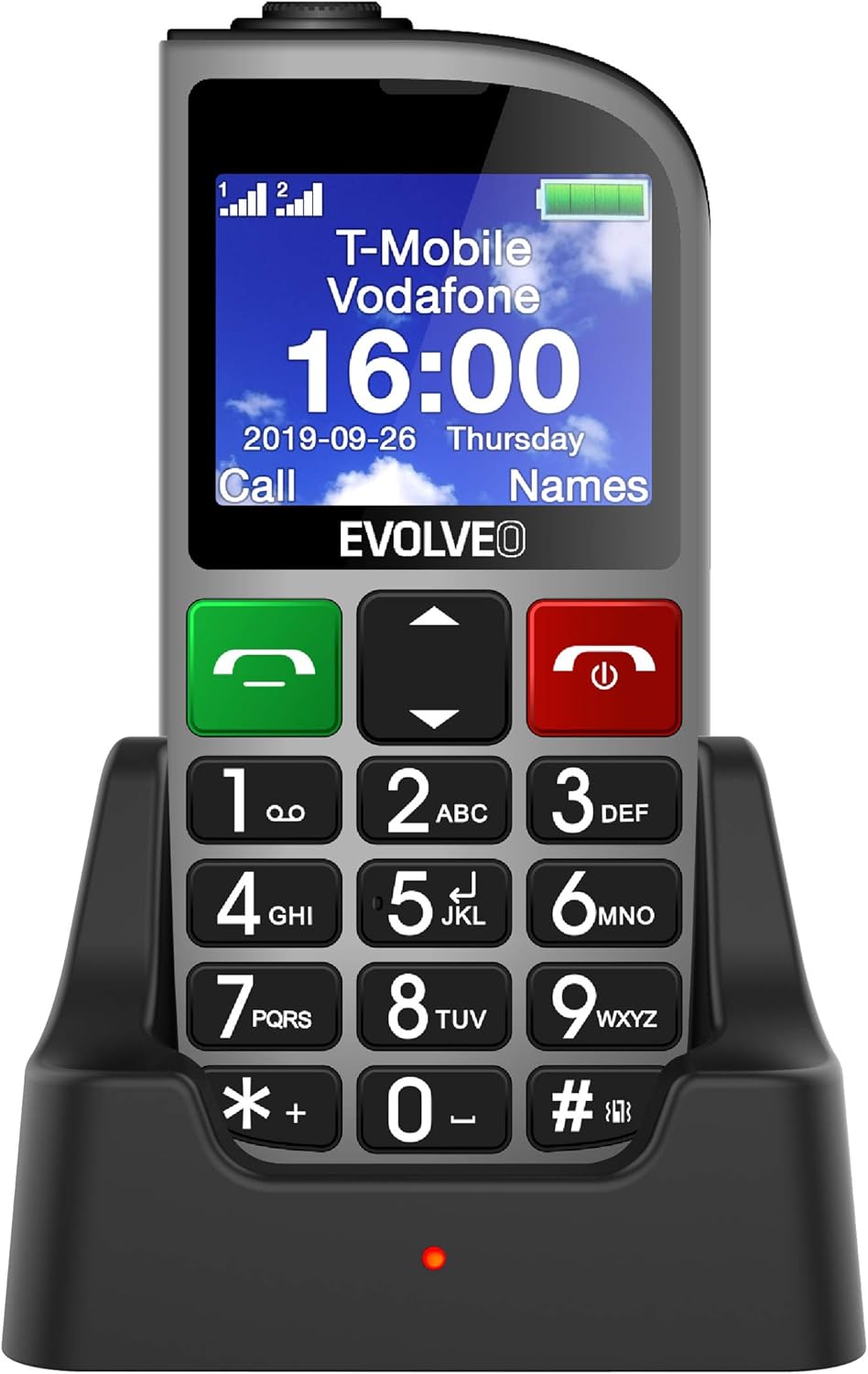
شڪل 1.1: EVOLVEO EASYPHONE FM placed in its charging dock. The phone features a large display showing time and network information, with prominent green call and red end call buttons, and a numeric keypad below.
2. سيٽ اپ
2.1. بيٽري لڳائڻ ۽ چارج ڪرڻ
- فون جي پوئين ڍڪ کي هٽايو.
- Insert the Li-ion 1000 mAh battery, ensuring the contacts align correctly.
- پٺيون غلاف بدلايو.
- Connect the AC adapter to the charging dock.
- Place the phone into the charging dock. The charging indicator light will illuminate.
- پهرين استعمال کان اڳ فون کي مڪمل چارج ٿيڻ ڏيو.
2.2. سم ڪارڊ داخل ڪرڻ
The phone supports two SIM cards (Dual SIM) for GSM/GPRS 850/900/1800/1900 MHz networks.
- پڪ ڪريو ته فون بند ٿيل آهي.
- پوئتي ڪپڙا ۽ بيٽري کي هٽايو.
- سم ڪارڊ سلاٽ ڳوليو.
- Insert your SIM card(s) into the designated slots, ensuring correct orientation.
- بيٽري ۽ پوئين ڪپڙا ٻيهر داخل ڪريو.
2.3. Inserting a MicroSDHC Card
You can expand the phone's storage for music, photos, and other files by inserting a MicroSDHC card.
- پڪ ڪريو ته فون بند ٿيل آهي.
- پوئتي ڪپڙا ۽ بيٽري کي هٽايو.
- Locate the MicroSDHC card slot.
- Gently insert the MicroSDHC card until it clicks into place.
- بيٽري ۽ پوئين ڪپڙا ٻيهر داخل ڪريو.
3. آپريٽنگ هدايتون
3.1. پاور آن/آف
- پاور آن ڪرڻ لاءِ: دٻايو ۽ رکو ريڊ اينڊ ڪال/پاور بٽڻ دٻايو جيستائين اسڪرين جي روشني نه ٿئي.
- پاور آف ڪرڻ لاءِ: دٻايو ۽ رکو ريڊ اينڊ ڪال/پاور button until the power off options appear, then confirm.

شڪل 3.1: سامهون view of the EVOLVEO EASYPHONE FM, highlighting the large display, call buttons, and numeric keypad for easy dialing.
3.2. ڪالون ڪرڻ ۽ وصول ڪرڻ
- ڪال ڪرڻ: Dial the number using the numeric keypad and press the گرين ڪال بٽڻ
- اسپيڊ ڊائل: The phone supports quick access to 8 popular contacts. Assign numbers to keys 2-9 for speed dialing. Press and hold the assigned key to dial.
- ڪال وصول ڪرڻ: کي دٻايو گرين ڪال ايندڙ ڪال جو جواب ڏيڻ لاءِ بٽڻ.
- ڪال ختم ڪرڻ: کي دٻايو ريڊ اينڊ ڪال/پاور button to end an active call.
3.3. Sending and Receiving SMS Messages
The separated keyboard keys facilitate easy writing of SMS messages.
- Navigate to the Messaging menu.
- Select "Write Message" to compose a new SMS.
- وصول ڪندڙ جو نمبر داخل ڪريو يا رابطن مان چونڊيو.
- ڪي پيڊ استعمال ڪندي پنھنجو پيغام ٽائپ ڪريو.
- پيغام موڪلڻ لاءِ "موڪليو" کي دٻايو.
3.4. حجم ڪنٽرول
Adjust the call and ringtone volume using the dedicated volume control button located on the left side of the phone.

شڪل 3.2: Left side of the phone, showing the volume control buttons and the FM radio activation button.
3.5. SOS ايمرجنسي بٽڻ
The SOS button, located on the back of the device, allows for quick emergency calls and messages.
- Before use, configure up to five emergency contact numbers in the phone settings.
- هنگامي حالت ۾، دٻايو ۽ رکو SOS بٽڻ
- The phone will automatically dial the predefined emergency numbers sequentially and send an emergency message to these contacts.

شڪل 3.3: ريڙهه view of the EVOLVEO EASYPHONE FM, showing the prominent red SOS emergency button and the camera lens.
3.6. ايف ايم ريڊيو
The phone includes an FM radio with a dedicated activation button.
- To turn on the FM radio, press the independent FM button on the side of the device.
- The radio can play in the background, allowing you to use other phone functions.
- During an incoming or outgoing call, the radio will automatically mute and resume playback after the call ends.
3.7. ٽارچ
A powerful flashlight is integrated into the phone, activated by a dedicated button.
- Press the dedicated flashlight button on the side of the phone to turn the flashlight on or off.

شڪل 3.4: Right side of the phone, showing the dedicated flashlight button.
3.8. ٻيون خاصيتون
- ڪئميرا: The phone includes a VGA camera for basic photo capture.
- ميوزڪ پليئر موسيقي کيڏيو files stored on your MicroSDHC card.
- Digital Recorder (Dictaphone): Record voice notes.
- ڪئلينڊر: اهم تاريخن ۽ واقعن جي ٽريڪ رکو.
- الارم ڪلاڪ: ياد ڏياريندڙ لاء الارم مقرر ڪريو.
- ڪليڪٽر بنيادي حساب سان انجام ڏيو.
- ميگنيفائنگ گلاس: Utilize the screen as a magnifying glass.
4. سار سنڀال
4.1. ڊوائيس صاف ڪرڻ
- Use a soft, dry cloth to clean the phone's surface and screen.
- Avoid using liquid cleaners or abrasive materials, as they may damage the device.
- Ensure no moisture enters the charging port or other openings.
4.2. بيٽري جي سنڀال
- بيٽري جي زندگي کي وڌائڻ لاءِ، فون کي انتهائي گرمي پد تي بي نقاب ڪرڻ کان پاسو ڪريو.
- Charge the battery regularly, but avoid overcharging or letting it completely drain for extended periods.
- If the phone will not be used for a long time, charge the battery to about 50% before storing it.
5. مسئلا حل ڪرڻ
If you encounter issues with your EVOLVEO EASYPHONE FM, refer to the following common problems and solutions:
5.1. فون آن نٿو ٿئي
- پڪ ڪريو ته بيٽري صحيح طرح سان نصب ۽ چارج ٿيل آهي.
- Connect the phone to the charger and wait a few minutes before attempting to power it on again.
- چيڪ ڪريو ته بيٽري جا رابطا صاف آهن.
5.2. ڪالون نه ٿو ڪري سگھجي ۽ نه ئي وصول ڪري سگھجي ٿو.
- Check if the SIM card(s) are correctly inserted and activated.
- Ensure you have network coverage.
- Verify that the phone is not in airplane mode (if applicable).
- Check your account balance or subscription status with your service provider.
5.3. FM Radio Not Working
- پڪ ڪريو ته توهان سٺي ايف ايم سگنل جي استقبال واري علائقي ۾ آهيو.
- Check if the FM radio is properly activated using its dedicated button.
5.4. ڊسپلي جا مسئلا
- If the display is dim, check the brightness settings.
- If the screen is unresponsive, try restarting the phone.
6. وضاحتون
| برانڊ | ايوالويو |
| ماڊل | EASYPHONE FM |
| ڊسپلي سائيز | 1.8 انچ |
| ڊسپلي قرارداد | 320 x 240 px |
| سيلولر ٽيڪنالاجي | 2G (GSM/GPRS 850/900/1800/1900 MHz) |
| سم سپورٽ | ڊبل سم |
| رابطي | بلوٽوٿ، 3.5 ايم ايم جڪ |
| بيٽري | لي آئن 1000 ايم ايڇ |
| طول و عرض | 130 × 61 × 16.5 ملي ميٽر |
| وزن | 105 گرام (بيٽري سان) |
| ڪئميرا | VGA |
| اسٽوريج جي توسيع | MicroSDHC ڪارڊ سلاٽ |
نوٽ: وضاحتون بغير ڪنهن اڳواٽ اطلاع جي تبديلي جي تابع آهن.
7. وارنٽي ۽ سپورٽ
For warranty information and technical support, please refer to the warranty card included in your package or visit the official Evolveo webسائيٽ. وارنٽي دعوائن لاءِ خريداري جو ثبوت رکو.


