1. پراڊڪٽ ختمview
The Baseus W09 TWS Wireless Earphones (Model: Encok W09) are designed for convenient audio playback and communication. These in-ear earphones feature touch control and connect wirelessly via Bluetooth, offering a stereo bass sound experience.

Image 1: The Baseus W09 TWS Wireless Earphones securely placed within their charging case. The case is open, revealing both earbuds.
2. سيٽ اپ
2.1 ائرفون ۽ ڪيس کي چارج ڪرڻ
Before initial use, ensure both the earphones and the charging case are fully charged. The charging case contains a built-in Lithium Ion battery.
- ائرفون کي چارجنگ ڪيس ۾ رکو.
- Connect the charging case to a power source using a compatible charging cable (not specified, assume USB).
- مڪمل چارج ٿيڻ ۾ عام طور تي لڳ ڀڳ 1.5 ڪلاڪ لڳن ٿا.
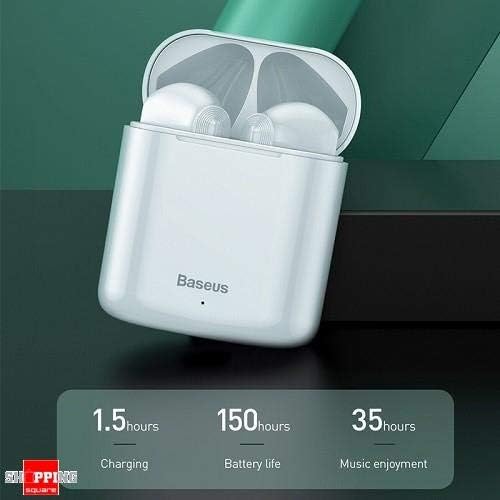
Image 2: The Baseus W09 charging case, illustrating its charging time of 1.5 hours, a standby battery life of 150 hours, and 35 hours of music enjoyment.
2.2 بلوٽوٽ جوڙي
The Baseus W09 earphones are designed for quick and instant connection.
- پڪ ڪريو ته ائرفون چارج ٿيل آهن.
- چارجنگ ڪيس کوليو.
- چارجنگ ڪيس مان ائرفون ڪڍو. اهي خودڪار طريقي سان پيئرنگ موڊ ۾ داخل ٿيندا.
- پنهنجي ڊوائيس (اسمارٽ فون، ٽيبليٽ، وغيره) تي، بلوٽوٿ کي فعال ڪريو ۽ موجود ڊوائيسز جي ڳولا ڪريو.
- Select "Baseus Encok W09" or a similar name from the list to connect.
- هڪ ڀيرو ڳنڍيل، توهان کي هڪ آڊيو پرامپٽ ٻڌڻ ۾ ايندو، ۽ ائرفون استعمال لاءِ تيار هوندا.

Image 3: A hand demonstrating the "Pick up and Connect" feature, showing an earphone being removed from its charging case, initiating quick Bluetooth connection.
3. آپريٽنگ هدايتون
3.1 ائرفون پائڻ
Gently insert each earphone into the corresponding ear canal (L for left, R for right). Adjust them for a comfortable and secure fit to ensure optimal sound quality and stability.
3.2 ٽچ ڪنٽرول افعال
The Baseus W09 earphones feature intelligent touch controls for various functions. Specific gestures may vary; please refer to the product packaging or the official Baseus website for detailed touch control instructions.
- راند/روڪ: Typically a single tap on either earphone.
- جواب/آخر ڪال: Usually a single tap during an incoming call.
- اڳيون / پويون ٽريڪ Often a double or triple tap on a specific earphone.
- وائس اسسٽنٽ کي فعال ڪريو. May involve a long press or specific tap sequence.
3.3 بيٽري جي زندگي
The Baseus W09 earphones and charging case offer extended usage times:
- Music Enjoyment: Up to 35 hours (with charging case).
- اسٽينڊ بائي ٽائيم: 150 ڪلاڪ تائين.
4. سار سنڀال
4.1 صفائي
- ائرفون ۽ چارجنگ ڪيس صاف ڪرڻ لاءِ نرم، سڪل، لِنٽ فري ڪپڙو استعمال ڪريو.
- گھڙڻ وارا صاف ڪندڙ، الڪوحل، يا ڪيميائي محلول استعمال نه ڪريو.
- Ensure no moisture enters the earphone speakers or charging ports.
4.2 اسٽوريج
- جڏهن استعمال ۾ نه هجي، ته ائرفون کي انهن جي چارجنگ ڪيس ۾ محفوظ ڪريو ته جيئن انهن جي حفاظت ٿئي ۽ انهن کي چارج رکيو وڃي.
- سڌو سج جي روشني ۽ انتهائي گرمي پد کان پري ٿڌي، سڪل جاءِ تي ذخيرو ڪريو.
5. مسئلا حل ڪرڻ
If you encounter issues with your Baseus W09 earphones, try the following steps:
- آواز ناهي: Ensure earphones are charged, connected to your device, and volume is up on both the earphones and your device.
- جوڙي نه ٿو سگهجي: Make sure Bluetooth is enabled on your device and the earphones are in pairing mode. Try turning Bluetooth off and on again on your device.
- وقتي ڪنيڪشن: Ensure there are no obstructions between the earphones and your device. Try moving closer to your device.
- چارج جا مسئلا: Check the charging cable and power adapter. Ensure the charging contacts on the earphones and case are clean.
- تبديل ڪريو If issues persist, try resetting the earphones. Refer to the official Baseus website or product packaging for specific reset instructions.
6. وضاحتون
| خاصيت | تفصيل |
|---|---|
| برانڊ | بيسس |
| ماڊل نمبر | اينڪوڪ W09 |
| قسم | ڪن ۾ |
| رابطي ٽيڪنالاجي | وائرليس (بلوٽوت) |
| ڪنٽرول جو طريقو | ڇڪڻ |
| مائڪروفون شامل | ها |
| شور منسوخ ڪرڻ | نه |
| بيٽري جو قسم | ليتيم آئن (شامل) |
| چارج ڪرڻ وقت | لڳ ڀڳ. 1.5 ڪلاڪ |
| Music Enjoyment Time | 35 ڪلاڪن تائين (چارجنگ ڪيس سان) |
| اسٽينڊ بائي ٽائيم | 150 ڪلاڪ تائين |
| سان مطابقت | سڀ Bluetooth-فعال ڊوائيسز |
| رنگ | اڇو |
| پيڪيج جي ماپ | 14.6 x 11 x 4 سينٽي |
| شيءِ جو وزن | 170 جي |
7. وارنٽي ۽ سپورٽ
For warranty information, technical support, or further assistance, please refer to the documentation included with your product or visit the official Baseus webسائيٽ. وارنٽي دعوائن لاءِ خريداري جو ثبوت رکو.


