1. تعارف
This manual provides essential instructions for the proper installation, operation, maintenance, and troubleshooting of the Fargo YMCK Color Ribbon, part number 84911. This ribbon is specifically designed for use with Fargo HDP6600 series card printers to produce high-quality, full-color images on ID cards.
1.1 هن دستور بابت
Please read this manual thoroughly before using the ribbon to ensure optimal performance and to prevent damage to the ribbon or your printer. Keep this manual for future reference.
1.2 حفاظتي ڄاڻ
Always handle the ribbon with clean hands to avoid contamination. Do not expose the ribbon to direct sunlight, high temperatures, or excessive humidity. Keep out of reach of children.
2. پراڊڪٽ ختمview
The Fargo YMCK Color Ribbon 84911 is a genuine Fargo consumable designed for the HDP6600 printer. It consists of Yellow (Y), Magenta (M), Cyan (C), and Black (K) panels, allowing for the creation of a full spectrum of colors and sharp black text or barcodes. Each roll is capable of producing approximately 750 full-color images.
2.1 Ribbon Components
The ribbon cartridge contains the YMCK color panels wound onto spools, along with an integrated cleaning roller (if applicable to the specific cartridge design) to help maintain print quality.
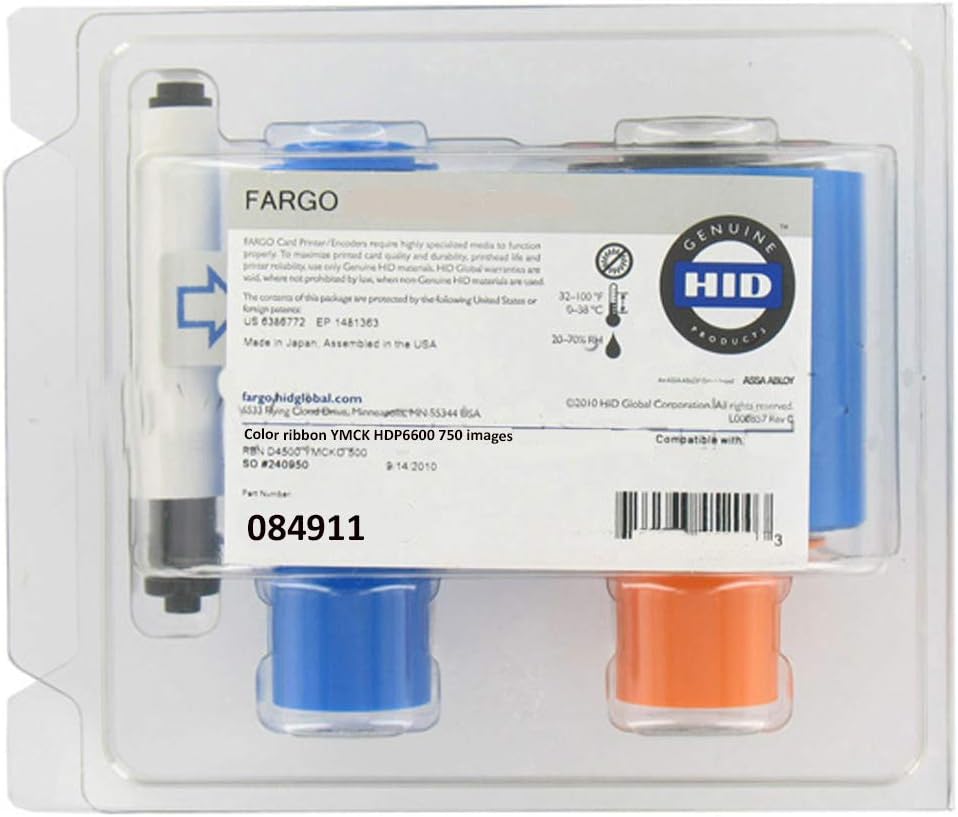
تصوير 1: The Fargo YMCK Color Ribbon 84911 shown in its original sealed packaging. The packaging indicates compatibility with the HDP6600 printer and the ribbon's capacity of 750 images.

تصوير 2: An unwound section of the Fargo YMCK color ribbon, clearly displaying the sequential Yellow, Magenta, Cyan, and Black panels. This illustrates the color sequence used during the printing process.
3. سيٽ اپ ۽ تنصيب
Before installing the ribbon, ensure your Fargo HDP6600 printer is powered off and disconnected from the power source for safety.
3.1 پرنٽر تيار ڪرڻ
- Open the printer's front cover or ribbon compartment access door. Refer to your HDP6600 printer's user manual for specific instructions on accessing the ribbon area.
- Remove any used ribbon cartridge from the printer. Dispose of used ribbons responsibly.
3.2 Installing the Ribbon
- Carefully remove the new Fargo YMCK Color Ribbon 84911 from its packaging. Avoid touching the ribbon panels directly.
- Locate the ribbon loading area within your HDP6600 printer. The cartridge is designed to fit only one way.
- Align the ribbon cartridge with the guides in the printer and gently push it into place until it clicks securely. Do not force the cartridge.
- Close the printer's front cover or ribbon compartment access door.
- Reconnect the printer to the power source and turn it on. The printer should automatically detect the new ribbon.
4. آپريشن
Once the ribbon is correctly installed, your Fargo HDP6600 printer is ready for operation. The printer's software and drivers manage the ribbon's usage during the printing process.
4.1 Printing with the Ribbon
- Ensure your HDP6600 printer drivers are up to date and correctly installed on your computer.
- Load blank cards into the printer's input hopper.
- Use your card design software to create or select the desired card layout.
- Initiate the print job from your computer. The printer will automatically use the YMCK ribbon to transfer the image onto the retransfer film, which is then applied to the card.
- Monitor the printer's status for any error messages or low ribbon warnings.
5. مينٽيننس ۽ اسٽوريج
Proper maintenance and storage of your Fargo YMCK Color Ribbon 84911 will extend its lifespan and ensure consistent print quality.
5.1 اسٽوريج هدايتون
- Store unused ribbons in their original sealed packaging to protect them from dust, moisture, and contaminants.
- Keep ribbons in a cool, dry place, away from direct sunlight and heat sources. Recommended storage temperature is between 5°C and 25°C (41°F and 77°F) with relative humidity between 40% and 60%.
- Avoid storing ribbons near chemicals or solvents that could damage the ribbon material.
5.2 احتياطي تدبيرون
- Always handle ribbon cartridges by their plastic casing, avoiding contact with the ribbon film itself.
- Do not attempt to rewind or repair a damaged ribbon. Replace it with a new one.
- Ensure your printer's interior is clean, especially the print head and rollers, as dust and debris can affect ribbon performance and print quality.
6. مسئلا حل ڪرڻ
This section addresses common issues you might encounter with your Fargo YMCK Color Ribbon 84911.
6.1 عام مسئلا
- Ribbon Not Recognized:
- Ensure the ribbon cartridge is correctly seated in the printer. Remove and reinsert it firmly.
- Verify that you are using a genuine Fargo ribbon. Non-genuine ribbons may not be recognized by the printer.
- Check for any obstructions or debris in the ribbon compartment.
- پرنٽر ٻيهر شروع ڪريو.
- Poor Print Quality (Faded, Streaky, or Missing Colors):
- Ensure the ribbon is not damaged or wrinkled.
- Perform a printer cleaning cycle as per your HDP6600 printer manual. A dirty print head or rollers can cause print defects.
- Check the printer driver settings to ensure they match the ribbon type and card material.
- Replace the ribbon if it is nearing the end of its life or appears physically damaged.
- Ribbon Breakage:
- Ribbon breakage can occur due to improper installation, excessive tension, or foreign objects in the printer.
- Carefully remove the broken ribbon and inspect the printer for any issues. Install a new ribbon.
- Ensure cards are not warped or damaged, as this can also contribute to ribbon issues.
If these steps do not resolve the issue, consult your Fargo HDP6600 printer's comprehensive user manual or contact Fargo technical support.
7. وضاحتون
| خاصيت | تفصيل |
|---|---|
| پيداوار جو نالو | Fargo YMCK Color Ribbon |
| حصو نمبر | 84911 |
| مطابقت | Fargo HDP6600 Card Printers (Single or Dual Sided) |
| Print Capacity | 750 Images/roll |
| ربن جو قسم | YMCK (Yellow, Magenta, Cyan, Black) |
| ٺاهيندڙ | Fargo (a brand of HID Global) |
| پيداوار جي ماپ | 4 x 2 x 4 انچ |
| شيءِ جو وزن | 7.8 اونس |
8. وارنٽي ۽ سپورٽ
For information regarding the warranty of your Fargo YMCK Color Ribbon 84911, please refer to the warranty documentation provided with your Fargo HDP6600 printer or visit the official Fargo/HID Global website. For technical support, contact your authorized Fargo dealer or HID Global customer service.
آن لائين وسيلا:
- جو دورو ڪريو HID Store on Amazon for related products.
- Refer to your Fargo HDP6600 printer manual for detailed operational instructions.


