تعارف
This manual provides essential instructions for the Easytry123 Replacement Remote Control (Model: B086H8722F). This remote is designed to function as a direct replacement for specific Hisense Smart LED HDTV models. It operates using infrared technology and requires 2 AAA batteries (not included).
اهم نوٽ: This is a replacement remote control and is not a universal remote. While it is designed to work with the listed Hisense TV models, some advanced or specific functions of your original remote may not be fully supported. Please ensure your TV model is listed for compatibility.
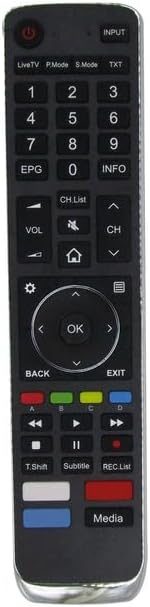
شڪل 1: سامهون view of the Easytry123 Replacement Remote Control. This image displays the full layout of buttons, including the power button, number pad, navigation controls, volume and channel buttons, and media playback keys.
سيٽ اپ ڪريو
1. بيٽري لڳائڻ
- ريموٽ ڪنٽرول جي پٺي تي بيٽري جي خاني کي ڳوليو.
- ليچ کي دٻايو ۽ ان کي کولڻ لاءِ بيٽري جي ڍڪ کي هيٺ سلائڊ ڪريو.
- ٻہ (2) AAA بيٽريون داخل ڪريو، پڪ ڪريو ته مثبت (+) ۽ منفي (-) ٽرمينل صحيح طرح سان ڪمري اندر نشانن سان ترتيب ڏين.
- بيٽري جي ڍڪ کي واپس جاء تي سلائيڊ ڪريو جيستائين اهو محفوظ طور تي ڪلڪ ڪري.
نوٽ: No programming or code setup is required for this remote control. Once batteries are installed, it is ready for use with compatible Hisense TVs.

شڪل 2: پوئتي view of the remote control with the battery compartment cover removed, showing the empty battery slots.

شڪل 3: پوئتي view of the remote control with two AAA batteries correctly installed in the compartment.
آپريٽنگ هدايتون
The Easytry123 Replacement Remote Control features an ergonomic design and standard button layout for intuitive operation of your Hisense Smart LED HDTV.
اهم ڪم:
- پاور بٽڻ (●): ٽي وي کي آن يا بند ڪري ٿو.
- ان پٽ: ان پٽ سورس (HDMI، AV، وغيره) چونڊيندو آهي.
- نمبر پيڊ (0-9): سڌو سنئون چينل نمبر داخل ڪري ٿو.
- VOL +/-: حجم جي سطح کي ترتيب ڏئي ٿو.
- CH +/-: ٽي وي چينل تبديل ڪري ٿو.
- خاموش: ٽي وي آڊيو کي خاموش يا خاموش ڪري ٿو.
- نيويگيشن پيڊ (مٿي، هيٺ، کاٻي، ساڄي، ٺيڪ): مينيو کي نيويگيٽ ڪري ٿو ۽ چونڊن جي تصديق ڪري ٿو.
- پوئتي: پوئين مينيو يا اسڪرين ڏانهن واپس اچي ٿو.
- نڪرڻ: موجوده مينيو يا ايپليڪيشن مان نڪرندو آهي.
- گھر (⌂): سمارٽ ٽي وي هوم اسڪرين تائين رسائي حاصل ڪري ٿو.
- EPG: ڏيکاري ٿو اليڪٽرانڪ پروگرام گائيڊ.
- ڄاڻ: موجوده پروگرام بابت معلومات ڏيکاري ٿو.
- ميڊيا پلے بیک ڪنٽرول (کيڏڻ، روڪيو، روڪيو، ريوائنڊ، فاسٽ فارورڊ): ميڊيا پلے بیک کي ڪنٽرول ڪري ٿو.
- رنگين بٽڻ (ڳاڙهو، سائو، پيلو، نيرو): Functionality varies by TV model and application. Refer to your TV's user manual for specific uses.
سار سنڀال
بيٽري مٽائڻ:
Replace batteries when the remote's response becomes sluggish or stops working. Always replace both AAA batteries simultaneously with new ones. Do not mix old and new batteries, or different types of batteries.
صفائي:
ريموٽ کي صاف ڪرڻ لاءِ، نرم، سڪل ڪپڙي سان ان جي مٿاڇري کي نرميءَ سان صاف ڪريو. ضدي مٽيءَ لاءِ، ٿورو ڊيampڪپڙي کي پاڻي يا نرم، غير رگڙيندڙ ڪلينر سان ڌوئڻ ڏيو. سخت ڪيميڪلز يا گهڻي نمي استعمال ڪرڻ کان پاسو ڪريو، ڇاڪاڻ ته اهو ريموٽ جي اليڪٽرانڪس کي نقصان پهچائي سگهي ٿو.
مشڪلاتون
- ريموٽ جواب نه ڏئي رهيو آهي:
- Ensure there is a clear line of sight between the remote and the TV's infrared sensor.
- چيڪ ڪريو ته ڇا بيٽريون صحيح پولارٽي سان صحيح طور تي نصب ٿيل آهن.
- تازو AAA بيٽرين سان بيٽرين کي تبديل ڪريو.
- Verify that your TV model is listed as compatible with this remote control.
- ڪجھ ڪم ڪم نه ڪري رهيا آهن:
- As a replacement remote, some advanced or specific functions of your original TV remote may not be supported. This is normal for replacement units.
- Refer to your Hisense TV's original user manual for specific button functionalities if you suspect a feature should be working.
وضاحتون
| برانڊ | ايزيٽري 123 |
| ماڊل | B086H8722F |
| مطابقت رکندڙ ڊوائيسز | Hisense Smart LED HDTVs (Models: 55RG, 75R7, 65R7, 55R7, 50R7, 65R8, 65P1, 24P2, 32P2, 39P4, 49P4, 55P4, 55PX, 65PX) |
| رابطي ٽيڪنالاجي | انفراريڊ (IR) |
| ڪنٽرولر جو قسم | بٽڻ ڪنٽرول |
| خاص خصوصيت | Ergonomic ڊيزائن |
| بيٽرين جي ضرورت آهي | 2 x AAA (شامل نه آهي) |
وارنٽي ۽ سپورٽ
Specific warranty information for this Easytry123 Replacement Remote Control is not provided in the product details. For any support inquiries or to check return policies, please refer to the retailer or seller from whom the product was purchased.
For detailed information regarding your Hisense TV's features and functions, please consult the original user manual provided with your television.