1. تعارف
This manual provides detailed instructions for the safe and effective use of your Elecom LBT-TWS05BK True Wireless Bluetooth Earphones. Please read this manual thoroughly before using the product and retain it for future reference.
The Elecom LBT-TWS05BK earphones are designed for stable connectivity, superior comfort, and high usability, delivering rich audio performance. They feature an ergonomic design, advanced communication technology, and convenient smart features.
2. حفاظت جي ڄاڻ
محفوظ آپريشن کي يقيني بڻائڻ ۽ نقصان کي روڪڻ لاءِ، مھرباني ڪري ھيٺ ڏنل احتياطي تدبيرن تي عمل ڪريو:
- Do not expose the earphones or charging case to extreme temperatures, humidity, or liquids.
- ڊوائيس کي مضبوط اثرن لاءِ ڇڏڻ يا تابع ڪرڻ کان پاسو ڪريو.
- پراڊڪٽ کي ڌار ڪرڻ يا تبديل ڪرڻ جي ڪوشش نه ڪريو. اهو وارنٽي کي رد ڪري ڇڏيندو.
- ٻارن ۽ پالتو جانورن جي پهچ کان پري رکو.
- ٻڌڻ جي نقصان کي روڪڻ لاءِ وچولي آواز جي سطح تي ٻڌو.
- Be aware of your surroundings when using the earphones, especially in traffic or dangerous situations.
3. پيڪيج مواد
پڪ ڪريو ته سڀئي شيون توهان جي پراڊڪٽ پيڪيج ۾ موجود آهن:
- Elecom LBT-TWS05BK True Wireless Bluetooth Earphones (Left and Right)
- چارج ڪيس
- USB Charging Cable (Type-A to Type-C)
- Ear Caps (XS, S, M, L sizes; M size pre-installed)
- ھدايت وارو دستور
4. پراڊڪٽ ختمview
Familiarize yourself with the components of your Elecom LBT-TWS05BK earphones.

تصوير: ويجهو تصوير view of the Elecom LBT-TWS05BK true wireless earbuds, showcasing their sleek black design and the ELECOM branding.

Image: The Elecom LBT-TWS05BK earbuds placed inside their compact charging case, ready for storage or charging.
The earphones feature a compact design with a 6.0mm diameter external magnetic dynamic driver for clear sound. The charging case is designed for single-handed operation with a push-button lid.
5. سيٽ اپ
5.1. ائرفون ۽ ڪيس کي چارج ڪرڻ
- Connect the supplied USB Type-A to Type-C cable to the charging case's USB Type-C port and a USB power source.
- The LED indicators on the charging case will show the charging status. Four LEDs indicate a full charge.
- ائرفون کي چارجنگ ڪيس ۾ رکو. اهي پاڻمرادو چارج ٿيڻ شروع ٿي ويندا.
- A 15-minute charge provides approximately 1 hour of music playback. A full charge of the earphones allows for about 5 hours of continuous music playback or 4.5 hours of talk time. The charging case can recharge the earphones up to 2.5 times, providing a total of about 17.5 hours of use.
5.2. شروعاتي جوڙو
The Elecom LBT-TWS05BK supports auto-pairing and Google Fast Pair for compatible Android devices.

Image: An illustration demonstrating the Google Fast Pair feature, where simply opening the charging case near a compatible smartphone prompts a pairing notification. Also shows the one-push open mechanism of the case.
- پڪ ڪريو ته توهان جي اسمارٽ فون جو بلوٽوٿ فعال آهي.
- چارجنگ ڪيس کوليو. ائرفون پاڻمرادو پيئرنگ موڊ ۾ داخل ٿي ويندا.
- For Android devices with Google Fast Pair, a notification will appear on your screen. Tap to connect.
- For other devices, go to your device's Bluetooth settings and select "LBT-TWS05BK" from the list of available devices.
- Once paired, the earphones will automatically connect to the last paired device when removed from the case.
5.3. ائربڊس لڳائڻ
The earphones feature an ergonomic design for optimal fit and stability.
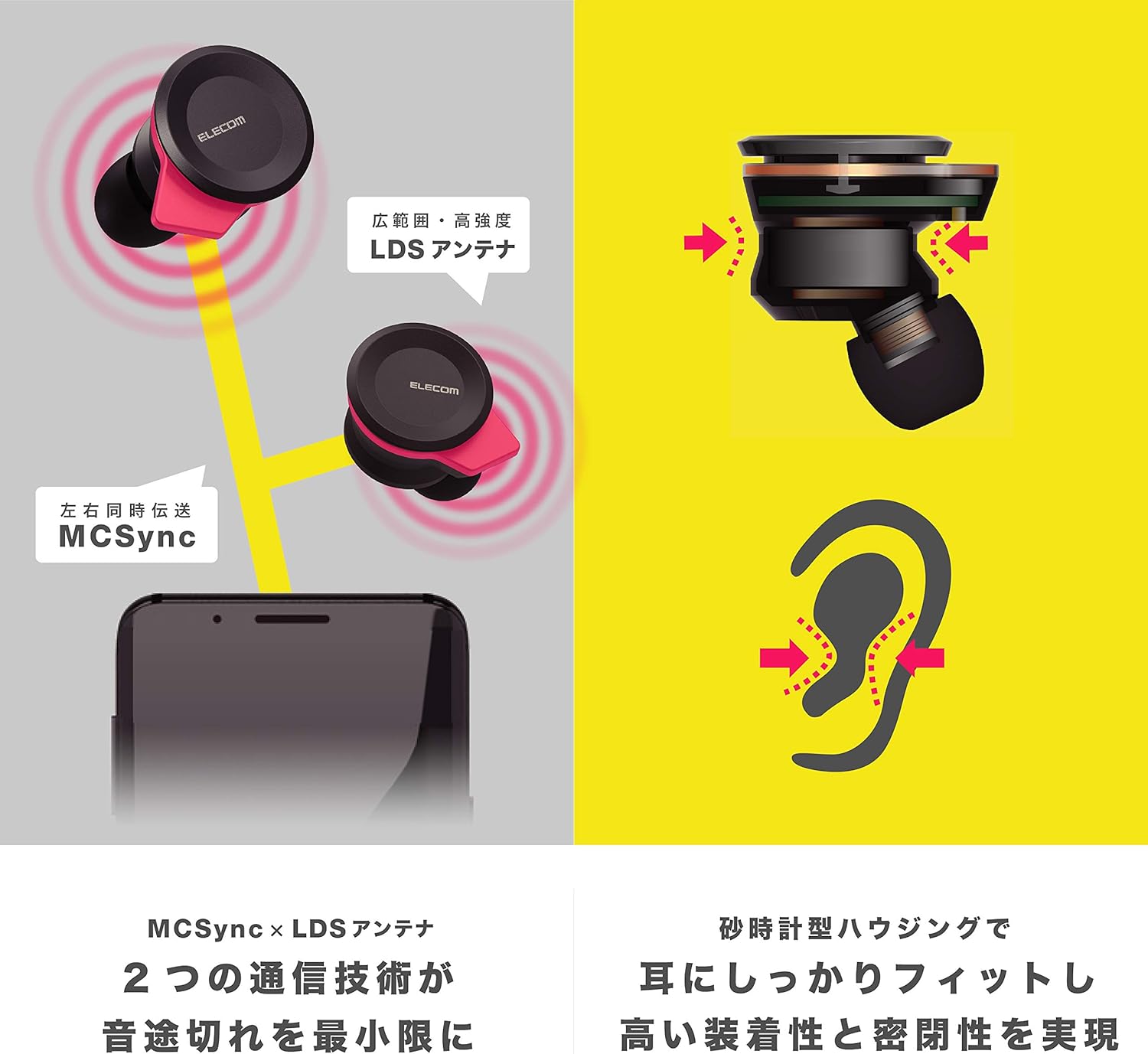
Image: An illustration showing the ergonomic hourglass shape of the earbud designed to fit securely in the ear, alongside a diagram explaining the MCSync and LDS antenna technologies for stable communication.
- Select the ear caps that provide the best seal and comfort from the four included sizes (XS, S, M, L). The M size is pre-installed.
- آسانيءَ سان earbud کي پنهنجي ڪنن جي واهه ۾ داخل ڪريو.
- Adjust the earbud so that the hourglass shape is firmly seated between your ear tragus and anti-tragus for a stable fit.
6. آپريٽنگ هدايتون
The Elecom LBT-TWS05BK earphones offer various functions for audio playback, calls, and smart assistant interaction.
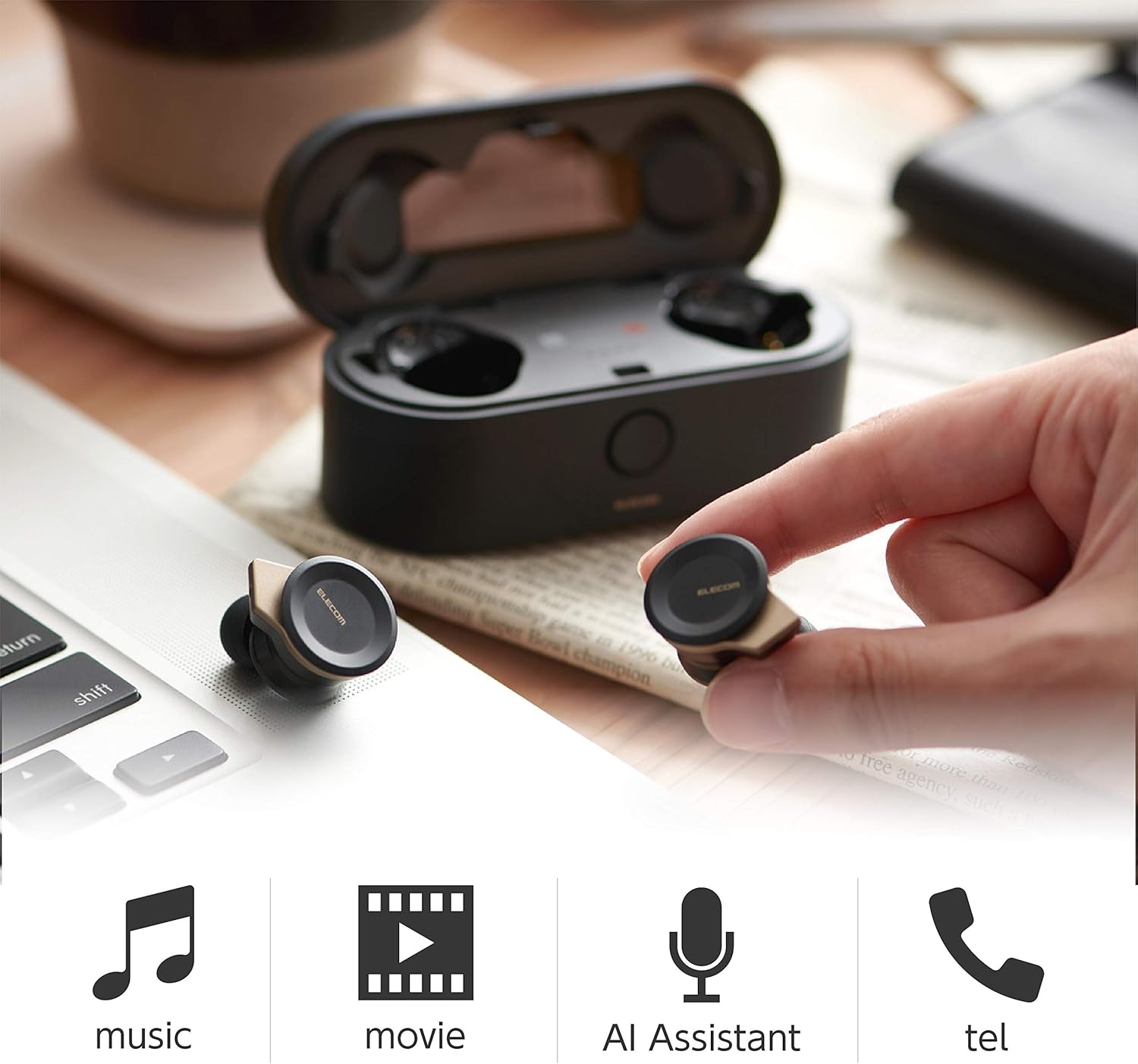
Image: The Elecom LBT-TWS05BK earbuds displayed with icons representing their versatile uses: music playback, movie watching, AI assistant activation, and phone calls.
6.1. پاور آن/آف
- پاور آن: Remove the earphones from the charging case. They will power on automatically.
- بجلي بند: ائرفونز کي واپس چارجنگ ڪيس ۾ رکو. اهي پاڻمرادو بند ٿي ويندا.
6.2. ميوزڪ پلے بیک
Use the buttons on the earphones to control music playback (specific button functions may vary, refer to quick start guide for exact mapping):
- راند/روڪ: ٻنهي ائربڊ تي هڪ ڀيرو دٻايو.
- اڳيون ٽريڪ: ساڄي ائربڊ تي ٻٽي دٻايو.
- پويون ٽريڪ: کاٻي ائربڊ تي ٻٽي دٻايو.
- حجم ڪنٽرول: Adjust via your connected device or voice assistant.
6.3. ڪال هينڊلنگ
The right earbud supports calls and voice AI functions.
- جواب/آخر ڪال: Single press on the right earbud.
- ڪال رد ڪريو: 2 سيڪنڊن لاءِ سا earي ڪنڊ کي د andايو ۽ رکو.
6.4. Voice AI Activation
Compatible with voice AI assistants like Siri and Google Assistant.
- Activate Voice AI: Triple press on the right earbud.
6.5. External Sound Capture Function
This function allows you to hear surrounding sounds while wearing the earphones.
- چالو / غير فعال ڪرڻ: 2 سيڪنڊن لاءِ کا leftي ڪنڊ کي د andايو ۽ رکو.
7. سار سنڀال
مناسب سار سنڀال توهان جي ائرفون جي ڊگهي عمر ۽ ڪارڪردگي کي يقيني بڻائي ٿي.
- صفائي: ائرفون ۽ چارجنگ ڪيس کي صاف ڪرڻ لاءِ نرم، سڪل ڪپڙو استعمال ڪريو. رگڙيندڙ ڪلينر يا سالوينٽس استعمال نه ڪريو.
- ڪنن جا ٽوپا: Remove and clean ear caps regularly with water and mild soap. Ensure they are completely dry before reattaching.
- اسٽوريج: جڏهن استعمال ۾ نه هجي، ته ائرفون کي انهن جي چارجنگ ڪيس ۾ رکو ته جيئن انهن کي مٽي ۽ نقصان کان بچائي سگهجي.
- بيٽري جي سنڀال: بيٽري کي بار بار مڪمل طور تي چارج ڪرڻ کان پاسو ڪريو. بيٽري جي صحت کي برقرار رکڻ لاءِ باقاعدي چارج ڪريو.
8. مسئلا حل ڪرڻ
If you encounter issues with your Elecom LBT-TWS05BK earphones, refer to the following common solutions:
- ڪو به آواز/ڪنيڪشن مسئلا نه آهن:
- پڪ ڪريو ته ائرفون چارج ٿيل ۽ آن آهن.
- چيڪ ڪريو جيڪڏھن بلوٽوٽ فعال آھي توھان جي ڊوائس تي.
- ائرفون کي پنهنجي ڊوائيس سان ٻيهر جوڙڻ جي ڪوشش ڪريو.
- Ensure earphones are within the 10m transmission distance.
- ائرفون چارج نه ٿيڻ:
- پڪ ڪريو ته چارجنگ ڪيبل ڪيس ۽ پاور سورس ٻنهي سان محفوظ طور تي ڳنڍيل آهي.
- Check if the charging case has sufficient battery.
- Ensure the earphones are correctly seated in the charging case.
- خراب آواز جي معيار:
- Ensure ear caps provide a good seal in your ear.
- ائربڊ نوزلز مان ڪنهن به ملبي کي صاف ڪريو.
- سگنل جي طاقت کي بهتر بڻائڻ لاءِ پنهنجي ڳنڍيل ڊوائيس جي ويجهو وڃو.
- Voice AI/Calls Not Working on Left Earbud:
- Note that calls and voice AI functions are only compatible with the right earbud.
9. وضاحتون
| خاصيت | تفصيل |
|---|---|
| ماڊل نمبر | LBT-TWS05BK |
| رابطي جو طريقو | Bluetooth Standard Version 5.0 |
| ٻاھر | بلوٽوٿ پاور ڪلاس 1 |
| وڌ ۾ وڌ ٽرانسميشن فاصلو | لڳ ڀڳ. 10 ايم |
| فريکوئنسي بينڊ | 2.4GHz |
| ماڊلنگ جو طريقو | FHSS (فريڪئنسي هاپنگ اسپريڊ اسپيڪٽرم) |
| سپورٽ ٿيل بلوٽو پروfiles | A2DP، AVRCP، HFP، HSP |
| A2DP Compatible Codec | ايس بي سي ، اي سي |
| A2DP Compatible Content Protection | ايس ايس ايم ايس-ٽي |
| Maximum Registration Capacity | 8 ڊوائيسز |
| Multipoint (Simultaneous Standby) | مطابقت ناهي |
| ڊرائيور جو قسم | 6.0mm diameter external magnetic dynamic driver (ETEMDriver) |
| ڪميونيڪيشن ٽيڪنالاجي | MCSync (MultiCast Synchronization), LDS Antenna |
| مائڪروفون | High-quality MEMS microphone with HDVoice |
| مسلسل ڳالهائڻ جو وقت | لڳ ڀڳ. 4.5 ڪلاڪ |
| Continuous Music Playback Time | لڳ ڀڳ. 5 ڪلاڪ |
| ڪُل پلے بیک وقت (چارجنگ ڪيس سان) | لڳ ڀڳ. 17.5 ڪلاڪ |
| چارجنگ پورٽ | USB قسم-سي |
| فاسٽ چارج | 1 ڪلاڪ پلے بیک لاءِ 15 منٽ چارج |
| وزن | 61 Grams (total package weight) |
| مواد | پلاسٽڪ |
| پاڻي جي مزاحمت جي سطح | پاڻي مزاحمتي |
| مطابقت رکندڙ ڊوائيسز | Smartphones, Tablets, iOS Devices, Android Devices |
10. وارنٽي ۽ سپورٽ
For warranty information and customer support, please refer to the official ELECOM webسائيٽ تي وڃو يا پنهنجي مقامي پرچون ڪندڙ سان رابطو ڪريو. وارنٽي دعوائن لاءِ خريداري جو ثبوت رکو.


