1. تعارف
This manual provides detailed instructions for the installation, operation, and maintenance of your D-Link DCS-8627LH Full HD Outdoor Wi-Fi Camera with Spotlight. Please read this manual thoroughly before using the device to ensure proper setup and functionality. Keep this manual for future reference.
2. پراڊڪٽ ختمview
The D-Link DCS-8627LH is an outdoor Wi-Fi camera designed for security monitoring, featuring Full HD 1080p resolution, a built-in spotlight, and advanced detection capabilities. It integrates with the mydlink app for remote access and smart home ecosystems like Google Assistant and Amazon Alexa.
2.1 پيڪيج مواد
- D-Link DCS-8627LH مڪمل HD آئوٽ ڊور وائي فائي ڪئميرا
- ماؤنٽنگ ڪٽ (اسڪرو، وال پلگ)
- پاور اڊاپٽر
- تڪڙي انسٽاليشن ھدايت
2.2 ڪيمرا جون خاصيتون
- مڪمل HD 1080p قرارداد: 30 فريم في سيڪنڊ جي رفتار سان صاف وڊيو ڪيپچر ڪري ٿو.
- مربوط اسپاٽ لائٽ: Enhances color night vision and acts as a deterrent.
- Infrared Night Vision: Provides clear video up to 7 meters in low light conditions.
- ٻه طرفي آڊيو: رابطي لاءِ بلٽ ان مائڪروفون ۽ اسپيڪر.
- حرڪت ۽ آواز جي ڳولا: Triggers recording and sends notifications.
- وائي فائي ڪنيڪشن: آسان وائرليس سيٽ اپ ۽ رسائي.
- مقامي اسٽوريج: Supports microSD card for video recording.
- Weatherproof ڊيزائن: ٻاهرين تنصيب لاء مناسب.
- سمارٽ گهر انٽيگريشن: Compatible with mydlink app, Google Assistant, Amazon Alexa, and IFTTT.
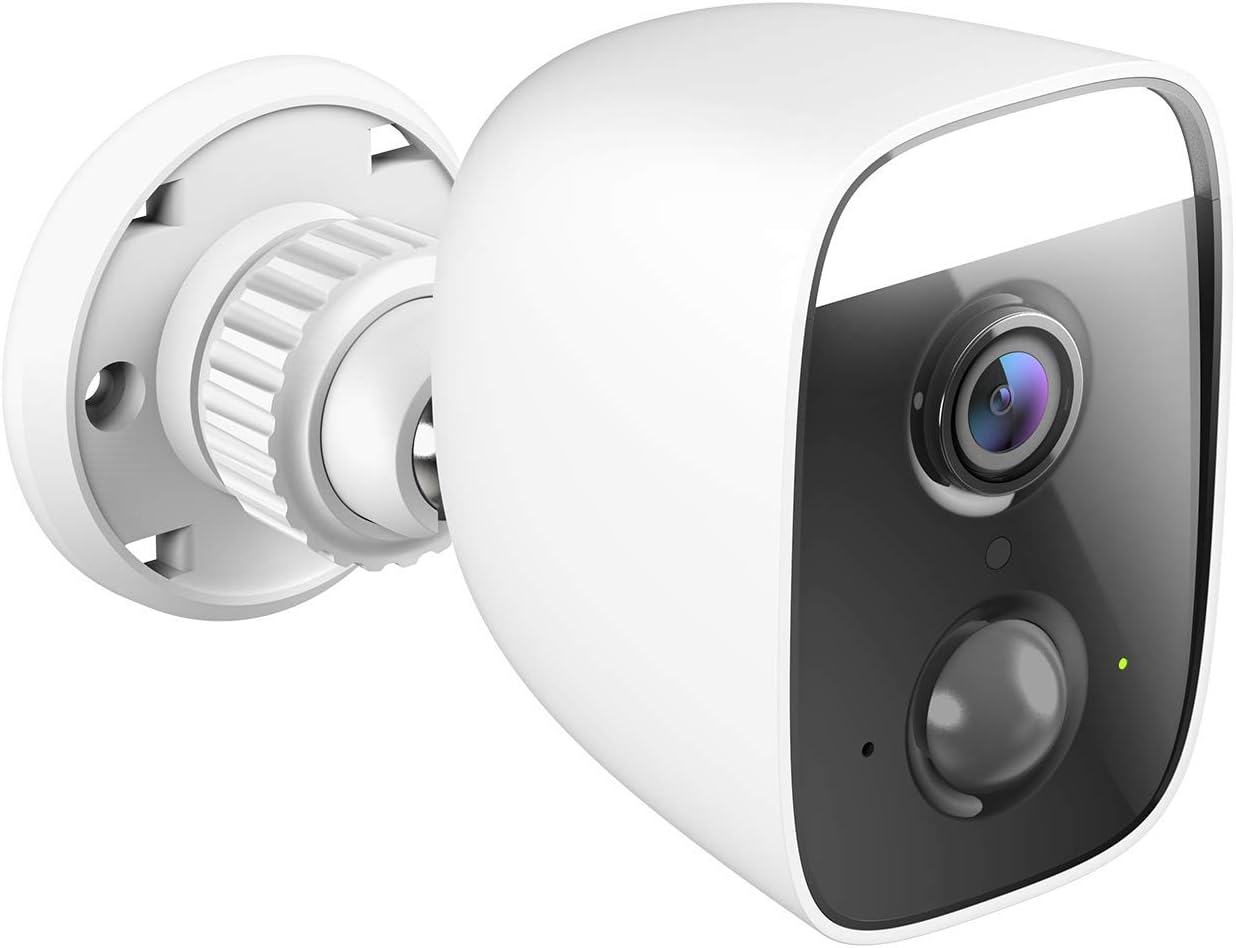
شڪل 1: زاويه view ڊي-لنڪ DCS-8627LH ڪئميرا جو، شوڪasing its compact design and integrated spotlight.

شڪل 2: سامهون view of the D-Link DCS-8627LH camera, highlighting the lens, motion sensor, and spotlight.
3. سيٽ اپ
3.1 توهان کان اڳ شروع ڪريو
- Ensure your Wi-Fi network is active and you have the Wi-Fi password.
- Have your smartphone or tablet ready.
- Choose a suitable outdoor location for installation, ensuring Wi-Fi signal strength and access to a power outlet.
3.2 mydlink App Installation
- Download the free mydlink app from the App Store (iOS) or Google Play (Android).
- Launch the mydlink app and create a new account or log in with an existing one.
3.3 Adding the Camera to mydlink
- Plug the camera into a power outlet near your Wi-Fi router for initial setup.
- Wait for the camera's LED indicator to flash orange, indicating it's ready for setup.
- In the mydlink app, tap the menu icon (☰) and select "Add a Device."
- Scan the setup QR code located on the camera or its packaging.
- ڪئميرا کي پنهنجي وائي فائي نيٽ ورڪ سان ڳنڍڻ لاءِ ايپ ۾ اسڪرين تي ڏنل هدايتن تي عمل ڪريو.
- Once connected, the LED indicator will turn solid green.
3.4 جسماني تنصيب
The DCS-8627LH camera is designed for wall or pole mounting. Ensure the chosen location provides a clear view and is within range of your Wi-Fi signal and a power source.
- Use the provided mounting template to mark screw holes on the wall or pole.
- Drill pilot holes and insert wall plugs if mounting on masonry.
- Secure the mounting bracket to the surface using the screws.
- ڪئميرا کي ماؤنٽنگ بریکٹ سان ڳنڍيو ۽ ضرورت مطابق زاويه کي ترتيب ڏيو.
- Connect the power adapter to the camera and plug it into a weather-protected outdoor power outlet.

شڪل 3: زاويه view of the D-Link DCS-8627LH camera, showing the adjustable mounting base.

شڪل 4: ريڙهه view of the camera, indicating the location of the microSD card slot and reset button.
4. آپريٽنگ هدايتون
The D-Link DCS-8627LH camera is primarily operated through the mydlink app.
4.1 Using the mydlink App
- جيئڻ View: Tap on your camera in the app to view لائيو وڊيو فيڊ.
- رڪارڊنگ: Manually record video or configure event-based recording (motion/sound detection).
- پلے بیک: Access recorded videos stored on the microSD card or mydlink cloud (if subscribed).
- نوٽيفڪيشن: Receive push notifications on your smartphone when motion or sound is detected.
- ٻه طرفي آڊيو: لائيو ۾ مائڪروفون آئڪن استعمال ڪريو view ڪئميرا جي اسپيڪر ذريعي ڳالهائڻ لاءِ.
- اسپاٽ لائيٽ ڪنٽرول: Manually turn the spotlight on/off or configure it to activate upon motion detection.

شڪل 5: A smartphone screen showing a mydlink app notification for motion detection, with options for live view or contacting security.
4.2 حرڪت ۽ آواز جي سڃاڻپ
Configure detection zones and sensitivity levels within the mydlink app settings for your camera. This allows you to customize when the camera triggers recordings and sends alerts.
4.3 سمارٽ هوم انٽيگريشن
The DCS-8627LH supports integration with:
- گوگل اسسٽنٽ: استعمال ڪرڻ لاء آواز حڪم view your camera feed on compatible devices.
- Amazon Alexa: پنهنجي ڪئميرا کي ڪنٽرول ڪريو ۽ view its feed using Alexa-enabled devices.
- IFTTT (جيڪڏهن هي ته پوءِ اهو): Create custom automation rules with other smart devices and services.
Refer to the respective platform's documentation or the mydlink app for detailed setup instructions for these integrations.
5. سار سنڀال
5.1 ڪئميرا صاف ڪرڻ
وقتي طور تي ڪئميرا لينس ۽ هائوسنگ کي نرم، ڊي سان صاف ڪريوamp ڪپڙو. سخت ڪيميڪلز يا رگڙيندڙ مواد استعمال ڪرڻ کان پاسو ڪريو جيڪي لينس يا ختم کي نقصان پهچائي سگهن ٿا.
5.2 فرم ویئر تازه ڪاريون
D-Link regularly releases firmware updates to improve performance and add new features. Check for and install updates via the mydlink app to ensure your camera has the latest enhancements and security patches.
5.3 مائڪرو ايس ڊي ڪارڊ جو انتظام
If using a microSD card for local storage, ensure it is properly inserted and formatted through the mydlink app. Regularly check the card's status and consider replacing it if errors occur or its performance degrades.
6. مسئلا حل ڪرڻ
This section addresses common issues you might encounter with your D-Link DCS-8627LH camera.
6.1 ڪنيڪشن جا مسئلا
- ڪنيڪشن ناهي: Ensure the camera is powered on and within Wi-Fi range. Check your router's internet connection.
- ڪمزور وائي فائي سگنل: Relocate the camera closer to your router or consider using a Wi-Fi extender.
- سيٽ اپ ناڪامي: Try resetting the camera and repeating the setup process in the mydlink app.
6.2 تصوير جي معيار جا مسئلا
- مبهم تصوير: Clean the camera lens. Ensure there are no obstructions in front of the lens.
- خراب رات جو نظارو: Ensure the infrared LEDs are not obstructed. Check for reflective surfaces close to the camera.
6.3 Notifications Not Received
- Check mydlink app settings to ensure notifications are enabled for your camera.
- Verify your smartphone's notification settings for the mydlink app.
- Adjust motion/sound detection sensitivity and zones in the app.
6.4 ڪئميرا ري سيٽ ڪرڻ
To perform a factory reset, locate the reset button (refer to Figure 4). With the camera powered on, use a paperclip to press and hold the reset button for approximately 10 seconds until the LED changes color. Release the button and wait for the camera to restart. You will then need to set up the camera again through the mydlink app.
7. وضاحتون
| خاصيت | تفصيل |
|---|---|
| ماڊل نمبر | ڊي سي ايس 8627 ايل ايڇ |
| وڊيو قرارداد | 1080p مڪمل HD (1920x1080) |
| فريم جي شرح | 30 فريم في سيڪنڊ |
| Viewزاويه | 123.8 درجا |
| نائيٽ ويزن رينج | 7 ميٽر تائين (انفراريڊ) |
| وائرليس ڪنيڪشن | Wi-Fi (2.4 GHz), Bluetooth (for setup) |
| طاقت جو ذريعو | Electric cable (12 Volts) |
| پاڻي جي مزاحمت | پنروڪ |
| آپريٽنگ جي درجه حرارت | Up to 45 degrees Celsius |
| طول و عرض (L x W x H) | 12.6 x 6 x 8.4 سينٽي |
| وزن | 237 گرام |
| مقامي اسٽوريج | مائڪرو ايس ڊي ڪارڊ سلاٽ |
| مطابقت رکندڙ ڊوائيسز | Smartphone (mydlink app), Google Assistant, Amazon Alexa |
8. وارنٽي ۽ سپورٽ
8.1 ٺاهيندڙ جي وارنٽي
The D-Link DCS-8627LH camera comes with a 2 سالن جي ٺاهيندڙ جي وارنٽي خريداري جي تاريخ کان. هي وارنٽي عام استعمال هيٺ مواد ۽ ڪاريگري ۾ خرابين کي ڍڪيندي آهي. مھرباني ڪري وارنٽي دعوائن لاءِ خريداري جو ثبوت رکو.
8.2 اسپيئر پارٽس جي دستيابي
هن پراڊڪٽ جا اسپيئر پارٽس ڪجهه عرصي لاءِ موجود آهن 2 سال خريداري جي تاريخ کان.
8.3 ٽيڪنيڪل سپورٽ
For technical assistance, troubleshooting beyond this manual, or warranty inquiries, please visit the official D-Link support website or contact their customer service. Contact information can typically be found on the D-Link webتوهان جي علائقي لاء سائيٽ.


