1. تعارف
This manual provides comprehensive instructions for the setup, operation, and maintenance of your Browning Patriot Trail Camera. The Patriot is engineered with advanced dual-lens technology, offering superior image and video quality both day and night. Its military-grade invisible IR flash ensures discreet operation, making it an ideal tool for wildlife monitoring and security applications.
2. پراڊڪٽ ختمview
2.1 اهم خاصيتون
- Dual Lens Technology: Dedicated lens and sensor combinations for optimized daytime and nighttime capture.
- Invisible Infrared Illumination: Military-grade IR flash for undetectable night vision.
- هاءِ ڊيفينيشن وڊيو: Shoots 1080p Full HD videos at up to 60 frames per second.
- تيز ڪارڪردگي: Super-fast 0.15-second trigger speed and 0.35-second picture recovery time.
- ضم ٿيل Viewاسڪريننگ: 2 انچ رنگ جي خاصيت آهي viewing screen for easy setup and playback.
- Adjustable Night Illumination: Customizable settings for optimal night capture.
2.2 ڪئميرا جا حصا
Familiarize yourself with the main components of your Patriot Trail Camera:

شڪل 2.1: سامهون view of the Browning Patriot Trail Camera, closed. The durable camouflage casing blends seamlessly with natural environments, featuring the dual lens system and IR emitters.
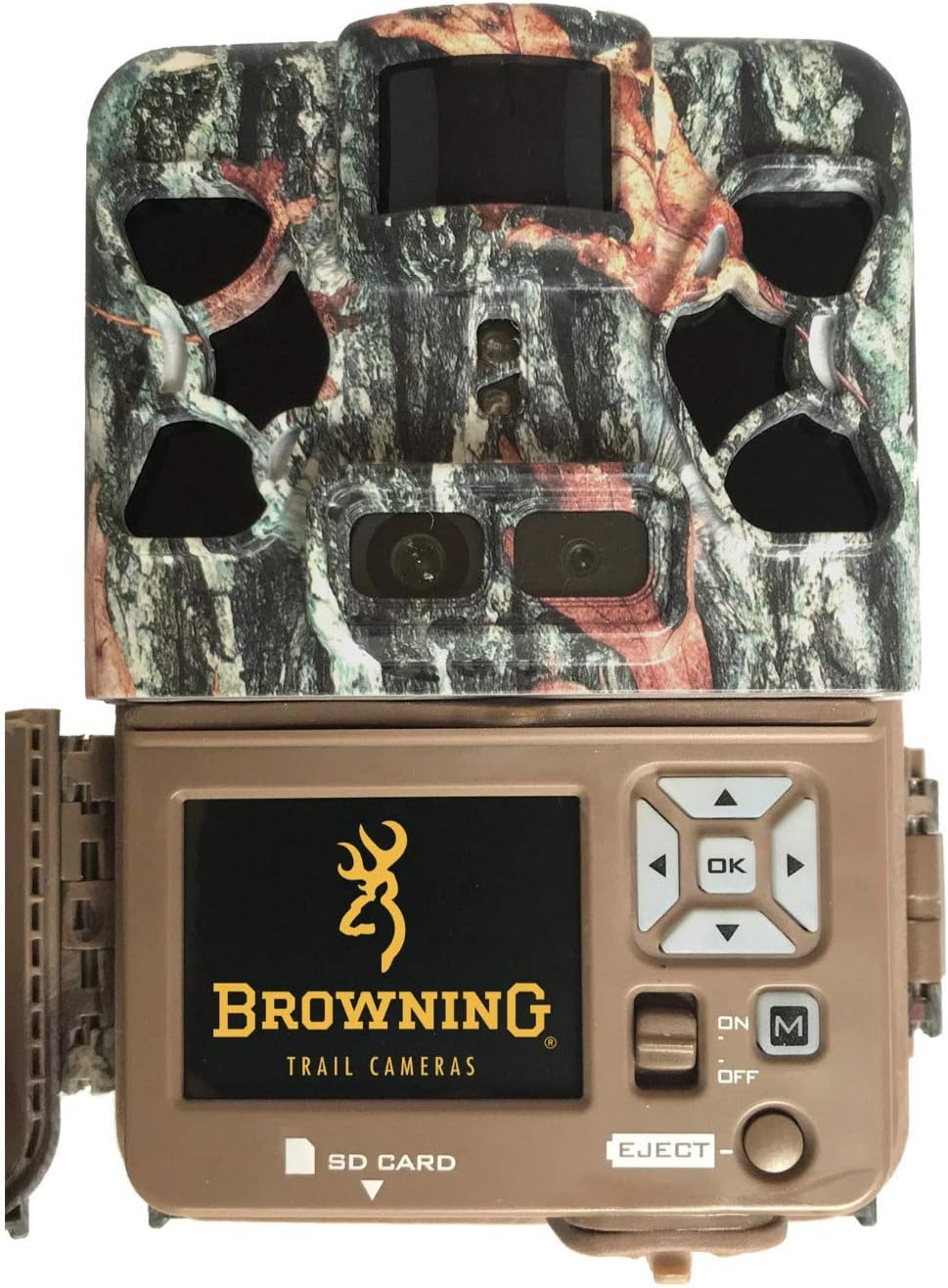
شڪل 2.2: سامهون view of the camera with the casing open, exposing the 2-inch color viewing screen, navigation buttons (OK, arrows), and mode switch (ON/OFF/M).
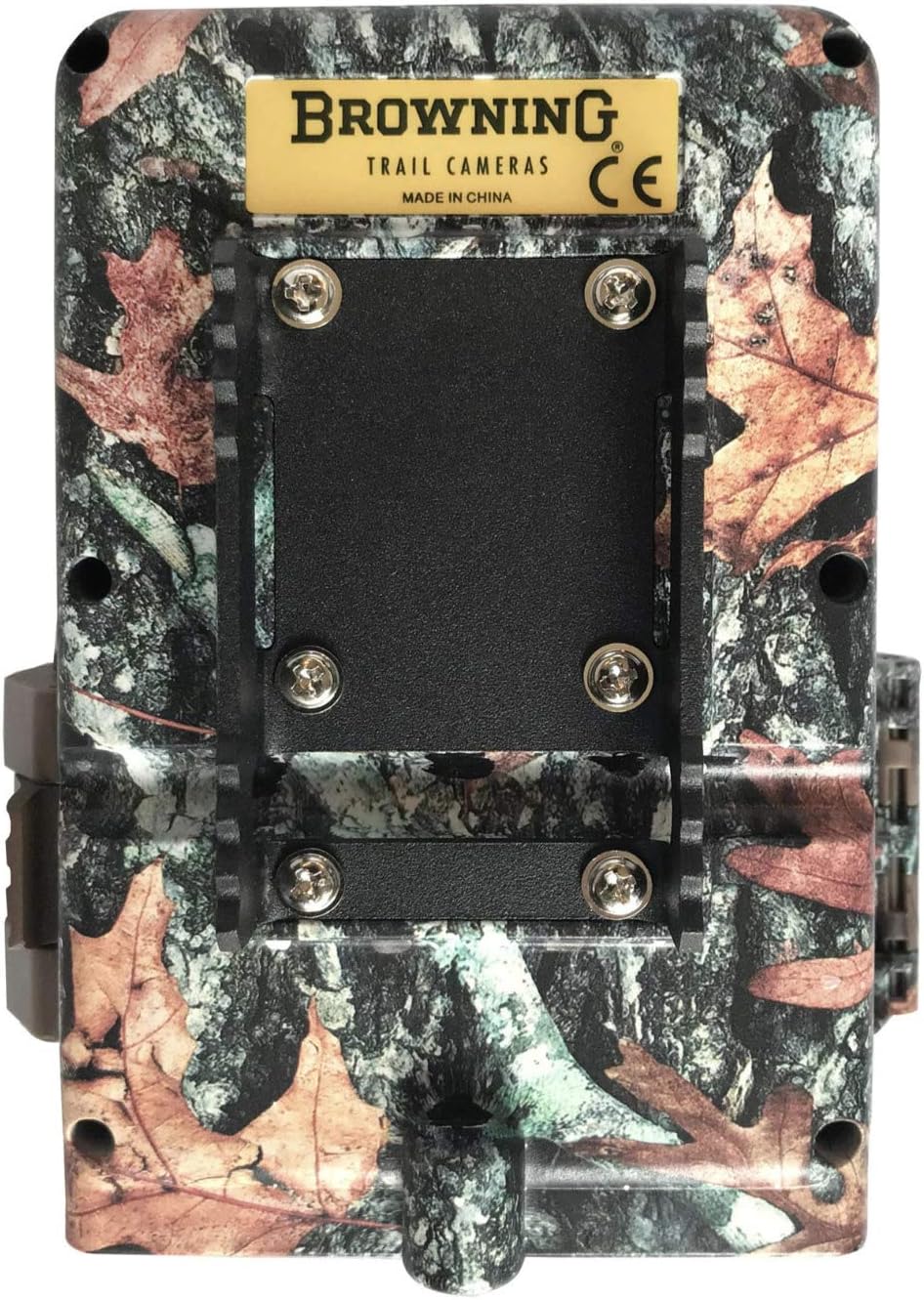
شڪل 2.3: ريڙهه view of the camera, highlighting the integrated mounting bracket for secure attachment to trees or posts, and the latch for the battery compartment.
3. سيٽ اپ
3.1 بيٽري لڳائڻ
The Patriot Trail Camera operates on 8 AA batteries (not included). For optimal performance and battery life, it is recommended to use high-quality alkaline or lithium batteries.
- ڪئميرا کوليو casing پاسي واري ڪلپس کي کولڻ سان.
- Locate the battery compartment on the bottom section of the camera.
- 8 AA بيٽريون داخل ڪريو، صحيح پولارٽي (+/-) کي يقيني بڻائي جيئن ڪمري اندر ڏيکاريل آهي.
- بيٽري جي ڪمري کي محفوظ طور تي بند ڪريو.
3.2 SD ڪارڊ لڳائڻ
A Class 10 SD card (up to 512 GB capacity) is required for storing photos and videos. The camera does not include an SD card.
- With the camera casing open, locate the SD card slot on the side of the internal unit.
- Insert the SD card into the slot with the label facing forward until it clicks into place.
- To remove, gently push the SD card in until it springs out.
3.3 شروعاتي پاور آن ۽ بنيادي سيٽنگون
After installing batteries and an SD card, you can power on the camera and configure basic settings.
- Slide the power switch to the 'ON' position. The 2-inch color viewing screen will illuminate.
- The camera will prompt you to set the date and time. Use the arrow buttons to navigate and the 'OK' button to confirm.
- It is recommended to format the SD card upon first use or after transferring files to ensure optimal performance. Navigate to the 'Format SD' option in the menu and confirm.

شڪل 3.1: Proper setup and placement are crucial for effective trail camera operation.
4. آپريٽنگ هدايتون
4.1 مينيو کي نيويگيٽ ڪرڻ
Use the control panel and 2-inch screen to navigate the camera's settings:
- تير بٽڻ: Use the Up, Down, Left, and Right arrows to move through menu options.
- OKيڪ بٽڻ: Press 'OK' to select an option or confirm a setting.
- ايم (موڊ) بٽڻ: Switches between Setup Mode, Photo Mode, and Video Mode.
- آن/آف سوئچ: Powers the camera on or off.
4.2 فوٽو موڊ
In Photo Mode, the camera captures still images. You can adjust settings such as photo resolution, picture delay, multi-shot, and time-lapse.
- قرارداد: Select desired image quality. Higher resolution results in larger file ماپون.
- Picture Delay: Sets the time interval before the camera takes the next picture after a trigger event.
- ملٽي شاٽ: Captures multiple images per trigger event.
4.3 وڊيو موڊ
In Video Mode, the camera records high-definition video clips. The Patriot supports 1080p Full HD video at up to 60 frames per second.
- وڊيو قرارداد: Choose between available video resolutions (e.g., 1080p).
- وڊيو ڊگھائي: Set the duration of each video clip.
- آڊيو رڪارڊنگ: The camera records audio with video clips.
4.4 Night Illumination
The Patriot features military-grade invisible Infrared (IR) illumination for clear nighttime photos and videos. This technology ensures the camera remains undetectable to wildlife.
- IR Flash Power: Adjustable settings to control the intensity of the IR flash for different distances and environments.
- ٻٽي لينس سسٽم: A dedicated lens and sensor system is optimized for low-light conditions, enhancing night image clarity.

شڪل 4.1: Example of a high-quality daytime image captured by the Patriot camera.

شڪل 4.2: Example of a clear nighttime image, demonstrating the effectiveness of the invisible IR illumination.
5. سار سنڀال
5.1 صفائي
Regular cleaning ensures optimal performance and longevity of your camera.
- لينس: Gently wipe the camera lens with a soft, lint-free cloth. Avoid abrasive materials that could scratch the lens.
- Casing: ڪئميرا جي ٻاهرين حصي کي اشتهار سان صاف ڪريوamp ڪپڙو. سخت ڪيميائي يا محلول استعمال نه ڪريو.
5.2 بيٽري مٽائڻ
Replace batteries when the battery indicator on the screen shows low power or when the camera ceases to function. Always replace all 8 AA batteries simultaneously with new ones to ensure consistent power.
5.3 SD ڪارڊ انتظام
To maintain optimal performance and prevent data corruption:
- فارميٽنگ: Format the SD card periodically, especially after transferring files to a computer, using the camera's internal format function.
- گنجائش: The camera supports SD cards up to 512 GB. Ensure your card has sufficient space for your recording needs.
6. مسئلا حل ڪرڻ
6.1 عام مسئلا ۽ حل
- ڪئميرا آن نه آهي:
- Check that batteries are inserted correctly with proper polarity.
- Ensure batteries are fully charged or replace them with new ones.
- پڪ ڪريو ته آن/آف سوئچ 'آن' پوزيشن ۾ آهي.
- خراب تصوير/وڊيو معيار:
- ڪنهن به مٽي يا داغ کي هٽائڻ لاءِ ڪئميرا لينس صاف ڪريو.
- Ensure the camera is placed within the effective range of the IR flash for night captures.
- Check camera settings for appropriate resolution and illumination options.
- SD ڪارڊ غلطيون:
- پڪ ڪريو ته SD ڪارڊ صحيح طرح سان داخل ڪيو ويو آهي.
- Format the SD card using the camera's menu.
- ڪارڊ جي خرابي کي رد ڪرڻ لاءِ هڪ مختلف SD ڪارڊ آزمايو.
- Camera Freezes When Reading Files:
- If the camera freezes when attempting to read files, try removing and reinserting the batteries to reset the device. This may indicate a software or card compatibility issue.
7. وضاحتون
7.1 ٽيڪنيڪل ڊيٽا
| خاصيت | تفصيل |
|---|---|
| ماڊل نمبر | BTC-PATRIOT-FHD |
| وڊيو قرارداد | 1080p مڪمل ايڇ ڊي |
| فريم جي شرح | 60 fps تائين |
| ٽرگر جي رفتار | 0.15 سيڪنڊ |
| Picture Recovery Time | 0.35 سيڪنڊ |
| ڊسپلي اسڪرين | 2-inch Color Viewاسڪرين |
| روشني جو قسم | Invisible Infrared (IR) |
| طاقت جو ذريعو | 8 AA بيٽريون (شامل نه آهن) |
| SD ڪارڊ جي گنجائش | 512 GB تائين |
| طول و عرض (L x W x H) | 8.89 x 24.77 x 13.03 سينٽي |
| وزن | 50 جي |
| مواد | ڌاتو |
8. وارنٽي ۽ سپورٽ
Browning Trail Cameras are designed for high performance and durability. For information regarding product warranty, please refer to the official Browning Trail Cameras webسائيٽ تي وڃو يا سڌو سنئون انهن جي گراهڪ سپورٽ سان رابطو ڪريو. ڪنهن به وارنٽي دعوائن لاءِ خريداري جو ثبوت رکو.
For technical assistance or further inquiries, please visit the manufacturer's support page or consult authorized dealers.


