1. تعارف
This document provides essential instructions for the Easytry123 replacement infrared remote control. This remote is designed to function as a direct replacement for specific Philips Smart LCD LED HDTV TV models. It is important to verify that your original remote control matches the appearance of this replacement unit for proper compatibility and functionality. This remote is not a universal remote control and is intended only for the listed models.

شڪل 1.1: سامهون view of the Easytry123 replacement remote control. This image displays the full layout of buttons, including power, navigation, volume, channel, and numeric keys.
2. سيٽ اپ
2.1 بيٽري لڳائڻ
The Easytry123 replacement remote control requires two AAA batteries for operation. No complex setup or coding is needed; simply install the batteries correctly, and the remote will be ready for use.
- ريموٽ ڪنٽرول جي پٺي تي بيٽري جي خاني کي ڳوليو.
- بيٽري جي ڪمپارٽمينٽ جي ڍڪ کي هيٺئين طرف سلائڊ ڪريو يا لچ کي دٻايو ۽ کولڻ لاءِ مٿي ڪريو.
- ٻه AAA بيٽريون داخل ڪريو، پڪ ڪريو ته مثبت (+) ۽ منفي (-) ٽرمينل ڪمري اندر اشارن سان ترتيب ڏين.
- بيٽري جي ڪمپارٽمينٽ جي ڍڪ کي واپس جاءِ تي سلائڊ ڪندي تبديل ڪريو جيستائين اهو محفوظ طور تي ڪلڪ نه ڪري.
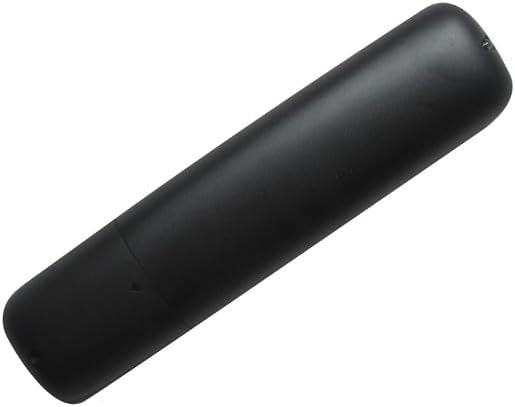
شڪل 2.1: پوئتي view ريموٽ ڪنٽرول جو، بيٽري جي ڪمپارٽمينٽ جو ڍڪ ڏيکاريندي.
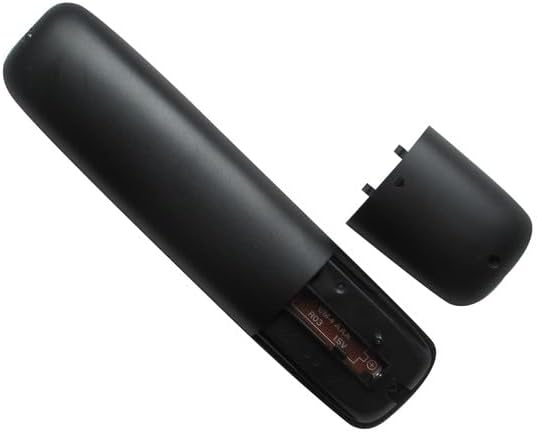
شڪل 2.2: The remote control with the battery compartment open, illustrating the correct orientation for AAA battery insertion.
3. آپريٽنگ هدايتون
3.1 بنيادي ڪم
This replacement remote control provides standard functions for operating your compatible Philips TV. Point the remote directly at your television's infrared receiver for optimal performance.

شڪل 3.1: زاويه view of the remote control, providing a clear perspective of the button layout and labels.
- پاور بٽڻ (Red Circle with Line): ٽيليويزن کي آن يا بند ڪري ٿو.
- حجم مٿي/گهٽ (VOL +/-): Adjusts the audio volume level.
- چينل مٿي/هيٺ (CH +/-): ٽيليويزن چينل تبديل ڪري ٿو.
- گونگا بٽڻ (Speaker with X): ٽيليويزن آڊيو کي خاموش يا خاموش ڪري ٿو.
- Source Button (SOURCE): دستياب ان پٽ ذريعن ذريعي چڪر (مثال طور، HDMI 1، HDMI 2، AV).
- نيويگيشن پيڊ (مٿي، هيٺ، کاٻي، ساڄي، ٺيڪ): Used to navigate menus and select options on the screen.
- Back Button (BACK): پوئين مينيو يا اسڪرين ڏانهن واپس اچي ٿو.
- NETTV Button: Provides direct access to Smart TV features or applications.
- عددي ڪي پيڊ (0-9): سڌو سنئون چينل نمبر يا ٻيا عددي ان پٽ داخل ڪري ٿو.
- APP Buttons (APP1, APP2, APP3, APP4): Dedicated buttons for quick access to specific applications, if supported by your TV model.
- پلے بیک ڪنٽرول (کيڏڻ، روڪيو، روڪيو، فاسٽ فارورڊ، ريوائنڊ): ميڊيا پلے بیک کي ڪنٽرول ڪري ٿو.
- سي سي (بند ڪيل ڪيپشننگ): Toggles closed captioning on or off.
- ڄاڻ: موجوده پروگرام يا ان پٽ بابت معلومات ڏيکاري ٿو.
- فارميٽ: Adjusts the screen aspect ratio or picture format.
4. Important Compatibility Notes
This remote control is specifically designed as a replacement for the Philips TV models listed in the title. It is crucial to:
- Verify Visual Match: Ensure your original remote control has the same appearance as this replacement unit.
- Model Number Confirmation: Confirm that your television's model number is explicitly included in the list of compatible models.
- ڪارڪردگي: While designed to replicate original functions, some advanced or less common features of your original remote may not be fully supported by this replacement.
- ڪابه پروگرامنگ جي ضرورت ناهي: This remote operates via infrared and does not require any programming or code setup.
5. وضاحتون
- برانڊ: ايزيٽري 123
- مطابقت رکندڙ ڊوائيسز: Philips Smart LCD LED HDTV Televisions (Specific models listed in title)
- رابطي ٽيڪنالاجي: انفراريڊ (IR)
- ڪنٽرولر جو قسم: بٽڻ ڪنٽرول
- طاقت جو ذريعو: 2 x AAA بيٽريون (شامل نه آهن)
- خاص خصوصيت: Ergonomic design, direct replacement functionality
6. مسئلا حل ڪرڻ
6.1 عام مسئلا
- ريموٽ جواب نه ڏئي رهيو آهي:
- پڪ ڪريو ته بيٽريون صحيح پولارٽي (+/-) سان صحيح طرح سان داخل ڪيون ويون آهن.
- پراڻين بيٽرين کي نئين AAA بيٽرين سان تبديل ڪريو.
- ريموٽ ۽ ٽي وي جي IR رسيور جي وچ ۾ ڪنهن به رڪاوٽ جي جانچ ڪريو.
- پڪ ڪريو ته ريموٽ سڌو سنئون ٽي وي ڏانهن اشارو ڪيو ويو آهي.
- ڪجھ ڪم ڪم نه ڪري رهيا آهن:
- Verify that your TV model is listed as compatible.
- Understand that some advanced or unique functions of your original remote may not be replicated by this replacement.
- وقفي وقفي سان جواب:
- پڪ ڪريو ته بيٽرين ۾ ڪافي طاقت آهي.
- Minimize strong light sources (e.g., direct sunlight, fluorescent lights) that might interfere with the IR signal.
7. وارنٽي ۽ سپورٽ
Information regarding specific warranty terms or direct customer support for this Easytry123 replacement remote control is not provided in this manual. Please refer to the retailer or your purchase documentation for details on warranty coverage and support options.


