1. تعارف
The D-Link DGS-1100-05PDV2 is a 5-Port Gigabit Smart Managed PoE Powered Switch/Extender designed for small, medium, and enterprise network environments. This switch is unique as it receives its power via Power over Ethernet (PoE) from an upstream PoE switch or injector, eliminating the need for a local AC power source. It also features PoE Pass-through capabilities, allowing it to supply power to one or two downstream PoE-enabled devices. The DGS-1100-05PDV2 incorporates energy-saving technologies like IEEE 802.3az Energy Efficient Ethernet and D-Link Green, ensuring efficient operation. Management is facilitated through an intuitive web-based interface, providing comprehensive control over network settings and features.
2. اهم خاصيتون
- PoE Powered Operation: Receives power from an upstream PoE Switch or PoE injector, eliminating the need for a dedicated AC power supply.
- PoE Pass-through: Provides PoE power to one or two downstream devices, extending network and power reach.
- 5 گيگابٽ پورٽ: Offers high-speed network connectivity for various devices.
- Smart Managed Capabilities: Features include 802.1Q VLAN support, Quality of Service (QoS), and Bandwidth Limiting for optimized network performance.
- ترقي يافته سيڪيورٽي خاصيتون: Includes Static MAC, Storm Control, and IGMP Snooping to enhance network security and stability.
- توانائي موثر: Compliant with IEEE 802.3az Energy Efficient Ethernet (EEE) and D-Link Green technology for reduced power consumption.
- آسان انتظام: Configurable via an intuitive web-based management interface for simplified network administration.
- تشخيصي اوزار: Features Loopback Detection and Cable Diagnostics to assist in quickly identifying and resolving network issues.
- بي ترتيب ڊيزائن: Ensures silent operation and contributes to a longer product lifespan.
- لچڪدار چڙهڻ: Supports both desktop and wall mount placement.
- لائف ٽائيم وارنٽي: Backed by a D-Link Lifetime Warranty for long-term reliability.
3. پيڪيج مواد
تصديق ڪريو ته توھان جي پيڪيج ۾ ھيٺيون شيون شامل آھن:
- DGS-1100-05PDV2 Gigabit Switch
- رٻڙ جا پير
- چڙهڻ اسڪرو
- جلدي انسٽاليشن ھدايت
- وارنٽي ڪارڊ
Note: A PoE injector or an upstream PoE switch is required to power the DGS-1100-05PDV2 and is not included in the package.
4. سيٽ اپ جون هدايتون
4.1 جسماني تنصيب
The DGS-1100-05PDV2 switch is designed for flexible placement, supporting both desktop and wall mounting. Ensure the installation location provides adequate ventilation and is free from excessive heat or moisture.

شڪل 4.1: سامهون view of the D-Link DGS-1100-05PDV2 switch, showing five Gigabit Ethernet ports and LED indicators.
4.2 Powering the Switch
This switch is PoE-powered. It receives power from an upstream PoE switch or a PoE injector. Connect an Ethernet cable from a PoE-enabled port on your upstream device to any of the five ports on the DGS-1100-05PDV2. The switch will draw power through this connection.
The switch also features a grounding screw for enhanced safety. If required by your installation environment, connect a grounding wire to the "SWITCH GND" terminal on the rear panel of the device.

شڪل 4.2: مثالample network diagram illustrating PoE power input and connections to various devices.
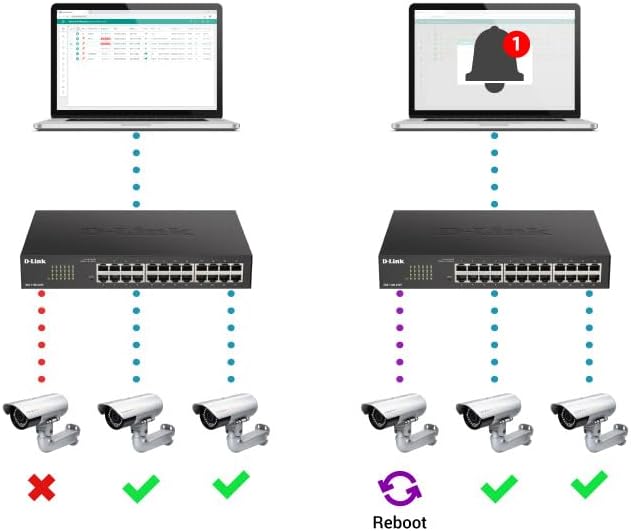
Figure 4.3: Rear panel of the switch, highlighting the "SWITCH GND" terminal for grounding.
4.3 شروعاتي ترتيب (Web-Based Management)
The DGS-1100-05PDV2 can be managed via a web-based interface. By default, the switch may have a static IP address (e.g., 10.90.90.90) or obtain one via DHCP. To access the web انٽرفيس:
- Connect a computer directly to one of the switch's Ethernet ports.
- Configure your computer's IP address to be in the same subnet as the switch's default IP (e.g., if the switch is 10.90.90.90, set your computer to 10.90.90.x with a subnet mask of 255.255.255.0).
- کوليو a web browser and enter the switch's default IP address (e.g., http://10.90.90.90).
- Log in using the default credentials (typically username: منتظم، پاسورڊ: منتظم or blank). Refer to the Quick Installation Guide for specific default credentials.
- Once logged in, you can configure network settings, including changing the IP address to DHCP or a different static IP, and enable desired features. Remember to save your configuration changes to ensure they persist after a reboot.
5. سوئچ هلائڻ
The DGS-1100-05PDV2 is a Smart Managed switch, offering various functionalities to optimize your network. After initial setup, you can utilize the web-based management interface to configure and monitor the switch.
5.1 PoE Pass-through Functionality
The switch supports PoE Pass-through on ports 1 and 2. This means that if the switch itself is powered by PoE (e.g., from an 802.3at source), it can then provide power to up to two downstream PoE-enabled devices connected to ports 1 and 2. The maximum PoE budget available for downstream devices depends on the input power received by the switch.
5.2 Network Management Features
جي ذريعي web interface, you can configure advanced Layer 2 features:
- VLANs (Virtual Local Area Networks): Segment your network for improved security and performance (e.g., 802.1Q VLAN support, Voice VLAN, Surveillance VLAN).
- خدمت جو معيار (QoS): Prioritize network traffic for critical applications like VoIP and video streaming.
- بينڊوڊٿ ڪنٽرول: Manage bandwidth allocation per port to prevent network congestion.
- Static MAC: Manually assign MAC addresses to ports for enhanced security.
- طوفان ڪنٽرول: Prevent network disruptions caused by broadcast, multicast, or unknown unicast storms.
- IGMP اسنوپنگ: Optimize multicast traffic delivery, useful for IPTV and other multicast applications.
- بندرگاهه جي چڪاس: Monitor network traffic by sending a copy of packets from one port to another.
- Spanning Tree Protocol (STP/RSTP): Prevent network loops in complex topologies.
6. سار سنڀال
The DGS-1100-05PDV2 is designed for minimal maintenance due to its fanless operation, which reduces moving parts and potential points of failure. However, regular checks and best practices are recommended:
- فرم ويئر اپڊيٽس: وقتي طور تي ڊي-لنڪ سپورٽ چيڪ ڪريو webبهترين ڪارڪردگي، سيڪيورٽي، ۽ نئين خاصيتن تائين رسائي کي يقيني بڻائڻ لاءِ فرم ويئر اپڊيٽس لاءِ سائيٽ.
- جسماني معائنو: Ensure the switch is placed in a well-ventilated area, free from dust and obstructions that could impede airflow. Keep the device clean using a soft, dry cloth.
- ڪيبل جو انتظام: Ensure all Ethernet cables are securely connected and properly routed to prevent accidental disconnections or damage.
- ڪنفيگريشن بيڪ اپ: Regularly back up your switch configuration settings through the web interface. This allows for quick restoration in case of accidental changes or device replacement.
7. مسئلا حل ڪرڻ
This section provides solutions to common issues you might encounter with your DGS-1100-05PDV2 switch.
7.1 No Power / Switch Not Turning On
- Verify that the switch is connected to a functioning PoE source (e.g., a PoE switch or PoE injector).
- Ensure the PoE source is active and providing sufficient power (e.g., 802.3at for full functionality, or 802.3af for basic operation).
- Check the Ethernet cable connecting the switch to the PoE source for damage or improper connection.
7.2 رسائي نه ٿي سگهي Web انتظامي انٽرفيس
- IP Address Mismatch: Ensure your computer's IP address is in the same subnet as the switch's IP address. If the switch is at its default static IP (10.90.90.90), configure your computer with a static IP like 10.90.90.x (where x is not 90) and a subnet mask of 255.255.255.0.
- DHCP Issue: If the switch is configured for DHCP, use an IP scanner tool or check your router's DHCP client list to find the IP address assigned to the switch.
- Incorrect Credentials: Double-check the username and password. Default credentials are often منتظم ٻنهي لاءِ.
- برائوزر مطابقت: Try accessing the interface with a different web برائوزر.
- فيڪٽري ڊفالٽ تي ري سيٽ ڪريو: If all else fails, perform a factory reset. Locate the 'Reset' button on the front panel (often recessed, requiring a paperclip to press) and hold it for approximately 5-10 seconds until the LEDs indicate a reset. خبردار: هي سڀ ڪسٽم ترتيبون ختم ڪري ڇڏيندو.
7.3 نيٽ ورڪ ڪنيڪٽيويٽي جا مسئلا
- ڪيبل تشخيص: Utilize the built-in Cable Diagnostics feature via the web interface to test the integrity of connected Ethernet cables.
- لوپ بيڪ جي چڪاس: If enabled, this feature can detect and prevent network loops. Check the switch logs for loopback events.
- LED اشارا: Observe the Link/Act LEDs on the switch ports. A solid green or amber light indicates a valid link, while a blinking light indicates activity. No light suggests a cable issue or a problem with the connected device.
- VLAN ترتيب: Ensure devices are assigned to the correct VLANs if VLANs are configured on the switch.
8. ٽيڪنيڪل وضاحتون
| وصف | تفصيل |
|---|---|
| ماڊل نمبر | DGS-1100-05PDV2 |
| بندرگاهن جو تعداد | 5 گيگابٽ ايٿرنيٽ بندرگاهن |
| PoE سپورٽ | PoE Powered (Input), PoE Pass-through on ports 1 & 2 (Output) |
| ڊيٽا جي منتقلي جي شرح | 10/100/1000 Mbps (گيگابٽ) |
| انٽرفيس جو قسم | آر جي 45 |
| ڪيس جو مواد | ڌاتو |
| پيداوار جي ماپ (LxWxH) | 10.16" x 8.26" x 2.79" (25.8 سينٽي ميٽر x 21 سينٽي ميٽر x 7.1 سينٽي ميٽر) |
| شيءِ جو وزن | 0.5 پائونڊ (تقريبن 227 گرام) |
| آپريٽنگ جي درجه حرارت | 32°F کان 104°F (0°C کان 40°C) |
| توانائي جي ڪارڪردگي | IEEE 802.3az توانائي موثر ايٿرنيٽ (EEE) |
| انتظام | Web-based GUI, D-Link Network Assistant |
| VLAN سپورٽ | 802.1Q VLAN, Voice VLAN, Surveillance VLAN |
| وارنٽي | لائف ٽائيم وارنٽي |

Figure 8.1: Dimensions of the DGS-1100-05PDV2 switch.
9. وارنٽي ۽ ٽيڪنيڪل سپورٽ
9.1 Lifetime Warranty
The D-Link DGS-1100-05PDV2 is backed by a لائف ٽائيم وارنٽي, which includes Next Business Day (NBD) hardware replacement. This warranty provides long-term confidence in the product's reliability. Please refer to the included warranty card or the D-Link official webسائيٽ مڪمل شرطن ۽ ضابطن لاءِ.
9.2 ٽيڪنيڪل سپورٽ
For technical assistance, product documentation, and firmware updates, please visit the official D-Link support webسائيٽ:
- USA Support: http://support.dlink.com
- Canada Support: http://support.dlink.ca
D-Link Systems, Inc. is located at 14420 Myford Road, Suite 100, Irvine, CA 92606, USA.


