ايئر پلس A80 پاورڊ بُڪ شيلف اسپيڪرز يوزر مينوئل
ماڊل: A80 | برانڊ: Airpulse
1. تعارف
خريد ڪرڻ لاءِ مهربانيasing the Airpulse A80 Powered Bookshelf Speakers. This manual provides essential information for the safe and efficient use of your new audio system. Please read it thoroughly before operation and retain it for future reference.
پيڪيج مواد
- Airpulse A80 Active Speaker (Right)
- Airpulse A80 Passive Speaker (Left)
- ريموٽ ڪنٽرول
- پاور ڪيبل
- Left/Right Speaker Connection Cable
- USB ڪيبل
- بصري ڪيبل
- آر سي سي ڪيبل
- Urethane Angle Bases (for speaker tilt)

شڪل 1: سامهون view of the Airpulse A80 powered bookshelf speakers.
2. حفاظتي هدايتون
محفوظ آپريشن کي يقيني بڻائڻ ۽ نقصان کي روڪڻ لاءِ، مھرباني ڪري ھيٺ ڏنل حفاظتي ھدايتن تي عمل ڪريو:
- طاقت جو ذريعو: Connect the speakers only to a power outlet with the correct voltage جيئن پراڊڪٽ تي اشارو ڪيو ويو آهي.
- وينٽيليشن: اسپيڪرن جي چوڌاري مناسب هوا جي وهڪري کي يقيني بڻايو. هوا جي وهڪري جي سوراخن کي بند نه ڪريو.
- پاڻي ۽ نمي: Do not expose the speakers to water, rain, or excessive moisture.
- گرمي جا ذريعا: Keep speakers away from heat sources such as radiators, heat registers, stoves, or other heat-producing apparatus.
- صفائي: Unplug the speakers before cleaning. Use a dry cloth only.
- خدمت ڪرڻ: Do not attempt to service the speakers yourself. Refer all servicing to qualified service personnel.
3. سيٽ اپ
3.1 اسپيڪر جي جاءِ
Place the speakers on a stable, level surface. For optimal stereo imaging, position the speakers equidistant from your listening position, forming an equilateral triangle. The included urethane angle bases can be used to slightly tilt the speakers upwards for better sound dispersion if placed on a lower surface.
3.2 ڳنڍڻ وارا اسپيڪر
The right speaker is the active unit containing the amplifier and controls. The left speaker is passive. Connect the left speaker to the "L SPEAKER OUT" port on the rear of the right speaker using the provided speaker connection cable.
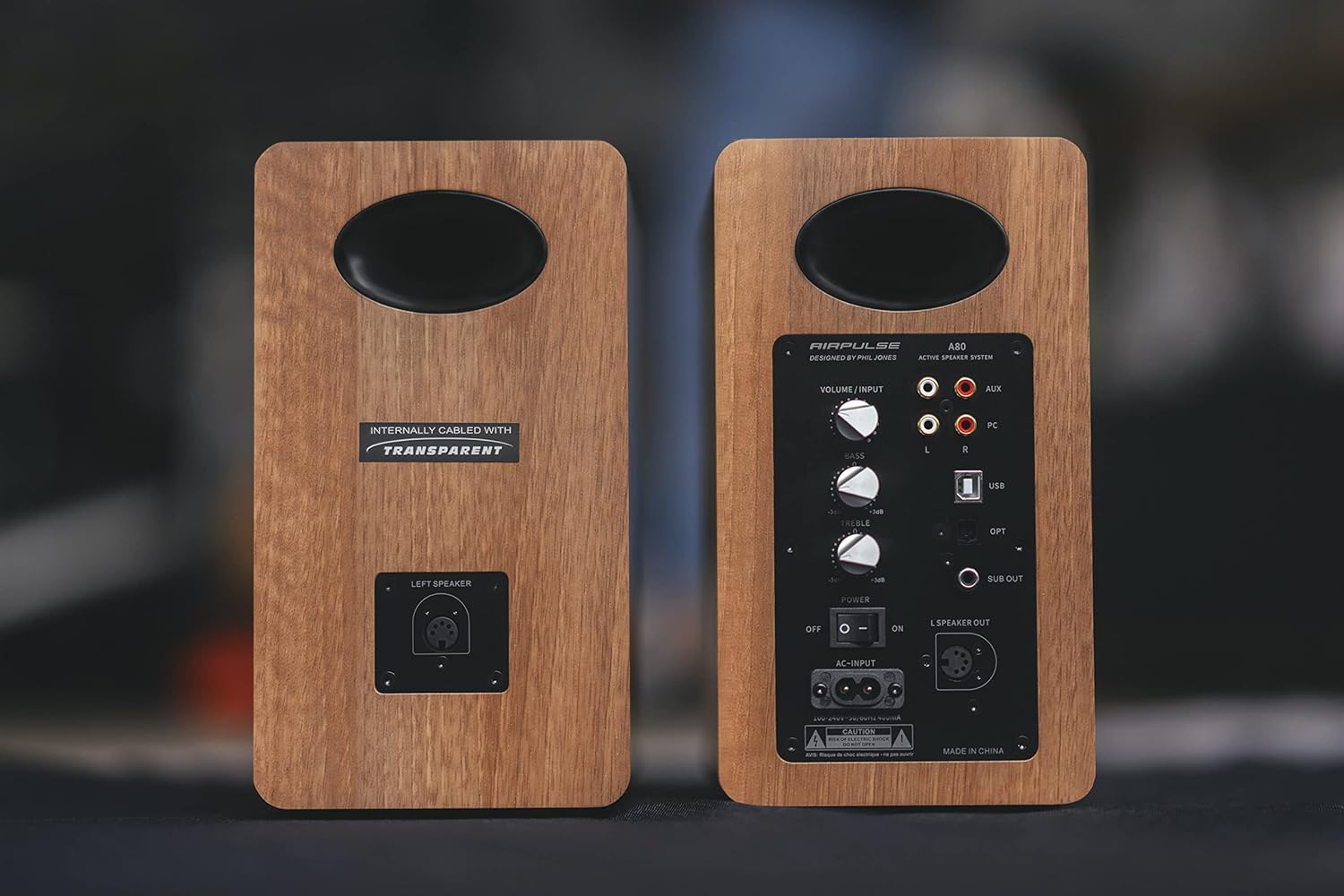
Figure 2: Rear panel of the Airpulse A80 speakers, illustrating the connection points.
3.3 پاور ڪنيڪشن
Connect the power cable to the "AC-INPUT" port on the rear of the active (right) speaker, then plug it into a wall outlet. Ensure the power switch is in the "OFF" position before connecting to power.
3.4 Audio Source Connections
The Airpulse A80 offers multiple input options:
- USB ان پٽ Connect your computer to the "USB" port using the provided USB cable for high-quality digital audio playback.
- بصري ان پٽ: Connect devices like TVs or game consoles to the "OPT" port using an optical cable.
- RCA (AUX) Input: Use the RCA cable to connect analog audio sources to the "AUX" ports (L/R).
- پي سي ان پٽ: Use the RCA cable to connect your PC's analog audio output to the "PC" ports (L/R).
- بلوٽوٿ: For wireless audio streaming from Bluetooth-enabled devices. (See Section 4.2 for pairing instructions)

شڪل 3: تفصيلي view of the active speaker's rear panel, showing input options and controls.
3.5 سبوپر ٻاھر
The "SUB OUT" port allows you to connect an external active subwoofer for enhanced bass response. Connect a subwoofer cable from this port to the input of your active subwoofer.
4. آپريٽنگ هدايتون
4.1 پاور آن/آف
Flip the "POWER" switch on the rear panel of the active speaker to "ON" to power on the system. Flip it to "OFF" to power off.
4.2 ان پٽ چونڊ
You can select the input source using the "VOLUME / INPUT" knob on the rear panel or the input selection buttons on the remote control. Rotate the knob or press the buttons to cycle through USB, Optical, Bluetooth, AUX, and PC inputs.
4.3 بلوٽوٽ جوڙي
- Select the Bluetooth input on the speakers. The indicator light will flash.
- On your Bluetooth-enabled device (e.g., smartphone, tablet), search for "Airpulse A80" in the Bluetooth settings.
- Select "Airpulse A80" to pair. Once connected, the indicator light on the speaker will glow steadily.
- To disconnect or pair with another device, press and hold the Bluetooth button on the remote control or the "VOLUME / INPUT" knob for a few seconds until the indicator light flashes again.
4.4 Volume, Bass, and Treble Controls
Adjust the overall volume using the "VOLUME / INPUT" knob on the rear panel or the volume buttons on the remote control. The "BASS" and "TREBLE" knobs on the rear panel allow you to fine-tune the low and high frequencies, respectively, from -6dB to +6dB.
4.5 ريموٽ ڪنٽرول افعال
The included remote control provides convenient access to various functions:
- پاور آن / آف
- حجم مٿي / ھيٺ
- گونگا
- Input Selection (USB, Optical, Bluetooth, AUX, PC)
- Bluetooth Disconnect/Pairing
- Playback Controls (Play/Pause, Next/Previous Track - for Bluetooth/USB)
5. سار سنڀال
5.1 صفائي
To clean the speakers, first unplug them from the power outlet. Use a soft, dry cloth to wipe the surfaces. Do not use liquid cleaners, aerosols, or abrasive materials, as these may damage the finish or internal components.
5.2 اسٽوريج
If storing the speakers for an extended period, ensure they are powered off and unplugged. Store them in a cool, dry place, away from direct sunlight and extreme temperatures.
6. مسئلا حل ڪرڻ
| مسئلو | ممڪن سبب | حل |
|---|---|---|
| طاقت نه آهي | Power cable not connected; Power switch off; Wall outlet not active. | Ensure power cable is securely connected. Turn power switch to "ON". Check wall outlet with another device. |
| آواز ڪونهي | Incorrect input selected; Volume too low; Mute activated; Cables loose. | Select correct input. Increase volume. Deactivate mute. Check all audio cables for secure connection. |
| بلوٽوٿ جوڙو ناهي | Speakers not in pairing mode; Device too far; Interference. | Ensure speakers are in Bluetooth input and indicator is flashing. Move device closer. Avoid other wireless devices. |
| آواز جي تحريف | Volume too high; Source audio quality poor; Bass/Treble settings too extreme. | Reduce volume. Check source audio. Adjust Bass/Treble knobs to neutral or lower settings. |
| صرف هڪ اسپيڪر آواز آهي | Left speaker cable loose or disconnected; Source audio issue. | Check the connection of the left speaker cable to the active speaker. Test with a different audio source. |
7. وضاحتون
| خاصيت | تفصيل |
|---|---|
| ماڊل | AP-A80 |
| اسپيڪر جو قسم | Powered Bookshelf Speaker System with Subwoofer Output |
| Ampو lifيڪ طاقت | Woofer: 40W x 2 | Tweeter: 10W x 2 (Total 100W RMS) |
| داخلائون | USB, Optical, Bluetooth 5.0, RCA (AUX), PC |
| ٻاھر ڪڍڻ | Subwoofer آئوٽ پٽ |
| رابطي ٽيڪنالاجي | بلوٽوٿ، يو ايس بي |
| ووفر جي ماپ | 4.5 انچ (11.5 سينٽي) |
| پيداوار جي ماپ (W x D x H) | 14 cm x 24 cm x 25.5 cm (per speaker, including protrusions) |
| پيداوار جو وزن | 4.8 ڪلوگرام (في اسپيڪر) |
| ڪنٽرول جو طريقو | Remote Control, On-board Knobs |
| آڊيو آئوٽ پٽ موڊ | اسٽيريو |
| چڙهڻ جو قسم | ٽيبل ٽاپ جبل |

شڪل 4: ڌماڪو ٿيو view of a speaker driver, illustrating its internal components.
8. وارنٽي ۽ سپورٽ
Airpulse products are designed and manufactured to the highest quality standards. For warranty information and technical support, please refer to the warranty card included with your product or visit the official Airpulse webسائيٽ. وارنٽي دعوائن لاءِ خريداري جي ثبوت طور پنهنجي خريداري جي رسيد رکو.
For further assistance, please contact your local dealer or Airpulse customer service.


