1. تعارف
This manual provides detailed instructions for the setup, operation, maintenance, and troubleshooting of your MYPIN Infrared Remote Control. This remote is specifically designed to work with MYPIN 4K Media Players, including models B07WPY8VKL and B07PGFCPTV.
مھرباني ڪري ريموٽ ڪنٽرول استعمال ڪرڻ کان پھريائين ھن دستور کي چڱي طرح پڙھو ته جيئن مناسب ڪارڪردگي کي يقيني بڻائي سگھجي ۽ پنھنجي استعمال ڪندڙ جي تجربي کي وڌ کان وڌ ڪري سگھجي.
2. پيڪيج مواد
- 1 x MYPIN Infrared Remote Control
نوٽ: AAA بيٽريون شامل نه آهن ۽ الڳ الڳ خريد ڪرڻ گهرجن.
3. سيٽ اپ
3.1 بيٽري لڳائڻ
- ريموٽ ڪنٽرول جي پٺي تي بيٽري جي خاني کي ڳوليو.
- ان کي کولڻ لاءِ بيٽري جي ڪمپارٽمينٽ جي ڍڪ کي هيٺئين طرف سلائڊ ڪريو.
- ٻہ (2) AAA بيٽريون داخل ڪريو، پڪ ڪريو ته مثبت (+) ۽ منفي (-) ٽرمينل صحيح طرح سان ڪمري اندر نشانن سان ترتيب ڏين.
- بيٽري جي ڪمپارٽمينٽ جي ڍڪ کي واپس جاءِ تي سلائڊ ڪريو جيستائين اهو محفوظ طور تي ڪلڪ نه ڪري.
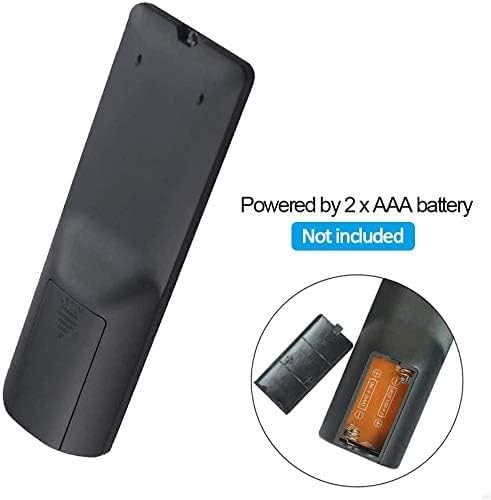
شڪل 3.1: Battery installation for the MYPIN Infrared Remote Control. Ensure correct polarity when inserting two AAA batteries.
3.2 مطابقت
This remote control is designed exclusively for MYPIN 4K Media Players. It is compatible with models such as B07WPY8VKL and B07PGFCPTV. It may not function correctly with other brands or models of media players.
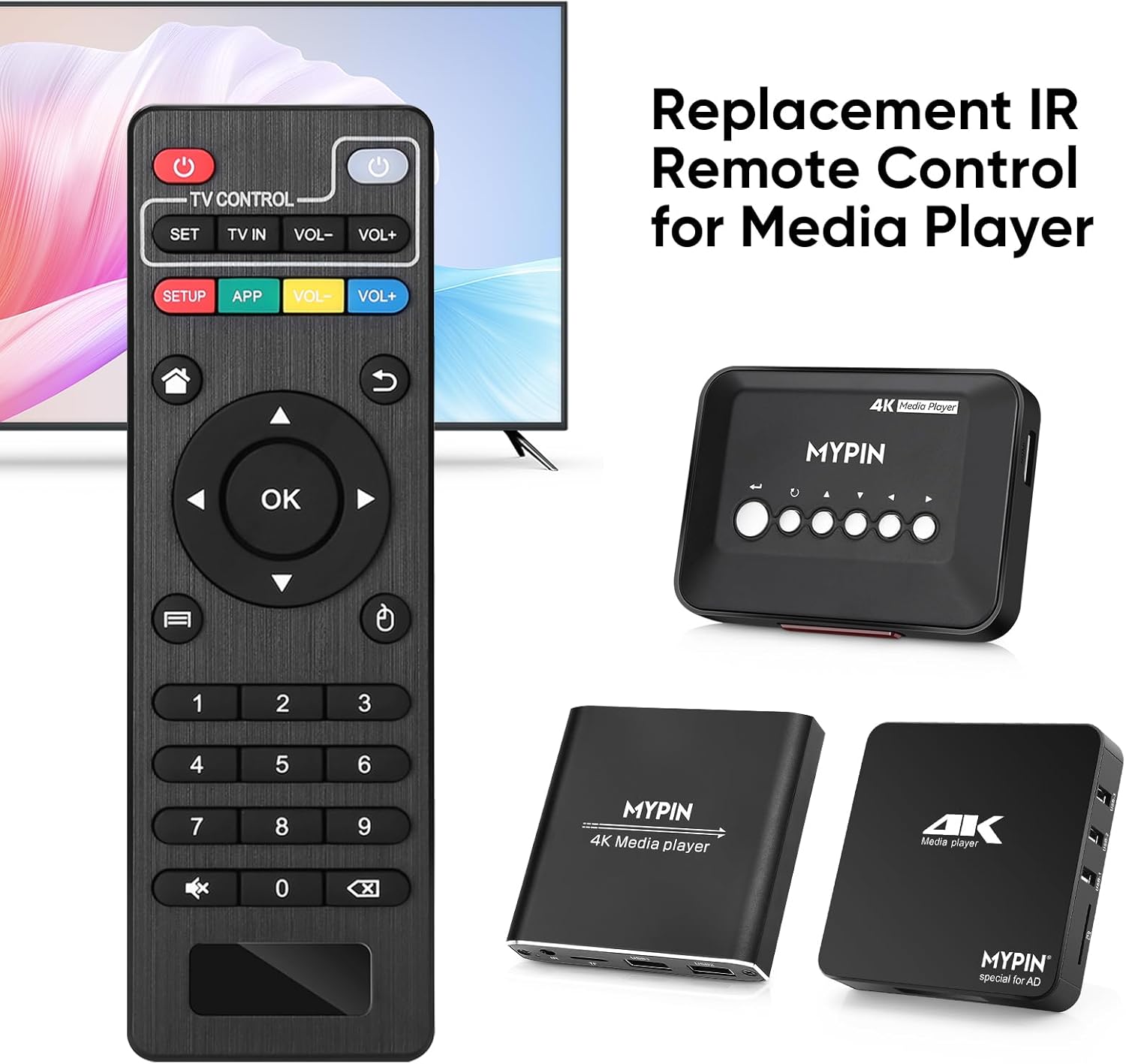
شڪل 3.2: The MYPIN remote control shown with compatible MYPIN 4K Media Players.
3.3 شروعاتي ڪنيڪشن
The MYPIN Infrared Remote Control operates via infrared (IR) signals. No pairing process is required. Simply point the remote control directly at the IR receiver of your MYPIN 4K Media Player. Ensure there are no obstructions between the remote and the media player.

شڪل 3.3: Using the MYPIN remote control with an optional IR cable for discreet placement of the media player.
4. آپريٽنگ هدايتون
The MYPIN Infrared Remote Control features a standard layout for intuitive control of your media player. Below is a guide to its primary functions:

شڪل 4.1: Key functional areas of the MYPIN Remote Control.
4.1 بٽڻ جا ڪم
- Power Button (Red, Top Left): Turns the media player on or off.
- TV Control Section (Top Row):
- TV Learning Button (1): Used to program basic TV functions (e.g., TV Power, Volume). Refer to your TV's manual for learning remote functions.
- سيٽ: Used for TV learning mode.
- ٽي وي اندر: Switches TV input source.
- جلد- / جلد+: ٽي وي جي مقدار کي ترتيب ڏئي ٿو.
- SETUP / APP / VOL- / VOL+ (Colored Buttons): These buttons provide quick access to specific media player functions or applications. Their exact function may vary depending on the media player's software.
- گھر جو بٽڻ (گھر جو آئڪن): Returns to the main menu or home screen of the media player.
- Return/Back Button (Arrow Icon): پوئين اسڪرين يا مينيو ڏانهن واپس وڃو.
- Direction Keys (2 - Up, Down, Left, Right): Navigates through menus and content. When playing videos or music, Up/Down typically selects previous/next track, and Left/Right performs fast backward/forward.
- OK Button (Center): Confirms selections or plays content.
- Menu Key (3 - Three Horizontal Lines Icon): Accesses context-sensitive menus or playback options.
- نمبر پيڊ (0-9): Used for direct input of numbers, such as channel selection or specific menu options.
- Mute Button (Crossed Speaker Icon): Mutes or unmutes the media player's audio.
- Context Menu Button (Box with Arrow Icon): Opens additional options or settings.

شڪل 4.2: Accessing playback options using the Menu key on the MYPIN remote control.
5. سار سنڀال
5.1 بيٽري مٽائڻ
When the remote control's performance degrades (e.g., reduced range, unresponsive buttons), it is likely time to replace the batteries. Follow the battery installation steps in Section 3.1 to replace the two AAA batteries.
5.2 صفائي
ريموٽ ڪنٽرول کي صاف ڪرڻ لاءِ، نرم، سڪل ڪپڙي سان ان جي مٿاڇري کي نرميءَ سان صاف ڪريو. ضدي مٽيءَ لاءِ، ٿورو ڊيampڪپڙي کي پاڻي يا نرم، غير رگڙيندڙ ڪلينر سان ڌوئڻ ڏيو. سخت ڪيميڪلز يا گهڻي نمي استعمال ڪرڻ کان پاسو ڪريو، ڇاڪاڻ ته اهي ريموٽ جي اليڪٽرانڪس کي نقصان پهچائي سگهن ٿا.
5.3 اسٽوريج
ريموٽ ڪنٽرول کي سڌي سج جي روشني ۽ انتهائي گرمي پد کان پري ٿڌي، سڪل جاءِ تي رکو. جيڪڏهن ريموٽ ڊگهي عرصي تائين استعمال نه ڪيو ويندو، ته پوءِ ليڪيج ۽ امڪاني نقصان کي روڪڻ لاءِ بيٽرين کي هٽائڻ جي سفارش ڪئي وئي آهي.
6. مسئلا حل ڪرڻ
- ريموٽ غير جوابده آهي:
- پڪ ڪريو ته تازيون AAA بيٽريون صحيح طرح سان نصب ٿيل آهن.
- Point the remote directly at the media player's IR receiver.
- Remove any obstructions between the remote and the media player.
- Check the operating distance; the remote has an infrared range of approximately 7 meters.
- If the remote initially seems unresponsive after battery installation, allow a short period for it to initialize, as some users have reported spontaneous functionality after a delay.
- Buttons not performing expected functions:
- Verify that the remote is compatible with your specific MYPIN media player model.
- Some buttons (e.g., SETUP, APP) may have functions determined by the media player's software and may not be universally assigned.
- TV Control buttons not working:
- Ensure you have successfully programmed the TV Learning Button functions according to your TV's instructions.
7. وضاحتون
| خاصيت | تفصيل |
|---|---|
| رابطي ٽيڪنالاجي | انفراريڊ (IR) |
| مطابقت رکندڙ ڊوائيسز | MYPIN media players (e.g., B07WPY8VKL, B07PGFCPTV) |
| سپورٽ ٿيل ڊوائيسز جو وڌ ۾ وڌ تعداد | 1 (for media player control) |
| خاص خصوصيت | Ergonomic ڊيزائن |
| طاقت جو ذريعو | 2 x AAA بيٽريون (شامل نه آهن) |
| انفراريڊ مفاصلو | 7 ميٽر تائين |
| انفراريڊ زاويه | 30 درجا |
| شيءِ جو وزن | 1.13 اونس |
| پيڪيج جي ماپ | 5.43 x 1.81 x 0.71 انچ |
| ماڊل نمبر | B08CDNZMJG |
8. وارنٽي ڄاڻ
MYPIN products are manufactured to high-quality standards. For specific warranty details regarding your remote control, please refer to the documentation included with your MYPIN 4K Media Player or visit the official MYPIN webسائيٽ. ڪنهن به وارنٽي دعوائن لاءِ خريداري جي ثبوت طور پنهنجي خريداري جي رسيد رکو.
9. سپورٽ
If you encounter any issues not covered in this manual or require further assistance, please contact MYPIN customer support through the retailer where you purchased the product or visit the official MYPIN support webرابطي جي معلومات لاء سائيٽ.


