1. تعارف
The LogiLink UA0363 is a USB-C to 3.5mm audio adapter designed to provide audio output for smartphones, tablets, and laptops that lack a dedicated 3.5mm audio jack. This adapter integrates a high-quality Digital-to-Analog Converter (DAC) and a hardware equalizer to deliver enhanced audio performance. It supports standard 3.5mm headphones and headsets with microphone functionality.
2. مصنوعات جون خاصيتون
- Supports most mobile phones and laptops with a USB-C interface.
- Integrated 3-level hardware equalizer (EQ), selectable via a control button.
- Integrated microphone support.
- LED display for sampling rate and EQ modes.
- Supports most 3.5mm 3-pin headphones with 16-600 ohms impedance.
- هيڊ فون Amplifier: Maxim MAX97220AA.
- DAC: BES Technik BES3100.
- جي حمايت ڪري ٿوampling frequencies of 44, 48, and 96 kHz with 24-bit resolution.
- USB powered, no external power supply required.
- Compliant with USB 2.0 specifications.
- Signal-to-Noise Ratio (SNR): Approximately 100 dB (A).
3. سيٽ اپ
- Connect the LogiLink UA0363 adapter to the USB-C port of your smartphone, tablet, or laptop. Ensure it is fully inserted.
- Plug your 3.5mm headphones or headset into the 3.5mm jack on the adapter.
- The device is plug-and-play and should be recognized automatically by most operating systems.

Image: The LogiLink UA0363 adapter connected to a smartphone, ready for headphone use.
4. آپريٽنگ هدايتون
4.1 بنيادي آڊيو پلے بیک
Once connected, audio from your device will be routed through the UA0363 adapter to your headphones. Use your connected device's volume controls to adjust the audio output level.
4.2 Equalizer (EQ) Function
The adapter features a built-in 3-level hardware equalizer. To cycle through the available EQ modes, press the control button located on the adapter. An LED display on the adapter indicates the currently active EQ mode and the sampلنگ جي شرح.
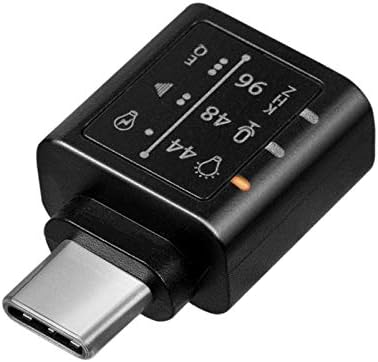
تصوير: تفصيلي view of the adapter's indicators for sampling frequency and equalizer settings.
4.3 مائڪروفون فنڪشن
If your connected headphones or headset include a microphone, its functionality will be supported through the UA0363 adapter. Ensure your device's audio input settings are configured to use the USB audio device's microphone.
5. سار سنڀال
- Keep the adapter clean and dry. Use a soft, dry cloth for cleaning.
- اڊاپٽر کي انتهائي گرمي پد، نمي، يا سڌي سج جي روشني ۾ بي نقاب ڪرڻ کان پاسو ڪريو.
- اڊاپٽر کي ڌار ڪرڻ يا تبديل ڪرڻ جي ڪوشش نه ڪريو، ڇاڪاڻ ته اهو وارنٽي کي رد ڪري ڇڏيندو.
- جسماني نقصان کي روڪڻ لاءِ استعمال ۾ نه هجڻ وقت اڊاپٽر کي محفوظ جاءِ تي رکو.
6. مسئلا حل ڪرڻ
6.1 ڪو به آواز آئوٽ پُٽ ناهي
- Ensure the UA0363 adapter is fully and securely inserted into your device's USB-C port.
- Verify that your headphones are fully plugged into the adapter's 3.5mm jack.
- Check your device's audio output settings to confirm that the USB audio device is selected as the primary output.
- Test the adapter with a different pair of headphones or another compatible USB-C device to isolate the issue.
- Ensure the volume on your connected device is not muted or set too low.
6.2 Poor Audio Quality or Distortion
- آڊيو ذريعو کي يقيني بڻايو (مثال طور، موسيقي) file، اسٽريمنگ سروس) اعليٰ معيار جي آهي.
- Try cycling through the different EQ settings on the adapter to see if a different profile improves the sound.
- Check for any loose connections between the adapter, device, and headphones.
- Avoid using the adapter near sources of strong electromagnetic interference.
6.3 مائڪروفون ڪم نه ڪري رهيو آهي
- Confirm that your headphones or headset are equipped with a working microphone.
- Check your device's audio input settings to ensure the USB audio device's microphone is selected as the input source.
- Ensure the microphone on your headset is not muted.
7. وضاحتون
| خاصيت | تفصيل |
|---|---|
| ماڊل نمبر | UA0363 |
| ڳنڍيندڙ | USB-C Male, 3.5mm Jack Female |
| ڊي سي چپ | BES Technik BES3100 |
| هيڊ فون Ampزندگي گذاريندڙ | Maxim MAX97220AA |
| سپورٽ SampRل قيمتون | 44 kHz ، 48 kHz ، 96 kHz |
| قرارداد | 24-bit |
| Impedance Support | 16-600 ohms |
| سگنل کان شور جي نسبت (SNR) | لڳ ڀڳ. 100 ڊي بي (اي) |
| طاقت جو ذريعو | USB ويڊيو |
| USB تعميل | USB 2.0 |
| خاص خاصيتون | Integrated Microphone Support, 3-level Hardware Equalizer, LED Indicators |
| طول و عرض (L x W x H) | 17 x 10 x 26 ملي ميٽر |
| رنگ | ڪارو |
8. وارنٽي ۽ سپورٽ
For warranty information, technical support, and further assistance, please refer to the official LogiLink webسائيٽ تي وڃو يا پنهنجي مجاز پرچون ڪندڙ سان رابطو ڪريو. وارنٽي دعوائن لاءِ پنهنجي خريداري جي رسيد رکو.


