1. تعارف
Welcome to the Surfans Kids Tablet T57 user manual. This guide provides detailed instructions on how to set up, operate, maintain, and troubleshoot your new 7-inch Android tablet. Designed specifically for children, this tablet features a durable kid-proof case, parental control functions, and pre-installed educational and entertainment applications.
2. دٻي ۾ ڇا آهي
مھرباني ڪري پنھنجي پيڪيج جي مواد کي چيڪ ڪريو ته جيئن پڪ ڪري سگھجي ته سڀئي شيون موجود آھن:
- 1x Surfans Kids Tablet
- 1x ٽيبليٽ اسٽينڊ
- 1x USB ڪيبل
- 1x Kids Tablet User Manual (this document)
3. پراڊڪٽ ختمview ۽ خاصيتون
The Surfans Kids Tablet T57 is built with a robust design and features tailored for young users. Below is an overview of its components and key functionalities.
3.1 ٽيبليٽ جا جزا
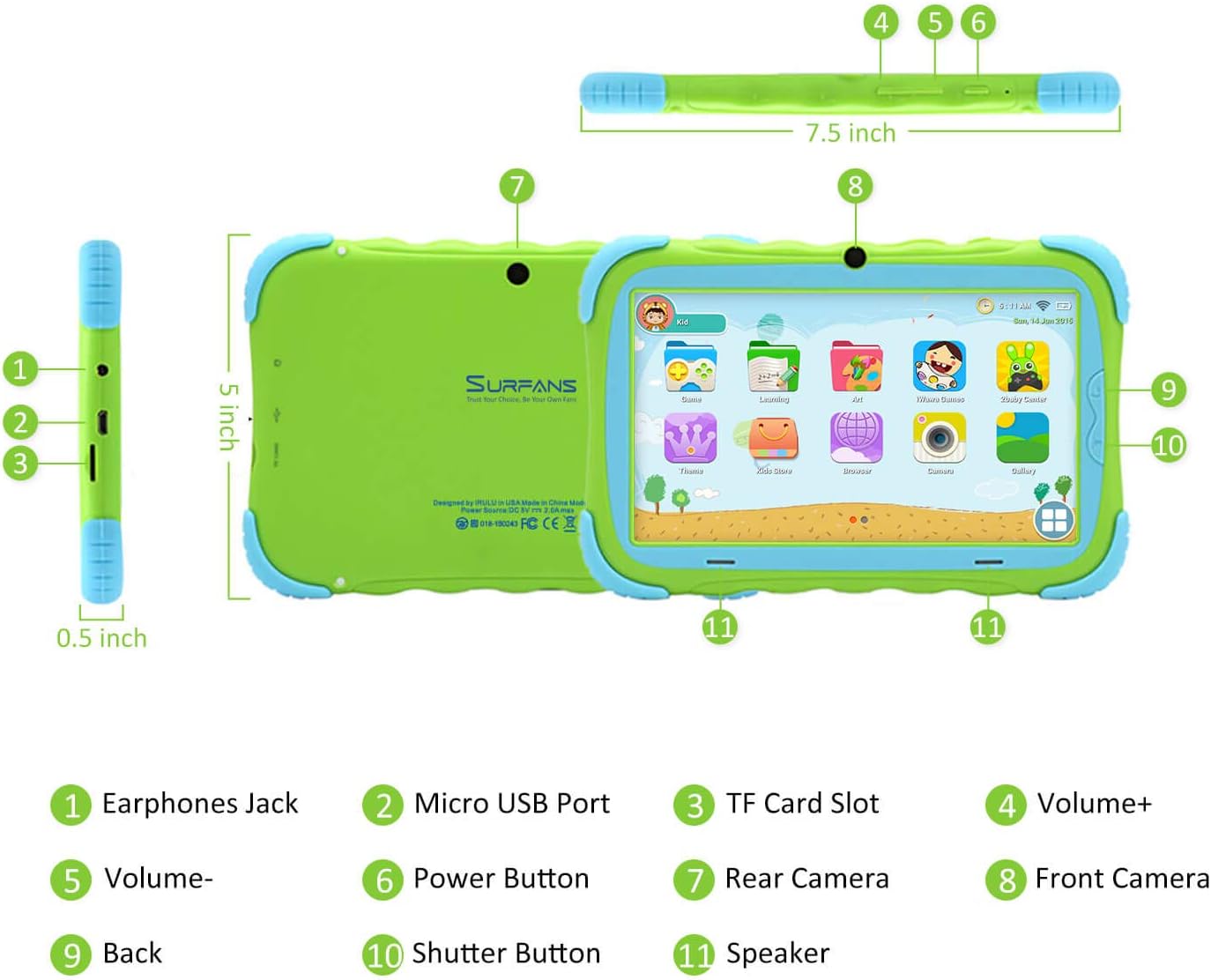
- ائرفون جڪ: هيڊفونز يا ٻاهرين آڊيو ڊوائيسز کي ڳنڍڻ لاءِ.
- مائڪرو USB پورٽ: ٽيبليٽ کي چارج ڪرڻ ۽ ڊيٽا جي منتقلي لاءِ ڪمپيوٽر سان ڳنڍڻ لاءِ استعمال ٿيندو آهي.
- TF ڪارڊ سلاٽ: For inserting a Micro SD card to expand storage capacity (up to 32GB).
- حجم +: Increases the tablet's audio volume.
- جلد-: Decreases the tablet's audio volume.
- پاور بٽڻ: Press and hold to turn the tablet on/off or restart. Press briefly to turn the screen on/off.
- پوئتي ڪئميرا: The primary camera located on the back of the tablet.
- سامهون ڪئميرا: The camera located on the front, typically used for video calls or selfies.
- پوئتي بٽڻ: Navigates back to the previous screen or closes the current application.
- شٽر بٽڻ: Used to capture photos or start/stop video recording in the camera application.
- اسپيڪر: Provides audio output from the tablet.
3.2 اهم خاصيتون
- Kid-Proof Design: Comes with a durable, lightweight, and skin-friendly case designed to protect against drops and bumps.
- 7-inch IPS HD Eye Protection Display: Provides clear visuals while minimizing eye strain.
- اينڊرائيڊ 9.0 او ايس: Runs on the latest Google Android 9.0 Pie operating system for smooth performance.
- Quad-Core Processor: Ensures responsive performance for apps, games, and videos.
- 1GB RAM & 16GB ROM: Sufficient memory for basic operations and storage, expandable up to 32GB via Micro SD card.
- Parental Control Mode: Allows parents to manage content, set time limits, and configure user settings for a safe digital environment.
- Pre-installed Kids Apps: Includes a variety of educational and entertaining apps, with access to the Google Play Store for more content.
- وائي فائي ڪنيڪشن: Supports 802.11g for fast browsing, streaming, and video calls.
- ڊگھي بيٽري زندگي: 3000mAh Li-ion Battery provides 3-5 hours of working time, or up to 8 hours of mixed use on a single charge.


4. سيٽ اپ گائيڊ
Follow these steps to set up your Surfans Kids Tablet for the first time.
4.1 شروعاتي چارج
Before first use, fully charge the tablet. Connect the included USB cable to the Micro USB Port (2) on the tablet and plug the other end into a compatible USB power adapter (not included) or a computer USB port. The charging indicator will show the charging status.
4.2 پاور آن/آف
- پاور آن ڪرڻ: Press and hold the Power Button (6) until the screen lights up.
- پاور آف ڪرڻ: Press and hold the Power Button (6) until a power-off menu appears. Select "Power off" and confirm.
- ٻيهر شروع ڪرڻ لاء: Press and hold the Power Button (6) until the power-off menu appears. Select "Restart" and confirm.
- اسڪرين آن / آف: Briefly press the Power Button (6) to turn the screen on or off without powering down the tablet.
4.3 وائي فائي ڪنيڪشن
To access online content and download apps, connect your tablet to a Wi-Fi network:
- هوم اسڪرين تان، تڪڙي سيٽنگون پينل کولڻ لاءِ مٿي کان هيٺ سوائپ ڪريو.
- Tap and hold the Wi-Fi icon to go to Wi-Fi settings.
- Toggle Wi-Fi ON if it's off.
- فهرست مان پنھنجو مطلوب وائي فائي نيٽ ورڪ چونڊيو.
- Enter the network password if prompted, then tap "Connect".
4.4 Setting Up Parental Control
The Parental Control mode is a key feature for managing your child's tablet usage. This allows you to filter website content, set time limits, and control app access.

Specific steps for setting up parental controls will be available within the tablet's pre-installed Kids app or settings menu. Look for an icon or section labeled "Parental Control" or "Kids Mode" to configure user profiles, allowed applications, and usage schedules.
5. ٽيبليٽ هلائڻ
This section covers basic operations and how to use the tablet's features.
5.1 بنيادي نيويگيشن
- Touch and Tap: To open apps, select items, or type.
- سوائپ To scroll through screens, menus, or web صفحا.
- زوم ڪرڻ لاءِ پنچ: تصويرن کي زوم ان يا آئوٽ ڪرڻ لاءِ يا web صفحا.
- گھر جي اسڪرين: مکيه اسڪرين جتي توهان ايپس ۽ ويجيٽس تائين رسائي ڪري سگهو ٿا.
- نيويگيشن بار: Located at the bottom of the screen, typically includes Back, Home, and Recent Apps buttons.
5.2 Using Kids Mode and Apps
The tablet comes with a dedicated Kids Mode interface, providing a safe and engaging environment for children. This mode typically features a simplified layout and access to pre-approved content.

- Accessing Kids Mode: Usually, there's a specific app icon or a setting to switch to Kids Mode.
- اڳ ۾ نصب ٿيل ائپس: Explore the various educational games, books, music, and art learning applications.
- گوگل پلي اسٽور: For additional apps, exit Kids Mode (if applicable) and access the Google Play Store. Ensure parental supervision for downloads.


5.3 Media Playback and Camera
- Videos and Music: Use pre-installed media players or download others from the Play Store to enjoy videos and music.
- ڪئميرا: Open the Camera app to use the Front (8) or Rear (7) cameras. Tap the Shutter Button (10) to take photos or record videos.
5.4 وڌائڻ لائق اسٽوريج
To expand the tablet's storage, insert a Micro SD card (up to 32GB, not included) into the TF Card Slot (3). This allows for more space for photos, music, movies, and apps.
6. سار سنڀال
مناسب سار سنڀال توهان جي ٽيبليٽ جي ڊگهي عمر ۽ بهترين ڪارڪردگي کي يقيني بڻائي ٿي.
- صفائي: اسڪرين ۽ ٽيبليٽ جي جسم کي صاف ڪرڻ لاءِ نرم، لِنٽ فري ڪپڙو استعمال ڪريو. رگڙيندڙ ڪلينر يا محلولن کان پاسو ڪريو.
- بيٽري جي سنڀال:
- بيٽري کي بار بار مڪمل طور تي چارج ڪرڻ کان پاسو ڪريو.
- ٽيبليٽ کي انتهائي گرمي پد تي نه لڳايو.
- چارج ڪرڻ لاءِ صرف مهيا ڪيل USB ڪيبل استعمال ڪريو.
- سافٽ ويئر اپڊيٽ: Periodically check for system updates in the tablet's settings to ensure you have the latest features and security patches.
- اسٽوريج جو انتظام: باقاعده غير ضروري صاف ڪريو fileاسٽوريج جي جاءِ خالي ڪرڻ ۽ ڪارڪردگي برقرار رکڻ لاءِ استعمال نه ٿيل ايپس کي انسٽال ڪريو ۽ انسٽال ڪريو.
7. مسئلا حل ڪرڻ
If you encounter issues with your tablet, refer to the following common problems and solutions.
| مسئلو | ممڪن حل |
|---|---|
| ٽيبليٽ آن نه ٿي. | Ensure the battery is charged. Connect the charger and wait a few minutes before attempting to power on again. If unresponsive, press and hold the Power Button for 10-15 seconds to force a restart. |
| وائي فائي ڪنيڪشن جا مسئلا. | سيٽنگز ۾ چيڪ ڪريو ته وائي فائي فعال آهي يا نه. پنهنجو وائي فائي روٽر ٻيهر شروع ڪريو. نيٽ ورڪ وساريو ۽ ٻيهر ڳنڍيو. پڪ ڪريو ته توهان وائي فائي سگنل جي حد اندر آهيو. |
| سست ڪارڪردگي يا ايپس جو ڪريش ٿيڻ. | Close unused apps. Clear app caches. Free up storage space by deleting unnecessary files or uninstalling unused apps. Restart the tablet. |
| اسڪرين غير جوابده آهي. | Restart the tablet by holding the Power Button. Ensure the screen is clean and dry. |
| Cannot download apps from Google Play Store. | Check your Wi-Fi connection. Ensure sufficient storage space. Verify parental control settings are not blocking downloads. Clear cache and data for Google Play Store app. |
| Tablet not charging. | Check the USB cable and charger for damage. Try a different USB port or power adapter. Ensure the Micro USB Port is clean and free of debris. |
If the problem persists after trying these solutions, please contact Surfans customer support for further assistance.
8. وضاحتون
Detailed technical specifications for the Surfans Kids Tablet T57:
| خاصيت | تفصيل |
|---|---|
| ماڊل نالو | تي57 |
| آپريٽنگ سسٽم | Android 9 پائي |
| اسڪرين جي ماپ | 7 انچ |
| اسڪرين جي قرارداد | 1024x600 IPS HD |
| پروسيسر | 1.5 GHz Quad-core Cortex-X7 (ARM) |
| رام | 1 جي بي |
| اندروني اسٽوريج (ROM) | 16 جي بي |
| وسعت وارو اسٽوريج | 32GB تائين مائڪرو ايس ڊي ڪارڊ کي سپورٽ ڪري ٿو |
| وائرليس جو قسم | 802.11g Wi-Fi |
| ڪيمرا | Front Camera, Rear Camera (2 MP) |
| بيٽري | 3000mAh لي آئن بيٽري |
| سراسري بيٽري جي زندگي | 3-5 hours (working time), 8 hours (mixed use) |
| طول و عرض (LxWxH) | 7.5 x 5 x 0.5 انچ |
| شيءِ جو وزن | 1.22 پائونڊ |
| رنگ | سائو |
9. وارنٽي ۽ سپورٽ
For warranty information, technical support, or any inquiries regarding your Surfans Kids Tablet T57, please refer to the contact details provided on the product packaging or the official Surfans website. Surfans is committed to providing fast response and technical assistance for any issues encountered during use.


