1. تعارف
This manual provides essential information for the proper installation, configuration, and operation of your GIGABYTE B550 AORUS ELITE AX motherboard. This motherboard is designed to support 3rd Gen AMD Ryzen Processors and offers advanced features for high-performance computing.

تصوير 1.1: مٿيview of the GIGABYTE B550 AORUS ELITE AX Motherboard. This image displays the full motherboard with its various components, including the CPU socket, RAM slots, PCIe slots, and heatsinks.
Key features include a True 12+2 Phases Digital VRM Solution, advanced thermal design with enlarged surface heatsinks, an Ultra Durable PCIe 4.0 x16 Slot, dual ultra-fast NVMe PCIe 4.0/3.0 x4 M.2 slots with dual thermal guards, and integrated Intel WiFi 6 802.11ax with Bluetooth 5.
2. سيٽ اپ ۽ تنصيب
انسٽاليشن شروع ڪرڻ کان اڳ، پڪ ڪريو ته توهان جو سسٽم پاور آف آهي ۽ وال آئوٽليٽ مان ان پلگ ٿيل آهي. جامد خارج ٿيڻ کان بچڻ لاءِ هميشه مدر بورڊ کي ان جي ڪنارن سان سنڀاليو.
2.1. اجزاء جي ساڻپ
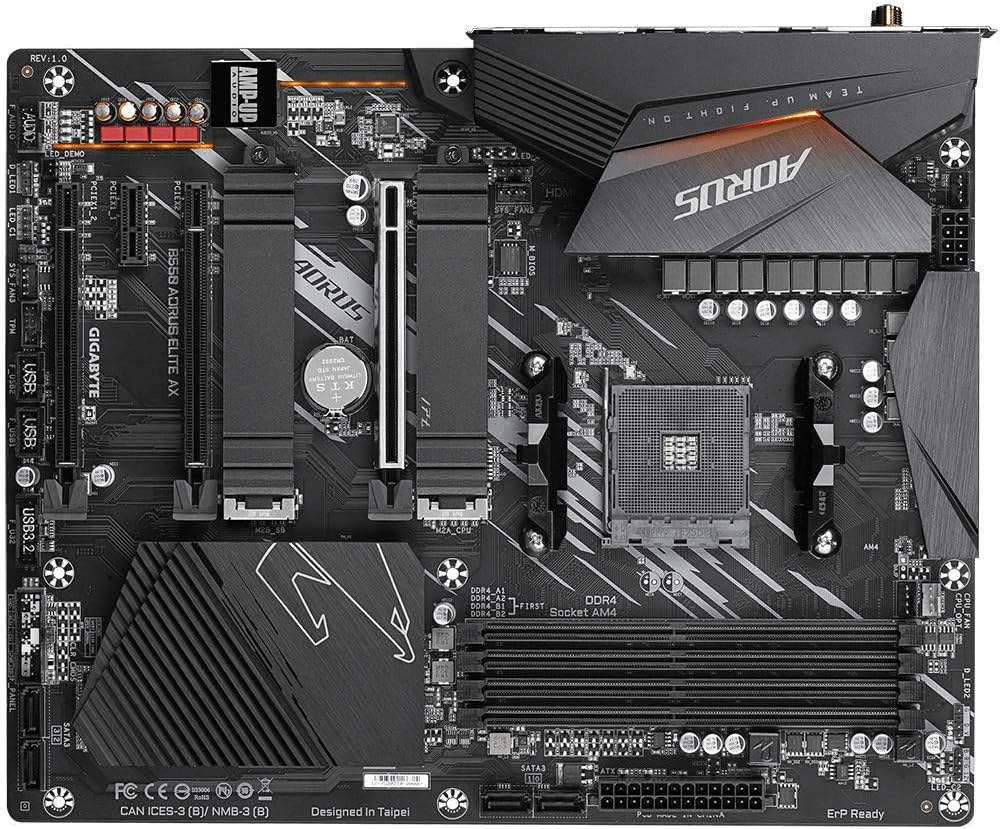
تصوير 2.1: مٿي کان هيٺ تائين view of the GIGABYTE B550 AORUS ELITE AX Motherboard. This image highlights the layout of the CPU socket, four DDR4 DIMM slots, multiple PCIe slots, and two M.2 slots with their thermal guards.
2.2. سي پي يو جي انسٽاليشن
- Locate the AM4 CPU socket. Lift the load lever to open the socket.
- Carefully align the triangular mark on the CPU with the mark on the socket. Gently place the CPU into the socket without forcing it.
- Lower the load lever back into place to secure the CPU.
2.3. رام جي انسٽاليشن
This motherboard supports Dual Channel ECC/Non-ECC Unbuffered DDR4 memory across 4 DIMM slots.
- DIMM سلاٽ جي ٻنهي پاسن تي ڪلپس کوليو.
- Align the notch on the DDR4 memory module with the key on the DIMM slot.
- ميموري ماڊيول جي ٻنهي پاسن تي مضبوطيءَ سان دٻايو جيستائين ڪلپس پنهنجي جاءِ تي نه اچن.
2.4. M.2 SSD جي انسٽاليشن
The motherboard features dual ultra-fast NVMe PCIe 4.0/3.0 x4 M.2 slots with dual thermal guards.
- Unscrew and remove the M.2 thermal guard from the desired slot.
- M.2 SSD کي سلاٽ ۾ هڪ زاويه تي داخل ڪريو.
- ايس ايس ڊي کي نرميءَ سان دٻايو ۽ ان کي ڏنل اسڪرو سان محفوظ ڪريو.
- Reattach the M.2 thermal guard to ensure optimal cooling.
2.5. PCIe ڪارڊ جي انسٽاليشن
Install graphics cards or other expansion cards into the PCIe slots. The top slot is an Ultra Durable PCIe 4.0 x16 slot.
- PCIe ڪارڊ کي چونڊيل سلاٽ سان ترتيب ڏيو.
- Press down firmly until the card is fully seated and the retention clip engages.
2.6. بجلي رابطا
24-پن ATX مين پاور ڪنيڪٽر ۽ 8-پن CPU پاور ڪنيڪٽر کي پنهنجي پاور سپلائي مان مدر بورڊ سان ڳنڍيو.
2.7. فرنٽ پينل ڪنيڪٽر
Connect the power button, reset button, HDD LED, and USB/audio headers from your PC case to the corresponding pins on the motherboard. Refer to the motherboard diagram for exact pin locations.
2.8. پوئين I/O پينل

Image 2.2: Rear I/O Panel of the GIGABYTE B550 AORUS ELITE AX Motherboard. This image shows the various ports available, including USB 3.2 Gen 1, USB 3.2 Gen 2, DisplayPort, HDMI, 2.5GbE LAN, Wi-Fi antenna connectors, and audio jacks. The pre-installed I/O shield is visible.
The motherboard features a pre-installed I/O shield for easy and quick installation. Connect your peripherals such as monitor, keyboard, mouse, and network cable to the appropriate ports on the rear I/O panel.
3. آپريٽنگ هدايتون
3.1. پهريون بوٽ
After assembling all components and connecting power, press the power button on your PC case. The system should power on and display the GIGABYTE splash screen.
3.2. Accessing BIOS/UEFI
BIOS/UEFI سيٽ اپ يوٽيلٽي ۾ داخل ٿيڻ لاءِ، دٻايو ڊي ايل key repeatedly during the initial boot process when the GIGABYTE logo appears. The BIOS allows you to configure system settings, boot order, and enable features like XMP for memory profiles.
3.3. ڊرائيور لڳائڻ
After installing your operating system, install the necessary drivers for the motherboard's components. These include chipset drivers, LAN drivers, Wi-Fi/Bluetooth drivers, and audio drivers. Drivers can typically be found on the GIGABYTE official webتوهان جي مخصوص مدر بورڊ ماڊل لاءِ سائيٽ.
4. سار سنڀال
4.1. System Cleaning
Regularly clean your computer's interior to prevent dust buildup, which can lead to overheating and reduced performance. Use compressed air to remove dust from fans, heatsinks, and other components. Ensure the system is powered off and unplugged before cleaning.
4.2. BIOS اپڊيٽس
GIGABYTE provides BIOS updates to improve system stability, add support for new hardware, and fix bugs. The B550 AORUS ELITE AX supports Q-Flash Plus, allowing you to update the BIOS without installing the CPU, memory, or graphics card. Refer to the GIGABYTE website for detailed instructions on using Q-Flash Plus and for the latest BIOS versions.
5. مسئلا حل ڪرڻ
هي حصو عام مسئلن کي حل ڪري ٿو جيڪي توهان کي منهن ڏئي سگهن ٿا.
5.1. ڪابه بجلي ناهي / ڪابه بوٽ ناهي
- Verify all power cables (24-pin ATX, 8-pin CPU) are securely connected to the motherboard and power supply.
- پڪ ڪريو ته پاور سپلائي سوئچ 'آن' پوزيشن ۾ آهي.
- Check that the front panel power button connector is correctly attached to the motherboard.
- جيڪڏهن ممڪن هجي ته مختلف پاور سپلاءِ سان ٽيسٽ ڪريو.
5.2. ڪوبه ڊسپلي آئوٽ پٽ ناهي
- Ensure your monitor is connected to the graphics card (if installed) or the motherboard's HDMI/DisplayPort (if using an APU with integrated graphics).
- گرافڪس ڪارڊ ۽ ميموري ماڊلز کي ٻيهر سيٽ ڪريو.
- صرف هڪ RAM اسٽڪ نصب ٿيل سان بوٽ ڪرڻ جي ڪوشش ڪريو.
5.3. Bluetooth / Wi-Fi Connectivity Issues
- Ensure the external Wi-Fi antenna is securely connected to the rear I/O panel.
- Update your Wi-Fi and Bluetooth drivers to the latest version from the GIGABYTE webسائيٽ.
- If Bluetooth devices disconnect after sleep mode, try disabling USB selective suspend settings in Windows Power Options or updating the BIOS to the latest version, as this has resolved similar issues in some cases.
5.4. BIOS ري سيٽ ڪريو
If you encounter issues after changing BIOS settings, you may need to reset the BIOS to default settings. This motherboard does not feature a dedicated BIOS reset button. To clear CMOS (BIOS settings), power off your system, unplug it, and remove the small circular battery (CMOS battery) from the motherboard for a few minutes. Reinsert the battery and power on the system.
6. وضاحتون
Below are the key technical specifications for the GIGABYTE B550 AORUS ELITE AX Motherboard:
| خاصيت | تفصيل |
|---|---|
| برانڊ | گيگا بائيٽ |
| ماڊل نالو | B550 AORUS ELITE AX |
| سي پي يو ساکٽ | ساکٽ AM4 |
| مطابقت رکندڙ پروسيسر | AMD ٽيون نسل Ryzen |
| چپ سيٽ جو قسم | AMD B550 |
| رام ميموري ٽيڪنالاجي | ڊي ڊي آر 4 |
| ياداشت جي رفتار | 2133 MHz (Base), up to 4733MHz (OC) |
| ميموري رکڻ جي صلاحيت | 128 GB (وڌ کان وڌ) |
| وائرليس جو قسم | 802.11ax (Intel WiFi 6) |
| LAN | 2.5 گيگاابٽ ايٿرنيٽ |
| PCIe سلاٽون | 1x PCIe 4.0 x16, 2x PCIe 3.0 x16 (x4 mode), 1x PCIe 3.0 x1 |
| M.2 سلاٽ | 2x NVMe PCIe 4.0/3.0 x4 with Thermal Guards |
| USB 2.0 بندرگاهن | 2 (ريئر) |
| USB 3.2 Gen 1 بندرگاهن | 4 (ريئر) |
| USB 3.2 Gen 2 بندرگاهن | 2 (Rear, Type-A) |
| وڊيو آئوٽ | HDMI، ڊسپلي پورٽ |
| آڊيو | Realtek ALC1200 Codec, AMP-UP Audio |
| فارم فيڪٽر | اي ٽي ايڪس |
| شيءِ جو وزن | 4.07 پائونڊ |
| پيداوار جي ماپ | 13.18 x 10.62 x 3.14 انچ |
7. وارنٽي ڄاڻ
GIGABYTE products are covered by a limited warranty. The specific terms and duration of the warranty may vary by region and product type. Please retain your proof of purchase for warranty claims. For detailed warranty information, including coverage, limitations, and the claims process, please visit the official GIGABYTE webسائيٽ تي وڃو يا پنهنجي مقامي پرچون ڪندڙ سان رابطو ڪريو.
8. ٽيڪنيڪل سپورٽ
If you encounter issues that cannot be resolved using this manual or require further assistance, please contact GIGABYTE technical support. You can find support resources, FAQs, driver downloads, and contact information on the official GIGABYTE webسائيٽ:
When contacting support, please have your motherboard model (B550 AORUS ELITE AX) and a detailed description of your issue ready.


