1. پراڊڪٽ ختمview
This FINTIE protective case is designed to safeguard your iPad Air while enhancing its functionality. It features a durable exterior, a soft interior, and multiple viewing angles, along with convenient storage options.

Image 1: FINTIE Protective Case for iPad Air (Blossom)
2. مطابقت
This case is exclusively designed for the following iPad Air models:
- iPad Air 11-inch (M3) 2025 (Models: A3266 / A3267 / A3270)
- iPad Air 11-inch (M2) 2024 (Models: A2902 / A2903 / A2904)
- iPad Air 5th Generation 10.9 Inch 2022 (Models: A2588 / A2589 / A2591)
- iPad Air 4th Generation 10.9 Inch 2020 (Models: A2072 / A2316 / A2324 / A2325)
نوٽ: This case is not compatible with any other iPad models. Please verify your iPad model number before installation.

Image 2: iPad Model Compatibility Guide
3. خاصيتون
- پريميئم مواد: Constructed from a premium synthetic leather exterior and a soft microfiber interior for a snug fit, durability, and protection.
- خودڪار سمهڻ/جاڳڻ جو ڪم: A built-in magnetic strip automatically puts your iPad to sleep when the cover is closed and wakes it up when opened.
- گھڻا زاويه Viewing: The case allows for adjustment to multiple secure viewآرام سان استعمال لاء زاويه.
- Integrated Pencil Holder: Securely carries and protects your Apple Pencil Pro or Apple Pencil 2nd Generation. A dedicated hole behind the holder facilitates easy removal of the pencil.
- Pencil Charging Support: Seamlessly supports magnetic and wireless charging of the Apple Pencil Pro / 2nd Gen when the case is on.
- Document Card Pocket: A convenient pocket is included for storing business cards, bank cards, notes, or bills.
- Elastic Band Closure: An elastic band wraps around the front cover to hold the tablet closed securely when not in use.
4. سيٽ اپ ۽ تنصيب
- Ensure your iPad Air model is compatible with this case (refer to Section 2).
- Align your iPad with the hard shell back cover of the case.
- Gently press your iPad into the case, ensuring all corners and edges are securely clipped into place. The case is designed for easy clip-on application.
- Verify that all ports, buttons, and the camera cutout are correctly aligned and accessible.
Image 3: iPad securely installed in the FINTIE case.
5. آپريٽنگ هدايتون
5.1 آٽو سليپ/ويڪ فنڪشن
The case features a magnetic strip that automatically activates your iPad's sleep/wake function. Simply close the cover to put your iPad to sleep and open it to wake it up.

Image 4: Auto Sleep/Wake Feature
5.2 Multi-Angle Viewاسٽينڊ
To use the multi-angle viewing stand:
- Open the front cover of the case.
- Fold the cover back to form a triangular stand.
- Place the edge of your iPad into one of the anti-slip stripes on the inner cover to achieve your desired viewزاويه.

Image 5: Multi-Angle Viewسيٽ اپ
5.3 Apple Pencil Holder and Charging
The built-in pencil holder is located on the side of the case. Insert your Apple Pencil into this slot for secure storage. The design allows for magnetic attachment and wireless charging of compatible Apple Pencils while stored.

Image 6: Built-in Apple Pencil Holder
5.4 Document Card Pocket
A large pocket is integrated into the front cover for convenient storage of small documents, cards, or cash.
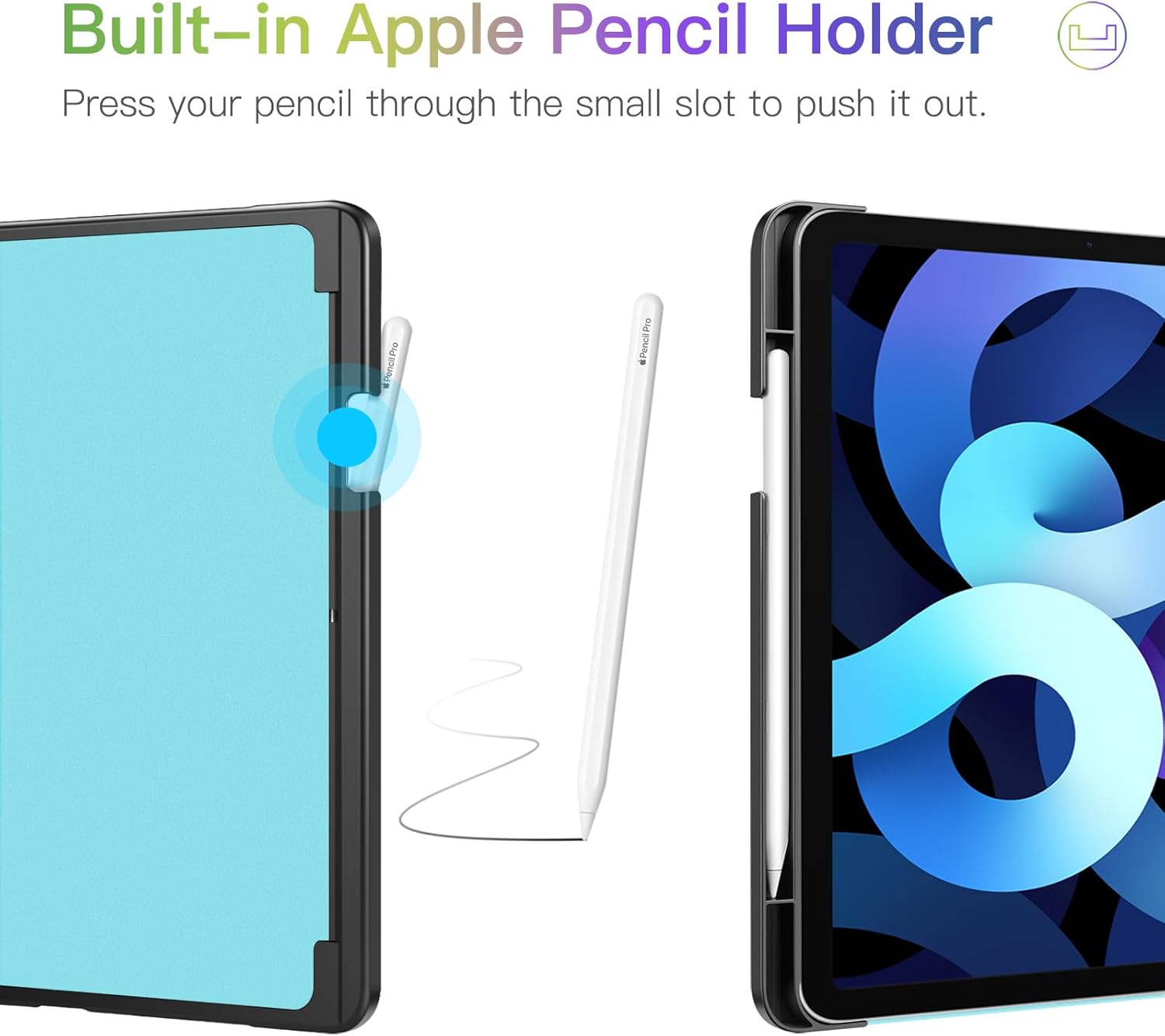
Image 7: Document Card Pocket
5.5 Elastic Band
An elastic band is provided on the back of the case. Wrap this band around the front cover to keep the case securely closed when your iPad is not in use, offering additional protection during transport.

Image 8: Elastic Band Closure
6. سار سنڀال
To maintain the appearance and longevity of your FINTIE protective case:
- ٻاھرين کي نرم سان صاف ڪريو، ڊيamp مٽي ۽ داغ هٽائڻ لاءِ ڪپڙو.
- Avoid using harsh chemicals or abrasive cleaners, as these may damage the material.
- Keep the case away from extreme temperatures and direct sunlight to prevent discoloration or material degradation.
7. مسئلا حل ڪرڻ
- iPad does not fit: Double-check the model number of your iPad Air against the compatibility list in Section 2. This case is designed for specific models and will not fit others.
- Auto Sleep/Wake not working: Ensure your iPad is correctly seated in the case and that the magnetic strip on the cover aligns properly with your iPad's sensors. Check your iPad settings to ensure 'Lock/Unlock' is enabled under 'Display & Brightness'.
- Pencil not charging: Confirm your Apple Pencil is compatible with your iPad Air model and that it is placed correctly in the holder for magnetic attachment and wireless charging.
8. وضاحتون
| پيداوار جي ماپ | 10.04 x 7.68 x 0.63 انچ |
| شيءِ جو وزن | 8 اونس |
| شيون ماڊل نمبر | EPAN006 |
| رنگ | ڦل |
| ٺاهيندڙ | مڪمل ٿيو |
| مطابقت رکندڙ ڊوائيسز | iPad Air 11-inch M3 (2025) / M2 (2024), iPad Air 5th / 4th Generation (2022/2020) 10.9 Inch Tablet |
| خاص خاصيتون | Adjustable Stand, Card Slots, Multi-Angle Viewing, Stylus Holder |
| شيل جو قسم | سخت |
9. دٻي ۾ ڇا آهي
- 1 x FINTIE Protective Case
10. وارنٽي ۽ سپورٽ
For warranty information, product support, or any inquiries regarding your FINTIE protective case, please refer to the official FINTIE website or contact their customer service directly. Contact details are typically available on the product packaging or the manufacturer's webسائيٽ.


