1. پراڊڪٽ ختمview
The Logitech G513 Carbon is a high-performance mechanical gaming keyboard featuring LIGHTSYNC RGB lighting and GX Red Linear switches. Designed for durability and comfort, it includes a memory foam palm rest and a USB pass-through port for convenience.

تصوير 1.1: مٿي کان هيٺ تائين view of the Logitech G513 Carbon keyboard with its detachable palm rest.
اهم خاصيتون:
- LIGHTSYNC RGB Lighting: Personalize lighting for each individual key with a spectrum of 16.8 million colors. Customize lighting effects and integrate with in-game actions using Logitech G HUB software.
- GX Red Linear Switches: Experience a smooth and consistent keystroke, ideal for rapid, precise key presses during gaming.
- Memory Foam Palm Rest: Provides enhanced comfort during extended use, designed to quickly recover its shape.
- Aircraft-Grade Aluminum Top Case: Constructed from 5052 aluminum for a slim, premium design combined with rigid durability.
- USB Pass-Through Port: Conveniently connect a mouse, flash drive, or phone for direct data transmission or charging.
- Integrated Media Controls: Access volume, play/pause, skip track, mute, toggle lighting, and game mode functions directly via FN-F keys.
- لاجيٽيڪ جي هب سافٽ ويئر: Customize lighting, game mode settings, and macro programming for a personalized experience.
2. پيڪيج مواد
پڪ ڪريو ته سڀئي شيون توهان جي پراڊڪٽ پيڪنگنگ ۾ موجود آهن:
- Logitech G513 Carbon LIGHTSYNC RGB Mechanical Gaming Keyboard
- Detachable Memory Foam Palm Rest
- USB Cable (Integrated)
- User Documentation (This Manual)
3. سيٽ اپ جون هدايتون
Follow these steps to set up your Logitech G513 keyboard:
- ڪي بورڊ ڳنڍيو: Plug the integrated USB cable from the keyboard into an available USB port on your computer. The keyboard requires a single USB port for full functionality.
- Attach Palm Rest (Optional): Align the detachable memory foam palm rest with the front edge of the keyboard and position it for comfort.
- Install Logitech G HUB Software: For full customization of LIGHTSYNC RGB lighting, macro programming, and game mode settings, download and install the Logitech G HUB software from the official Logitech webسائيٽ (www.logitechg.com/ghub).
- USB پاس-ذريعي: If you wish to use the USB pass-through port on the keyboard, ensure your computer has a second available USB port. Connect the secondary USB connector (if present on your keyboard's cable) to this port.
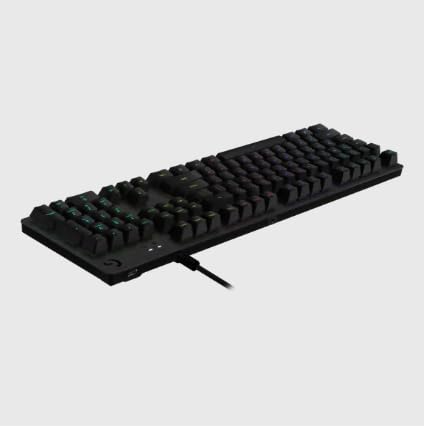
تصوير 3.1: ريئر view of the keyboard illustrating the USB cable connection.
4. آپريٽنگ هدايتون
This section details the primary functions and controls of your G513 keyboard.

تصوير 4.1: زاويه view of the Logitech G513 Carbon keyboard in operation.
4.1. LIGHTSYNC RGB Lighting
The G513 features per-key LIGHTSYNC RGB lighting. You can control and customize this lighting:
- جهاز تي ڪنٽرول: Use the FN + F5/F6/F7 keys to cycle through various lighting effects and brightness levels.
- لاجيٽيڪ جي هب سافٽ ويئر: For advanced customization, including per-key color assignment, animation effects, and synchronization with other Logitech G devices, use the G HUB software.
4.2. GX Red Linear Switches
The GX Red switches provide a smooth, linear keystroke without a tactile bump or audible click. This design is favored by many gamers for its rapid actuation and consistent feel.
4.3. USB Pass-Through
The dedicated USB pass-through port on the keyboard allows you to connect a USB device directly to your keyboard, extending a USB port from your computer to a more accessible location. This is useful for connecting a gaming mouse, headset, or charging a mobile device.
4.4. Media and Function Keys
The G513 integrates media and function controls directly into the F-keys. To activate these functions, press the FN key simultaneously with the corresponding F-key:
- ايف اين + ايف 1-ايف 4: Customizable function keys via G HUB.
- FN + F5: Cycle through LIGHTSYNC lighting effects.
- FN + F6: Decrease LIGHTSYNC brightness.
- FN + F7: Increase LIGHTSYNC brightness.
- FN + F8: Game Mode toggle (disables Windows key and other customizable keys).
- FN + F9: ميڊيا کي هلائڻ / روڪيو.
- FN + F10: Stop media.
- FN + F11: اڳوڻو رستو.
- FN + F12: ايندڙ ٽريڪ.
- FN + PRTSC: آواز بند ڪريو.
- FN + SCRLK: حجم ھيٺ.
- FN + PAUSE: حجم وڌايو.
5. سار سنڀال
مناسب سار سنڀال توهان جي ڪيبورڊ جي ڊگهي عمر ۽ ڪارڪردگي کي يقيني بڻائي ٿي.
- ڪي بورڊ جي صفائي: نرم، لِنٽ کان خالي ڪپڙو استعمال ڪريو ٿورڙو ڊيampened with water or a mild cleaning solution to wipe down the keycaps and chassis. Avoid harsh chemicals or abrasive materials.
- ڪي ڪيپس هيٺان صفائي: For deeper cleaning, you may carefully remove keycaps using a keycap puller (not included) and use compressed air to remove dust and debris from beneath. Reattach keycaps by pressing them firmly onto the switch stems.
- کجيءَ جي آرام جي سنڀال: The memory foam palm rest can be wiped clean with a damp ڪپڙو. ان کي پاڻي ۾ ٻڏڻ کان پاسو ڪريو.
- ڪيبل جو انتظام: پڪ ڪريو ته USB ڪيبل نقصان کان بچڻ لاءِ ڦاسي يا تنگ نه آهي.
6. مسئلا حل ڪرڻ
If you encounter issues with your G513 keyboard, refer to the following common solutions:
- ڪي بورڊ جواب نه ڏئي رهيو آهي:
- Ensure the USB cable is securely plugged into your computer.
- ڪيبورڊ کي ڪنهن ٻئي USB پورٽ ۾ لڳائڻ جي ڪوشش ڪريو.
- پنهنجي ڪمپيوٽر کي ٻيهر شروع ڪريو.
- LIGHTSYNC RGB Not Working/Incorrect:
- Verify Logitech G HUB software is installed and up to date.
- Check lighting settings within G HUB.
- Ensure the keyboard's firmware is updated via G HUB.
- چاٻيون جيڪي رجسٽر نه ٿي رهيون آهن يا ٻٽي ٽائيپ ڪري رهيون آهن:
- Clean the affected keycap and switch area for debris.
- If the issue persists, contact Logitech support for further assistance.
- USB Pass-Through Not Functioning:
- Ensure both USB connectors from the keyboard (if applicable) are plugged into your computer.
- Test the connected device directly in your computer's USB port to rule out device issues.
For more detailed troubleshooting or persistent issues, visit the Logitech support webسائيٽ يا انهن جي ڪسٽمر سروس سان رابطو ڪريو.
7. وضاحتون
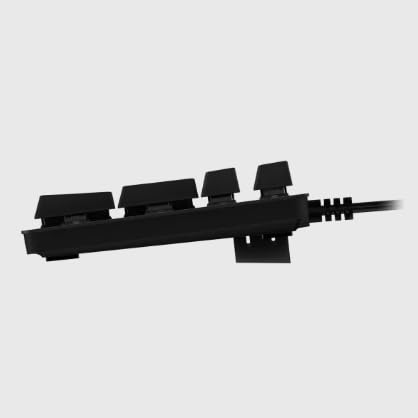
تصوير 7.1: پاسي view of the Logitech G513 Carbon keyboard.
| وصف | تفصيل |
|---|---|
| ماڊل نمبر | جي 513 |
| طول و عرض (L x W x H) | 17.52 x 3.46 x 0.85 انچ (44.5 x 8.8 x 2.16 سينٽي) |
| وزن | 2.44 پائونڊ (1.11 ڪلوگرام) |
| سوئچ جو قسم | GX Red Linear Mechanical Switches |
| روشني | LIGHTSYNC RGB (Per-key customizable) |
| رابطي | USB 2.0 Pass-Through |
| ڪيبل ڊگھائي | تقريبن 6 فوٽ (1.8 ميٽر) |
| مواد | Aircraft-grade 5052 aluminum top case |
8. وارنٽي ۽ سپورٽ
Logitech products are manufactured to high quality standards. For information regarding your product's warranty, please refer to the warranty documentation included with your purchase or visit the official Logitech support webسائيٽ.
For technical support, driver downloads, FAQs, and community forums, please visit the Logitech G support page:


