تعارف
This manual provides comprehensive instructions for the setup, operation, and maintenance of your ROCCAT Burst Core Gaming Mouse. Designed for performance and precision, the Burst Core features an extreme lightweight design, an 8,500 DPI optical sensor, and durable construction. Please read this manual thoroughly to ensure optimal use and longevity of your device.
پيداوار ختمview
The ROCCAT Burst Core is an extreme lightweight optical gaming mouse engineered for core performance. It features a symmetrical ergonomic shape, a solid honeycomb shell, and ROCCAT's Titan Switch Optical technology.
- Symmetrical Ergonomic Shape: Crafted for comfort and performance.
- هلڪو ڊيزائن: Weighs only 68g due to its solid honeycomb shell.
- ٽائيٽن سوئچ آپٽيڪل: Provides a mechanical feel with optical speed for rapid, precise clicks.
- PTFE Mouse Feet: Ensures exceptional glide across various surfaces.
- 8,500 DPI Optical Sensor: Based on the PixArt PMW3330 sensor for high precision tracking.

تصوير 1: سامهون-ساڄي view of the ROCCAT Burst Core Gaming Mouse, showcasing ان جي ergonomic ڊيزائن ۽ اسڪرول ويل.
سيٽ اپ ڪريو
1. مائوس کي ڳنڍڻ
- توھان جي ڪمپيوٽر تي موجود يو ايس بي پورٽ ڳولھيو.
- Plug the USB connector of the ROCCAT Burst Core mouse into the USB port.
- Your operating system (Windows 7, Windows XP, Linux, or newer versions) should automatically detect and install the necessary drivers.
2. سافٽ ويئر تنصيب (ROCCAT Swarm)
For advanced customization options, including DPI control, button assignments, scroll speed, click speed, and RGB lighting effects, it is recommended to install the ROCCAT Swarm software.
- سرڪاري ROCCAT جو دورو ڪريو webسائيٽ (www.roccat.com/pages/swarm) to download the latest version of ROCCAT Swarm.
- انسٽاليشن مڪمل ڪرڻ لاءِ اسڪرين تي ڏنل هدايتن تي عمل ڪريو.
- Once installed, launch ROCCAT Swarm to configure your mouse settings.

تصوير 2: مٿي view of the ROCCAT Burst Core, highlighting the main buttons, scroll wheel, and DPI button.
آپريٽنگ هدايتون
بنيادي ڪم
- کاٻي ڪلڪ ڪريو: بنيادي عمل، چونڊ.
- ساڄي ڪلڪ ڪريو: Secondary action, context menu.
- اسڪرول ويل: Scroll up/down, middle click for universal scrolling or assigned function.
- DPI بٽڻ: Cycles through preset DPI (Dots Per Inch) sensitivity levels. Default settings can be customized via ROCCAT Swarm.
- پاسي جا بٽڻ: Typically assigned as 'Forward' and 'Back' in web برائوزر ۽ file explorers. Customizable via ROCCAT Swarm.
Advanced Customization with ROCCAT Swarm
The ROCCAT Swarm software allows you to personalize your mouse experience.
- DPI سيٽنگون: Adjust DPI steps and values to match your preference.
- بٽڻ تفويض: Reassign functions to any of the mouse buttons, including macros.
- پولنگ جي شرح: Configure the mouse's reporting rate to the computer.
- آر بي جي روشني: Customize the illumination effects and colors of the scroll wheel.
- پروfiles: گھڻن پرو ٺاهيو ۽ محفوظ ڪريوfileمختلف راندين يا ايپليڪيشنن لاءِ.
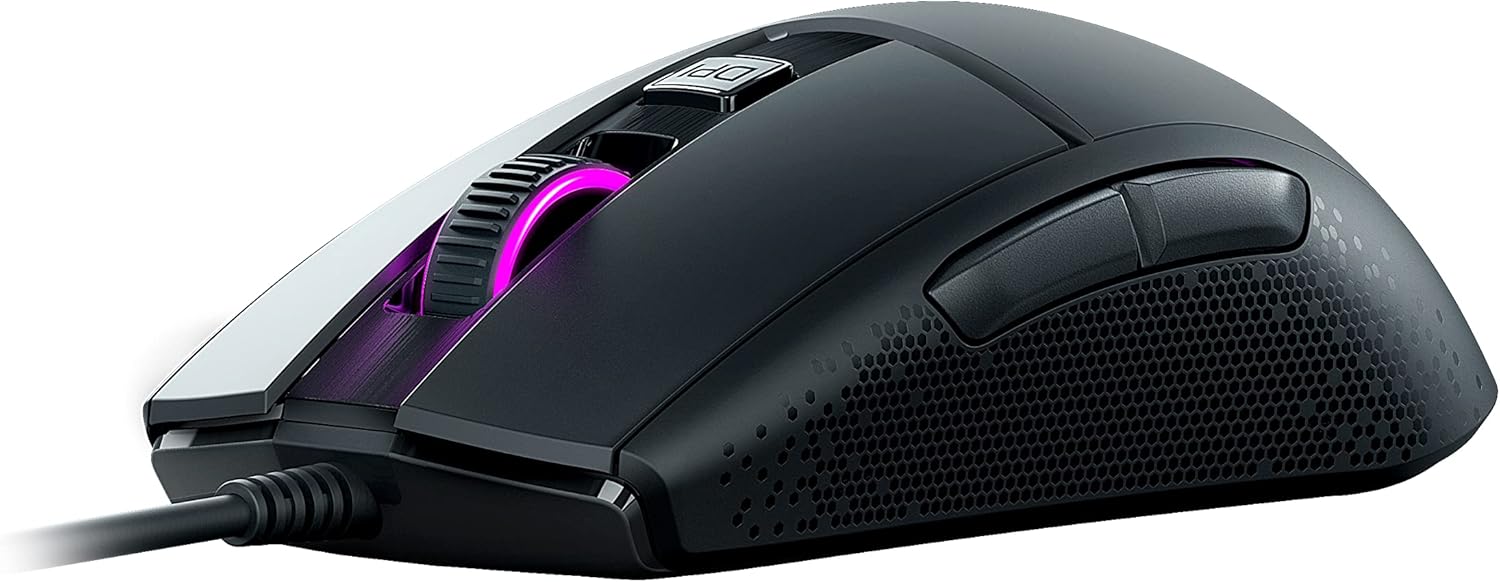
تصوير 3: پاسي view of the ROCCAT Burst Core, illustrating the textured hexagonal pattern for enhanced grip.
سار سنڀال
توهان جي ماؤس جي صفائي
- صفائي ڪرڻ کان اڳ مائوس کي ڪمپيوٽر کان ڌار ڪريو.
- نرم، لِنٽ کان خالي ڪپڙو استعمال ڪريو ٿورڙو ڊيampپاڻي يا نرم صفائي جي حل سان ختم ڪيو وڃي.
- سخت ڪيميڪلز، رگڙيندڙ صاف ڪندڙ، يا محلول استعمال ڪرڻ کان پاسو ڪريو.
- Gently wipe the surface of the mouse. For the optical sensor, use a cotton swab to carefully remove any dust or debris.
- Ensure the mouse is completely dry before reconnecting it to your computer.
ذخيرو
Store the mouse in a cool, dry place away from direct sunlight and extreme temperatures. Avoid placing heavy objects on the mouse or its cable.
مشڪلاتون
| مسئلو | ممڪن سبب | حل |
|---|---|---|
| مائوس جواب نه ڏئي رهيو آهي |
|
|
| Inaccurate tracking or cursor lag |
|
|
| بٽڻ ڪم نه ڪري رهيا آهن |
|
|

تصوير 4: تفصيلي view of the ROCCAT Titan Switch Optical mechanism, illustrating its internal components.
وضاحتون
| برانڊ | روڪوٽ |
| ماڊل نمبر | ROC-11-750 |
| رابطي ٽيڪنالاجي | USB |
| تحريڪ جي سڃاڻپ ٽيڪنالاجي | Optical (PixArt PMW3330 based) |
| وڌ ۾ وڌ ڊي پي آئي | 8,500 ڊي پي آئي |
| شيءِ جو وزن | 68 گرام (2.4 اونس) |
| پيداوار جي ماپ (LxWxH) | 0.63 x 6.69 x 5.28 انچ |
| رنگ | ڪارو |
| هارڊويئر پليٽ فارم | PC |
| آپريٽنگ سسٽم مطابقت | Windows 7, Windows XP, Linux (and newer versions) |
| خاص خاصيتون | Ergonomic Design, Lightweight, Titan Switch Optical, PTFE Mouse Feet |
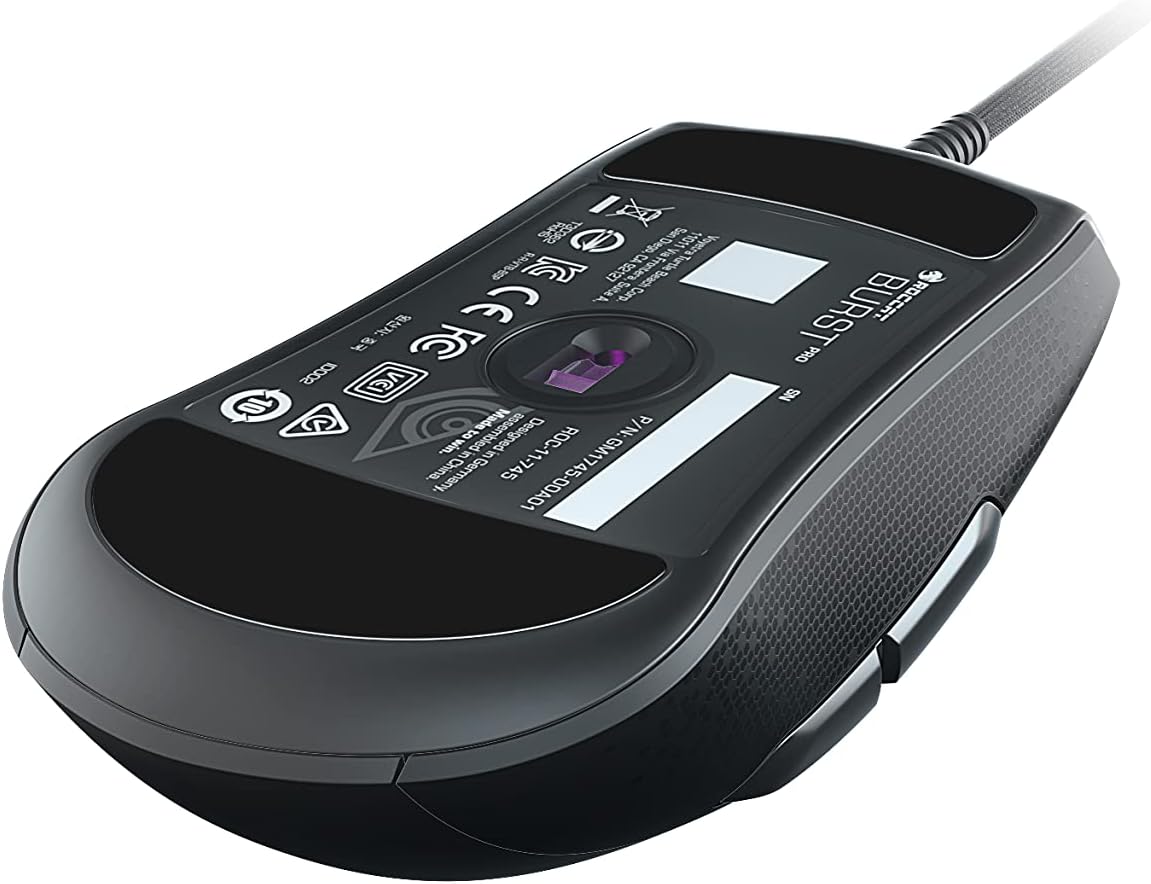
تصوير 5: هيٺيون view of the ROCCAT Burst Core Gaming Mouse, displaying the model number and regulatory certifications.
وارنٽي ۽ سپورٽ
وارنٽي ڄاڻ
ROCCAT products typically come with a manufacturer's warranty. Please refer to the warranty card included with your product or visit the official ROCCAT webتوهان جي علائقي لاءِ مخصوص تفصيلي وارنٽي شرطن ۽ ضابطن لاءِ سائيٽ. وارنٽي دعوائن لاءِ خريداري جو ثبوت رکو.
ڪسٽمر سپورٽ
For technical assistance, troubleshooting, or product inquiries, please contact ROCCAT customer support.
- Webسائيٽ: Visit the official ROCCAT support page at support.roccat.com for FAQs, drivers, and contact options.
- آن لائين وسيلا: Check for updated drivers and firmware on the ROCCAT webبهترين ڪارڪردگي کي يقيني بڻائڻ لاء سائيٽ.
حفاظت جي ڄاڻ
- ڊوائيس کي انتهائي گرمي پد، نمي، يا مائعات جي سامهون نه رکو.
- ڊوائيس کي ڌار ڪرڻ يا تبديل ڪرڻ جي ڪوشش نه ڪريو. اهو وارنٽي کي رد ڪري ڇڏيندو.
- ڊوائيس ٻارن ۽ پالتو جانور کان پري رکو.
- Dispose of the device according to local environmental regulations.


