تعارف
The Fms Reflex V3 Mini Gyro Flight Control System is an advanced stable flight controller designed for remote control aircraft. It utilizes a high-speed 32-bit ARM processor and incorporates solid-state 3-axis gyro and 3-axis accelerometer sensors to provide precise flight stabilization. This system is engineered to automatically recognize SBUS/PPM/PWM systems, ensuring compatibility with all radio systems featuring 4 channels or more. The Reflex V3 simplifies operation by being pre-programmed for specific aircraft, eliminating the need for complex additional programming. Users can easily connect their receiver to the gyro and set up the aircraft normally. A key enhancement in the V3 version is its Bluetooth connectivity, allowing users to connect to a mobile app for convenient parameter setting functions, even for non-FMS models.
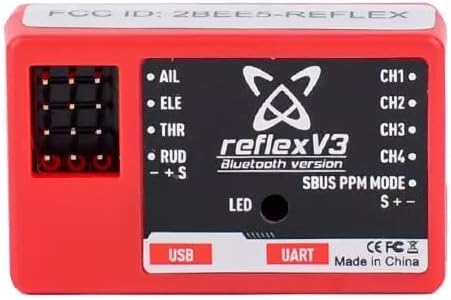
Image: The Fms Reflex V3 Mini Gyro Flight Control System unit.
دٻي ۾ ڇا آهي
پيڪيج کولڻ تي، مھرباني ڪري تصديق ڪريو ته سڀئي اجزا موجود آھن ۽ سٺي حالت ۾ آھن:
- 1 x Reflex V3 Flight Controller Unit
- 1 x USB ڊيٽا ڪيبل

Image: Contents of the Fms Reflex V3 package, including the Reflex V3 unit, USB cable, and connection wires.
وضاحتون
| خاصيت | تفصيل |
|---|---|
| پروسيسر | High-speed 32-bit ARM processor |
| سينسر | Solid-state 3-axis gyro and 3-axis accelerometer |
| مطابقت | SBUS/PPM/PWM systems, all radio systems with 4 channels or above |
| رابطي | Bluetooth for mobile app (iOS/Android), USB for PC software |
| طول و عرض | 3.58 x 3.5 x 1.57 انچ (پيڪيج) |
| شيءِ جو وزن | 2.39 اونس |
| ٺاهيندڙ سفارش ٿيل عمر | 14 سال ۽ مٿي |
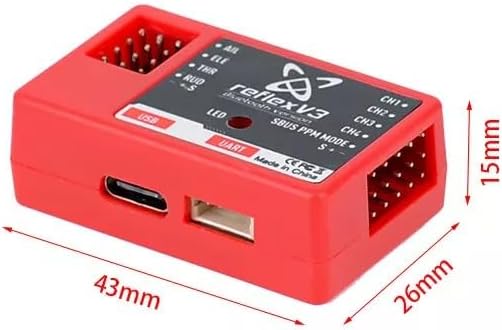
Image: Detailed dimensions of the Fms Reflex V3 unit.
سيٽ اپ ڪريو
هارڊويئر ڪنيڪشن
Connecting the Reflex V3 to your RC aircraft's receiver is a straightforward process. The system is designed for easy integration. Ensure your aircraft's power is off before making any connections.
- Identify the Aileron, Elevator, Throttle, and Rudder channels on your receiver.
- Connect the corresponding servo leads from your aircraft's control surfaces (aileron, elevator, throttle, rudder) to the designated ports on the Reflex V3 unit (AIL, ELE, THR, RUD).
- Connect the Reflex V3 to your receiver. The Reflex V3 automatically recognizes SBUS/PPM/PWM systems. If using a 4-channel transmitter, utilize the included jumper to select between flight modes by plugging it into the “gyro mode input” port.
- Securely mount the Reflex V3 unit in your aircraft. Ensure it is firmly attached and oriented correctly as indicated in the software's installation instructions for your specific aircraft model.

Image: Diagram showing the connection points for Aileron, Elevator, Throttle, and Rudder channels on the Reflex V3 unit.
Software Installation & Configuration
The Reflex V3 can be configured and updated via a mobile app (iOS/Android) or computer software. This allows for fine-tuning parameters and selecting specific aircraft models.
- موبائل ايپ: The Reflex V3 version can be connected to a mobile app via Bluetooth after power-on. This unlocks parameter setting functions, which are available for non-FMS models as well.
- ڪمپيوٽر سافٽ ويئر: Synchronize required parameters through computer software. Connect the Reflex V3 to your computer using the provided USB data cable.
For a detailed guide on software installation and initial configuration, please watch the official video below:
Video: Official software installation guide for the Fms Reflex V3. This video demonstrates the steps to install and configure the necessary software for your flight controller.
After installation, set up the corresponding channels and directions on your remote controller. Parameter setting functions are primarily supported by the mobile app for user-friendly operation.
آپريٽنگ موڊس
The Fms Reflex V3 offers multiple flight modes to cater to different pilot skill levels and flight conditions:
Stabilized Mode
In Stabilized Mode, the Reflex V3 limits control surface travel, which results in tame flight characteristics ideal for beginner pilots. The aircraft automatically returns to level flight when no control input is given, significantly reducing the sensitivity of the aircraft and eliminating rolls and yaw caused by operational errors, thereby maximizing flight safety.
Video: Demonstration of the FMS Reflex V3 in Stabilized Mode, showcasing its ability to maintain stable flight and assist with takeoff.
Optimized Mode
Optimized Mode minimizes environmental effects on the airframe. In this mode, the pilot retains maximum control while the Reflex system neutralizes attitude changes caused by wind gusts. This provides a balance between stability and responsiveness, allowing for more dynamic flight while still benefiting from gyro assistance.
وڊيو: ختمview of Reflex V3 Stable Flight Technology, illustrating the benefits of Optimized Mode in various flight scenarios.
دستي موڊ
In Manual Mode, pilots maintain complete control over maneuvering the aircraft for rolls, high-speed turns, and other aerobatic maneuvers. The Reflex V3 system provides no stabilization or angle limits in this mode, offering an unrestricted flight experience for experienced pilots.
سار سنڀال
To ensure the longevity and optimal performance of your Fms Reflex V3 Flight Control System, regular maintenance is recommended:
- صاف رکو: Periodically clean the exterior of the Reflex V3 unit with a soft, dry cloth. Avoid using harsh chemicals or solvents.
- ڪنيڪشن چيڪ ڪريو: Before each flight, inspect all wiring connections to ensure they are secure and free from damage. Loose connections can lead to erratic behavior or loss of control.
- ماحولياتي تحفظ: Protect the unit from moisture, extreme temperatures, and direct sunlight. While designed for RC aircraft, excessive exposure to harsh elements can degrade performance.
- سافٽ ويئر اپڊيٽ: Regularly check for and install the latest software and firmware updates via the Fms mobile app or PC software. Updates often include performance improvements and bug fixes.
- اسٽوريج: When not in use, store the Reflex V3 in a dry, cool place, away from dust and static electricity.
مشڪلاتون
If you encounter issues with your Fms Reflex V3 Flight Control System, consider the following common troubleshooting steps:
- No Response/Incorrect Control:
- Verify all connections between the Reflex V3, receiver, and servos are correct and secure.
- Ensure the Reflex V3 is powered on and receiving power from the receiver.
- Check the orientation of the Reflex V3 unit in the aircraft against the recommended installation diagram for your model. Incorrect orientation can lead to reversed or erratic control. - No Stabilization/Erratic Behavior:
- Confirm that the correct aircraft model profile is loaded onto the Reflex V3 via the mobile app or PC software.
- Check the sensitivity settings in the app. Adjusting sensitivity can resolve over-correction or under-correction issues.
- Ensure your transmitter's sub-trims and end-points are correctly set and not interfering with the gyro's operation. - Connection Issues (Bluetooth/USB):
- For Bluetooth, ensure the Reflex V3 is powered on and within range of your mobile device. Restart both devices if necessary.
- For USB, ensure the USB data cable is properly connected to both the Reflex V3 and your computer. Try a different USB port or cable if connection fails. - فرم ويئر اپڊيٽ ناڪامي:
- Ensure a stable internet connection during updates.
- Do not disconnect the USB cable or power off the unit during an update.
- If an update fails, try again, ensuring all other applications are closed on your computer.
If problems persist after attempting these steps, please refer to the official Fms support resources or contact customer service.
وارنٽي ۽ سپورٽ
Specific warranty details for the Fms Reflex V3 Mini Gyro Flight Control System are typically provided at the point of purchase or within the product packaging. Please retain your proof of purchase for warranty claims.
For technical support, further assistance, or to access the latest software and firmware, please visit the official Fms website or contact their customer service department. Online resources often include FAQs, detailed guides, and community forums that can provide valuable information and solutions.
You can visit the Fms Store for more information: Fms Store on Amazon


